1. บทนำ
Thank you for choosing Senso Wireless Earbuds. These True Wireless Stereo (TWS) earphones are designed for an active lifestyle, featuring a secure fit, high-quality audio, and sweatproof construction. This manual will guide you through the setup, operation, and maintenance of your new earbuds.
2. อะไรอยู่ในกล่อง
- Senso Wireless Earbuds (Left and Right)
- เคสชาร์จแบบพกพา
- สายชาร์จ USB
- คู่มือการใช้งาน
- จุกหูฟังหลายขนาด
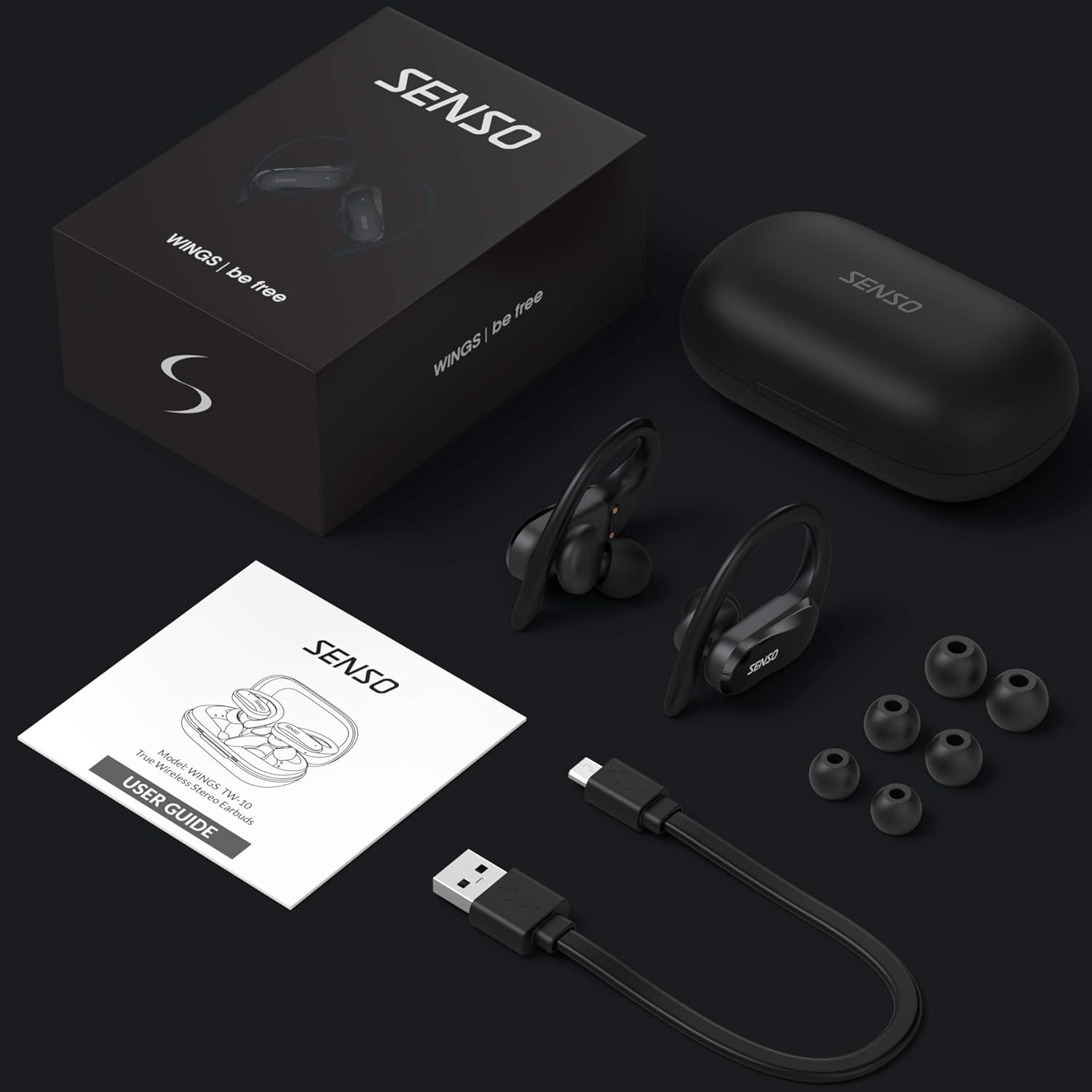
Image: The Senso Wireless Earbuds packaging, displaying the earbuds, charging case, user guide, USB charging cable, and various ear tip sizes.
3. สินค้าหมดview
The Senso Wings TW10 earbuds are designed for comfort and performance, featuring advanced audio technology and a durable build.

ภาพ: ระเบิด view of the earbud, illustrating the 13mm dynamic driver responsible for delivering premium sound quality with intense bass and dynamic range.

ภาพ: รายละเอียด view of the earbud's internal circuitry, emphasizing the Bluetooth 5.0 chipset and CVC 8.0 Noise Cancellation Technology for stable connection and clear audio.

Image: Two scenarios demonstrating the earbuds' versatility: one earbud in use for mono mode (e.g., driving) and both earbuds for dual mode (e.g., binaural calls).

Image: The earbuds are shown resisting water splashes, indicating their IPX6 waterproof rating, suitable for sweat, water, and rain.
4. การตั้งค่า
4.1 การชาร์จหูฟังและเคส
Before first use, fully charge the earbuds and the charging case. Place the earbuds into the charging case. Connect the USB charging cable to the case and a power source. The indicator lights on the case will show the charging status.
4.2 การจับคู่เริ่มต้น
- โปรดตรวจสอบให้แน่ใจว่าหูฟังของคุณชาร์จแบตเตอรี่เต็มแล้ว
- เปิดกล่องชาร์จ หูฟังจะเปิดอัตโนมัติและเข้าสู่โหมดจับคู่
- เปิดใช้งาน Bluetooth บนอุปกรณ์ของคุณ (สมาร์ทโฟน แท็บเล็ต ฯลฯ)
- ค้นหา available Bluetooth devices and select "SENSO Wings TW10" from the list.
- เมื่อเชื่อมต่อเสร็จแล้ว คุณจะได้ยินเสียงแจ้งเตือน และไฟแสดงสถานะบนหูฟังจะเปลี่ยนไป

Image: The earbuds are shown connecting to a smartphone, demonstrating the simple and fast pairing process upon removal from the charging case.
Video: An official product video demonstrating the features and setup of the Senso WINGS Ultra Durable Premium Audio Wireless Earbuds.
5. คู่มือการใช้งาน
5.1 การสวมหูฟัง
Place the earbuds in your ears and adjust the ear hooks for a secure and comfortable fit. The 60-degree twist lock system ensures they stay in place during physical activity.

Image: A user demonstrating the secure fit of the earbuds with the 60-degree twist lock system, ideal for sports and exercise.
5.2 การควบคุมขั้นพื้นฐาน
The earbuds feature touch-sensitive controls for media playback and call management. Refer to the detailed user guide included in the box for specific touch commands for functions such as play/pause, skip track, answer/end call, and voice assistant activation.
5.3 Mono or Dual Mode
You can use either earbud independently (mono mode) or both together (dual mode) for a stereo audio experience. This flexibility allows for awareness of your surroundings when needed.
5.4 ฟังก์ชั่นการโทร
Each earbud is equipped with a microphone, enabling binaural calls for clear communication. Use the touch controls to answer, end, or reject calls.
6. การบำรุงรักษา
6.1 การทำความสะอาด
- ทำความสะอาดหูฟังและกล่องชาร์จเป็นประจำด้วยผ้าแห้งนุ่มที่ไม่เป็นขุย
- ถอดปลายหูออกแล้วทำความสะอาดด้วยสบู่ชนิดอ่อนและน้ำ จากนั้นเช็ดให้แห้งสนิทก่อนใส่กลับเข้าไปอีกครั้ง
- หลีกเลี่ยงการใช้น้ำยาทำความสะอาดหรือตัวทำละลายที่มีฤทธิ์กัดกร่อน
6.2 พื้นที่จัดเก็บ
- เก็บหูฟังเอียร์บัดไว้ในกล่องชาร์จเมื่อไม่ได้ใช้งานเพื่อปกป้องและชาร์จอยู่เสมอ
- เก็บอุปกรณ์ไว้ในที่แห้งและเย็น หลีกเลี่ยงอุณหภูมิที่สูงและแสงแดดโดยตรง
7 การแก้ไขปัญหา
7.1 ปัญหาการจับคู่
- ตรวจสอบให้แน่ใจว่าชาร์จหูฟังทั้งสองข้างจนเต็ม
- ปิดบลูทูธบนอุปกรณ์ของคุณ จากนั้นเปิดใหม่อีกครั้ง
- ลบอุปกรณ์ออกจากรายการอุปกรณ์บลูทูธของคุณ แล้วลองจับคู่ใหม่อีกครั้ง
- If only one earbud connects, try resetting the earbuds (refer to the full user guide for specific reset instructions).
7.2 ไม่มีเสียงหรือเสียงเบา
- ตรวจสอบระดับเสียงทั้งบนอุปกรณ์และหูฟังของคุณ
- ตรวจสอบให้แน่ใจว่าหูฟังอยู่ในหูของคุณอย่างถูกต้อง
- ทำความสะอาดสิ่งสกปรกที่ติดอยู่บริเวณลำโพงและจุกหูฟังออกให้หมด
7.3 ปัญหาการชาร์จไฟ
- ตรวจสอบว่าสายชาร์จเชื่อมต่อกับเคสและแหล่งจ่ายไฟอย่างแน่นหนาแล้ว
- ตรวจสอบให้แน่ใจว่าขั้วชาร์จบนหูฟังและภายในเคสสะอาดและไม่มีสิ่งกีดขวาง
- ลองใช้สายชาร์จหรืออะแดปเตอร์ไฟอื่น
8. ข้อมูลจำเพาะ
| คุณสมบัติ | รายละเอียด |
|---|---|
| ชื่อรุ่น | Wings TW10 |
| เทคโนโลยีการเชื่อมต่อ | บลูทูธ 5.0 ไร้สาย |
| เทคโนโลยีการสื่อสารไร้สาย | บลูทูธ |
| การควบคุมเสียงรบกวน | ระบบตัดเสียงรบกวนแบบแอคทีฟ |
| ระดับความต้านทานต่อน้ำ | กันน้ำ (IPX6) |
| อายุการใช้งานแบตเตอรี่ (หูฟัง) | 8 ชั่วโมง |
| เวลาเล่นทั้งหมด (รวมเคส) | นานถึง 30 ชั่วโมง |
| ขนาดไดร์เวอร์เสียง | 10 มิลลิเมตร |
| อิมพีแดนซ์ | 32 โอห์ม |
| ประเภทการควบคุม | การควบคุมสื่อ |
| วิธีการควบคุม | ระยะไกล |
| การวางตำแหน่งหู | ในหู |
| ฟอร์มแฟกเตอร์ | ในหู |
| วัสดุ | ซิลิโคน |
| น้ำหนักสินค้า | 7 ออนซ์ |

Image: The earbuds and charging case illustrating the extended playtime: 6 hours for the earbuds and up to 30 hours total with the portable charging case.
9. การรับประกันและการสนับสนุน
Senso offers a standard warranty for its products. Additionally, you may be eligible for an extended warranty.
9.1 การรับประกันเพิ่มเติม
To convert to a two-year extended warranty, visit www.sensoshop.com/warranty. This must be claimed within 7 days of receiving your product.
9.2 การสนับสนุนลูกค้า
For any product-related issues or inquiries, please contact Senso customer support. Details can be found on the warranty card included in your product packaging or on the official Senso webเว็บไซต์.


