1. บทนำ
This user manual provides essential information for the safe and efficient operation of your Philips Audio HTL1020/94 Soundbar. Please read these instructions carefully before using the product and retain them for future reference.
The Philips HTL1020/94 is a 20W soundbar designed to enhance your audio experience with versatile connectivity options including Bluetooth 5.0, AUX, and USB. Its low-rise profile allows for flexible placement in various home entertainment setups.

ภาพที่ 1.1: ด้านหน้า view ของลำโพงซาวด์บาร์ Philips HTL1020/94
2. ข้อมูลด้านความปลอดภัย
ปฏิบัติตามข้อควรระวังด้านความปลอดภัยพื้นฐานเสมอเมื่อใช้ผลิตภัณฑ์นี้ เพื่อลดความเสี่ยงต่อการเกิดไฟไหม้ ไฟฟ้าช็อต และการบาดเจ็บส่วนบุคคล
- อย่าให้ Soundbar โดนฝนหรือความชื้น
- ห้ามปิดกั้นช่องระบายอากาศใดๆ
- ตรวจสอบให้แน่ใจว่าปริมาณแหล่งจ่ายไฟที่เหมาะสมtage ตามที่ระบุไว้บนผลิตภัณฑ์
- Keep the soundbar away from heat sources and direct sunlight.
- ใช้เฉพาะอุปกรณ์เสริม/สิ่งที่แนบตามที่ผู้ผลิตกำหนดเท่านั้น
3. อะไรอยู่ในกล่อง
แกะกล่องอย่างระมัดระวังและตรวจสอบให้แน่ใจว่าสิ่งของทั้งหมดครบถ้วน:
- Philips Audio HTL1020/94 Soundbar
- สายไฟ
- คู่มือเริ่มต้นอย่างรวดเร็ว
- รีโมทคอนโทรล
- คู่มือการใช้งาน (เอกสารนี้)
- บัตรรับประกัน
4. สินค้าหมดview
4.1. การควบคุมและตัวชี้วัด
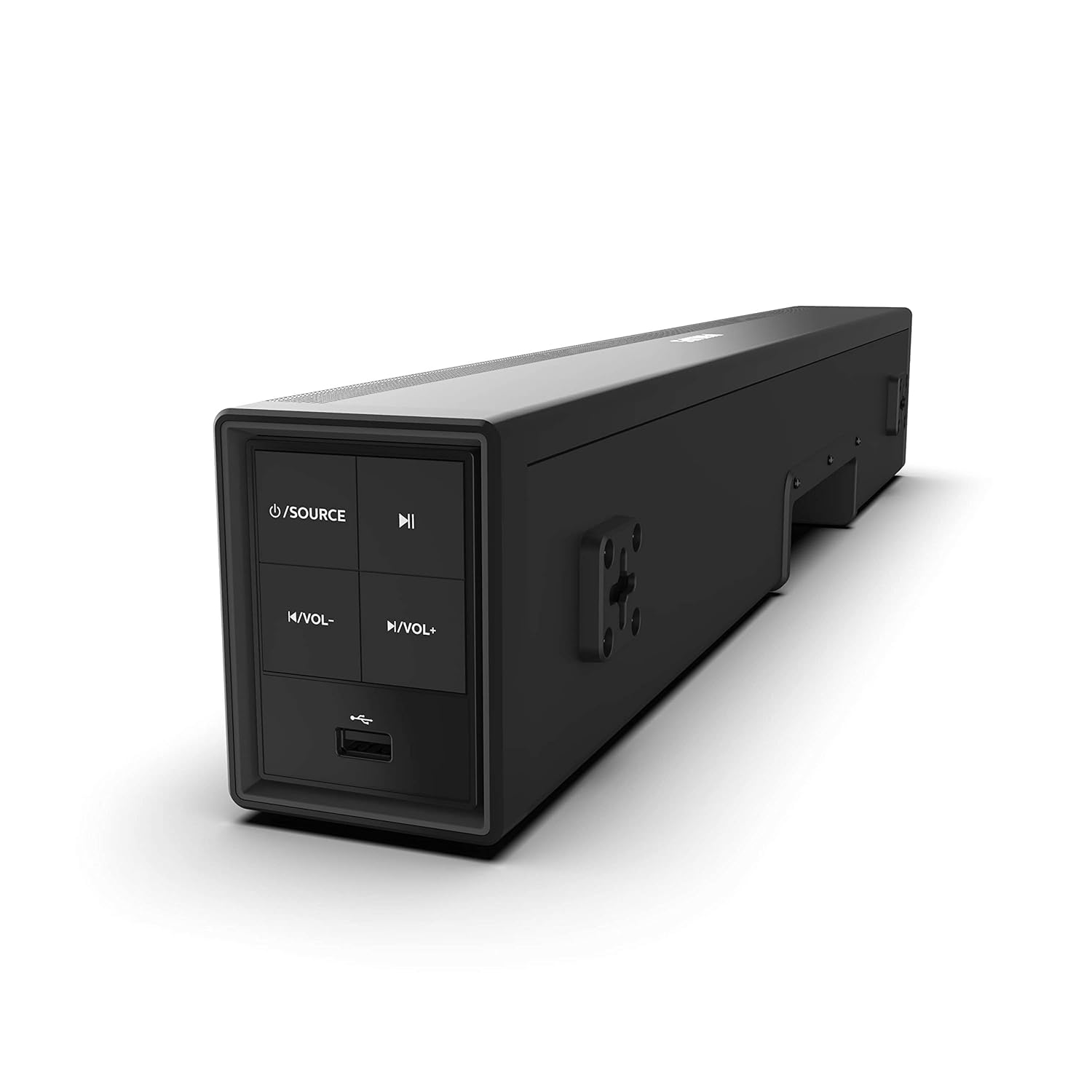
Image 4.1: Side panel controls of the Philips HTL1020/94 Soundbar.
- ปุ่มเปิด/ปิด: Press to turn on/off or switch input sources (Bluetooth, AUX, USB).
- ปุ่มเล่น/หยุดชั่วคราว: ควบคุมการเล่นสื่อในโหมดบลูทูธหรือยูเอสบี
- ปุ่มลดระดับเสียง: ลดระดับเสียง
- ปุ่มเพิ่มระดับเสียง: เพิ่มระดับเสียง
- พอร์ต USB: สำหรับเล่นไฟล์เสียงจากอุปกรณ์จัดเก็บข้อมูล USB
4.2. การเชื่อมต่อแผงด้านหลัง
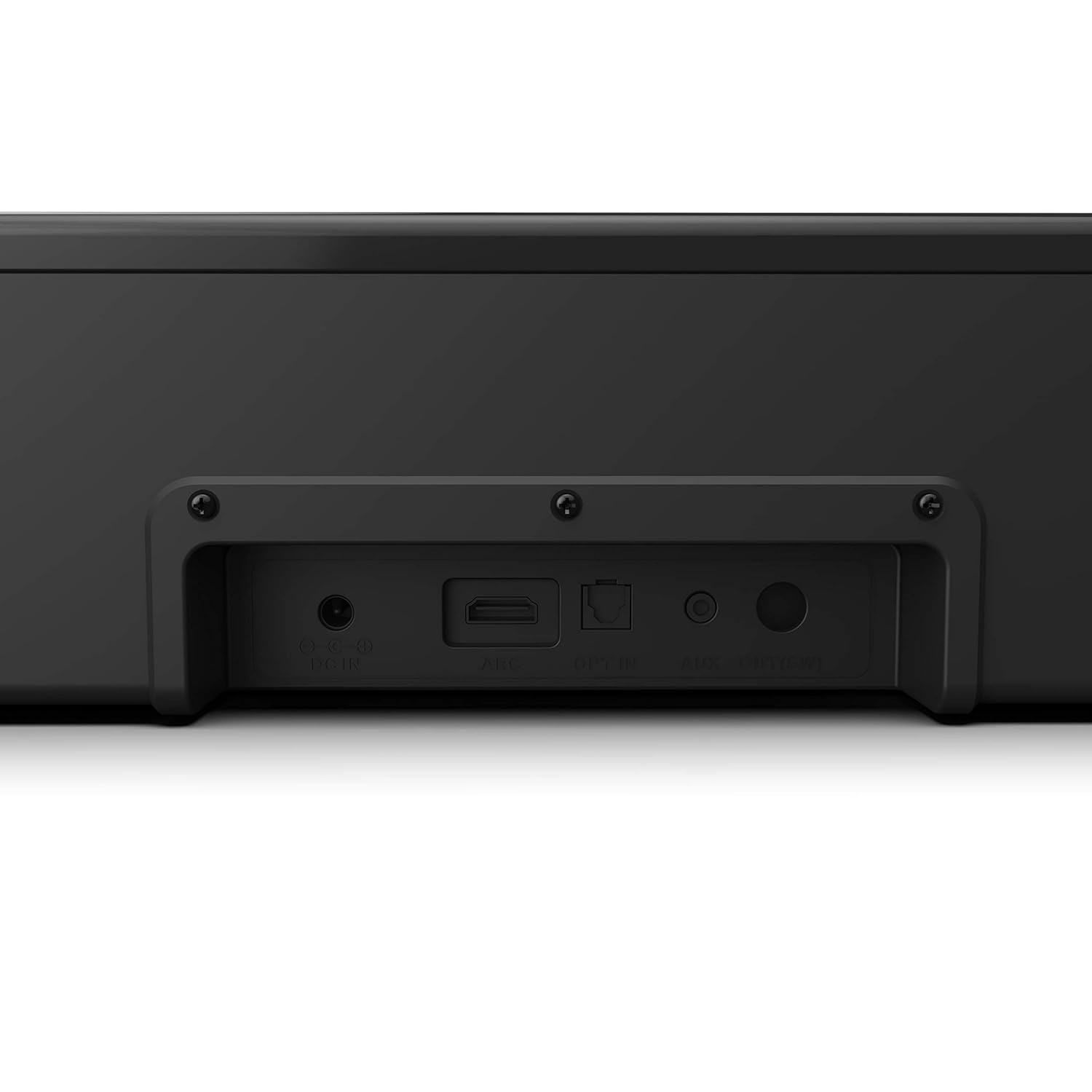
Image 4.2: Rear panel connections of the Philips HTL1020/94 Soundbar.
- DC IN: เชื่อมต่ออะแดปเตอร์ไฟฟ้าที่นี่
- อาร์ซี (HDMI): Connect to a TV's HDMI ARC port for audio input.
- เลือกใช้: Connect to a TV or audio device's optical digital output.
- ช่องรับสัญญาณเสียงเข้า: Connect to an audio device's analog output using a 3.5mm audio cable.
5. การตั้งค่าและการติดตั้ง
5.1 การวาง
The soundbar can be placed on a tabletop or mounted on a wall. Ensure it is positioned centrally in front of your television for optimal sound distribution.
- ตำแหน่งบนโต๊ะ: Place the soundbar on a stable, flat surface below your TV.
- การติดตั้งบนผนัง: Use appropriate wall mounting hardware (not included) and follow the instructions provided in the Quick Start Guide for secure installation.
5.2. กำลังเชื่อมต่อกับพลังงาน
- ต่อสายไฟเข้ากับ ดีซี ใน port on the rear of the soundbar.
- เสียบปลายสายไฟอีกด้านเข้ากับเต้ารับที่ผนัง
5.3. การเชื่อมต่อแหล่งเสียง
เลือกวิธีการเชื่อมต่อแหล่งกำเนิดเสียงของคุณวิธีใดวิธีหนึ่งต่อไปนี้:
5.3.1. การเชื่อมต่อบลูทู ธ
- กดปุ่ม แหล่งพลังงาน button on the soundbar or remote control to select Bluetooth mode. The indicator light will flash.
- บนอุปกรณ์มือถือของคุณ เปิดใช้งาน Bluetooth และค้นหาอุปกรณ์ที่มีอยู่
- Select "Philips HTL1020/94" from the list.
- เมื่อจับคู่แล้ว ไฟแสดงสถานะจะหยุดกะพริบและยังคงนิ่ง
5.3.2. การเชื่อมต่อ AUX
- Connect a 3.5mm audio cable (not included) from your audio device's headphone jack or AUX output to the AUX IN พอร์ตบนแถบเสียง
- กดปุ่ม แหล่งพลังงาน ปุ่มเพื่อเลือกโหมด AUX
5.3.3. การเชื่อมต่อ USB
- เสียบอุปกรณ์จัดเก็บข้อมูล USB (เช่น แฟลชไดรฟ์ USB) เข้าไป พอร์ต USB on the side panel of the soundbar.
- กดปุ่ม แหล่งพลังงาน button to select USB mode. The soundbar will automatically begin playing compatible audio files.
5.3.4. HDMI ARC Connection
- Connect an HDMI cable (not included) from your TV's HDMI ARC port to the อาร์ค พอร์ตบนแถบเสียง
- ตรวจสอบให้แน่ใจว่าได้เปิดใช้งานฟังก์ชัน HDMI ARC ในการตั้งค่าของทีวีแล้ว
- กดปุ่ม แหล่งพลังงาน button to select ARC mode.
5.3.5. การเชื่อมต่อด้วยแสง
- Connect an optical cable (not included) from your TV's optical digital output to the เลือกเข้า พอร์ตบนแถบเสียง
- กดปุ่ม แหล่งพลังงาน button to select OPTICAL mode.
6. การดำเนินการ
6.1. เปิด/ปิดเครื่อง
กดปุ่ม แหล่งพลังงาน กดปุ่มบนซาวด์บาร์หรือรีโมทคอนโทรลเพื่อเปิดหรือปิดเครื่อง
6.2. การเลือกแหล่งที่มา
กดปุ่มซ้ำๆ แหล่งพลังงาน button on the soundbar or the remote control to cycle through available input sources: Bluetooth, AUX, USB, ARC, Optical.
6.3. การควบคุมระดับเสียง
ใช้ เพิ่มระดับเสียง และ ลดระดับเสียง buttons on the soundbar or the remote control to adjust the audio level.
6.4. Bluetooth Pairing (Re-pairing)
If the soundbar is not automatically connecting to a previously paired device, or if you wish to pair a new device:
- Ensure the soundbar is in Bluetooth mode (indicator light flashing).
- On your device, go to Bluetooth settings and select "Philips HTL1020/94" to connect.
7. การบำรุงรักษา
เพื่อให้ซาวด์บาร์ของคุณมีอายุการใช้งานยาวนานและมีประสิทธิภาพเหมาะสมที่สุด โปรดปฏิบัติตามคำแนะนำในการบำรุงรักษาดังต่อไปนี้:
- การทำความสะอาด: ใช้ผ้านุ่มและแห้งเช็ดทำความสะอาดพื้นผิวของซาวด์บาร์ ห้ามใช้น้ำยาทำความสะอาดหรือวัสดุขัดถู
- การระบายอากาศ : รักษาช่องระบายอากาศให้โล่งเพื่อป้องกันความร้อนสูงเกินไป
- พื้นที่จัดเก็บ: หากจะเก็บซาวด์บาร์ไว้เป็นเวลานาน ควรถอดปลั๊กออกและเก็บไว้ในที่แห้งและเย็น
8 การแก้ไขปัญหา
หากคุณพบปัญหาเกี่ยวกับซาวด์บาร์ โปรดดูปัญหาทั่วไปและวิธีแก้ไขต่อไปนี้:
| ปัญหา | สาเหตุที่เป็นไปได้ | สารละลาย |
|---|---|---|
| ไม่มีไฟฟ้า | ไม่ได้เสียบสายไฟ; ปลั๊กไฟไม่ทำงาน | Ensure power cord is securely connected; Test outlet with another device |
| ไม่มีเสียง | Incorrect source selected; Volume too low; Cables not connected | Select correct input source; Increase volume; Check all audio cables |
| การจับคู่บลูทูธล้มเหลว | ซาวด์บาร์ไม่ได้อยู่ในโหมดจับคู่; อุปกรณ์อยู่ไกลเกินไป; มีสัญญาณรบกวน | Ensure soundbar is in Bluetooth mode; Move device closer; Restart both devices |
| ปัญหาการเล่นไฟล์ผ่าน USB | ไม่เข้ากัน file format; USB device not recognized | รับรองเสียง files are compatible (e.g., MP3); Try a different USB device |
9. ข้อมูลจำเพาะ
Technical specifications for the Philips Audio HTL1020/94 Soundbar:
| คุณสมบัติ | ข้อมูลจำเพาะ |
|---|---|
| ชื่อรุ่น | HTL1020/94 |
| ประเภทลำโพง | ซาวด์บาร์ |
| ช่องสัญญาณเสียงออก | 2.0 |
| กำลังขับรวม | 20 วัตต์ |
| เทคโนโลยีการเชื่อมต่อ | Bluetooth 5.0, AUX, USB, HDMI ARC, Optical |
| วิธีการควบคุม | สัมผัส, รีโมทคอนโทรล |
| ขนาด (กxยxส) | 60 x 15 x 9.2 ซม. |
| น้ำหนักสินค้า | 2 กก. |
| แหล่งพลังงาน | สายไฟ |
| อัตราส่วนสัญญาณต่อเสียงรบกวน | 55 เดซิเบล |
| ส่วนประกอบที่รวมอยู่ | Power cord, Quick Start Guide, Remote, User Manual, Warranty Card |
10. การรับประกันและการสนับสนุน
Your Philips Audio HTL1020/94 Soundbar comes with a 1-year warranty. Please refer to the included Warranty Card for detailed terms and conditions.
For technical support or service inquiries, please contact Philips Audio customer service. Contact information can typically be found on the Philips Audio official webไซต์หรือบนบัตรรับประกันของคุณ


