1. สินค้าหมดview
The Sharp Digital Clock is designed for simplicity and convenience, featuring a clear green LED display and dual USB FastCharge ports for charging your devices. It includes an alarm function and a battery backup system to retain settings during power outagใช่

รูปที่ 1 : ด้านหน้า view of the Sharp Digital Clock, highlighting the large green LED display and dual USB charging ports.
2. คู่มือการติดตั้ง
2.1 การเชื่อมต่อสายไฟ
Connect the provided power adapter to the DC IN jack located at the back of the clock. Plug the other end into a standard electrical outlet. The display will illuminate, and the clock will be ready for time setting.
2.2 แบตเตอรี่สำรอง (ทางเลือก)
For battery backup functionality, which retains time and alarm settings during a power outage, install two (2) AAA batteries (not included) into the battery compartment located on the bottom of the unit. During battery backup, the display will go blank to conserve power, but settings will be preserved.
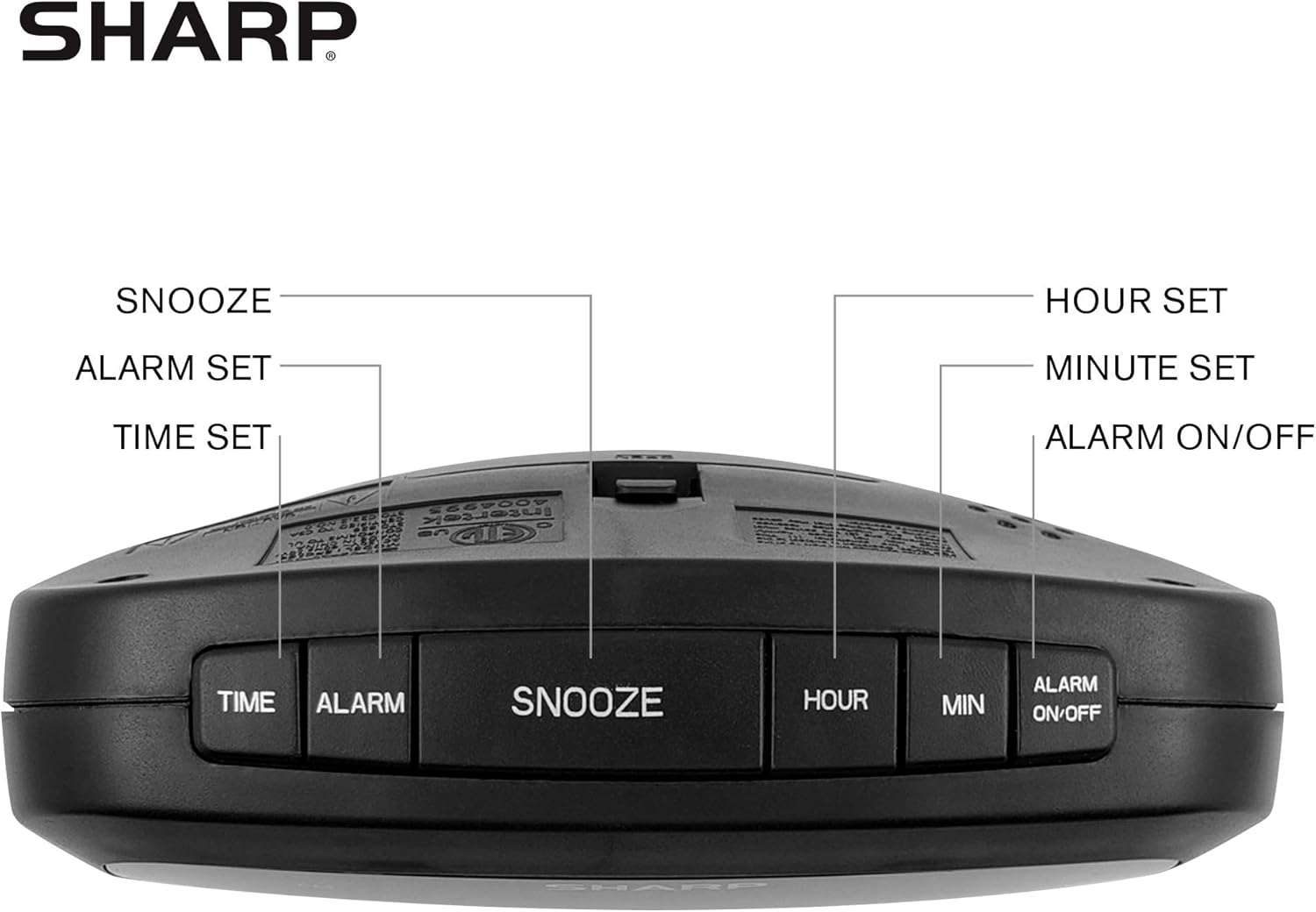
Figure 2: Underside of the clock with the battery compartment visible, requiring 2 AAA batteries for backup.
3. คู่มือการใช้งาน
The clock features intuitive top-mounted buttons for easy operation.

Figure 3: Top panel of the clock with clearly labeled buttons for time, alarm, snooze/dimmer, hour, minute, and alarm on/off.
3.1 การตั้งเวลา
- กดปุ่มค้างไว้ เวลา กดปุ่มค้างไว้จนกว่าตัวเลขชั่วโมงจะเริ่มกะพริบ
- กดปุ่ม ชั่วโมง button to adjust the hour. Pay attention to the PM indicator if setting a PM time.
- กดปุ่ม นาที ปุ่มเพื่อปรับนาที
- กดปุ่ม เวลา กดปุ่มอีกครั้งเพื่อยืนยันและบันทึกเวลา
3.2 การตั้งปลุก
- กดปุ่มค้างไว้ เตือน กดปุ่มค้างไว้จนกว่าตัวเลขชั่วโมงของนาฬิกาปลุกจะเริ่มกะพริบ
- กดปุ่ม ชั่วโมง ปุ่มเพื่อปรับชั่วโมงปลุก
- กดปุ่ม นาที ปุ่มสำหรับปรับนาทีของนาฬิกาปลุก
- กดปุ่ม เตือน button again to confirm and save the alarm time.
- หากต้องการเปิดหรือปิดสัญญาณเตือน ให้กดปุ่ม เปิด / ปิดนาฬิกาปลุก button. An alarm indicator light will appear on the display when the alarm is active.
3.3 Snooze and Dimmer Function
- เมื่อเสียงสัญญาณเตือนดังขึ้น ให้กดปุ่มขนาดใหญ่ เลื่อน/หรี่ไฟ button to temporarily silence the alarm for a few minutes.
- To adjust the brightness of the green LED display, repeatedly press the เลื่อน/หรี่ไฟ button when the alarm is not sounding. Cycle through bright, medium, and low brightness settings.
3.4 Using the USB Charging Ports
The clock is equipped with two 2 AMP USB charging ports on the front, allowing you to conveniently charge your smartphone or other USB-powered devices directly from the clock.

Figure 4: The clock demonstrating its dual USB charging capability with two smartphones connected.
- Simply connect your device's USB charging cable to one of the USB ports on the front of the clock.
- Ensure your device is compatible with 2 AMP charging for optimal speed.
4. การบำรุงรักษา
To ensure the longevity and proper functioning of your Sharp Digital Clock, follow these simple maintenance guidelines:
- การทำความสะอาด: Wipe the clock with a soft, dry cloth. Do not use abrasive cleaners, waxes, or solvents as they may damage the finish.
- การจัดวาง: วางนาฬิกาบนพื้นผิวที่มั่นคงและเรียบ หลีกเลี่ยงแสงแดดโดยตรง แหล่งความร้อน และความชื้นมากเกินไป
- การเปลี่ยนแบตเตอรี่: If using the battery backup, replace the AAA batteries annually or when the clock consistently loses time during power interruptions.
5 การแก้ไขปัญหา
| ปัญหา | สาเหตุที่เป็นไปได้ | สารละลาย |
|---|---|---|
| หน้าจอแสดงผลนาฬิกาว่างเปล่า | ไม่มีอำนาจหรืออำนาจคุณtage. | Ensure the power adapter is securely plugged into the clock and a working electrical outlet. If there was a power outage, check if backup batteries are installed and functional. |
| สัญญาณเตือนภัยไม่ดัง | Alarm not set or not activated. | Verify that the alarm time is correctly set and that the alarm indicator light is visible on the display (press ALARM ON/OFF). |
| USB ports are not charging devices. | Device incompatibility or faulty cable. | Ensure your device is compatible with USB charging. Try a different USB cable. Confirm the clock is powered on. |
| หน้าจอแสดงผลสว่าง/มืดเกินไป | การตั้งค่าความสว่างต้องมีการปรับ | Press the SNOOZE/DIMMER button repeatedly to cycle through brightness levels (bright, medium, low). |
6. ข้อมูลจำเพาะผลิตภัณฑ์
- ยี่ห้อ: คม
- แบบอย่าง: B08H3STVWG
- ประเภทจอภาพ: Digital Green LED
- แหล่งพลังงาน: สายไฟ
- แบตเตอรี่สำรอง: แบตเตอรี่ AAA 2 ก้อน (ไม่รวม)
- พอร์ต USB: 2 x 2 AMP USB FastCharge Ports
- ขนาดสินค้า : กว้าง 5.95 นิ้ว x สูง 2.3 นิ้ว
- น้ำหนักสินค้า: 9.59 ออนซ์
- สี: ไฟ LED สีเขียว
- วัสดุ: พลาสติก
- ยูพีซี: 049353005089
7. การรับประกันและการสนับสนุน
This Sharp Digital Clock comes with a limited warranty. For detailed warranty information, product support, or to purchase accessories, please visit the official Sharp webหรือติดต่อฝ่ายบริการลูกค้า คุณยังสามารถเยี่ยมชม ร้าน Sharp บน Amazon.
โปรดเก็บใบเสร็จรับเงินของคุณไว้สำหรับการเรียกร้องการรับประกัน


