1. บทนำ
This manual provides essential information for setting up, operating, maintaining, and troubleshooting your Samsung Galaxy A71 smartphone. Please read this manual thoroughly to ensure proper use and to maximize the device's capabilities.
The Samsung Galaxy A71 (Model A715F) features a 6.7-inch Super AMOLED Plus display, a 64MP Quad Camera system, a 4500 mAh battery with 25W fast charging, and runs on Android 10.0 with One UI 2. It is an international model designed for GSM carriers.
2. เค้าโครงอุปกรณ์
Familiarize yourself with the physical components of your Galaxy A71.

ภาพที่ 2.1: ด้านหน้า view of the Samsung Galaxy A71, showing the display and front camera.
ภาพที่ 2.2: ด้านหลัง view of the Samsung Galaxy A71, highlighting the quad camera module and Samsung branding.
3. การตั้งค่า
3.1. การใส่ซิมการ์ด
The Galaxy A71 uses a single Nano-SIM card. Ensure the device is powered off before inserting or removing the SIM card.
- ค้นหาถาดใส่การ์ด SIM ที่ด้านข้างของอุปกรณ์
- ใส่หมุดดีดถาดเข้าไปในรูบนถาดใส่ซิมการ์ดเพื่อเปิดออก
- วางซิมการ์ดนาโนลงในถาดโดยให้ด้านขั้วสีทองหันลง
- ค่อยๆ ดันถาดกลับเข้าไปในช่องจนกระทั่งชิดกับอุปกรณ์
3.2. การเปิดเครื่องครั้งแรกและการตั้งค่า
- กดปุ่มเปิด/ปิดค้างไว้จนกว่าโลโก้ Samsung จะปรากฏขึ้น
- ทำตามคำแนะนำบนหน้าจอเพื่อเลือกภาษา เชื่อมต่อกับเครือข่าย Wi-Fi และตั้งค่าบัญชี Google ของคุณ
3.3. การตั้งค่าเซ็นเซอร์ลายนิ้วมือ
The Galaxy A71 features an in-display optical fingerprint sensor for secure unlocking.
- นำทางไปที่ การตั้งค่า > ไบโอเมตริกซ์และความปลอดภัย > ลายนิ้วมือ.
- Follow the on-screen instructions to register your fingerprint. You will be prompted to lift and press your finger multiple times on the designated area of the screen.
- Ensure your finger is clean and dry for accurate recognition.

Image 3.1: Illustration of the in-display fingerprint sensor for unlocking the device.
4. การใช้งานอุปกรณ์ของคุณ
4.1. การแสดงผลและการนำทาง
The 6.7-inch Super AMOLED Plus display offers vibrant colors and deep blacks. Navigate the interface using touch gestures, including tap, swipe, pinch-to-zoom, and long press.
4.2. การใช้กล้อง
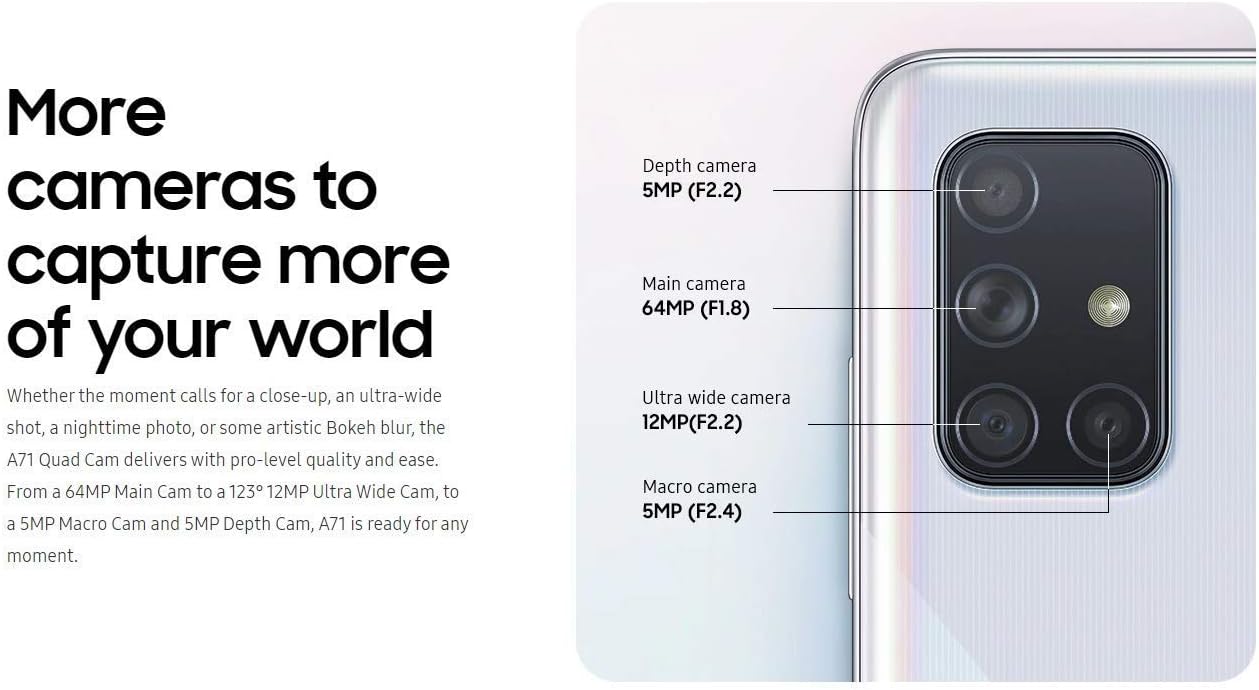
The Galaxy A71 is equipped with a versatile quad-camera system on the rear and a high-resolution front camera.
- กล้องหลัง: 64 MP (F1.8) Main, 12 MP (F2.2) Ultra Wide, 5 MP (F2.4) Macro, 5 MP (F2.2) Depth.
- กล้องหน้า: 32 ล้านพิกเซล (F2.2)
To open the camera, tap the Camera icon on the home screen or double-press the Power key. Select different modes like Photo, Video, Pro, Panorama, Food, Night, Macro, and Live Focus from the camera interface.

ภาพที่ 4.1: รายละเอียด view of the Galaxy A71's quad camera system, indicating the function of each lens.
4.3. แบตเตอรี่และการชาร์จ
The device is powered by a 4500 mAh battery and supports 25W Super Fast Charging.
- Use the included 25W fast charger for optimal charging speeds.
- To charge, connect the USB-C cable to the phone's charging port and the adapter to a power outlet.
- Avoid using damaged chargers or cables, as this can harm the device and void the warranty.

Image 4.2: Information on the 4500mAh battery and 25W Super Fast Charging capability.
4.4. การจัดเก็บและหน่วยความจำ
The Galaxy A71 comes with 128GB of internal storage and 6GB of RAM. Storage can be expanded up to 512GB using a MicroSD card (sold separately).
4.5. การเชื่อมต่อ
อุปกรณ์รองรับตัวเลือกการเชื่อมต่อที่หลากหลาย:
- เซลลูล่าร์: GSM, HSDPA, and 4G LTE bands (refer to specifications for detailed band information).
- ไวไฟ : เชื่อมต่อกับเครือข่ายไร้สายเพื่อการเข้าถึงอินเทอร์เน็ต
- บลูทูธ: สำหรับเชื่อมต่ออุปกรณ์เสริมไร้สาย
- ยูเอสบี-C: สำหรับการชาร์จและถ่ายโอนข้อมูล
- แจ็คเสียง: ช่องเสียบ 3.5 มม. สำหรับหูฟังแบบมีสาย
5. การบำรุงรักษา
5.1. การดูแลแบตเตอรี่
- หลีกเลี่ยงอุณหภูมิที่สูงเกินไป เพราะอาจทำให้แบตเตอรี่มีอายุการใช้งานลดลง
- อย่าปล่อยให้อุปกรณ์ชาร์จเป็นเวลานานหลังจากถึงระดับ 100%
- หากต้องการเก็บรักษาในระยะยาว ให้ชาร์จแบตเตอรี่ให้เหลือประมาณ 50% แล้วปิดอุปกรณ์
5.2. การอัปเดตซอฟต์แวร์
ตรวจสอบและติดตั้งการอัปเดตซอฟต์แวร์เป็นประจำเพื่อให้มั่นใจถึงประสิทธิภาพ ความปลอดภัย และการเข้าถึงฟีเจอร์ใหม่ๆ ที่ดีที่สุด ไปที่ การตั้งค่า > อัพเดทซอฟต์แวร์ > ดาวน์โหลดและติดตั้ง.
5.3. การทำความสะอาดอุปกรณ์ของคุณ
- ใช้ผ้านุ่มไม่เป็นขุยทำความสะอาดหน้าจอและตัวเครื่อง
- หลีกเลี่ยงสารเคมีรุนแรง วัสดุที่มีฤทธิ์กัดกร่อน หรือความชื้นที่มากเกินไป
- สำหรับรอยเปื้อนฝังแน่น ให้เช็ดเบาๆampชุบผ้าด้วยน้ำกลั่น
6 การแก้ไขปัญหา
6.1. อุปกรณ์ไม่เปิดเครื่อง
- ตรวจสอบให้แน่ใจว่าแบตเตอรี่ชาร์จเต็มแล้ว เสียบที่ชาร์จและรอสักครู่ก่อนลองเปิดเครื่อง
- Press and hold the Power key for at least 10 seconds to perform a forced restart.
6.2 ปัญหาการเชื่อมต่อเครือข่าย
- ตรวจสอบให้แน่ใจว่าได้ใส่ซิมการ์ดอย่างถูกต้องและเปิดใช้งานกับผู้ให้บริการ GSM ที่ใช้งานร่วมกันได้แล้ว
- Check your network settings: การตั้งค่า > การเชื่อมต่อ > เครือข่ายมือถือ.
- รีสตาร์ทอุปกรณ์
- Note: This is an international model and may not be compatible with all carriers, especially CDMA networks like Verizon, Sprint, or Boost in the US.
6.3 เซ็นเซอร์ลายนิ้วมือไม่ทำงาน
- ตรวจสอบให้แน่ใจว่านิ้วและหน้าจอของคุณสะอาดและแห้ง
- หากปัญหายังคงอยู่ โปรดลงทะเบียนลายนิ้วมือของคุณอีกครั้ง
- Ensure you are pressing firmly on the correct area of the screen.
7. ข้อมูลจำเพาะ
| ชื่อรุ่น | กาแล็คซี่ A71 |
| หมายเลขรุ่น | A715F |
| แสดง | 6.7 inches Super AMOLED Plus, FHD+ (1080 x 2400 pixels) |
| โปรเซสเซอร์ | Qualcomm SDM730 Snapdragon 730 (8 nm), Octa-core (2x2.2 GHz + 6x1.8 GHz) |
| แรม | 6GB |
| การจัดเก็บข้อมูลภายใน | 128GB |
| พื้นที่เก็บข้อมูลแบบขยายได้ | MicroSD (up to 512 GB) |
| กล้องหลัง | 64 MP (F1.8) Main + 12 MP (F2.2) Ultra Wide + 5 MP (F2.4) Macro + 5 MP (F2.2) Depth |
| กล้องหน้า | 32 ล้านพิกเซล (F2.2) |
| ความจุของแบตเตอรี่ | 4500 มิลลิแอมป์ |
| การชาร์จไฟ | ชาร์จเร็วสุดๆ 25 วัตต์ |
| ระบบปฏิบัติการ | ระบบปฏิบัติการ Android 10.0, One UI 2 |
| ประเภทซิม | นาโนซิมเดี่ยว |
| การเชื่อมต่อ | 4G LTE, Wi-Fi, Bluetooth, GPS, USB-C |
| แจ็คเสียง | 3.5 มม. |
| ขนาด (โดยประมาณ) | 163.6 x 76.0 x 7.7 มม. (6.44 x 2.99 x 0.30 นิ้ว) |
| น้ำหนัก (โดยประมาณ) | 179 กรัม (6.31 ออนซ์) |
8. การรับประกันและการสนับสนุน
โปรดทราบว่านี่คือ International Version of the Samsung Galaxy A71 (Model A715F). As such, there is ไม่มีการรับประกันในสหรัฐอเมริกา provided by the manufacturer for this specific model.
This international model is compatible with most GSM carriers, including T-Mobile, AT&T, and MetroPCS. It will ไม่ work with CDMA carriers such as Verizon, Sprint, or Boost.
For further support or detailed product information, please refer to the official Samsung support website for international models or contact your point of purchase.
For general information about Samsung products, you may visit: www.samsung.com