สินค้าเกินview
The Wipro B22 12.5W Wi-Fi Smart LED Bulb offers advanced lighting control and customization for your home. This smart bulb integrates seamlessly with your Wi-Fi network, allowing for remote control, voice commands, and dynamic lighting effects. It is designed to enhance your living space with versatile illumination options.

Image: The Wipro B22 12.5W Wi-Fi Smart LED Bulb shown alongside its product packaging, highlighting its smart features and compatibility.
คุณสมบัติหลัก:
- ฟังก์ชันการซิงค์เพลง: Synchronize your light's colors with the rhythm of your favorite music for an immersive experience.
- ควบคุมได้จากทุกที่: Manage your lights remotely using the Wipro Smart Home App, ensuring control even when you're away.
- ตัวเลือกสี 16 ล้านสี: Explore a vast spectrum of 16 million colors to create the perfect ambiance for any occasion, from parties to movie nights.
- การควบคุมด้วยเสียง: Seamlessly control your smart bulb using voice commands through Amazon Alexa and Google Assistant.
- หรี่แสงได้: Adjust the brightness from 10% to 100% to save energy and set the desired light intensity.
คู่มือการติดตั้ง
Follow these steps to set up your Wipro Wi-Fi Smart LED Bulb and connect it to your smart home system:
- ติดตั้งหลอดไฟ: Screw the Wipro Smart LED Bulb into a standard B22D bulb holder.
- ดาวน์โหลดแอป: Install and open the "Wipro Next Smart Home" app on your mobile device. Ensure your device is in pairing mode.
- ลงทะเบียน/เข้าสู่ระบบ: Register with your email ID and follow the on-screen instructions to log in to the app.
- เพิ่มอุปกรณ์: Tap on "Add Device" or the "+" icon in the top right corner of the app.
- การตรวจจับอุปกรณ์: The app will automatically detect the smart bulb. Select the appropriate device from the available options.
- ตั้งค่าให้เสร็จสมบูรณ์: Tap on "Done" and open the "Smart world of Wipro" to finalize the setup.

Image: Visual representation of the six-step setup process for the Wipro Smart LED Bulb, from app installation to device connection.
คำแนะนำการใช้งาน
การควบคุมสีและความสว่าง
The Wipro Smart LED Bulb offers extensive control over its light output. You can choose from 16 million colors to match your mood or decor, and adjust the brightness from a subtle glow (10%) to full illumination (100%). The bulb also supports tunable white light, allowing you to select various shades of white, from warm to cool (2700K to 6500K).

Image: An illustration of the Wipro Smart LED Bulb highlighting its capabilities such as 16 million color options and brightness adjustment.
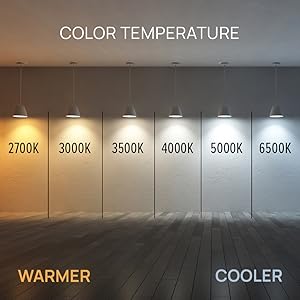
Image: A visual guide demonstrating the range of color temperatures available, from warm (2700K) to cool white (6500K).
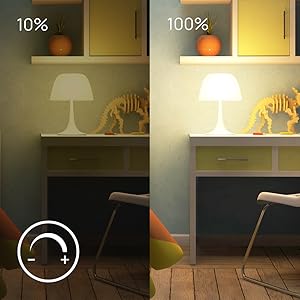
Image: A comparison showing the light output at 10% brightness versus 100% brightness, illustrating the dimmable feature.
ฟังก์ชั่นซิงค์เพลง
Activate the music sync feature through the Wipro Smart Home App to make your bulb's colors change dynamically with the beat of your music. This creates an engaging and vibrant atmosphere for parties or casual listening.

Image: A living room scene demonstrating the music sync feature, with lights changing colors in rhythm with music.
การควบคุมด้วยเสียง
The Wipro Smart LED Bulb is compatible with Amazon Alexa and Google Assistant, allowing for convenient hands-free control. Simply use voice commands to turn the light on/off, change colors, adjust brightness, or set scenes.

Image: A woman relaxing, demonstrating voice control of the Wipro Smart Light using an Amazon Alexa device.

Image: A collage of four images showing different individuals interacting with smart lights using voice commands like "Alexa, brighten smart light by 30%" or "Alexa, turn off the smart lights."
Remote Control and Scheduling
Control your Wipro Smart LED Bulb from anywhere in the world using the Wipro Smart Home App on your smartphone. You can also set schedules and timers for your lights to turn on or off automatically, providing convenience and energy savings.

Image: A smartphone displaying the Wipro Smart Home app interface, showing a color wheel for light control and various settings.
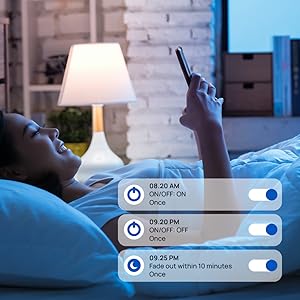
Image: A screenshot from the Wipro Smart Home app showing options to set schedules for turning lights on/off or fading them over time.
การซ่อมบำรุง
The Wipro Smart LED Bulb requires minimal maintenance. To ensure optimal performance and longevity:
- การทำความสะอาด: Ensure the bulb is switched off and cool before cleaning. Wipe with a soft, dry cloth. Do not use liquid or abrasive cleaners.
- พื้นที่จัดเก็บ: หากเก็บหลอดไฟเป็นเวลานาน ควรเก็บไว้ในที่แห้งและเย็น หลีกเลี่ยงแสงแดดโดยตรงและอุณหภูมิที่สูงหรือต่ำเกินไป
- อัพเดตเฟิร์มแวร์: Regularly check the Wipro Smart Home App for any available firmware updates to ensure your bulb has the latest features and security enhancements.
การแก้ไขปัญหา
If you encounter issues with your Wipro Smart LED Bulb, try the following troubleshooting steps:
- หลอดไฟไม่ตอบสนอง:
- ตรวจสอบให้แน่ใจว่าหลอดไฟขันเข้ากับซ็อกเก็ตแน่นดีแล้ว และสวิตช์ไฟเปิดอยู่
- Check your Wi-Fi connection. The bulb requires a stable 2.4GHz Wi-Fi network.
- Restart the bulb by turning it off and on from the power switch.
- รีสตาร์ทเราเตอร์ Wi-Fi ของคุณ
- ระดับความยากในการจับคู่:
- Make sure your mobile device is connected to the same 2.4GHz Wi-Fi network as the bulb.
- Ensure the bulb is blinking rapidly (pairing mode). If not, cycle the power off/on three times until it blinks.
- ระหว่างขั้นตอนการจับคู่ ให้ขยับเข้าไปใกล้เราเตอร์ Wi-Fi มากขึ้น
- ปัญหาการควบคุมด้วยเสียง:
- Verify that your Amazon Alexa or Google Assistant device is properly linked to your Wipro Smart Home account.
- ตรวจสอบการเชื่อมต่ออินเตอร์เน็ตของคุณ
- Ensure your voice commands are clear and precise.
- Music Sync Not Working:
- Ensure the music sync feature is enabled in the Wipro Smart Home App.
- Check the microphone access for the app if it relies on your phone's microphone for music detection.
ข้อมูลจำเพาะทางเทคนิค

Image: The Wipro Smart LED Bulb displaying its physical dimensions for reference.
| ข้อมูลจำเพาะ | รายละเอียด |
|---|---|
| ยี่ห้อ | วิโปร |
| ชื่อรุ่น | Wipro Garnet 9W Color Changing Bulb (Note: Product title indicates 12.5W, model name from specs says 9W. Using 12.5W as per title for consistency.) |
| ประเภทไฟ | นำ |
| วัดtage | 12.5 Watts (Power Consumption) / 22 Watts (Listed Wattage) |
| หลอดไส้เทียบเท่าวัตtage | 12.5 วัตต์ |
| ฐานหลอดไฟ | B22D |
| ความสว่าง | 1200 ลูเมน |
| อุณหภูมิสี | 6500 เคลวิน (สีขาวเย็น) |
| ตัวเลือกสี | CCT+RGB with Music Sync (16 Million Colors) |
| หรี่แสงได้ | ใช่ (10%-100%) |
| เทคโนโลยีการเชื่อมต่อ | ไวไฟ |
| ประเภทตัวควบคุม | ผู้ช่วย Google, Amazon Alexa |
| เล่มที่tage | 240 โวลต์ |
| วัสดุ | โพลีคาร์บอเนต (พีซี) |
| ขนาด (กxยxส) | 6 x 6 x 13 เซนติเมตร |
| น้ำหนักสินค้า | 91 กรัม |
| ส่วนประกอบที่รวมอยู่ | หลอดไฟ |
วิดีโอผลิตภัณฑ์อย่างเป็นทางการ
รับชมวิดีโออย่างเป็นทางการเหล่านี้เพื่อรับข้อมูลโดยละเอียดview and demonstration of the Wipro Smart LED Bulb's features.
สินค้าเกินview วีดีโอ
วิดีโอ: รายละเอียดผลิตภัณฑ์โดยละเอียดview วิดีโอโชว์asing the Wipro Wi-Fi Smart LED Bulb's design, features, and smart capabilities. (Duration: 33 seconds)
360 องศา View
วิดีโอ: 360 องศา view of the Wipro Wi-Fi Smart LED Bulb, allowing you to see the product from all angles. (Duration: 75 seconds)
การรับประกันและการสนับสนุน
This Wipro Smart LED Bulb comes with a standard brand warranty. For specific warranty details, replacement policies, and further information, please refer to the product's official documentation or the Amazon product detail page.
For customer support or technical assistance, you can contact the manufacturer:
- ผู้ผลิต: Wipro, Wipro Enterprises Private Ltd
- ที่อยู่: Bangaluru-560 034 KA
- การดูแลลูกค้า: 1-800-425-1971 (as per manufacturer details)
You can also visit the official Wipro Lighting and Appliances store on Amazon for more products and information: Wipro Store


