การแนะนำ
This manual provides essential information for the proper setup, operation, and maintenance of your NEC DTZ-12D-3 DT400 12-Button Display Phone. Please read these instructions carefully to ensure optimal performance and longevity of your device. This phone is designed for business communication environments, offering a range of features to enhance productivity.
สินค้าเกินview
The NEC DTZ-12D-3 DT400 is a corded 12-button display phone, featuring a clear LCD screen for call information and menu navigation. It is designed for efficient communication in a professional setting.
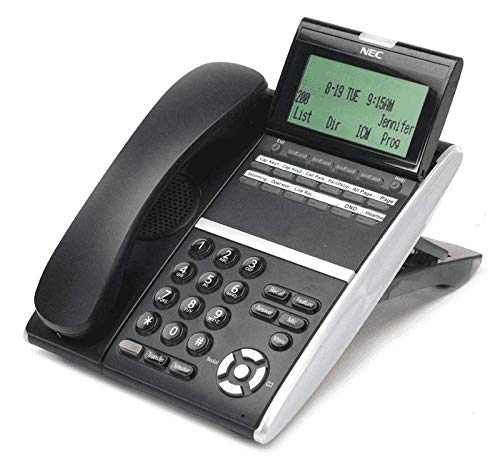
รูปที่ 1: NEC DTZ-12D-3 DT400 12-Button Display Phone. This image shows the black corded desk phone with its adjustable display unit. The display shows time, date, and soft-key options. The phone features a standard dial pad, 12 programmable function keys, and dedicated buttons for speaker, transfer, redial, and navigation.
ส่วนประกอบหลัก:
- โทรศัพท์มือถือ: สำหรับการสนทนาส่วนตัว
- หน้าจอแสดงผล: Shows call status, time, date, and menu options.
- Programmable Feature Keys (12): Customizable buttons for speed dials, line access, or specific functions.
- แป้นกดหมายเลข: ปุ่มตัวเลขมาตรฐาน (0-9, *, #) สำหรับการโทรออก
- ปุ่มนำทาง: For scrolling through menus and lists.
- ปุ่มลำโพง: Activates the speakerphone function.
- ปุ่มโอน: Used to transfer an active call to another extension.
- ปุ่มโทรซ้ำ: กดหมายเลขสุดท้ายที่โทรออก
- DND (Do Not Disturb) Button: Activates/deactivates the Do Not Disturb feature.
การตั้งค่า
1. การแกะกล่อง
- นำส่วนประกอบทั้งหมดออกจากบรรจุภัณฑ์อย่างระมัดระวัง
- Verify that all items are present: phone unit, handset, coiled handset cord, and telephone line cord.
2. การเชื่อมต่อโทรศัพท์มือถือ
Connect one end of the coiled handset cord to the handset and the other end to the handset jack located on the side or back of the phone unit.
3. Connecting to the Telephone Line
Plug one end of the telephone line cord into the LINE jack on the phone unit and the other end into a standard telephone wall jack.
4. การเชื่อมต่อพลังงาน
This phone is designed for corded electric operation. Ensure it is connected to a compatible telephone system that provides power, or use the appropriate power adapter if supplied separately (check your system's requirements).
คำแนะนำการใช้งาน
การโทรออก
- ยกหูโทรศัพท์หรือกด ลำโพง ปุ่ม.
- Dial the desired telephone number using the dial pad.
- รอให้สายเชื่อมต่อ
การรับสายโทรศัพท์
- เมื่อโทรศัพท์ดัง ให้ยกหูโทรศัพท์ขึ้นหรือกดปุ่ม ลำโพง ปุ่ม.
Using Programmable Feature Keys
The 12 programmable keys can be configured for various functions such as speed dialing, line access, or system features. Consult your system administrator for specific programming details and assigned functions.
Caller Identification (Caller ID)
If subscribed to Caller ID service, the incoming caller's number and name (if available) will be displayed on the screen before you answer the call.
การโอนสาย
- ในระหว่างการสนทนา ให้กดปุ่ม โอนย้าย ปุ่ม.
- Dial the extension or number to which you want to transfer the call.
- Wait for the recipient to answer, then announce the call and hang up. Alternatively, you may hang up immediately for an unsupervised transfer.
การโทรซ้ำหมายเลขสุดท้าย
ยกหูโทรศัพท์หรือกด ลำโพง ปุ่มแล้วกดปุ่ม โทรซ้ำ ปุ่มโทรออกหมายเลขล่าสุด
ห้ามรบกวน (DND)
กดปุ่ม งดจัดงาน button to activate or deactivate the Do Not Disturb feature. When active, incoming calls may be redirected to voicemail or a busy signal, depending on system configuration.
การซ่อมบำรุง
การทำความสะอาด
- เช็ดทำความสะอาดภายนอกโทรศัพท์ด้วยผ้าเนื้อนุ่มและแห้งamp ผ้า.
- Do not use harsh chemicals, abrasive cleaners, or excessive moisture.
- โปรดตรวจสอบให้แน่ใจว่าได้ถอดปลั๊กโทรศัพท์ออกจากแหล่งจ่ายไฟก่อนทำความสะอาด
พื้นที่จัดเก็บ
ควรเก็บโทรศัพท์ไว้ในที่แห้งและเย็น หลีกเลี่ยงแสงแดดโดยตรงและอุณหภูมิที่สูงหรือต่ำเกินไป เมื่อไม่ได้ใช้งานเป็นเวลานาน
การแก้ไขปัญหา
ไม่มีเสียงสัญญาณโทรศัพท์
- Check all cable connections, especially the telephone line cord.
- Ensure the phone system is operational.
- Test with another phone if available to rule out line issues.
การแสดงผลไม่ทำงาน
- Verify the phone is properly connected to the system and receiving power.
- Adjust the display contrast if applicable (refer to system administrator).
Cannot Make or Receive Calls
- Check if the DND feature is accidentally activated.
- ตรวจสอบให้แน่ใจว่าสายโทรศัพท์ใช้งานได้ปกติ
- Contact your system administrator for assistance with line configuration.
ข้อมูลจำเพาะ
| คุณสมบัติ | รายละเอียด |
|---|---|
| แบบอย่าง | DTZ-12D-3 DT400 |
| ยี่ห้อ | NEC Co |
| ประเภทโทรศัพท์ | แบบมีสาย |
| สี | สีดำ |
| วัสดุ | พลาสติก |
| น้ำหนักสินค้า | 2.9 ปอนด์ |
| ขนาดแพ็คเกจ | 12.28 x 9.21 x 4.61 นิ้ว |
| แหล่งพลังงาน | สายไฟ |
| ประเภทผู้โทรออก | Single Keypad (tone dialing) |
| ประเภทของระบบตอบรับ | ดิจิตอล |
| การทำงานแบบหลายบรรทัด | การทำงานแบบบรรทัดเดียว |
| การระบุผู้โทร | ใช่ |
| อุปกรณ์ที่รองรับ | Traditional telephone networks (PSTN, ISDN), potential integration with other communication devices. |
การรับประกันและการสนับสนุน
For warranty information and technical support, please refer to the documentation provided by your system vendor or contact your NEC authorized dealer. As this product may be a renewed item, specific warranty terms may vary from new products. Please consult your purchase agreement for details.
For further assistance, it is recommended to contact your IT department or the telecommunications system administrator responsible for your NEC phone system.


