การแนะนำ
The Fitbit Inspire 2 is a slim, easy-to-use health and fitness tracker designed to help you build healthy habits. It offers comprehensive tracking features including 24/7 heart rate monitoring, Active Zone Minutes, and detailed activity and sleep tracking. This manual provides essential information for setting up, operating, and maintaining your Inspire 2 device.
The Inspire 2 requires the use of the Fitbit app, compatible with iPhone or Android devices. A Google account may be required for full functionality.
สิ่งที่รวมอยู่
Your Fitbit Inspire 2 package includes the following components:
- Fitbit Inspire 2 Tracker (Lunar White)
- Classic Silicone Bands (Small and Large sizes included)
- สายชาร์จ
- Product Information and Quick-Start Guide

Image: The Fitbit Inspire 2 package contents, showing the tracker, two sizes of silicone bands, the charging cable, and documentation.
การตั้งค่า
1. การชาร์จอุปกรณ์ของคุณ
Before initial use, fully charge your Fitbit Inspire 2. Connect the charging cable to a USB port (e.g., computer, USB wall adapter). Align the pins on the charging cable with the ports on the back of your tracker until it snaps into place. A full charge typically takes about 1-2 hours. The device has a battery life of up to 10 days, though this may vary with usage.

Image: The back of the Fitbit Inspire 2 tracker, highlighting the charging pins.
2. Downloading the Fitbit App
The Fitbit app is essential for setting up and syncing your Inspire 2. Download the app from the Apple App Store (for iOS devices) or Google Play Store (for Android devices). Ensure your smartphone or tablet is compatible with the latest version of the Fitbit app. Please note that the Fitbit app for Windows computers has been discontinued.
3. Pairing and Setup
- Open the Fitbit app on your smartphone or tablet.
- If you don't have a Fitbit account, create one. If you do, log in.
- Follow the on-screen instructions in the app to pair your Inspire 2. Ensure Bluetooth is enabled on your device.
- During setup, you will be prompted to activate your 1-year Fitbit Premium trial (for new Premium users). Activate this trial within 60 days of device activation to avoid recurring fees after the trial period.
4. Attaching the Bands
Your Inspire 2 comes with both small and large classic silicone bands. Choose the band size that provides a comfortable and secure fit. To attach a band, slide the pin into the small hole on the tracker, then push the other end of the band down until it clicks into place. To remove, pull the pin away from the tracker and gently pull the band away.
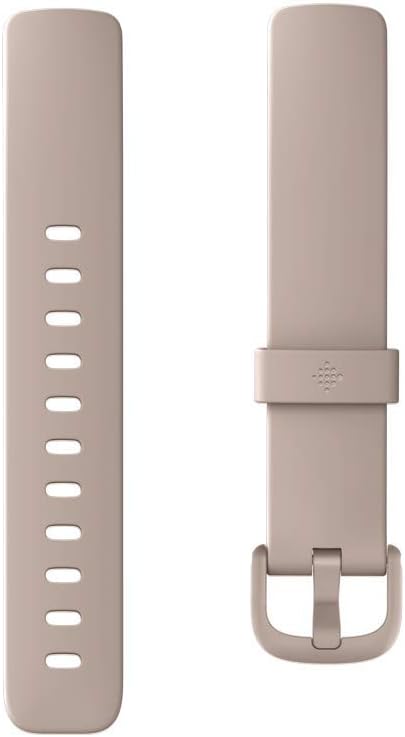
Image: The Fitbit Inspire 2 tracker shown with both the small and large silicone bands.
การใช้งานอุปกรณ์ของคุณ
The Fitbit Inspire 2 features a responsive touchscreen display. Navigate by swiping up, down, left, or right, and tap to select options.
Key Features and Tracking
- 24/7 Heart Rate Tracking: Continuously monitors your heart rate to provide insights into your fitness levels and calorie burn.
- นาทีโซนแอคทีฟ: Earn credit for time spent in fat burn, cardio, and peak heart rate zones. Your goal is 150 minutes per week.
- การติดตามกิจกรรมตลอดทั้งวัน: Records your steps, distance traveled, hourly activity, and calories burned throughout the day.
- การติดตามการนอนหลับ: Automatically tracks your time in light, deep, and REM sleep stages. Receive a Sleep Score in the Fitbit app to understand your sleep quality.
- โหมดการออกกำลังกายมากกว่า 20 โหมด: Select specific exercise modes on your tracker to track real-time stats during workouts.
- Water Intake Tracking: Log your water consumption directly on the device or through the Fitbit app to stay hydrated.
- การแจ้งเตือน: Receive call, text, calendar, and smartphone app notifications directly on your wrist when your phone is nearby.
- คะแนนความพร้อมรายวัน: (Requires Fitbit Premium membership) This feature helps you understand if your body is ready for exercise or needs recovery, based on activity, sleep, and heart rate variability.
Image: Visual representation of the Fitbit Inspire 2's core features.

Image: The Inspire 2 tracking heart rate, with corresponding data displayed in the Fitbit app on a smartphone.

Image: The Inspire 2 displaying sleep tracking information.
การซ่อมบำรุง
Cleaning Your Inspire 2
Regularly clean your tracker and band to prevent skin irritation and maintain device functionality. Use a mild, soap-free cleanser and water. Dry thoroughly before wearing. Avoid harsh chemicals or abrasive materials.
ความต้านทานต่อน้ำ
The Fitbit Inspire 2 is swimproof and water-resistant up to 50 meters. This means you can wear it in the shower, pool, or ocean. After swimming or getting the band wet, it is recommended to dry the band thoroughly to prevent skin irritation.
การดูแลแบตเตอรี่
To maximize battery life, avoid exposing your device to extreme temperatures. Charge your device regularly, ideally before the battery is completely depleted. The Inspire 2 boasts up to 10 days of battery life, depending on usage and other factors.
การแก้ไขปัญหา
- อุปกรณ์ไม่ตอบสนอง: If your Inspire 2 is unresponsive, try restarting it by connecting it to the charging cable and pressing the button on the charger three times within eight seconds.
- ปัญหาการซิงค์: Ensure Bluetooth is enabled on your smartphone/tablet and the Fitbit app is open and running in the background. If issues persist, try restarting both your device and the Inspire 2. For syncing with a computer, note that the Fitbit app for Windows has been discontinued; older setups might require a separate Fitbit Wireless Sync Dongle and active Bluetooth on the computer.
- การติดตามไม่แม่นยำ: Ensure your Inspire 2 is worn correctly, typically three fingers above your wrist bone, for optimal heart rate and activity tracking. Clean the sensors regularly.
- ความเข้ากันได้ของแอพ: Verify that your smartphone or tablet meets the minimum operating system requirements for the Fitbit app. Older devices may not be compatible.
ข้อมูลจำเพาะ
| คุณสมบัติ | รายละเอียด |
|---|---|
| หมายเลขรุ่น | FB418 |
| ขนาดสินค้า | 1.47 x 0.66 x 0.51 นิ้ว |
| น้ำหนักสินค้า | 1.1 ออนซ์ |
| อายุการใช้งานแบตเตอรี่ | นานถึง 10 วัน |
| ประเภทแบตเตอรี่ | แบตเตอรี่ลิเธียมโพลิเมอร์ 1 ก้อน (รวมอยู่ด้วย) |
| การเชื่อมต่อ | บลูทูธ |
| ความต้านทานต่อน้ำ | Swimproof (up to 50 meters) |
| ความเข้ากันได้ของระบบปฏิบัติการ | Android, iOS (via Fitbit app) |
| คุณสมบัติพิเศษ | Time Display, Calendaring, Notifications, Heart Rate Monitor, Calorie Tracker, Sleep Monitor, Pedometer, Text Messaging, Activity Tracker, Distance Tracker, GPS Via Smartphone |
การรับประกันและการสนับสนุน
For detailed warranty information, please refer to the official Fitbit website or the documentation included with your product. Fitbit offers customer support for any technical issues or questions you may have.
คู่มือผู้ใช้ฉบับสมบูรณ์ในรูปแบบ PDF พร้อมให้ดาวน์โหลดได้: Fitbit Inspire 2 User Manual (PDF).
Remember to activate your 1-year Fitbit Premium trial to unlock advanced features and personalized insights.

Image: Benefits of the 1-year Fitbit Premium trial, including personalized health and fitness guidance.


