1. สินค้าหมดview
This RF Mini Wireless Remote Controller is designed for controlling single color 3528 and 5050 LED strip lights. It provides convenient wireless control over brightness and dynamic modes for 12V DC LED ribbons and shelf lights. The compact design and 11-key remote ensure ease of use and versatile application.

Image 1.1: The RF Mini Wireless Remote Controller (right) and its accompanying LED controller unit (left) with DC connectors.
2. คำแนะนำในการตั้งค่า
2.1. การระบุส่วนประกอบ
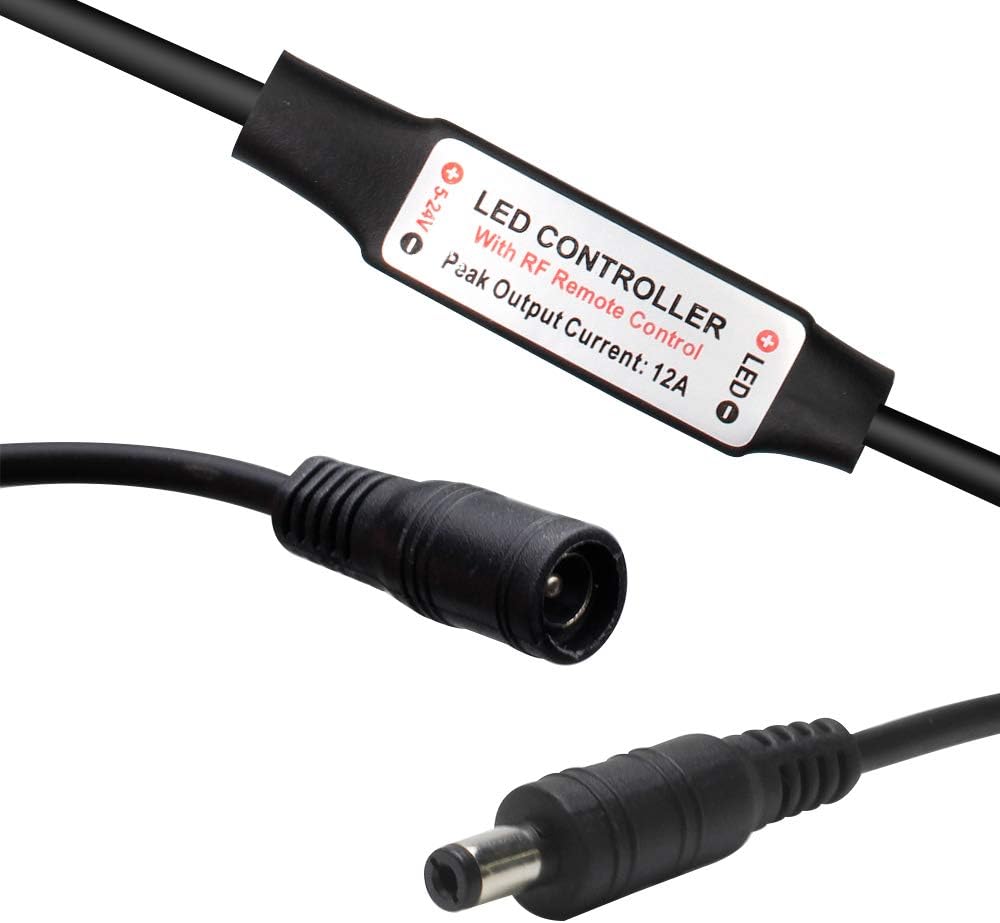
ภาพที่ 2.1: ภาพระยะใกล้ view of the LED controller unit, showing the input (5-24V) and output (LED) connections, and the "LED CONTROLLER With RF Remote Control Peak Output Current: 12A" label.
The system consists of two main parts: the RF Mini Wireless Remote Control and the LED Controller unit. The LED controller unit has a DC input connector and a DC output connector for connecting to your LED strip lights.
2.2. การติดตั้งแบตเตอรี่
The remote control requires one CR2025 or CR2032 battery, which is included. To install or replace the battery:
- ค้นหาช่องใส่แบตเตอรี่ที่ด้านหลังของรีโมทคอนโทรล
- Push the tab marked "PUSH" and slide the battery tray out.
- Insert the CR2025/CR2032 battery with the positive (+) side facing up.
- Slide the battery tray back into the remote until it clicks into place.

Image 2.2: The back of the remote control, illustrating the battery compartment and the CR2025 battery being inserted.
2.3. Connecting the LED Controller
- Connect your 12V DC power adapter to the input side of the LED controller unit (labeled "5-24V").
- Connect your single color LED strip lights to the output side of the LED controller unit (labeled "LED"). Ensure correct polarity if applicable.
2.4. การจับคู่รีโมทคอนโทรล
The remote control and LED controller are typically pre-paired. If re-pairing is necessary or for multi-controller setups, follow these instructions:

Image 2.3: Visual guide for pairing the remote control, detailing both 1-to-many and 1-to-1 pairing methods.
- 1-to-Many Pairing: To pair one remote with multiple controllers, plug in the adapter for the LED controller. Within 5 seconds of powering on, press the green "LIGHT" button on the remote. The LED lights will flicker to indicate successful pairing. Repeat for other controllers.
- 1-to-1 Pairing: To pair one remote exclusively with a single controller, turn off the remote. Within 5 seconds of turning it back on, simultaneously press the "SPEED-" and "SPEED+" keys. The LED lights will flash, indicating a unique frequency pairing.
3. คู่มือการใช้งาน
The 11-key RF remote control allows for easy adjustment of your single color LED strip lights.
- ปุ่มเพาเวอร์ (⏻): เปิดหรือปิดไฟ LED
- LIGHT Button (แสงสว่าง): Toggles the light on/off and is used for 1-to-many pairing.
- BRIGHT+ / BRIGHT- Buttons: Adjusts the brightness level of the LED lights. The controller offers a smooth dimmer effect.
- ปุ่ม 100% / 50% / 25%: Quickly sets the brightness to preset levels (100%, 50%, or 25%).
- ปุ่ม MODE+ / MODE-: Cycles through the available dynamic lighting modes. There are 8 dynamic modes.
- SPEED+ / SPEED- Buttons: Adjusts the speed of the current dynamic lighting mode. There are 10 speed levels. These buttons are also used for 1-to-1 pairing.
The controller features an autosave function, retaining the last setting even after power off.
4. การบำรุงรักษา
To ensure optimal performance and longevity of your RF Mini Wireless Remote Controller and LED Controller:
- Keep the remote control and LED controller dry. Avoid exposure to moisture or liquids.
- ทำความสะอาดอุปกรณ์ด้วยผ้าแห้งเนื้อนุ่ม ห้ามใช้สารทำความสะอาดที่มีฤทธิ์กัดกร่อนหรือตัวทำละลาย
- Replace the remote control battery (CR2025/CR2032) when the remote's range decreases or it becomes unresponsive. Refer to Section 2.2 for battery installation.
- Ensure proper ventilation around the LED controller unit to prevent overheating, especially during prolonged use.
5 การแก้ไขปัญหา
If you encounter issues with your RF Mini Wireless Remote Controller, please refer to the following common solutions:
| ปัญหา | สาเหตุที่เป็นไปได้ / วิธีแก้ไข |
|---|---|
| LED lights do not respond to the remote. |
|
| ไฟกระพริบหรือทำงานผิดปกติ |
|
| ระยะการควบคุมระยะไกลไม่ดี |
|
6. ข้อมูลจำเพาะ
Technical specifications for the RF Mini Wireless Remote Controller and LED Controller unit:

Image 6.1: Detailed specifications table for the RF Mini Wireless Remote Controller system.
| คุณสมบัติ | รายละเอียด |
|---|---|
| โหมดไดนามิก | 8 โหมด |
| ระดับความเร็วไดนามิก | 10 ระดับ |
| ระดับความสว่างของแสง | 10 levels (256 PWM grades) |
| เอฟเฟกต์หรี่เรียบ | ใช่ |
| ฉบับทำงานtage | DC 12-24V |
| กระแสไฟขาออก | สูงสุด 6A |
| โหมดการควบคุมระยะไกล | RF ไร้สาย |
| ความถี่ระยะไกล | 433.92เมกะเฮิรตซ์ |
| ระยะทางไกล | >30m ที่พื้นที่เปิดโล่ง |
| หมายเลขรุ่นสินค้า | DC-RF-RC-12V |
| แบตเตอรี่ | 1 CR2025/CR2032 battery required (included) |
| อุปกรณ์ที่รองรับ | LED Strip Lights, LED Ribbon, Shelf Lights |
7. การรับประกันและการสนับสนุน
For warranty information and customer support, please refer to the documentation provided with your purchase or contact LEDLightsWorld directly through their official channels. Specific warranty terms and support contact details are not available in this manual.
Manufacturer: LEDLightsWorld


