1. บทนำ
Thank you for choosing the NETVUE Indoor Camera NI-3421. This manual provides essential information for setting up, operating, and maintaining your camera. Please read it thoroughly before use and retain it for future reference.

Image 1: NETVUE Indoor Camera NI-3421, a compact white and black security camera.
2. สินค้าหมดview
The NETVUE Indoor Camera NI-3421 is a versatile 1080P FHD security camera designed for indoor use, offering features such as 2.4GHz Wi-Fi connectivity, two-way audio, night vision, and AI human detection. It is suitable for monitoring pets, babies, or general home security.
คุณสมบัติหลัก:
- วิดีโอความละเอียด Full HD 1080P: ให้ภาพวิดีโอที่คมชัดและชัดเจนtage.
- การเชื่อมต่อ Wi-Fi 2.4GHz: Ensures stable wireless connection.
- ฟังก์ชันแพนและเอียง: Offers 360° horizontal and 100° vertical rotation for comprehensive coverage.
- เสียงสองทาง: ช่วยให้สามารถสื่อสารแบบเรียลไทม์ผ่านกล้องได้
- การมองเห็นกลางคืนขั้นสูง: Provides clear monitoring in low-light conditions up to 32 feet.
- AI การตรวจจับมนุษย์: Intelligently identifies human motion to reduce false alarms.
- ตัวเลือกการจัดเก็บข้อมูลหลากหลาย: Supports AWS Cloud storage (up to 30 days) and local MicroSD card storage (up to 128GB, not included).
- บูรณาการของ Alexa: ใช้งานร่วมกับ Amazon Alexa สำหรับการควบคุมด้วยเสียงและการใช้งานแบบสด view บนอุปกรณ์ที่เข้ากันได้

Image 2: The NETVUE Indoor Camera demonstrating its 360-degree pan and tilt capabilities, showing a wide view of a living room.
3. เนื้อหาบรรจุภัณฑ์
กรุณาตรวจสอบเนื้อหาแพ็คเกจเมื่อแกะกล่อง:
- NETVUE Indoor Camera NI-3421
- อะแดปเตอร์แปลงไฟ
- สาย USB
- วงเล็บยึดและสกรู
- คู่มือการใช้งาน (เอกสารนี้)
4. การตั้งค่า
4.1 การตั้งค่าทางกายภาพ
- Unpack the camera and all accessories.
- Place the camera on a flat surface or mount it to a wall/ceiling using the provided mounting kit. Ensure it is within range of your 2.4GHz Wi-Fi network.
- เชื่อมต่อกล้องเข้ากับแหล่งจ่ายไฟโดยใช้สาย USB และอะแดปเตอร์แปลงไฟที่ให้มา กล้องจะเปิดใช้งานโดยอัตโนมัติ
4.2 การติดตั้งและการเชื่อมต่อแอปพลิเคชัน
- Download the NETVUE app from the App Store (iOS) or Google Play Store (Android).
- ลงทะเบียนบัญชีใหม่หรือเข้าสู่ระบบหากคุณมีบัญชีอยู่แล้ว
- Follow the in-app instructions to add your new camera. This typically involves scanning a QR code on the camera or in the manual.
- โปรดตรวจสอบให้แน่ใจว่าอุปกรณ์มือถือของคุณเชื่อมต่อกับเครือข่าย Wi-Fi 2.4GHz ในระหว่างขั้นตอนการตั้งค่า
4.3 การเชื่อมต่อ Wi-Fi
The camera supports 2.4GHz Wi-Fi networks only. During app setup, the app will generate a QR code. Present this QR code to the camera lens (10-30cm distance) for the camera to scan and connect to your Wi-Fi network. If connection fails, ensure your Wi-Fi password is entered correctly and try resetting the camera using the reset pin (usually located near the SD card slot).
5. คู่มือการใช้งาน
5.1 สด View
Once connected, open the NETVUE app and select your camera to view the live video feed. You can switch between different cameras if you have multiple devices.
5.2 Pan & Tilt
Use the directional controls within the app to remotely pan (horizontal) and tilt (vertical) the camera lens, allowing you to monitor different areas of your room.
5.3 เสียงสองทาง
Tap the microphone icon in the app to speak through the camera's built-in speaker. This feature is useful for communicating with pets, family members, or deterring intruders.

Image 3: A visual representation of the two-way audio feature, where a child is seen interacting with a dog via the camera's speaker and microphone.
5.4 Advanced Night Vision
The camera automatically switches between day and night vision modes. Infrared LEDs provide clear black-and-white video in complete darkness up to 32 feet.

Image 4: A split image illustrating the camera's automatic day/night vision switching, highlighting its 32ft infrared night vision capability.
5.5 Motion Detection & AI Human Detection
The camera features motion detection and advanced AI human detection. You will receive instant notifications on your mobile device when motion or a human figure is detected. Sensitivity levels can be adjusted in the app settings.

Image 5: A graphic demonstrating the camera's human and motion detection capabilities, with a smartphone displaying a motion alert notification.
5.6 ตัวเลือกการจัดเก็บข้อมูล
Choose between two storage methods for your video recordings:
- การเก็บข้อมูลบนคลาวด์: AWS Cloud provides up to 30 days of storage. Subscription services are available for AI detection and continuous/event video recording.
- การ์ด MicroSD: Supports local storage up to 128GB (card not included). Both options allow replaying 14 days of videos.
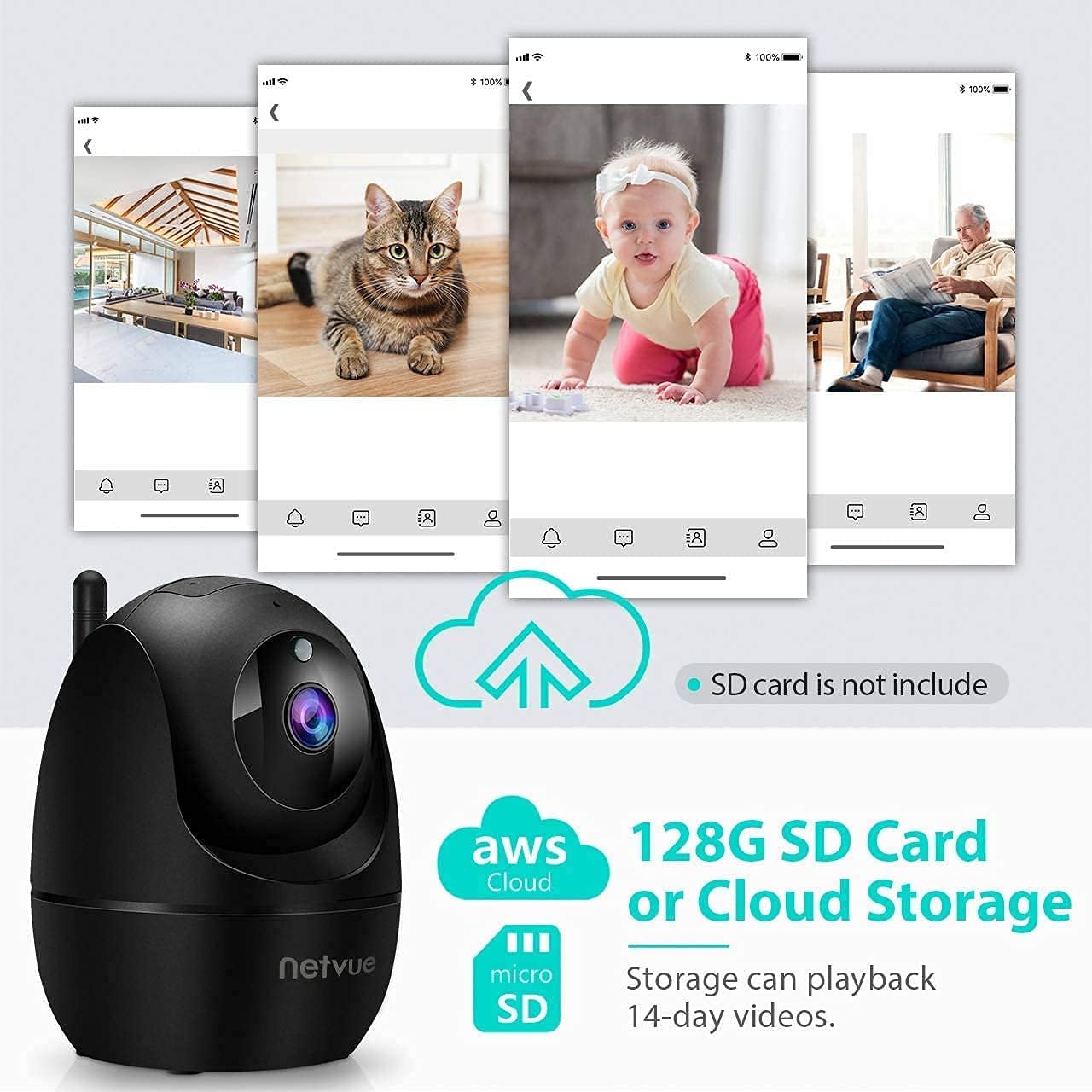
Image 6: The NETVUE Indoor Camera highlighting its compatibility with both AWS Cloud storage and MicroSD card storage for video recordings.
5.7 การรวม Alexa
The NETVUE camera can be integrated with Amazon Alexa for convenient voice control. You can ask Alexa to show live video feeds on compatible devices like the Echo Show.
Video 1: This video demonstrates the NETVUE camera's integration with Amazon Alexa, showing how to use voice commands to view camera feeds on an Echo Show device.
6. การบำรุงรักษา
- การทำความสะอาด: ใช้ผ้าแห้งนุ่มเช็ดทำความสะอาดเลนส์และตัวกล้อง หลีกเลี่ยงสารเคมีรุนแรง
- อัพเดตเฟิร์มแวร์: Regularly check the NETVUE app for firmware updates to ensure optimal performance and security.
- การจัดวาง: ตรวจสอบให้แน่ใจว่าได้วางกล้องไว้ในตำแหน่งที่มั่นคง ห่างจากแสงแดดโดยตรง แหล่งความร้อน และความชื้น
7 การแก้ไขปัญหา
- ปัญหาการเชื่อมต่อ: Ensure your Wi-Fi network is 2.4GHz. Verify the Wi-Fi password. Try resetting the camera and re-pairing it with the app.
- สถานะออฟไลน์: Check power supply and Wi-Fi signal strength. Reboot your router and the camera.
- Echoing Audio: This can occur if the camera's speaker output is picked up by its microphone. Adjust volume or distance between the camera and any audio output devices.
- การตรวจจับความเคลื่อนไหวไม่ทำงาน: Check app settings for motion detection sensitivity and ensure it's enabled. Verify camera's field of view.
8. ข้อมูลจำเพาะ
| คุณสมบัติ | ข้อมูลจำเพาะ |
|---|---|
| ความละเอียดวิดีโอ | ความละเอียด 1080p |
| การเชื่อมต่อ | ไวไฟ 2.4GHz |
| ช่วงการมองเห็นตอนกลางคืน | 32 ฟุต (อินฟราเรด) |
| ทุ่งแห่ง View | 100 Degrees (Digital Zoom) |
| แพน/เอียง | แนวนอน 360 องศา แนวตั้ง 100 องศา |
| ตัวเลือกการจัดเก็บข้อมูล | AWS Cloud (up to 30 days), MicroSD Card (up to 128GB) |
| เสียง | ระบบเสียง 2 ทาง |
| การตรวจจับ | AI Human Detection, Motion Sensor |
| แหล่งพลังงาน | ใช้ไฟฟ้าแบบมีสาย (4.5V AC, 6W) |
| ขนาด | 3 x 3 x 3 นิ้ว |
| น้ำหนักสินค้า | 11.7 ออนซ์ |
9. การรับประกันและการสนับสนุน
NETVUE products typically come with a limited warranty. Please refer to the warranty card included in your package or visit the official NETVUE website for detailed warranty information and terms. For technical support, FAQs, or to contact customer service, please visit the NETVUE support page or use the support features within the NETVUE app.

Image 7: A graphic illustrating NETVUE's 24/7 online customer support, showing a customer service representative with a headset.
ความเป็นส่วนตัวและความปลอดภัยของข้อมูล:
NETVUE ensures the highest protection of data and privacy via bank-level AES 256-bit encryption and TLS Encryption Protocol.

Image 8: A graphic emphasizing NETVUE's commitment to privacy and security, featuring a house protected by a shield icon.