1. บทนำ
The YABER V3 Mini Bluetooth Projector is designed to provide a versatile and high-quality viewing experience for home entertainment and outdoor use. Featuring native 1280x720p resolution with 1080P support, a 6000:1 contrast ratio, and an advanced German LED light source, it delivers clear and accurate images. This projector also includes Bluetooth 5.0 for wireless audio connectivity and supports wireless screen mirroring via Anycast or Chromecast (adapters sold separately).
2. อะไรอยู่ในกล่อง
- YABER V3 Mini Bluetooth Projector
- สาย HDMI
- สายไฟ
- คู่มือการใช้งาน
- เคเบิ้ล AV
- ผ้าเช็ดเลนส์
- รีโมทคอนโทรล (ไม่รวมแบตเตอรี่)
3. คุณสมบัติของผลิตภัณฑ์
- Native 720P & 1080P Supported: Offers a native resolution of 1280x720 pixels, supporting up to 1080P input for clear images.
- อัตราส่วนความคมชัดสูง: Features a 6000:1 contrast ratio for enhanced image depth and detail.
- การเชื่อมต่อบลูทูธ 5.0: Allows wireless connection to Bluetooth headsets, speakers, and Airpods for enhanced audio.
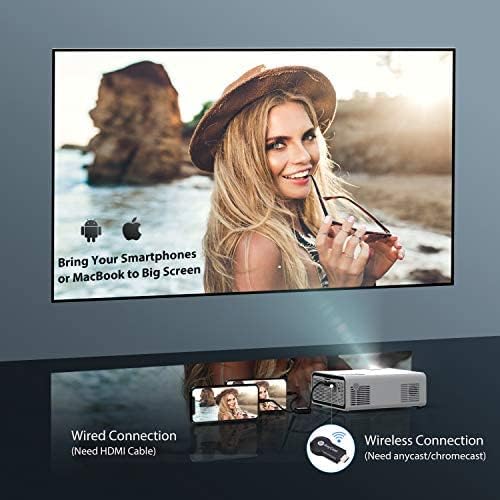
- มิเรอร์หน้าจอไร้สาย: Supports Anycast and Chromecast for mirroring content from smartphones and other devices (adapters required).
- ฟังก์ชั่นซูม: Adjusts image size from 100% to 50% using the remote control without moving the projector.
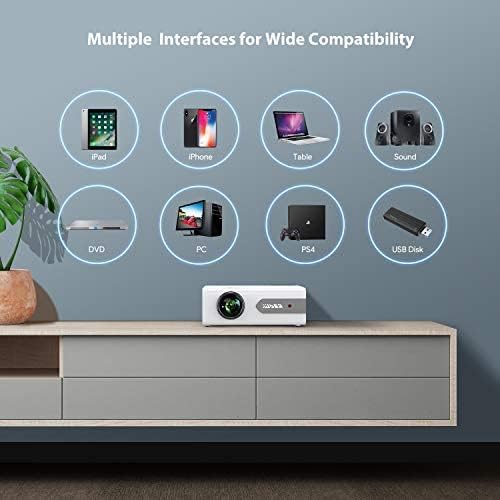
- หลายอินเทอร์เฟซ: Equipped with HDMI, USB, VGA, AV, and Audio ports for wide compatibility with various devices.
- HIFI Stereo Sound: Built-in dual stereo speakers with an SRS sound system provide a good auditory experience.
- ระบบระบายความร้อนขั้นสูง: Designed to minimize lamp power consumption and extend lamp อายุการใช้งานยาวนานถึง 100,000 ชั่วโมง


4. การตั้งค่า
4.1 การจัดวางเริ่มต้น
Place the projector on a stable, flat surface or mount it to the ceiling. Ensure there is adequate ventilation around the projector to prevent overheating. The projection distance and screen size can be adjusted based on your viewการปรับปรุงสิ่งแวดล้อม

4.2 การเชื่อมต่อสายไฟ
ต่อสายไฟเข้ากับช่องเสียบสายไฟของโปรเจ็กเตอร์ จากนั้นเสียบปลั๊กเข้ากับเต้ารับไฟฟ้า
4.3 เปิด/ปิดเครื่อง
กดปุ่มเปิด/ปิดบนโปรเจคเตอร์หรือรีโมทคอนโทรลเพื่อเปิดหรือปิดเครื่อง
5. คู่มือการใช้งาน
5.1 การแก้ไขโฟกัสและคีย์สโตน
Adjust the focus ring on the projector lens until the image is clear. Use the keystone correction feature (manual or digital, if available) to correct any trapezoidal distortion of the image.
5.2 การเลือกแหล่งที่มาของอินพุต
Use the 'Source' button on the remote or projector to select the desired input source (HDMI, USB, VGA, AV).
5.3 การเชื่อมต่อบลูทูธ
To connect to a Bluetooth audio device:
- Ensure your Bluetooth speaker or headset is in pairing mode.
- เข้าไปที่การตั้งค่าบลูทูธบนโปรเจ็กเตอร์
- เลือกอุปกรณ์ของคุณจากรายการอุปกรณ์ที่พร้อมใช้งานเพื่อทำการจับคู่
- Once connected, audio will play through the Bluetooth device.
บันทึก: The V3 mini projector supports Bluetooth output devices (speakers, headphones) but does not connect to phones/pads via Bluetooth for mirroring. Turn off Bluetooth when not in use to avoid potential issues.
5.4 การสะท้อนหน้าจอแบบไร้สาย
The YABER V3 supports wireless screen mirroring from iOS and Android devices using an external Anycast or Chromecast dongle (purchased separately). Connect the dongle to an HDMI port and follow the dongle's instructions for mirroring.
5.5 ฟังก์ชั่นซูม
To adjust the image size without moving the projector, use the zoom function via the remote control. This allows you to shrink the image from 100% down to 50%.
5.6 สถานการณ์การใช้งาน
The YABER V3 projector is suitable for various applications:
- โฮมเธียเตอร์ : Enjoy movies and shows on a large screen.
- การเล่นเกม: Connect gaming consoles for an immersive experience.
- Outdoor Movies: Perfect for backyard movie nights in dark environments.

6. การบำรุงรักษา
6.1 การทำความสะอาดเลนส์
Regularly clean the projector lens using the provided lens cleaning cloth or a soft, lint-free cloth. Avoid using abrasive cleaners or harsh chemicals.
6.2 การทำความสะอาดตัวกรองอากาศ
Check and clean the air filter periodically to ensure proper airflow and prevent dust buildup, which can affect performance and lamp ชีวิต.
6.3 ลิตรamp ชีวิต
LED ของโปรเจ็กเตอร์ lamp has a lifespan of up to 100,000 hours. Proper maintenance, including adequate ventilation and cleaning, helps maximize its longevity.
7 การแก้ไขปัญหา
- ไม่มีรูปภาพ:
- ตรวจสอบว่าสายไฟเชื่อมต่อแน่นดีแล้วหรือไม่
- ตรวจสอบให้แน่ใจว่าเลือกแหล่งอินพุตที่ถูกต้อง
- Verify that the connected device (e.g., TV Stick, PC) is powered on and outputting a signal.
- Adjust focus and keystone.
- ไม่มีเสียง:
- ตรวจสอบการตั้งค่าระดับเสียงทั้งบนโปรเจ็กเตอร์และอุปกรณ์ที่เชื่อมต่อ
- หากใช้บลูทูธ โปรดตรวจสอบให้แน่ใจว่าอุปกรณ์ได้จับคู่และเชื่อมต่ออย่างถูกต้องแล้ว
- If using an external speaker via AUX, ensure the cable is fully inserted.
- Some content (e.g., certain streaming services) may have audio format incompatibilities; try a different source or content.
- ภาพเบลอ:
- ปรับวงแหวนโฟกัสบนเลนส์
- ตรวจสอบให้แน่ใจว่าพื้นผิวที่จะฉายภาพเรียบและโปรเจคเตอร์ตั้งมั่นคง
- ทำความสะอาดเลนส์โปรเจ็กเตอร์
- รีโมทคอนโทรลไม่ทำงาน:
- เปลี่ยนแบตเตอรี่ในรีโมทคอนโทรล
- ตรวจสอบให้แน่ใจว่าไม่มีสิ่งกีดขวางระหว่างรีโมทและตัวรับ IR ของโปรเจ็กเตอร์
- ความร้อนสูงเกินไป:
- ตรวจสอบให้แน่ใจว่ามีการระบายอากาศที่เหมาะสมรอบๆ โปรเจ็กเตอร์
- Clean the air filter and vents to remove dust.
- Avoid operating in excessively hot environments.
8. ข้อมูลจำเพาะ
| หมายเลขรุ่น | V3 |
| ความละเอียดการแสดงผล | Native 1280 x 720 (Supports 1080P) |
| อัตราส่วนคอนทราสต์ | 6000:1 น. |
| อัตราส่วนภาพ | 16:9 / 4:3 |
| แหล่งกำเนิดแสง | นำ |
| Lamp ชีวิต | นานถึง 100,000 ชั่วโมง |
| เทคโนโลยีการเชื่อมต่อ | 3.5mm Jack, Bluetooth, HDMI, USB, VGA, AV |
| เวอร์ชันบลูทูธ | 5.0 |
| ขนาดสินค้า | 8.19 x 6.61 x 3.07 นิ้ว |
| น้ำหนักสินค้า | 2.2 ปอนด์ |
| การใช้ที่แนะนำ | Home Cinema, Gaming, Business (not recommended for professional presentations) |
9. การรับประกันและการสนับสนุน
YABER provides a 6-month return policy and 3-year repair service for the V3 Mini Bluetooth Projector. Lifetime professional technical support is also available. For any issues or inquiries, please contact YABER customer service.