1. บทนำ
Thank you for choosing the ANSMANN Comfort Smart Battery Charger. This manual provides essential information for the safe and efficient operation of your new charger. Please read these instructions carefully before first use and keep them for future reference.
2. คำแนะนำด้านความปลอดภัย
เพื่อให้การใช้งานปลอดภัย โปรดปฏิบัติตามข้อควรระวังด้านความปลอดภัยดังต่อไปนี้:
- This charger is designed for indoor use only. Do not expose it to rain or moisture.
- Only charge NiMH (Nickel-Metal Hydride) AA and AAA rechargeable batteries. Do not attempt to charge primary (non-rechargeable) batteries or other battery types (e.g., Alkaline, Lithium-Ion, NiCd), as this may lead to explosion, rupture, or leakage.
- อย่าให้เกิดไฟฟ้าลัดวงจรที่หน้าสัมผัสแบตเตอรี่
- ควรเก็บเครื่องชาร์จให้ห่างจากแหล่งความร้อน แสงแดดโดยตรง และวัสดุที่ติดไฟได้ง่าย
- Do not disassemble, modify, or repair the charger yourself. Refer all servicing to qualified personnel.
- ตรวจสอบให้แน่ใจว่าใส่แบตเตอรี่โดยให้ขั้วถูกต้อง
- ถอดปลั๊กเครื่องชาร์จออกจากแหล่งจ่ายไฟเมื่อไม่ใช้งานหรือก่อนทำความสะอาด
- เก็บให้พ้นจากมือเด็ก
3. เนื้อหาบรรจุภัณฑ์
ตรวจสอบว่ามีรายการทั้งหมดอยู่ในแพ็คเกจของคุณ:
- ANSMANN Comfort Smart Battery Charger
- สายชาร์จ USB (1 เมตร)
- คู่มือการใช้งาน
4. สินค้าหมดview
The ANSMANN Comfort Smart charger is an intelligent charging device designed for NiMH AA and AAA batteries. It features four independent charging slots and LED indicators for each slot to show the charging status.

Image: The ANSMANN Comfort Smart Battery Charger, showing its four battery slots and the included USB charging cable.
5. การตั้งค่า
Setting up your ANSMANN Comfort Smart charger is simple:
- Connect the included USB charging cable to the micro USB input port on the back of the charger.
- Plug the other end of the USB cable into a suitable USB power source (e.g., a USB wall adapter, power bank, laptop USB port, or car USB port). The charger is designed to be powered by various USB sources for convenience.
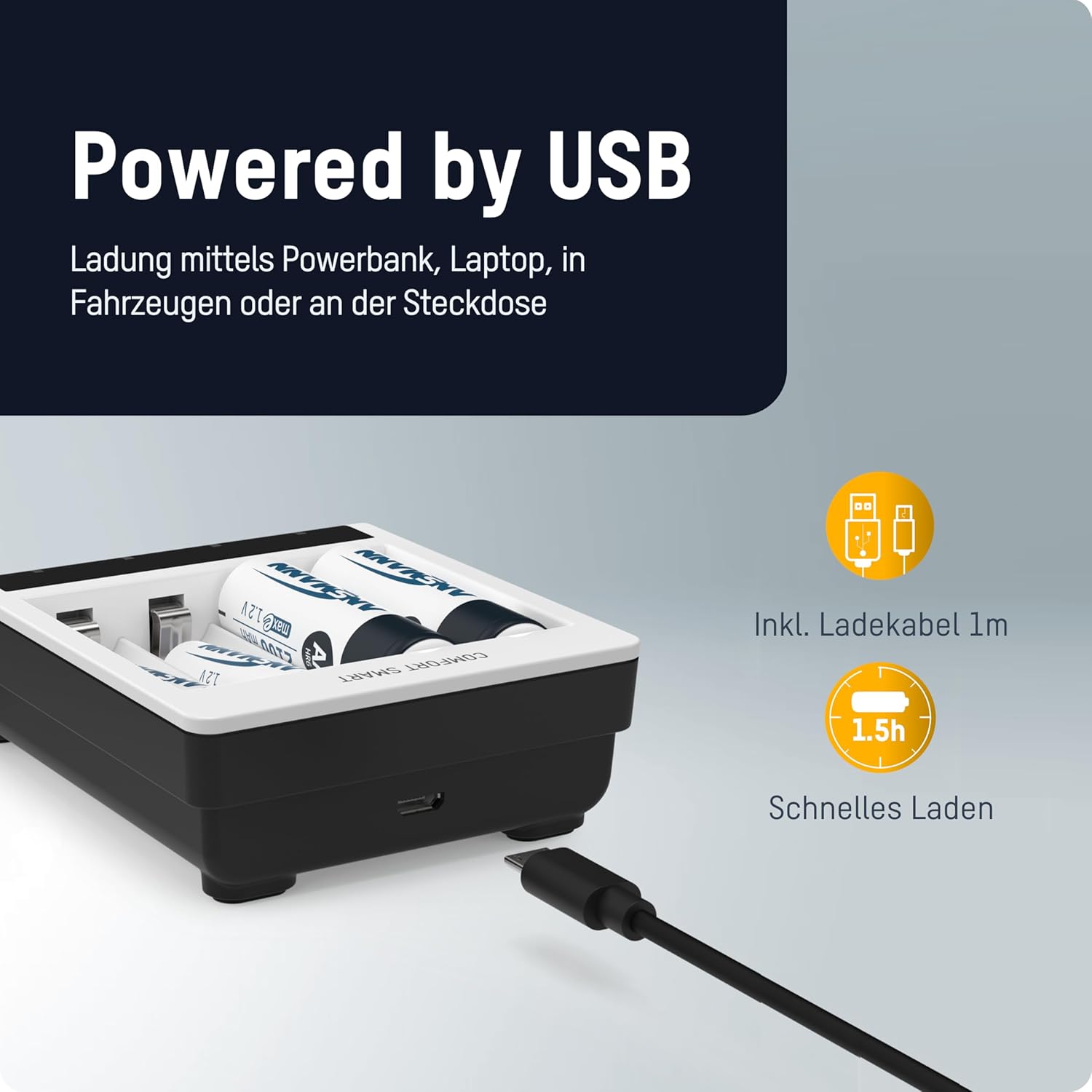
Image: The ANSMANN Comfort Smart Charger connected via its micro USB input, illustrating its compatibility with various USB power sources like power banks or laptops.
6. คู่มือการใช้งาน
The Comfort Smart charger is designed for easy operation: simply plug in, insert batteries, and start charging.
6.1 การใส่แบตเตอรี่
Insert 1 to 4 NiMH AA or AAA rechargeable batteries into the independent charging slots. Ensure correct polarity (+ and -) as indicated on the charger and the batteries.

Image: The ANSMANN Comfort Smart Charger with batteries inserted, highlighting its independent slots, LED indicators (red for charging, green for ready), and compatibility with AA/AAA NiMH batteries.
6.2 ไฟแสดงสถานะ LED
- ไฟ LED สีแดง: Indicates that the battery in the corresponding slot is currently charging.
- ไฟ LED สีเขียว: Indicates that the battery in the corresponding slot is fully charged and ready for use.
6.3 Perfect 7 Charging Technology
The ANSMANN Comfort Smart charger utilizes advanced Perfect 7 Charging Technology for optimal battery care and longevity. This fully automatic 7-stage charging process ensures efficient and safe charging:
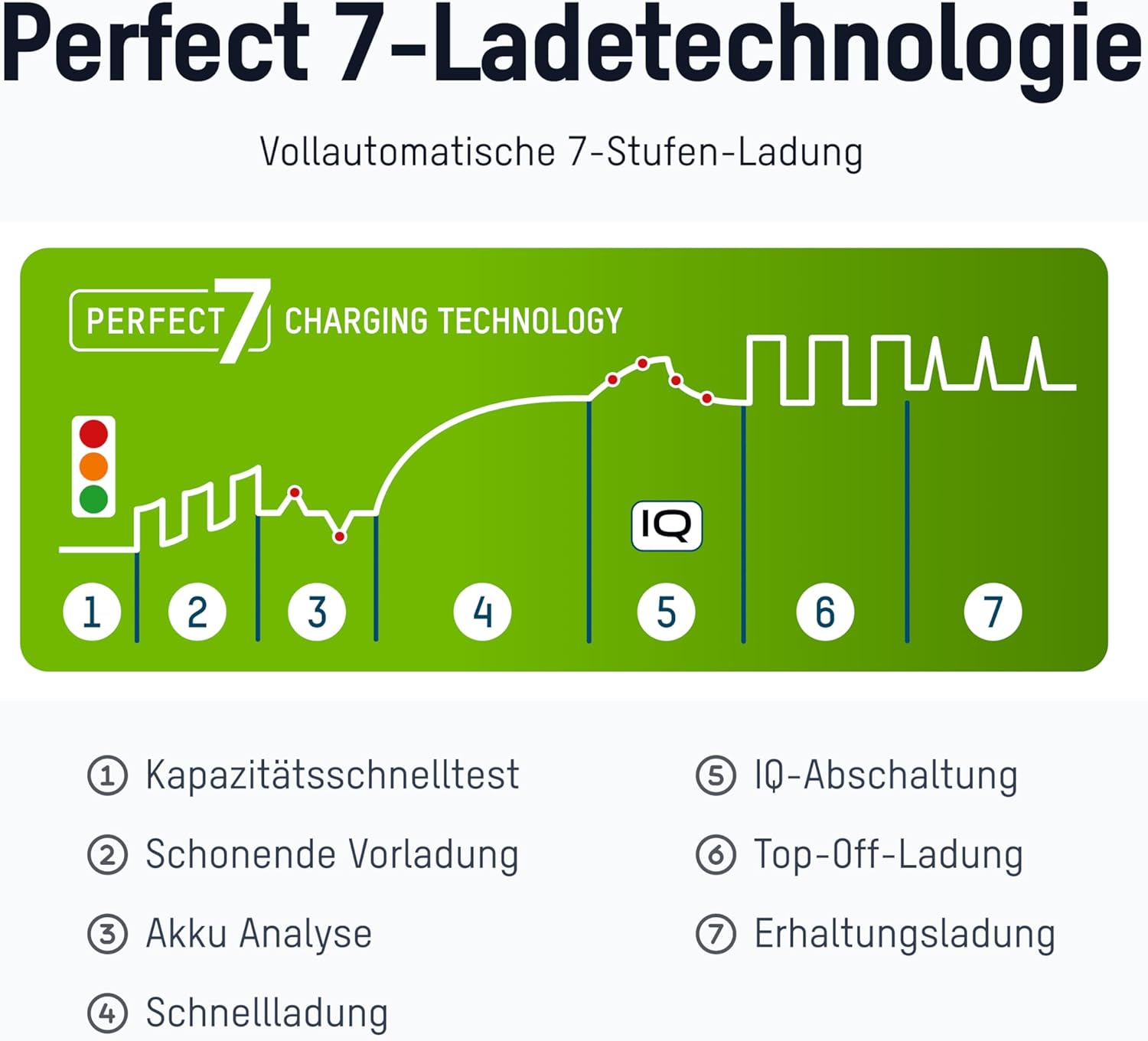
Image: A diagram illustrating the seven stages of the Perfect 7 Charging Technology, showing the charging curve and key steps.
 Quick Capacity Test: Checks the battery's initial charge level.
 Gentle Pre-charging: Slowly charges deeply discharged batteries to a safe level.
 การวิเคราะห์แบตเตอรี่: Assesses the battery's condition to determine optimal charging parameters.
 ชาร์จเร็ว: Charges the battery quickly and efficiently.
 IQ Cut-off: Intelligent termination of the main charging process to prevent overcharging.
 Top-Off Charging: Ensures the battery reaches its full capacity.
 การชาร์จแบบหยด: Maintains the battery's charge level, keeping it ready for use.
7. การบำรุงรักษา
เพื่อให้มั่นใจได้ว่าที่ชาร์จของคุณจะมีอายุการใช้งานยาวนานและทำงานได้อย่างถูกต้อง:
- การทำความสะอาด: ถอดปลั๊กเครื่องชาร์จออกจากแหล่งจ่ายไฟก่อนทำความสะอาด ใช้ผ้าแห้งนุ่มๆ เช็ดทำความสะอาดภายนอก ห้ามใช้สารทำความสะอาดที่มีฤทธิ์กัดกร่อนหรือตัวทำละลาย
- พื้นที่จัดเก็บ: เก็บเครื่องชาร์จไว้ในที่แห้งและเย็น หลีกเลี่ยงแสงแดดโดยตรงและอุณหภูมิที่สูงหรือต่ำมากเมื่อไม่ได้ใช้งาน
8 การแก้ไขปัญหา
หากคุณพบปัญหาเกี่ยวกับเครื่องชาร์จ โปรดดูปัญหาทั่วไปและวิธีแก้ไขต่อไปนี้:
- Battery not charging / LED not lighting up:
- ตรวจสอบให้แน่ใจว่าสาย USB เชื่อมต่อกับที่ชาร์จและแหล่งจ่ายไฟอย่างแน่นหนาแล้ว
- Verify that the power source is active and providing sufficient power.
- ตรวจสอบให้แน่ใจว่าได้ใส่แบตเตอรี่โดยหันขั้วให้ถูกต้องแล้ว
- Ensure the battery type is NiMH AA or AAA. The charger will not charge other battery types.
- The battery might be defective. The charger has a defective cell detection feature.
- เครื่องชาร์จจะอุ่นขึ้นขณะใช้งาน:
- It is normal for the charger and batteries to become slightly warm during charging. If it becomes excessively hot, disconnect immediately and contact support.
8.1 ฟังก์ชันการป้องกัน
The ANSMANN Comfort Smart charger incorporates multiple safety features to protect both the charger and your batteries:

Image: A visual representation of the protection functions of the ANSMANN Comfort Smart Charger, including a shield icon symbolizing safety.
- Reverse Polarity and Overcharge Protection: Prevents damage from incorrect battery insertion or excessive charging.
- ปิดเครื่องอัตโนมัติ: The charger automatically stops charging when batteries are full.
- Individual Slot Monitoring: Each charging slot is monitored independently for optimal charging.
- Safety Timer after 5.5 h: A built-in timer acts as an additional safety measure.
- Defective Cell Detection: Identifies and prevents charging of faulty batteries.
9. ข้อมูลจำเพาะ
| คุณสมบัติ | ข้อมูลจำเพาะ |
|---|---|
| ขนาดสินค้า | 3.35 x 1.46 x 7.8 นิ้ว |
| น้ำหนักสินค้า | 3 ออนซ์ |
| หมายเลขรุ่น | 1001-0092 |
| ประเภทแบตเตอรี่ที่เข้ากันได้ | นิโมเมนต์ไอออน AA, นิโมเมนต์ไอออน AAA |
| จำนวนช่องชาร์จ | 4 (อิสระ) |
| อินพุต Voltage | 9 โวลต์ |
| ปริมาณการส่งออกtage | 9 โวลต์ (กระแสตรง) |
| เวลาในการชาร์จ (โดยประมาณ) | 3.75 ชั่วโมง |
| วันที่พร้อมใช้งานครั้งแรก | 9 กรกฎาคม 2020 |
10. การรับประกันและการสนับสนุน
ANSMANN products are manufactured with high quality standards. For information regarding warranty terms and conditions, please refer to the warranty card included with your product or visit the official ANSMANN website. For technical support or customer service inquiries, please contact your retailer or the ANSMANN support team directly.


