1. บทนำ
The Escort MAX 3 is an advanced laser radar detector designed to enhance your driving awareness. It provides real-time alerts and warnings, leveraging premium detection range and sophisticated filtering capabilities. With its AutoLearn technology and Bluetooth connectivity, the MAX 3 integrates seamlessly into your driving experience, offering a more informed and safer journey.
This manual provides detailed instructions for setting up, operating, and maintaining your Escort MAX 3 Laser Radar Detector.
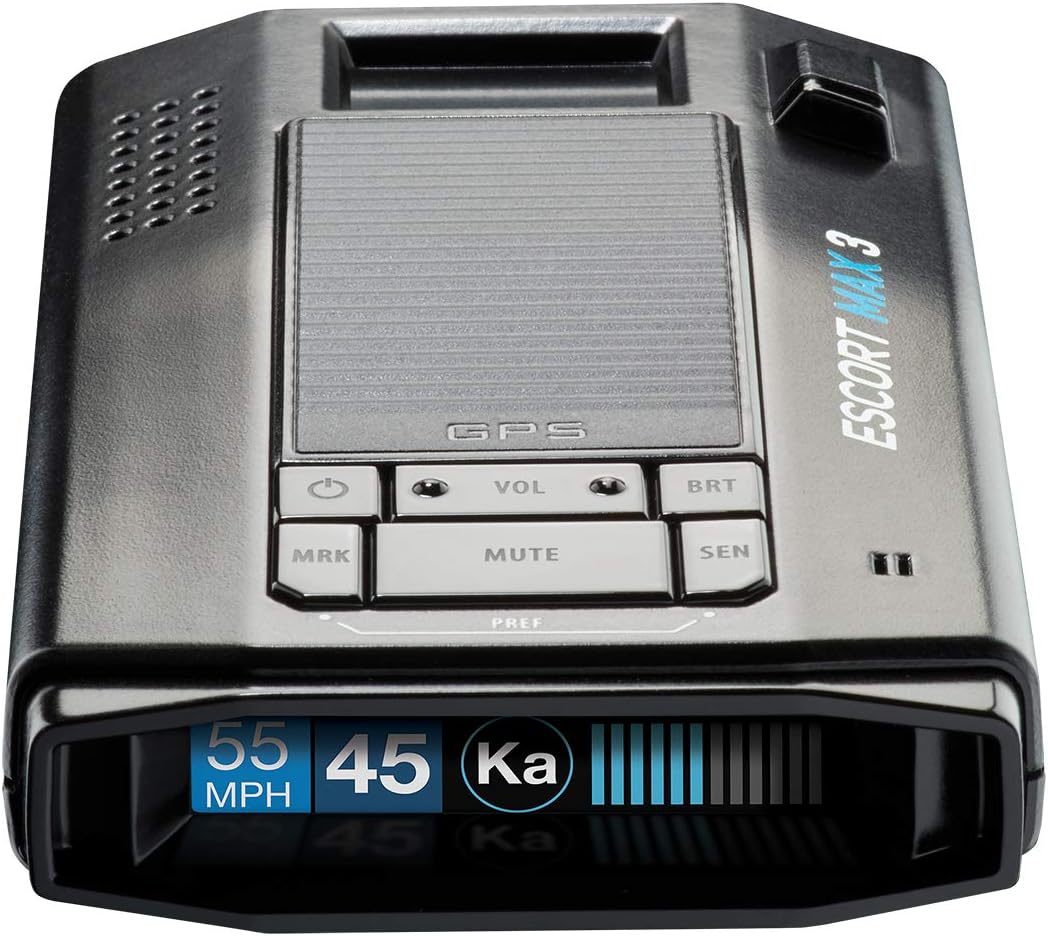
รูปที่ 1 : ด้านหน้า view of the Escort MAX 3 Laser Radar Detector, showing its OLED display and control buttons.
2. คุณสมบัติหลัก
- Premium Detection Range: Escort's legendary detection range provides rapid responses, advance alerts, and warnings, allowing significantly more time to adjust speed.
- การกรองขั้นสูง: Advanced filtering software processes thousands of radar signals to recognize and reduce false alerts, minimizing distractions and providing accurate alerts.
- AutoLearn Intelligence: Intelligent GPS-based software learns your route over time, enabling the detector to reject false alerts from specific locations.
- Variable Speed Sensitivity: Automatically adjusts sensitivity based on your speed to reduce false alerts and maximize accuracy. Access to the Defender Database provides up-to-date information on red light and speed camera alerts.
- M2 Compatible: The MAX 3 radar detector can be paired with the Escort M2 smart dash cam, allowing you to capture your drive in full HD resolution, day or night.

Figure 2: Core detection and learning features.

Figure 3: Advanced sensitivity and compatibility features.
3. เนื้อหาบรรจุภัณฑ์
The Escort MAX 3 package includes the following items:
- Escort MAX 3 Radar Detector
- กระเป๋าเดินทาง
- Magnetic Mount (Suction Cup)
- สาย USB SmartCord (พร้อมปุ่มปิดเสียง)

Figure 4: All items included in the MAX 3 complete package.
4. การตั้งค่าและการติดตั้ง
Follow these steps to properly set up your Escort MAX 3 in your vehicle:
- เลือกตำแหน่งการติดตั้ง: เลือกตำแหน่งบนกระจกหน้ารถที่มองเห็นได้ชัดเจน view of the road ahead and behind, typically near the center of the windshield, below the rearview mirror. Ensure it does not obstruct your driving view.
- ทำความสะอาดกระจกหน้ารถ: Thoroughly clean the chosen area on the windshield to ensure the suction cup mount adheres securely.
- ติดตั้งฐานแม่เหล็ก: Press the suction cup firmly against the clean windshield surface until it is securely attached.
- Attach the MAX 3: The MAX 3 unit has a magnetic connection point. Simply place the detector onto the magnetic mount until it clicks into place.
- เชื่อมต่อพลังงาน: Plug the small end of the USB SmartCord into the power input port on the MAX 3. Plug the larger end of the SmartCord into your vehicle's 12V accessory socket (cigarette lighter).
- ปรับ View: Adjust the angle of the detector to ensure it is level and has an unobstructed view.

Figure 5: Proper mounting of the Escort MAX 3 on a vehicle windshield.
5. คู่มือการใช้งาน
The Escort MAX 3 features an intuitive interface with several buttons and an OLED display. Here's how to operate your device:
5.1. เปิด/ปิดเครื่อง
- The device typically powers on automatically when connected to a powered 12V accessory socket.
- หากต้องการปิดเครื่องด้วยตนเอง ให้กดปุ่มค้างไว้ เอ็มอาร์เค button until the device announces "Powering down."
5.2. ปุ่มฟังก์ชัน
| ปุ่ม | ฟังก์ชั่น (กดสั้น) | ฟังก์ชั่น (กดค้าง) |
|---|---|---|
| เอ็มอาร์เค | Marks a location (e.g., "Mark this location"). Useful for false alert locations or points of interest. | Powers the device on/off (e.g., "Powering down"). |
| VOL - / + | ปรับระดับเสียง | No specific long-press function for volume. |
| บีอาร์ที | Cycles through display brightness modes (e.g., "Auto", "Full", "Dark", "Minimum", "Medium", "Maximum"). | No specific long-press function. |
| MUTE | Mutes current alert. | Cycles through sensitivity modes (e.g., "Highway", "Auto", "Auto No X", "Auto Low K"). |
| เซ็น | Adjusts sensitivity settings. | No specific long-press function. |
5.3. Drive Smarter® App Integration
The Escort MAX 3 can connect to the Drive Smarter® app via Bluetooth, offering enhanced features and real-time shared alerts.
- Download the Drive Smarter® app from your device's app store (compatible with Apple CarPlay and Android Auto).
- Pair your MAX 3 with your smartphone via Bluetooth as per the app's instructions.
- สะดวกสบาย view and verify shared alerts directly on your compatible display.

Figure 6: Drive Smarter® App interface on a smartphone and car display.
5.4. Video Demonstration (Not Embeddable)
While an official seller video is not available for direct embedding, the Escort MAX 3 offers various customizable settings for optimal performance. These include adjusting display brightness, marking locations, and cycling through different sensitivity modes (e.g., Highway, Auto, Auto No X, Auto Low K) to suit your driving environment. The device provides clear voice alerts for these changes and detected signals.
6. การบำรุงรักษา
- การทำความสะอาด: ใช้แบบนุ่มๆamp cloth to clean the exterior of the detector. Do not use abrasive cleaners or solvents.
- การดูแลเลนส์: Keep the front and rear lenses clean and free of dust or smudges to ensure optimal detection performance. Use a lens cleaning cloth if necessary.
- พื้นที่จัดเก็บ: When not in use for extended periods, store the detector in its travel case in a cool, dry place. Avoid extreme temperatures.
- การอัปเดตซอฟต์แวร์: Periodically check the Escort website or the Drive Smarter® app for available software updates to ensure your device has the latest features and performance enhancements.
7 การแก้ไขปัญหา
| ปัญหา | สาเหตุที่เป็นไปได้ | สารละลาย |
|---|---|---|
| อุปกรณ์ไม่เปิดเครื่อง | No power from 12V socket; loose connection; blown fuse in vehicle. | Check 12V socket for power with another device. Ensure SmartCord is securely plugged in. Check vehicle's fuse box. |
| มีการแจ้งเตือนผิดพลาดบ่อยครั้ง | Interference from other vehicles' blind spot monitors or traffic flow sensors; sensitivity setting too high. | Utilize AutoLearn technology by marking false alert locations. Adjust sensitivity mode (e.g., to "Auto" or "Auto Low K") via the MUTE button long press. |
| Poor detection range. | ถูกขัดขวาง view; dirty lenses; low sensitivity setting. | Ensure clear line of sight for the detector. Clean front and rear lenses. Increase sensitivity setting. |
| ปัญหาการเชื่อมต่อบลูทูธ | Bluetooth not enabled on phone; device not in pairing mode; interference. | Ensure Bluetooth is on. Restart both the detector and your phone. Try re-pairing the device through the Drive Smarter® app. |
8. ข้อมูลจำเพาะ
| คุณลักษณะ | รายละเอียด |
|---|---|
| ขนาดสินค้า | 5.13 x 1.25 x 2.88 นิ้ว (ยาว 5.13 นิ้ว x กว้าง 1.25 นิ้ว x สูง 2.88 นิ้ว) |
| น้ำหนักสินค้า | 7.9 ออนซ์ |
| หมายเลขรุ่นสินค้า | 0100047-1 |
| แบตเตอรี่ | ต้องใช้แบตเตอรี่ลิเธียมไอออน 1 ก้อน (รวมอยู่ด้วย) |
| สี | สีดำ |
| ผู้ผลิต | ซีดาร์ อิเล็กทรอนิกส์ |
| อุปกรณ์ที่รองรับ | คอมพิวเตอร์ส่วนบุคคล สมาร์ทโฟน แท็บเล็ต |
| รองรับแบนด์ความถี่ | K, KA, X, M, POP |
| แหล่งพลังงาน | สายไฟ |
| ประเภทจอภาพ | โอแอลอีดี |
| เล่มที่tage | 12 โวลต์ |
| ยูพีซี | 737795004714 |

รูปที่ 7: ด้านหลัง view of the Escort MAX 3 with regulatory information.
9. การรับประกันและการสนับสนุน
For detailed warranty information and customer support, please refer to the official Escort webหรือติดต่อฝ่ายบริการลูกค้า เก็บหลักฐานการซื้อไว้เพื่อใช้ในการเคลมประกัน
Additional resources, including PDF user guides and manuals, may be available on the manufacturer's support page.


