1. สินค้าหมดview
The PRUVEEO D90-4CH is an advanced quad-channel dash camera system designed to provide comprehensive vehicle surveillance. It features four 1920*1080P cameras, offering a 150° super wide-angle lens and a 3-inch large LCD screen for clear video and image capture. This system is ideal for taxis, rideshare vehicles, and general drivers seeking enhanced security and recording capabilities. Key features include built-in GPS for location and speed tracking, superior night vision with infrared lights, 24/7 all-weather monitoring, loop recording, and emergency accident locks via a G-sensor.
The unique design allows for simultaneous recording of the front and sides of the car, with two cabin cameras that can rotate to adjust recording angles, providing more evidence at critical moments. The device is designed without a battery to prevent issues from sun exposure and high temperatures, relying on direct power connection.
2. เนื้อหาบรรจุภัณฑ์
- PRUVEEO D90-4CH Dash Cam Unit
- แท่นดูด
- สายไฟ
- คู่มือการใช้งาน
- Additional mounting accessories (e.g., adhesive pads, cable clips)
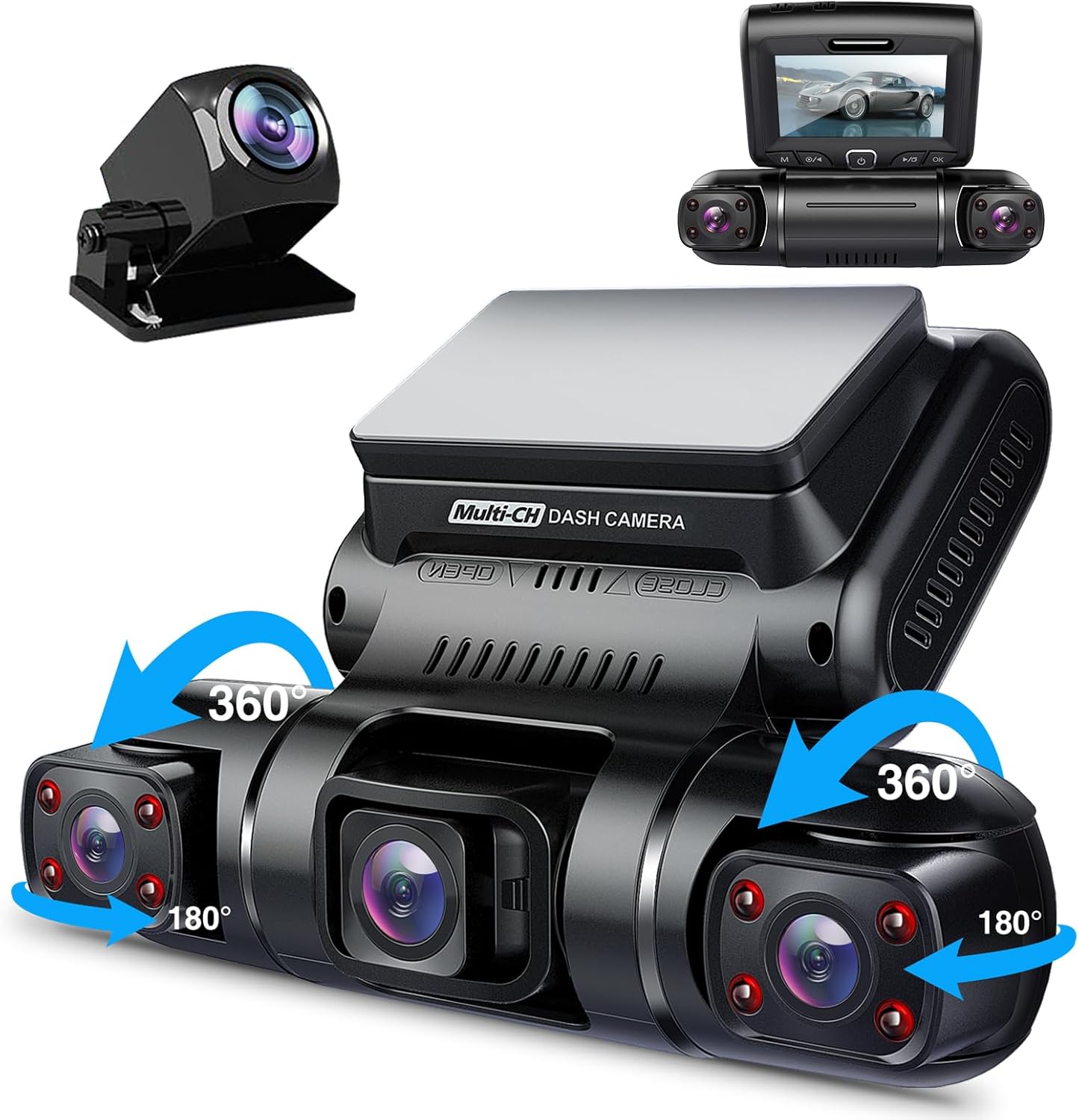
Figure 2.1: PRUVEEO D90-4CH Dash Cam unit with its main components and accessories.
3. การตั้งค่าและการติดตั้ง
3.1 Preparing the Micro SD Card
Before first use, a micro-SD card (Class 10 or higher, up to 256GB) is required and must be formatted within the dash cam. A professional-grade memory card like the SAMSUNG PRO Endurance 128GB is recommended for optimal performance and longevity, as many dash cam issues stem from incompatible or low-quality memory cards.

Figure 3.1: Proper insertion of the Micro SD card into the dash cam unit.
3.2 การติดตั้ง Dash Cam
The D90-4CH dash cam comes with a suction mount for easy attachment to your windshield. Choose a location that does not obstruct your view of the road or interfere with airbags. Ensure the windshield surface is clean and dry before attaching the mount for secure adhesion.
- ทำความสะอาดบริเวณที่ต้องการบนกระจกหน้ารถให้ทั่วถึง
- ติดฐานยึดแบบดูดเข้ากับตัวกล้องติดรถยนต์
- Press the suction cup firmly against the cleaned windshield surface and engage the locking mechanism to secure it.
- Adjust the angle of the dash cam to ensure optimal recording coverage for all four cameras (front, left, right, and rear).

Figure 3.2: The dash cam's adjustable cameras for flexible angle setup.

Figure 3.3: Illustrative diagram of the dash cam's comprehensive 360-degree recording coverage.
3.3 การเชื่อมต่อสายไฟ
Connect the provided power cable to the dash cam and then to your vehicle's 12V power outlet (cigarette lighter socket). The dash cam will automatically power on and begin recording when the vehicle's ignition is turned on.
4. คู่มือการใช้งาน
4.1 การทำงานพื้นฐาน
Once powered on, the D90-4CH will automatically start recording. The 3-inch LCD screen will display the live view from the cameras. You can switch between camera views or display all four simultaneously depending on the model's interface options.

Figure 4.1: Simultaneous display of all four camera views (Front, Left, Right, Rear) on the dash cam screen.
4.2 การบันทึกแบบวนซ้ำ
The dash cam supports continuous loop recording. When the memory card reaches its maximum capacity, the oldest unlocked footage will be overwritten automatically to ensure uninterrupted recording. Recording segments can typically be set to 1, 2, or 3 minutes.
4.3 G-Sensor (Emergency Accident Locks)
The built-in G-sensor automatically detects sudden collisions or impacts. When a collision is detected, the dash cam will immediately save and lock the current recording video as proof of the incident. These locked files ได้รับการปกป้องไม่ให้ถูกเขียนทับโดยการบันทึกแบบวนซ้ำ
4.4 ระบบตรวจสอบที่จอดรถตลอด 24 ชั่วโมง
For continuous protection, the D90-4CH offers 24-hour parking monitoring. This feature requires a hardwire kit (sold separately) to provide constant power. When the vehicle is parked, the dash cam will detect motion or impact and automatically begin recording, providing surveillance even when you are away from your vehicle.
4.5 Superior Night Vision
The two cabin cameras utilize 4 infrared lights and an F1.8 aperture, enhancing video clarity in low-light conditions. The three cameras also feature a highly sensitive night vision image sensor to present clear images even in dark areas at night, ensuring reliable recording around the clock.
4.6 Built-in GPS Functionality
The integrated GPS module allows the dash cam to precisely pinpoint your vehicle's real-time location, speed (KMH/MPH), time, and routes on a map. This data can be reviewed using a dedicated GPS player software on a computer, providing crucial evidence for roadside assistance or insurance claims in case of an accident.
5. การบำรุงรักษา
- การดูแลการ์ดหน่วยความจำ: Regularly format your micro-SD card (at least once a month) to prevent data corruption and ensure optimal recording performance. Using a high-endurance memory card is highly recommended.
- การทำความสะอาด: Use a soft, dry cloth to clean the dash cam's lens and screen. Avoid using abrasive cleaners or solvents that could damage the device.
- อุณหภูมิ: While designed to withstand high temperatures, avoid prolonged direct exposure to extreme heat when the vehicle is parked, especially if the dash cam is not in use.
- อัพเดตเฟิร์มแวร์: Check the PRUVEEO official website periodically for any available firmware updates to ensure your dash cam operates with the latest features and bug fixes.
6 การแก้ไขปัญหา
| ปัญหา | สาเหตุที่เป็นไปได้ | สารละลาย |
|---|---|---|
| กล้องติดรถยนต์ไม่สามารถเปิดได้ | Loose power connection, faulty power cable/adapter, vehicle's 12V outlet issue. | Check all power connections. Test the power cable/adapter with another device or use a different 12V outlet in your vehicle. Ensure the vehicle's ignition is on. |
| การบันทึกหยุดหรือหยุดนิ่ง | Memory card issues (full, slow speed, corrupted), firmware glitch. | Format the micro-SD card. Replace with a high-quality, Class 10 or higher card (e.g., SAMSUNG PRO Endurance). Restart the dash cam. Check for firmware updates. |
| Poor night vision quality (outside). | Infrared LEDs reflecting off glass, external light conditions. | Ensure the camera lens is clean. Adjust camera angle to minimize reflections from the windshield. Note that external night vision can be limited by environmental factors. |
| ระบบ GPS ไม่สามารถบันทึกตำแหน่ง/ความเร็วได้ | Poor GPS signal, GPS module malfunction. | ตรวจสอบให้แน่ใจว่ากล้องติดรถยนต์มีสัญญาณที่ชัดเจน view of the sky. Move the dash cam to a location with better GPS reception. Restart the device. |
| App connectivity issues (if applicable). | Wi-Fi connection problems, app version outdated. | Ensure Wi-Fi is enabled on the dash cam and your mobile device. Reconnect to the dash cam's Wi-Fi network. Update the app to the latest version. |
7. ข้อมูลจำเพาะ
| คุณสมบัติ | รายละเอียด |
|---|---|
| ยี่ห้อ | พรูวี่ |
| ชื่อรุ่น | D90-4CH |
| ความละเอียดในการจับภาพวิดีโอ | 1080p (Quad 1920*1080P) |
| ที่ดินของ View | 150 Degrees (Super Wide Angle) |
| การกำหนดค่ากล้อง | 4 Channel (Front, Rear, Inside Left, Inside Right) |
| แสดง | หน้าจอ LCD ขนาด 3 นิ้ว |
| เทคโนโลยีการเชื่อมต่อ | ไวไฟ |
| คุณสมบัติพิเศษ | Built-in GPS, Superior Night Vision (4 infrared lights, F1.8 aperture), Loop Recording, G-Sensor, 24/7 Parking Monitor |
| การสนับสนุนการจัดเก็บข้อมูล | Micro-SD card up to 256GB (Class 10 or higher recommended) |
| ประเภทการติดตั้ง | แท่นดูด |
| แหล่งพลังงาน | Vehicle 12V power outlet (no internal battery) |
| ขนาด | ประมาณ 2 x 3 x 5 นิ้ว |
| น้ำหนักสินค้า | ประมาณ 1.5 ปอนด์ |
8. การรับประกันและการสนับสนุน
For detailed warranty information and technical support, please refer to the product packaging or contact PRUVEEO customer service directly. If you have any questions or require assistance with your D90-4CH dash cam, you can reach out to the manufacturer via the contact information provided in the product documentation or on their official webเว็บไซต์.


