1. บทนำ
Thank you for choosing Smalody Stereo 2.0 USB Multimedia Speakers. These speakers are designed to provide clear audio for your computer, laptop, or desktop, featuring convenient USB power and integrated LED lighting. Please read this manual carefully to ensure proper setup and operation.
2. คุณสมบัติของผลิตภัณฑ์
- Stereo 2.0 Audio: Delivers clear and balanced sound.
- ใช้พลังงานจาก USB: Conveniently powered directly from a USB port on your device or a USB adapter.
- แจ็คเสียงขนาด 3.5 มม.: สามารถใช้งานร่วมกับอุปกรณ์เสียงส่วนใหญ่ได้
- ไฟ LED แบบบูรณาการ: Dynamic LED lights enhance the visual experience.
- การควบคุมระดับเสียง: Easy access to adjust audio levels.
- การออกแบบที่กะทัดรัด: Space-saving design suitable for various setups.

Image: Speaker internal components and sound projection.
3. เนื้อหาบรรจุภัณฑ์
กรุณาตรวจสอบสิ่งของภายในกล่องเมื่อแกะกล่อง หากมีสินค้าใดสูญหายหรือเสียหาย โปรดติดต่อฝ่ายสนับสนุนลูกค้า
- Smalody Stereo 2.0 USB Multimedia Speakers (2 units)
- สายไฟ USB ในตัว
- สายสัญญาณเสียง 3.5 มม. แบบบูรณาการ
- คู่มือการใช้งาน (เอกสารนี้)
4. คำแนะนำในการตั้งค่า
-
จัดวางตำแหน่งลำโพง: Place the two speakers on either side of your computer monitor or laptop for optimal stereo sound.

Image: Smalody speakers on a desk setup.
-
เชื่อมต่อสายสัญญาณเสียง: Plug the 3.5mm audio jack from the speakers into the audio output port (headphone jack) of your computer, laptop, or other audio device.

Image: Connection diagram for USB power and 3.5mm audio.
-
Connect the USB Power Cable: Plug the USB cable into an available USB port on your computer, a USB wall adapter (not included), or a power bank. The speakers will power on automatically.
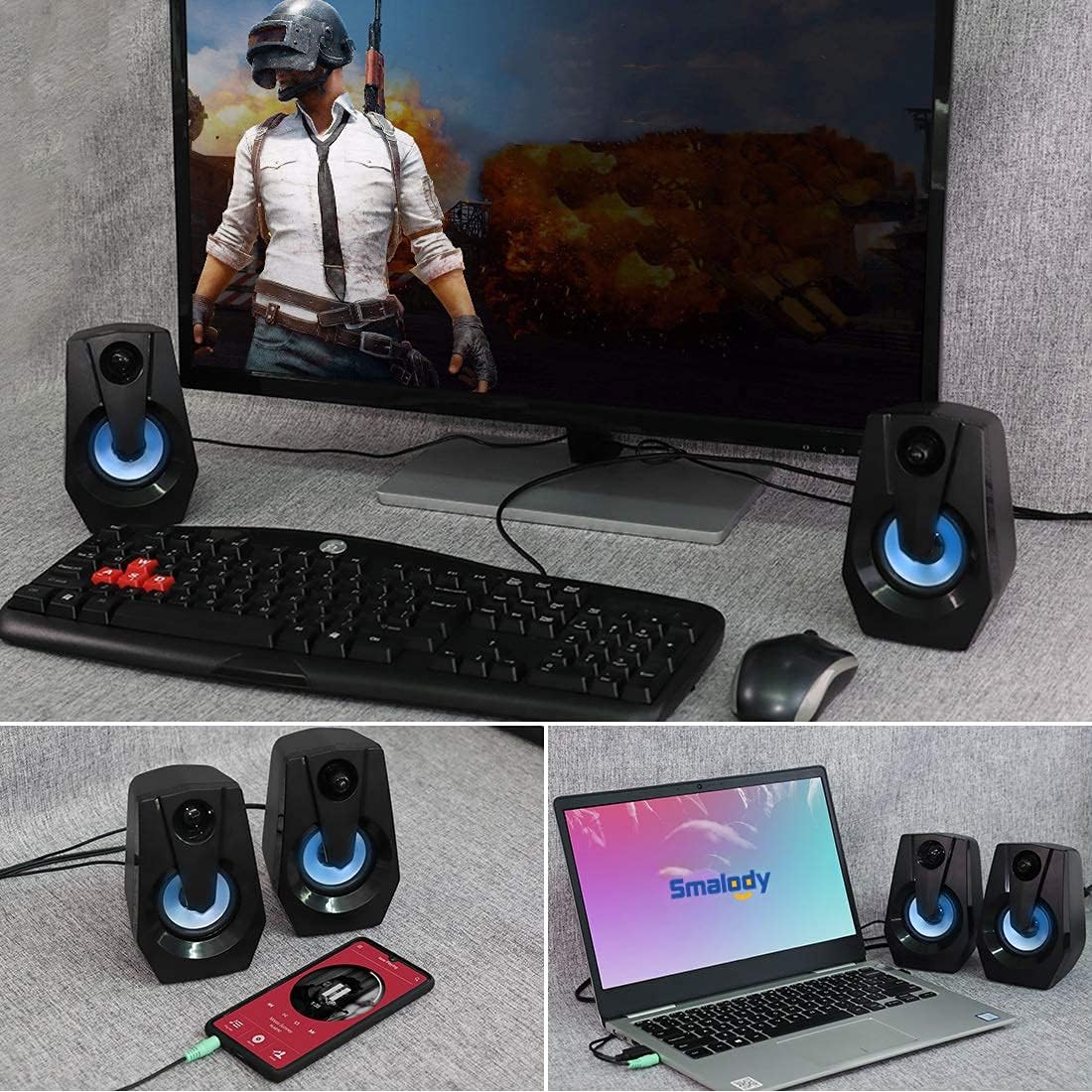
Image: Speakers connected to various devices.
-
Verify Power and LED Lights: Once powered, the integrated LED lights on the speakers should illuminate, indicating they are ready for use.
Video: Demonstration of Smalody speakers with LED lights and volume control during gaming. This video shows the speakers' dynamic lighting and how to adjust volume, highlighting their use in a gaming setup.
5. คู่มือการใช้งาน
5.1 เปิด/ปิดเครื่อง
The speakers power on automatically when the USB cable is connected to a powered USB port. To turn off, simply disconnect the USB power cable.
5.2 การปรับระดับเสียง
Use the rotary knob located on the front of the right speaker to adjust the volume. Turn clockwise to increase volume and counter-clockwise to decrease volume.

Image: Speakers with LED lights and visible volume control.
5.3 ไฟ LED
The speakers feature integrated LED lights that cycle through various colors automatically when powered on. There is no manual control for changing or turning off the LED light patterns.
6. การบำรุงรักษา
- การทำความสะอาด: ใช้ผ้านุ่มและแห้งเช็ดทำความสะอาดพื้นผิวลำโพง ห้ามใช้น้ำยาทำความสะอาดหรือสเปรย์
- พื้นที่จัดเก็บ: เก็บลำโพงไว้ในที่แห้งและเย็น หลีกเลี่ยงแสงแดดโดยตรงและอุณหภูมิที่สูงหรือต่ำเกินไป
- หลีกเลี่ยงน้ำ: Do not expose the speakers to water or excessive moisture. They are not waterproof.
- จัดการด้วยความระมัดระวัง: ควรหลีกเลี่ยงการทำลำโพงตกหรือกระแทกอย่างแรง
7 การแก้ไขปัญหา
| ปัญหา | สาเหตุที่เป็นไปได้ | สารละลาย |
|---|---|---|
| ไม่มีเสียงออกจากลำโพง |
|
|
| ไฟ LED ไม่ทำงาน. |
|
|
| เสียงผิดเพี้ยนหรือไม่ชัดเจน |
|
|
8. ข้อมูลจำเพาะ
| คุณสมบัติ | รายละเอียด |
|---|---|
| ยี่ห้อ | สมาโลดี้ |
| หมายเลขรุ่น | B08BXF6W9P |
| เทคโนโลยีการเชื่อมต่อ | USB (สำหรับจ่ายไฟ) |
| โหมดเอาต์พุตเสียง | สเตอริโอ |
| กำลังขับสูงสุดของลำโพง | 5 วัตต์ |
| คุณสมบัติพิเศษ | ไฟ LED |
| อุปกรณ์ที่รองรับ | แล็ปท็อป, คอมพิวเตอร์ส่วนบุคคล |
| ขนาดสินค้า | ลึก 3.95 นิ้ว x กว้าง 3.75 นิ้ว x สูง 5.31 นิ้ว |
| น้ำหนักสินค้า | 1.28 ปอนด์ |
| วิธีการควบคุม | Rotary Knob (Volume) |
| กันน้ำ | เลขที่ |

Image: Product dimensions and cable lengths.
9. การรับประกันและการสนับสนุน
Smalody products are manufactured with quality and performance in mind. For any warranty claims, technical support, or product inquiries, please contact Smalody customer service through the retailer where the product was purchased or visit the official Smalody webเว็บไซต์สำหรับข้อมูลการติดต่อ
โปรดเก็บหลักฐานการซื้อไว้เพื่อวัตถุประสงค์การรับประกัน
