1. บทนำ
The Vimar 19593 Arké Connected IoT Actuator is an electronic control device designed for smart home environments. It features a NO 16 A relay output and supports dual IoT technology: Bluetooth 5.0 for the Vimar VIEW wireless mesh system and Zigbee 3.0 for broader compatibility. This actuator allows for both local control via a physical button and remote control through dedicated applications. It also includes instantaneous power measurement and energy consumption monitoring capabilities, along with an RGB LED for status indication and adjustable intensity.
This manual provides essential information for the safe installation, operation, and maintenance of your Vimar 19593 Arké Connected IoT Actuator.
2. ข้อมูลด้านความปลอดภัย
- การติดตั้งระบบไฟฟ้า: Installation must be performed by qualified personnel in compliance with local electrical codes and regulations.
- แหล่งจ่ายไฟ: Ensure the power supply (100-240 V ~ 50/60 Hz) matches the device specifications before installation.
- ตัดการเชื่อมต่อไฟฟ้า: Always disconnect power at the main circuit breaker before performing any installation, wiring, or maintenance.
- สำหรับใช้ภายในอาคารเท่านั้น: This device is intended for indoor use in dry environments. Do not expose to moisture or extreme temperatures.
- หลีกเลี่ยงการโอเวอร์โหลด: Do not exceed the maximum load rating of 16 A for the relay output.
- เด็กและสัตว์เลี้ยง: เก็บอุปกรณ์และชิ้นส่วนต่างๆ ให้พ้นมือเด็กและสัตว์เลี้ยง
3. สินค้าหมดview
The Vimar 19593 Arké Connected IoT Actuator is a compact module designed for integration into standard electrical systems. It features a physical button for local control and pairing, and an RGB LED indicator for status feedback.

รูปที่ 1: ด้านหน้า view of the Vimar 19593 Arké Connected IoT Actuator. It is a dark gray rectangular module with a small indicator light and a circular button at the bottom.

รูปที่ 2: Close-up of the actuator showing a symbol for wireless connectivity and the control button.
ส่วนประกอบหลัก:
- ปุ่มควบคุม: Used for local ON/OFF control and initiating the pairing process.
- ไฟ LED RGB: Provides visual feedback on device status, pairing mode, and can be adjusted for intensity.
- เอาท์พุทรีเลย์: Connects to the load (e.g., lights, appliances) for switching ON/OFF.
- โมดูลไร้สาย: Integrated Bluetooth 5.0 and Zigbee 3.0 for smart home connectivity.
4. การตั้งค่า
4.1 การติดตั้งทางกายภาพ
- ตัดการเชื่อมต่อไฟฟ้า: ก่อนเริ่มดำเนินการ โปรดตรวจสอบให้แน่ใจว่าได้ปิดสวิตช์ไฟหลักของพื้นที่ติดตั้งที่เบรกเกอร์แล้ว
- การเดินสายไฟ: Connect the actuator according to the provided wiring diagram (typically found on the device itself or in the packaging). Ensure correct connection of live, neutral, and load wires to the appropriate terminals. This device is designed for modular, flush-mounted, or wall-mounted installations.
- อุปกรณ์ที่ปลอดภัย: Mount the actuator securely within the electrical box or housing.
- คืนค่าพลัง: เมื่อการติดตั้งเสร็จสมบูรณ์และการเชื่อมต่อทั้งหมดปลอดภัยแล้ว ให้จ่ายไฟอีกครั้งที่เบรกเกอร์
4.2 การติดตั้งและการจับคู่แอป
The Vimar 19593 supports two primary wireless technologies for smart home integration: Bluetooth 5.0 (via Vimar VIEW Wireless app) and Zigbee 3.0 (via compatible Zigbee hubs and apps).

รูปที่ 3: วิมาร์ VIEW App icon, used for managing the actuator.
- ดาวน์โหลดแอพ: ดาวน์โหลด วิมาร์ VIEW ไร้สาย app from your device's app store (for Bluetooth control) or a compatible Zigbee hub app (e.g., Amazon Alexa app for Zigbee).
- สร้างบัญชี: Open the app and create an account if you don't already have one.
- เริ่มโหมดการจับคู่: Press and hold the physical control button on the actuator for approximately 5 seconds. The RGB LED will begin to pulse blue, indicating it is in pairing mode.
- เพิ่มอุปกรณ์ในแอป: Follow the on-screen instructions in your chosen app to add a new device. The app should detect the Vimar 19593 actuator.
- Select Technology: Within the Vimar VIEW Wireless app, you can switch between Bluetooth and Zigbee modes if needed. For Zigbee, ensure your Zigbee hub is also in pairing mode.
- ตั้งค่าให้เสร็จสมบูรณ์: Assign a name to your device and configure any initial settings as prompted by the app.
5. คู่มือการใช้งาน
5.1 การควบคุมภายใน
- เปิด/ปิด: Briefly press the physical control button on the actuator to toggle the connected load ON or OFF.
5.2 การควบคุมระยะไกลผ่านแอปพลิเคชัน
Once paired, you can control the actuator remotely using the Vimar VIEW Wireless app (for Bluetooth) or a compatible Zigbee app.
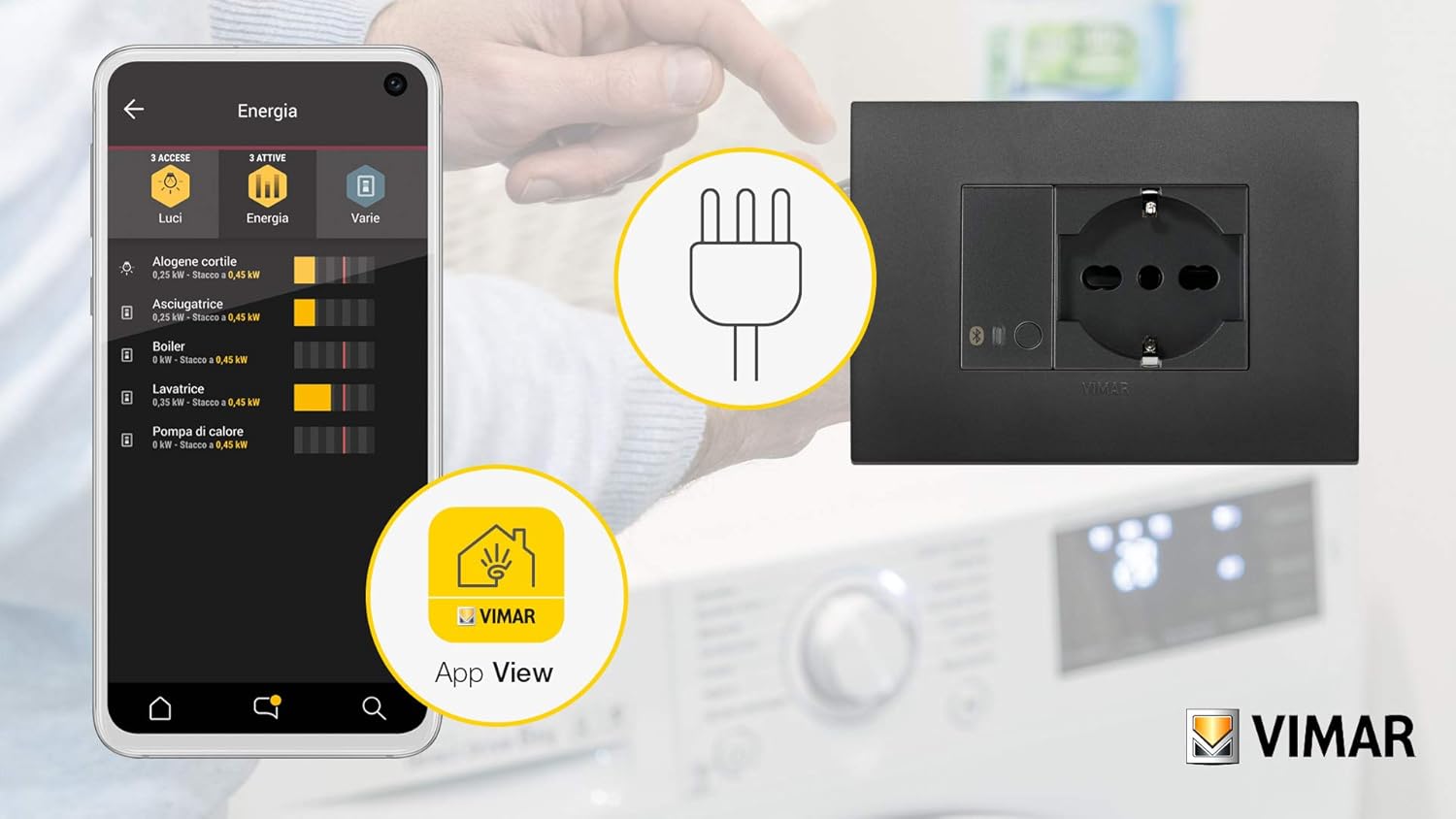
รูปที่ 4: Example of the Vimar app interface showing energy monitoring for connected devices.
- Toggle Load: Open the app, select your Vimar 19593 actuator, and use the virtual button to switch the connected load ON or OFF.
- การตรวจสอบพลังงาน: The app provides real-time instantaneous power measurement and tracks consumed energy. This feature allows you to monitor the power usage of the connected appliance.
- RGB LED Adjustment: Adjust the intensity and potentially the color (if supported by the app) of the RGB LED indicator through the app settings.
5.3 การบูรณาการการควบคุมด้วยเสียง
The actuator can be integrated with voice assistants through compatible smart home hubs (e.g., Amazon Alexa for Zigbee). Refer to your voice assistant's setup guide for integration steps.

รูปที่ 5: Illustration of a smart plug (similar to actuator function) being controlled via voice commands and a smartphone app.
6. การบำรุงรักษา
- การทำความสะอาด: Disconnect power before cleaning. Use a soft, dry cloth to wipe the device. Do not use liquid cleaners or abrasive materials.
- อัพเดตเฟิร์มแวร์: ตรวจสอบ Vimar เป็นระยะ VIEW Wireless app for available firmware updates to ensure optimal performance and security. Follow the app's instructions for any update procedures.
- การตรวจสอบปกติ: Occasionally inspect the device for any signs of damage or loose connections. If any issues are found, disconnect power and consult a qualified electrician.
7 การแก้ไขปัญหา
- อุปกรณ์ไม่ตอบสนอง:
- ตรวจสอบว่าแหล่งจ่ายไฟทำงานอยู่หรือไม่
- Ensure the device is properly wired.
- If using a Vimar Gateway, confirm it has an active internet (CLOUD) connection, as loss of connection may prevent operation.
- ปัญหาการจับคู่:
- Ensure the actuator's LED is pulsing blue, indicating pairing mode.
- Verify your smartphone or Zigbee hub is within range.
- If re-associating, you may need to switch the device to Bluetooth mode via the Vimar Arké app, then back to Zigbee. If this fails, temporarily remove power from the actuator and restore it to attempt a reset before re-pairing.
- LED Not Functioning as Expected (Zigbee Hub):
- When associated with a generic Zigbee hub, direct control over the LED's function and color may be limited. The LED typically reflects the actuator's ON (blue) or OFF (off) state.
- Power Consumption Readings Missing (Zigbee Hub):
- Some Zigbee integrations (e.g., ZHA) might not fully support reading power consumption data from this device. Verify compatibility with your specific Zigbee coordinator and integration.
- รีเซ็ตเป็นค่าเริ่มต้นจากโรงงาน: To perform a factory reset, remove power from the device for a few seconds, then restore it. This may clear all pairing information.
8. ข้อมูลจำเพาะ
| ผู้ผลิต | วิมาร์ |
| หมายเลขรุ่น | 19593 |
| ขนาดสินค้า | 4.9 x 2.22 x 5.01 ซม. |
| น้ำหนัก | 40 กรัม |
| สี | สีเทา |
| เล่มที่tage | 100-240 โวลต์ AC |
| ความถี่ | 50/60 เฮิรตซ์ |
| เอาท์พุตรีเลย์ | NO 16 A |
| เทคโนโลยีไร้สาย | Bluetooth 5.0, Zigbee 3.0 |
| แบตเตอรี่ที่จำเป็น | เลขที่ |
| ประเทศต้นกำเนิด | อิตาลี |
9. การรับประกัน
For information regarding the warranty period and terms for your Vimar 19593 Arké Connected IoT Actuator, please refer to the official Vimar website or the warranty documentation included with your purchase. Warranty policies may vary by region and retailer.
10. การสนับสนุน
For additional instructions, tutorials, and technical support, please visit the official Vimar support webเว็บไซต์:
You can also contact Vimar customer service directly for assistance with product inquiries, troubleshooting, or warranty claims.


