1. บทนำ
Vimar 14597 Plana Gateway เป็นอุปกรณ์ Internet of Things (IoT) ที่ออกแบบมาเพื่อบูรณาการ กำหนดค่า และควบคุมดูแลอุปกรณ์ต่างๆ VIEW ระบบบ้านอัจฉริยะไร้สาย ใช้การเชื่อมต่อทั้ง Bluetooth และ Wi-Fi เพื่อให้การสื่อสารระหว่างอุปกรณ์อัจฉริยะของคุณกับ Vimar Cloud เป็นไปอย่างราบรื่น โดยสามารถเข้าถึงได้ผ่านแอปพลิเคชันเฉพาะสำหรับสมาร์ทโฟนและแท็บเล็ต เกตเวย์นี้ช่วยให้สามารถควบคุมระบบบ้านอัตโนมัติขั้นสูงได้ รวมถึงการดูแลควบคุมผ่านทาง... View แอปพลิเคชันและความเข้ากันได้กับผู้ช่วยเสียงยอดนิยม เช่น Amazon Alexa, Google Assistant และ Apple Siri
อุปกรณ์นี้ได้รับการออกแบบมาสำหรับการติดตั้งแบบโมดูลาร์ โดยสามารถเสียบเข้ากับซ็อกเก็ต Plana มาตรฐานแบบ 2 โมดูล และทำงานด้วยแหล่งจ่ายไฟ 100-240 V 50/60 Hz

รูปที่ 1.1: ด้านหน้า view ของอุปกรณ์ Vimar 14597 Plana Gateway ซึ่งแสดงให้เห็นถึงดีไซน์ที่กะทัดรัดและไฟแสดงสถานะ Bluetooth และ Wi-Fi ในตัว
2. การตั้งค่า
2.1. การติดตั้งทางกายภาพ
การติดตั้งที่ถูกต้องเหมาะสมนั้นมีความสำคัญอย่างยิ่งต่อการทำงานที่ปลอดภัยและมีประสิทธิภาพของ Vimar 14597 Plana Gateway ของคุณ หากคุณไม่คุ้นเคยกับการติดตั้งระบบไฟฟ้า ขอแนะนำให้ปรึกษาช่างไฟฟ้าที่มีคุณสมบัติเหมาะสม
- การตัดการเชื่อมต่อไฟฟ้า: ก่อนเริ่มงานไฟฟ้าใดๆ โปรดตรวจสอบให้แน่ใจว่าได้ตัดกระแสไฟหลักที่จ่ายไปยังบริเวณที่จะติดตั้งแล้ว เพื่อป้องกันไฟฟ้าช็อต
- ตำแหน่งการติดตั้ง: อุปกรณ์ Vimar 14597 Gateway ออกแบบมาสำหรับการติดตั้งแบบโมดูลาร์ แบบฝังผนัง หรือแบบติดผนัง โดยใช้พื้นที่สองช่องมาตรฐานภายในเต้ารับ Vimar Plana
- การเดินสายไฟ: เชื่อมต่อเกตเวย์เข้ากับระบบไฟฟ้า จำเป็นต้องมีการเชื่อมต่อสายกลาง (N) นอกเหนือจากสายไฟ (L) เพื่อการทำงานที่ถูกต้อง โปรดดูเครื่องหมายที่ด้านหลังของอุปกรณ์เพื่อระบุขั้วต่อที่ถูกต้อง อุปกรณ์นี้ทำงานที่แรงดันไฟฟ้า 100-240 V ~ 50/60 Hz
- การติดตั้งที่ปลอดภัย: เมื่อต่อสายเสร็จแล้ว ให้ยึดเกตเวย์เข้ากับช่องเสียบโมดูลที่กำหนดไว้ให้แน่น
- การเชื่อมต่อไฟฟ้าใหม่: หลังจากตรวจสอบให้แน่ใจว่าการเชื่อมต่อทั้งหมดแน่นหนาและถูกต้องแล้ว ให้เปิดไฟไปยังบริเวณที่ติดตั้งอีกครั้ง
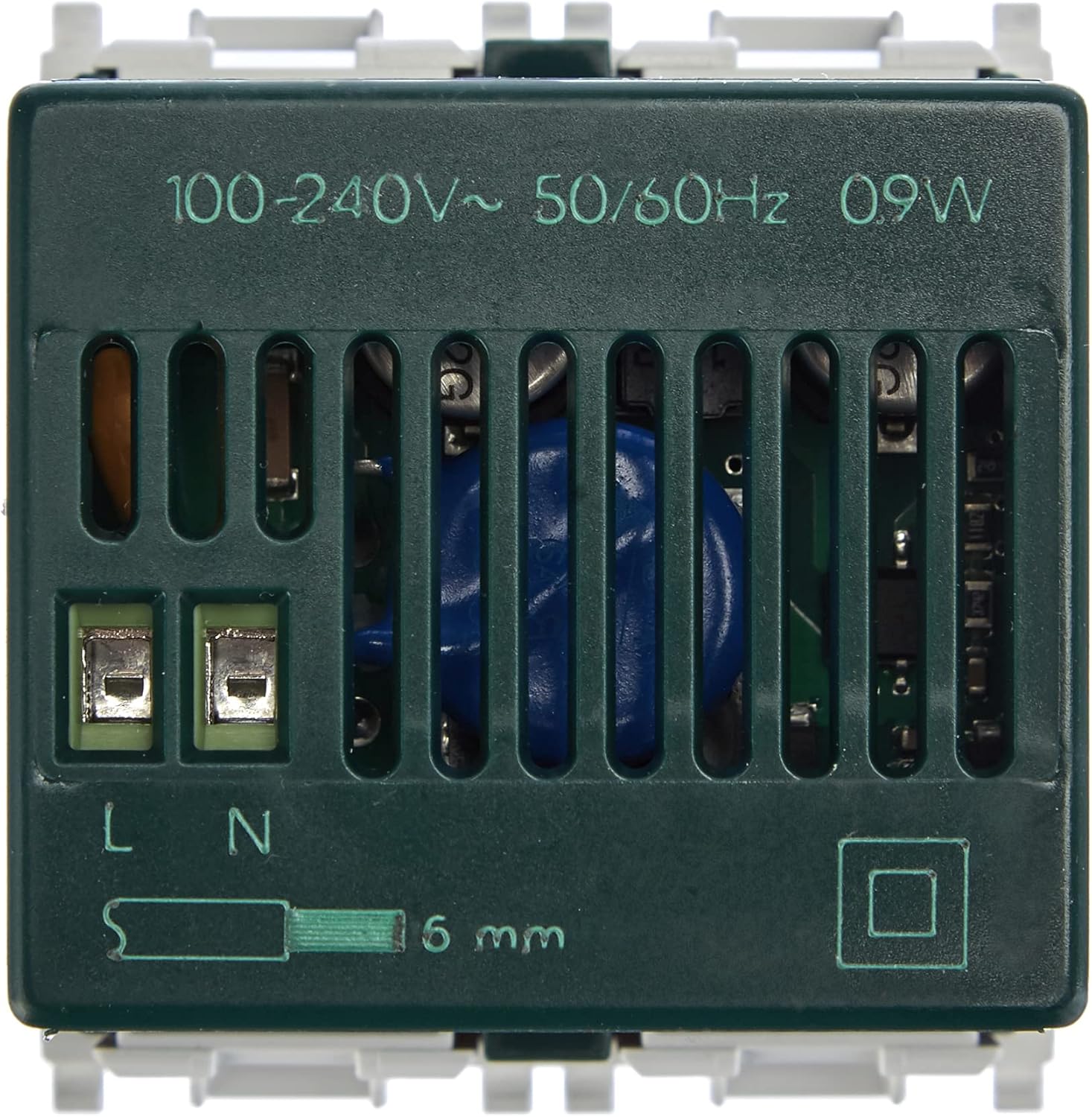
รูปที่ 2.1: หลัง view ภาพประกอบแสดงขั้วต่อไฟเข้า (L และ N) และปุ่มปรับระดับเสียงของ Vimar 14597 Gatewaytagข้อมูลจำเพาะ (100-240V~ 50/60Hz)

รูปที่ 2.2: ด้านล่าง view ภาพประกอบแสดงช่องระบายอากาศและจุดยึดของอุปกรณ์ Vimar 14597 Gateway
2.2. การกำหนดค่าซอฟต์แวร์
ระบบ Vimar ใช้แอปพลิเคชันสองตัวที่แตกต่างกันสำหรับการกำหนดค่าและการใช้งานประจำวัน:
- วิมาร์ VIEW แอพไร้สาย: ใช้สำหรับการกำหนดค่าเริ่มต้นของเกตเวย์และอุปกรณ์อื่นๆ โดยเฉพาะ VIEW อุปกรณ์ไร้สาย
- วิมาร์ VIEW แอป: ใช้สำหรับควบคุมและกำกับดูแลอุปกรณ์และสถานการณ์ที่เชื่อมต่อทั้งหมดในแต่ละวัน
- การสร้างบัญชี: หากคุณยังไม่มีบัญชี Vimar โปรดสร้างบัญชีนั้น การสร้างบัญชีเป็นสิ่งจำเป็นสำหรับการเข้าถึงบริการ Vimar Cloud
- ดาวน์โหลดแอป: ดาวน์โหลด "Vimar" ทั้งสองไฟล์ VIEW แอป "ไร้สาย" และ "Vimar" VIEWดาวน์โหลดแอปจากแอปสโตร์ของสมาร์ทโฟนหรือแท็บเล็ตของคุณ
- การกำหนดค่าเกตเวย์ (VIEW แอปไร้สาย):
- เปิดวิมาร์ VIEW แอปไร้สาย
- ทำตามคำแนะนำบนหน้าจอเพื่อเพิ่มและกำหนดค่า Vimar 14597 Plana Gateway ของคุณ โดยทั่วไปแล้วขั้นตอนนี้เกี่ยวข้องกับการเชื่อมต่อแอปกับเกตเวย์ผ่านบลูทูธหรือ Wi-Fi
- ในระหว่างกระบวนการนี้ คุณอาจได้รับแจ้งให้ทำการอัปเดตเฟิร์มแวร์ของเกตเวย์ ขอแนะนำให้ดำเนินการอัปเดตเฟิร์มแวร์เพื่อให้มั่นใจได้ถึงประสิทธิภาพสูงสุดและการเข้าถึงคุณสมบัติล่าสุด
- บทบาทผู้ดูแลระบบ: โปรดตรวจสอบให้แน่ใจว่าได้กำหนดบทบาทผู้ดูแลระบบภายในแอปพลิเคชันแล้ว เพื่อให้สามารถควบคุมระบบได้อย่างเต็มที่ ขั้นตอนนี้จำเป็นอย่างยิ่งสำหรับการจัดการระบบอย่างมีประสิทธิภาพ
- การจับคู่อุปกรณ์ (VIEW แอป): เมื่อตั้งค่าเกตเวย์เสร็จแล้ว ให้ใช้งาน Vimar VIEW แอปสำหรับจับคู่และจัดการอุปกรณ์ IoT อื่นๆ ของ Vimar (เช่น เทอร์โมสตัท สวิตช์ ตัวควบคุมม่านม้วน)

รูปที่ 2.3: Example ของ Vimar VIEW อินเทอร์เฟซแอปบนสมาร์ทโฟน ใช้สำหรับจัดการอุปกรณ์ที่เชื่อมต่อและสถานการณ์ต่างๆ

รูปที่ 2.4: วิมาร์ VIEW ไอคอนแอปที่ใช้สำหรับควบคุมและตรวจสอบระบบบ้านอัจฉริยะของคุณในชีวิตประจำวัน
3. การใช้งานเกตเวย์
เมื่อตั้งค่าเสร็จแล้ว Vimar 14597 Plana Gateway จะทำหน้าที่เป็นศูนย์กลางสำหรับอุปกรณ์ของคุณ VIEW ระบบบ้านอัจฉริยะไร้สาย ที่ช่วยให้สามารถควบคุมได้หลากหลายวิธี
3.1. การควบคุมผ่าน Vimar VIEW แอป
- การควบคุมอุปกรณ์: ใช้ Vimar VIEW แอปพลิเคชันสำหรับควบคุมอุปกรณ์อัจฉริยะแต่ละชิ้นที่เชื่อมต่อกับเกตเวย์ เช่น ไฟ มู่ลี่ และเทอร์โมสตัท
- การจัดการสถานการณ์จำลอง: สร้างและเปิดใช้งานสถานการณ์ที่กำหนดเอง (เช่น "อรุณสวัสดิ์" "ไม่อยู่บ้าน" "ดูหนัง") ซึ่งจะเรียกใช้งานหลายการกระทำพร้อมกันในอุปกรณ์ต่างๆ
- การเข้าถึงระยะไกล: อุปกรณ์เกตเวย์นี้ช่วยให้คุณควบคุมอุปกรณ์สมาร์ทโฮมจากระยะไกลได้ทุกที่ ตราบใดที่สมาร์ทโฟน/แท็บเล็ตของคุณมีการเชื่อมต่ออินเทอร์เน็ต
- การตรวจสอบพลังงาน: แอปอาจมีฟีเจอร์สำหรับตรวจสอบการใช้พลังงานของอุปกรณ์ที่เชื่อมต่อ หากแอปนั้นรองรับ

รูปที่ 3.1: Vimar Gateway ถูกติดตั้งอย่างแนบเนียนเข้ากับแผ่นปิดผนัง แสดงให้เห็นถึงการเชื่อมต่อกับแอป Vimar และผู้ช่วยเสียงต่างๆ เช่น Alexa, Google และ Siri
3.2. การบูรณาการผู้ช่วยเสียง
อุปกรณ์ Vimar 14597 Gateway รองรับการทำงานร่วมกับผู้ช่วยเสียงยอดนิยม ช่วยให้คุณควบคุมบ้านอัจฉริยะได้โดยไม่ต้องใช้มือ:
- อเมซอนอเล็กซ่า: เชื่อมต่อบัญชี Vimar ของคุณกับแอป Alexa เพื่อควบคุมอุปกรณ์โดยใช้คำสั่งเสียง (เช่น "Alexa เปิดไฟห้องนั่งเล่น")
- ผู้ช่วย Google: เชื่อมต่อระบบ Vimar ของคุณกับ Google Assistant เพื่อควบคุมด้วยเสียง (เช่น "Hey Google ตั้งอุณหภูมิเครื่องปรับอากาศเป็น 22 องศา")
- แอปเปิล Siri: ใช้ทางลัด Siri หรือการผสานรวม HomeKit (หากอุปกรณ์ Vimar บางรุ่นรองรับ) สำหรับคำสั่งเสียง (เช่น "เฮ้ Siri ปิดม่าน")

รูปที่ 3.2: ผู้ใช้งานกำลังใช้งานระบบบ้านอัจฉริยะ โดยสาธิตให้เห็นถึงความสะดวกสบายของการควบคุมด้วยเสียงผ่านทาง Vimar Gateway
4. การบำรุงรักษา
Vimar 14597 Plana Gateway ออกแบบมาเพื่อการใช้งานที่เชื่อถือได้ในระยะยาว โดยต้องการการบำรุงรักษาเพียงเล็กน้อย ไม่จำเป็นต้องมีการบำรุงรักษาใดๆ จากผู้ใช้ โปรดตรวจสอบให้แน่ใจว่าอุปกรณ์นั้นปราศจากฝุ่นและความชื้น เพื่อประสิทธิภาพสูงสุด ควรตรวจสอบและอัปเดตเฟิร์มแวร์ผ่านทาง Vimar เป็นประจำ VIEW แอปไร้สาย
5 การแก้ไขปัญหา
ส่วนนี้จะกล่าวถึงปัญหาทั่วไปที่คุณอาจพบเจอระหว่างการติดตั้งและการใช้งาน Vimar 14597 Plana Gateway ของคุณ
5.1. ปัญหาในการกำหนดค่า
- ขั้นตอนการตั้งค่าที่ซับซ้อน: ผู้ใช้รายงานว่าการตั้งค่าซอฟต์แวร์เริ่มต้นอาจซับซ้อน เนื่องจากต้องใช้แอปพลิเคชันแยกกันสองตัว (VIEW แบบไร้สายสำหรับการตั้งค่า VIEW สำหรับการใช้งานประจำวัน) และการกำหนดบทบาทผู้ดูแลระบบเฉพาะ โปรดปฏิบัติตามคำแนะนำทีละขั้นตอนที่ให้ไว้ใน Vimar อย่างระมัดระวัง VIEW แอปไร้สาย
- ปัญหาการอัพเดตเฟิร์มแวร์: หากเกตเวย์มีปัญหาหลังจากอัปเดตเฟิร์มแวร์ ให้ลองทำตามขั้นตอนการกำหนดค่าซ้ำอีกครั้ง ตรวจสอบให้แน่ใจว่ามีการเชื่อมต่ออินเทอร์เน็ตที่เสถียรในระหว่างการอัปเดต
- การจัดการบัญชีและแอปพลิเคชัน: ตรวจสอบให้แน่ใจว่าบัญชี Vimar ของคุณได้รับการตั้งค่าอย่างถูกต้อง และคุณกำลังใช้แอปที่เหมาะสมสำหรับงานนั้น (VIEW การเชื่อมต่อไร้สายสำหรับการตั้งค่าเกตเวย์เบื้องต้น VIEW (สำหรับควบคุมอุปกรณ์) ตรวจสอบให้แน่ใจว่าได้กำหนดบทบาทผู้ดูแลระบบอย่างถูกต้องแล้ว
5.2. ปัญหาการเชื่อมต่อ
- ไม่มีการเชื่อมต่อ: ตรวจสอบให้แน่ใจว่าเกตเวย์ได้รับพลังงานอย่างถูกต้อง และเราเตอร์ Wi-Fi ของคุณใช้งานได้และอยู่ในระยะที่ใช้งานได้ ตรวจสอบไฟ LED บนเกตเวย์เพื่อดูสถานะ
- ปัญหาการจับคู่บลูทูธ: หากพบปัญหาในการจับคู่บลูทูธระหว่างการตั้งค่าครั้งแรก โปรดตรวจสอบให้แน่ใจว่าบลูทูธบนสมาร์ทโฟนของคุณเปิดใช้งานอยู่ และอยู่ใกล้กับเกตเวย์
5.3. การรีเซ็ตอุปกรณ์
เราเตอร์ Vimar 14597 Gateway ไม่มีปุ่มรีเซ็ตทางกายภาพ หากต้องการรีเซ็ตเป็นค่าเริ่มต้นจากโรงงาน ต้องเริ่มกระบวนการนี้ผ่านทาง Vimar เท่านั้น VIEW แอปไร้สาย โปรดดูส่วนช่วยเหลือของแอปหรือเอกสารสนับสนุนอย่างเป็นทางการของ Vimar สำหรับคำแนะนำโดยละเอียดเกี่ยวกับการรีเซ็ตผ่านซอฟต์แวร์
6. ข้อมูลจำเพาะ
| คุณสมบัติ | รายละเอียด |
|---|---|
| ยี่ห้อ | วิมาน |
| หมายเลขรุ่น | 14597 |
| ขนาดสินค้า | 4.9 x 4.48 x 4.78 ซม. |
| น้ำหนัก | 50 กรัม |
| แหล่งจ่ายไฟ | 100-240 V ~ 50/60 เฮิร์ตซ์ |
| สี | สีขาว |
| การเชื่อมต่อ | ไอโอที, บลูทูธ, วิซิไลท์ |
| ขนาดโมดูล | 2 โมดูล (ซีรี่ส์ Plana) |
| ประเทศต้นกำเนิด | อิตาลี |

รูปที่ 6.1: ภาพที่แสดงคือ Vimar 14597 Gateway ในมือ ซึ่งแสดงให้เห็นถึงขนาดที่กะทัดรัด (สูงประมาณ 5 ซม.)

รูปที่ 6.2: แผนภาพแสดงโครงสร้างและตัวบ่งชี้สำคัญของ Vimar 14597 Plana Gateway
7. การรับประกันและการสนับสนุน
7.1. ข้อมูลการรับประกัน
เงื่อนไขและข้อกำหนดการรับประกันเฉพาะสำหรับ Vimar 14597 Plana Gateway นั้นจัดทำโดย Vimar โปรดดูรายละเอียดจากเอกสารอย่างเป็นทางการของ Vimar webตรวจสอบข้อมูลการรับประกันโดยละเอียดได้ที่เว็บไซต์หรือเอกสารที่มาพร้อมกับผลิตภัณฑ์ของคุณ
7.2. การสนับสนุนลูกค้า
หากต้องการความช่วยเหลือเพิ่มเติม การสนับสนุนทางเทคนิค หรือเข้าถึงคู่มือและคำแนะนำเพิ่มเติม โปรดเยี่ยมชมเว็บไซต์อย่างเป็นทางการของ Vimar webเว็บไซต์ Vimar เป็นที่รู้จักในด้านการบริการลูกค้าที่ตอบสนองรวดเร็วและมีความรู้ความเชี่ยวชาญ
วิมาร์อย่างเป็นทางการ Webเว็บไซต์: www.vimar.com
8. วิดีโอผลิตภัณฑ์อย่างเป็นทางการ
ไม่มีการจัดทำวิดีโอผลิตภัณฑ์อย่างเป็นทางการจากผู้ขายไว้ในข้อมูลผลิตภัณฑ์เพื่อฝังไว้ในคู่มือนี้


