1. บทนำ
This manual provides detailed instructions for the safe and effective operation of your Pyle PPHP834B Portable Bluetooth PA Speaker System. Please read this manual thoroughly before using the device and retain it for future reference.

Image 1.1: The Pyle PPHP834B Portable Bluetooth PA Speaker System, including the remote control and power adapter.
2. ข้อมูลด้านความปลอดภัย
To reduce the risk of electric shock, do not remove the cover. Refer servicing to qualified personnel only. Do not expose this appliance to rain or moisture. Do not block any ventilation openings. Ensure proper ventilation during use. Avoid placing the unit near heat sources. Use only attachments/accessories specified by the manufacturer. Unplug the unit during lightning storms or when unused for long periods.
3. เนื้อหาบรรจุภัณฑ์
- ระบบลำโพง PA (PPHP834B)
- รีโมทคอนโทรล
- อะแดปเตอร์แปลงไฟ
4. คุณสมบัติของผลิตภัณฑ์
- Portable PA Loudspeaker System
- สตรีมมิ่งเพลงแบบไร้สาย Bluetooth
- ไฟปาร์ตี้ LED กระพริบหลากสี
- แบตเตอรี่แบบชาร์จไฟได้ในตัว
- วิทยุ FM พร้อมจอแสดงผล LED แบบดิจิตอล
- เครื่องอ่านหน่วยความจำแฟลช USB
- แจ็คขั้วต่ออินพุต Aux (3.5 มม.)
- อินพุตไมโครโฟน 6.5 มม.
- Extendable Carry Handle for portability

Image 4.1: Internal components illustrating the 8-inch subwoofer and 1-inch tweeter, contributing to the 300 Watt peak power output.

Image 4.2: The speaker supports multiple audio input methods including Bluetooth, microphone, USB, AUX, and FM radio.
5. การควบคุมและการเชื่อมต่อ
The top panel of the speaker features various controls and input ports for managing audio playback and device functions.
- ไมค์ใน: 6.5mm input for connecting a microphone.
- ยูเอสบี: Port for USB flash drive playback.
- ช่องรับสัญญาณเสียงเข้า: ช่องต่อขนาด 3.5 มม. สำหรับเชื่อมต่ออุปกรณ์เสียงภายนอก
- DC IN: ช่องเสียบไฟสำหรับชาร์จลำโพง
- เปิด/ปิดเครื่อง: สวิตช์ไฟหลัก
- ปริมาณ: Rotary knob to adjust the master volume.
- เส้นทาง: Button to switch between Bluetooth, USB, AUX, and FM radio modes.
- เล่น/หยุดชั่วคราว: Button to play or pause audio playback.
- ก่อนหน้า/ถัดไป: Buttons to skip to the previous or next track/station.
- เปิด/ปิด LED: Button to control the party lights.
- จอแสดงผลดิจิตอล: แสดงโหมดปัจจุบัน หมายเลขแทร็ก หรือความถี่ FM
6. การตั้งค่า
- ค่าใช้จ่ายเริ่มต้น: Before first use, fully charge the speaker for approximately 4 hours using the provided power adapter.
- เปิดเครื่อง: Flip the POWER ON/OFF switch to the 'ON' position. The digital display will illuminate.
7. คู่มือการใช้งาน
7.1 การจับคู่บลูทูธ
- Turn on the speaker. The unit will automatically enter Bluetooth mode, indicated by 'BLUE' on the display and a blinking Bluetooth indicator.
- เปิดใช้งานบลูทูธบนอุปกรณ์เคลื่อนที่ของคุณ (สมาร์ทโฟน แท็บเล็ต ฯลฯ)
- ค้นหา the Bluetooth network name 'PYLEUSA' and select it to connect.
- Once connected, the Bluetooth indicator will stop blinking, and you can stream music wirelessly.

Image 7.1: Wireless control of the speaker via a Bluetooth-enabled smartphone.
7.2 การเล่น USB
- Insert a USB flash drive (up to 32GB, MP3 audio fileเสียบ (s) เข้ากับพอร์ต USB
- The speaker will automatically switch to USB mode and begin playing audio files. If not, press the MODE button to select USB.
- Use the PLAY/PAUSE, PREV, and NEXT buttons to control playback.
อินพุต AUX 7.3 ช่อง
- Connect an external audio device (e.g., MP3 player, laptop) to the AUX IN port using a 3.5mm audio cable.
- กดปุ่ม MODE เพื่อเลือกโหมด AUX
- ควบคุมการเล่นจากอุปกรณ์ที่เชื่อมต่อของคุณ
7.4 วิทยุ FM
- Press the MODE button to select FM radio mode. The display will show the FM frequency.
- Press and hold the PLAY/PAUSE button to automatically scan and save available FM stations.
- Use the PREV and NEXT buttons to navigate between saved stations.
7.5 อินพุตไมโครโฟน
- Connect a microphone to the MIC IN port.
- Adjust the master VOLUME knob to control the microphone's output level.
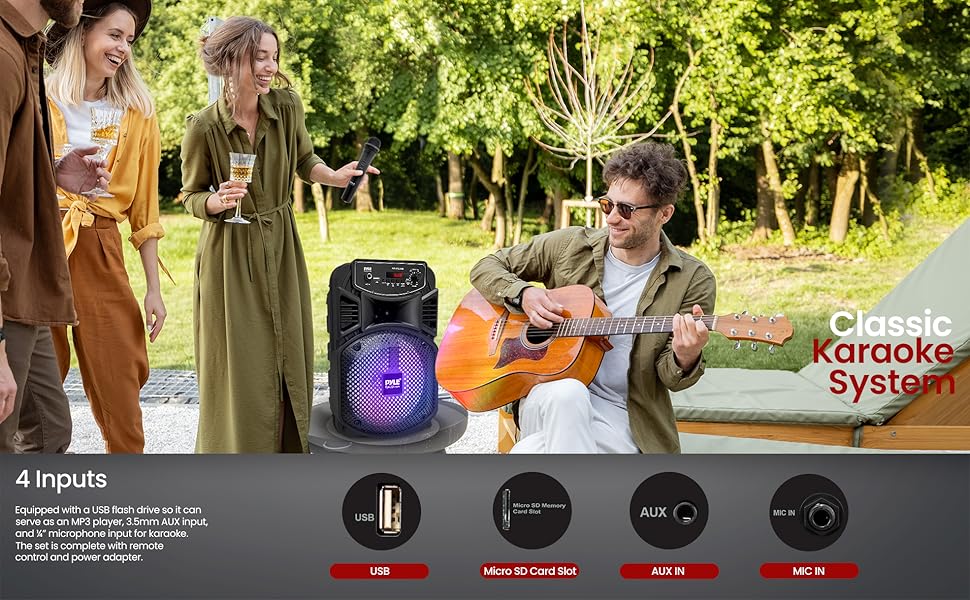
Image 7.2: The speaker can be used for karaoke with microphone and instrument inputs.
7.6 ไฟประดับงานปาร์ตี้
Press the LED ON/OFF button to activate or deactivate the multi-color flashing LED party lights on the speaker's grille.

Image 7.3: The speaker features multi-color LED lights to enhance the atmosphere.
8. การชาร์จอุปกรณ์
The speaker is equipped with a built-in rechargeable battery. When the battery level is low, connect the provided power adapter to the DC IN port on the speaker and plug it into a power outlet. The battery level LED indicators will show the charging status. A full charge takes approximately 4 hours and provides up to 2 hours of playback time.

Image 8.1: Connecting the power adapter to charge the speaker.

Image 8.2: Information on the speaker's built-in rechargeable battery, playing time, and capacity.
9. การบำรุงรักษา
- ทำความสะอาดลำโพงด้วยผ้านุ่มและแห้ง ห้ามใช้น้ำยาทำความสะอาดหรือสารละลายที่มีฤทธิ์กัดกร่อน
- ควรหลีกเลี่ยงการวางเครื่องไว้ในที่ที่มีอุณหภูมิสูงหรือต่ำเกินไป แสงแดดโดยตรง หรือความชื้นสูง
- เก็บลำโพงไว้ในที่เย็นและแห้งเมื่อไม่ได้ใช้งาน
- Turn off the power with the ON/OFF switch when not in use to prevent battery damage from standby mode.
10 การแก้ไขปัญหา
| ปัญหา | สาเหตุที่เป็นไปได้ | สารละลาย |
|---|---|---|
| ไม่มีไฟฟ้า | แบตเตอรี่หมดแล้ว สวิตช์เปิดปิดปิดอยู่ | Charge the speaker. Ensure the power switch is in the 'ON' position. |
| ไม่มีเสียง | ระดับเสียงเบาเกินไป เลือกโหมดอินพุตไม่ถูกต้อง เชื่อมต่ออุปกรณ์ไม่ถูกต้อง | Increase volume. Press MODE to select the correct input. Reconnect audio source. |
| บลูทูธไม่เชื่อมต่อ | Speaker not in pairing mode. Device Bluetooth is off. Too far from speaker. | Ensure speaker is in Bluetooth mode ('BLUE' blinking). Enable Bluetooth on your device. Move device closer to speaker (within 32 ft). |
| การเล่น USB ไม่ทำงาน | USB drive not formatted correctly. Unsupported file type. USB drive capacity too large. | Ensure USB is FAT32 format. Only MP3 files are supported. Max USB capacity is 32GB. |
11. ข้อมูลจำเพาะ
| คุณสมบัติ | ข้อมูลจำเพาะ |
|---|---|
| กำลังขับสูงสุด | สูงสุด 300 วัตต์ |
| ระบบเสียง | ซับวูฟเฟอร์ 8 นิ้ว + ทวีตเตอร์ 1 นิ้ว |
| อิมพีแดนซ์ | 2.6 โอห์ม |
| เวอร์ชันบลูทูธ | 4.1 |
| ช่วงสาย | สูงถึง 32 ฟุต |
| ประเภทอินเทอร์เฟซ USB | 2.0 |
| เสียงดิจิตอล File สนับสนุน | เอ็มพี 3 |
| รองรับ USB Flash สูงสุด | 32GB |
| อายุการใช้งานแบตเตอรี่ | สูงสุด 2 ชั่วโมง (เวลาชาร์จ: ประมาณ 4 ชั่วโมง) |
| แบตเตอรี่แบบชาร์จไฟได้ | 3.7V, 1800mAh – 6.66 วัตต์ชั่วโมง |
| แหล่งจ่ายไฟ | 120/240V, สลับได้ (5V/2A Power Adapter) |
| ขนาด (กว้าง x ยาว x สูง) | 8.7 นิ้ว x 7.9 นิ้ว x 13.8 นิ้ว |
| น้ำหนักสินค้า | 4.75 ปอนด์ |
12. การรับประกันและการสนับสนุน
For warranty information or technical support, please refer to the official Pyle website or contact their customer service. A detailed PDF user manual is also available for download:
- Official Pyle Store: ร้านไพล์ยูเอสเอ
- คู่มือผู้ใช้ PDF: ดาวน์โหลด PDF


