1. บทนำ
Thank you for choosing the BIOS Living Digital Pedometer 335FC. This compact and smart device is designed to help you maintain a healthy and active lifestyle by accurately tracking your daily physical activity.
It counts your steps walked, distance traveled, and calories burned, all displayed on a large, easy-to-read LCD screen. The pedometer is designed for convenience, easily clipping to your belt or waistband, and offers both 12/24 hour time formats and imperial/metric unit options.
2. ข้อมูลด้านความปลอดภัย
- เก็บอุปกรณ์ให้ห่างจากน้ำและความชื้นที่มากเกินไป
- Do not expose the pedometer to extreme temperatures (hot or cold).
- หลีกเลี่ยงการทำอุปกรณ์หล่นหรือกระแทกอย่างรุนแรง
- Do not attempt to disassemble or repair the pedometer yourself. Refer to qualified service personnel.
- เก็บแบตเตอรี่ให้พ้นมือเด็ก หากกลืนกิน ให้ไปพบแพทย์ทันที
- กำจัดแบตเตอรี่และอุปกรณ์ตามกฎระเบียบท้องถิ่น
3. สินค้าหมดview
Familiarize yourself with the components of your BIOS Living Digital Pedometer 335FC.

รูปที่ 3.1 : ด้านหน้า View of Pedometer
This image shows the front of the BIOS Living Digital Pedometer 335FC. It features a prominent LCD screen displaying "23 STEP" and three buttons below it: "RESET", "SET", and "MODE". The device is white with a blue accent around the screen, and "BIOS living" is printed at the top.
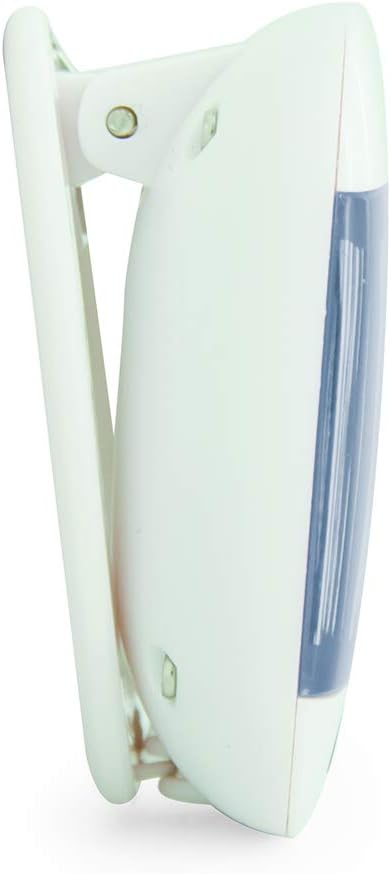
รูปที่ 3.2: ด้านข้าง View with Belt Clip
ภาพนี้แสดงมุมมองด้านข้างfile of the BIOS Living Digital Pedometer 335FC. It highlights the integrated white clip mechanism designed for attaching the pedometer to clothing, such as a belt or waistband. The blue accent on the front is visible from this angle.

รูปที่ 3.3: ย้อนกลับ View พร้อมช่องใส่แบตเตอรี่
This image shows the back of the BIOS Living Digital Pedometer 335FC. It clearly displays the battery compartment cover, which can be opened to insert or replace the battery. The back is white with some regulatory markings and the brand "HAPTIME" embossed.
ส่วนประกอบหลัก:
- จอแสดงผล LCD: หน้าจอขนาดใหญ่ใช้งานง่าย viewing of steps, distance, calories, and time.
- ปุ่มรีเซ็ต: Used to clear current readings or reset settings.
- ปุ่ม ตลท.: Used to confirm settings or enter setting mode.
- ปุ่มโหมด: Used to cycle through different display modes (Steps, Distance, Calories, Time).
- คลิปหนีบเข็มขัด: Integrated clip for secure attachment to clothing.
- ช่องใส่แบตเตอรี่: ตั้งอยู่ด้านหลังสำหรับการติดตั้งแบตเตอรี่
4. การตั้งค่า
4.1 การติดตั้งแบตเตอรี่
Your pedometer comes with a battery. Follow these steps to install it:
- หาช่องใส่แบตเตอรี่ที่ด้านหลังของเครื่องนับก้าว (ดูรูปที่ 3.3)
- Using a small screwdriver or coin, gently open the battery compartment cover.
- Insert the provided battery, ensuring the correct polarity (+/-) as indicated inside the compartment.
- ปิดฝาช่องใส่แบตเตอรี่กลับเข้าที่และขันให้แน่น
4.2 Initial Settings (Time & Units)
After battery installation, the device may prompt you to set the time and units. If not, press and hold the ชุด ปุ่มเพื่อเข้าสู่โหมดการตั้งค่า
- รูปแบบเวลา: The display will flash "12H" or "24H". Use the โหมด button to toggle between 12-hour and 24-hour formats. Press ชุด เพื่อยืนยัน.
- ตั้งเวลา: The hour digit will flash. Use the โหมด กดปุ่มเพื่อปรับเวลา ชุด เพื่อยืนยัน ทำซ้ำเป็นเวลาหลายนาที
- ระบบหน่วย: The display will flash "KM" (metric) or "MI" (imperial). Use the โหมด button to select your preferred unit system. Press ชุด เพื่อยืนยัน.
- Stride Length (for distance accuracy): If prompted, enter your average stride length. This can be estimated by walking 10 steps and dividing the total distance by 10. Use โหมด เพื่อปรับและ ชุด เพื่อยืนยัน.
- Weight (for calorie accuracy): If prompted, enter your weight. Use โหมด เพื่อปรับและ ชุด เพื่อยืนยัน.
The pedometer is now ready for use.
5. คู่มือการใช้งาน
5.1 Wearing the Pedometer
For accurate readings, clip the pedometer securely to your belt or waistband, preferably near your hip. Ensure it is positioned vertically.
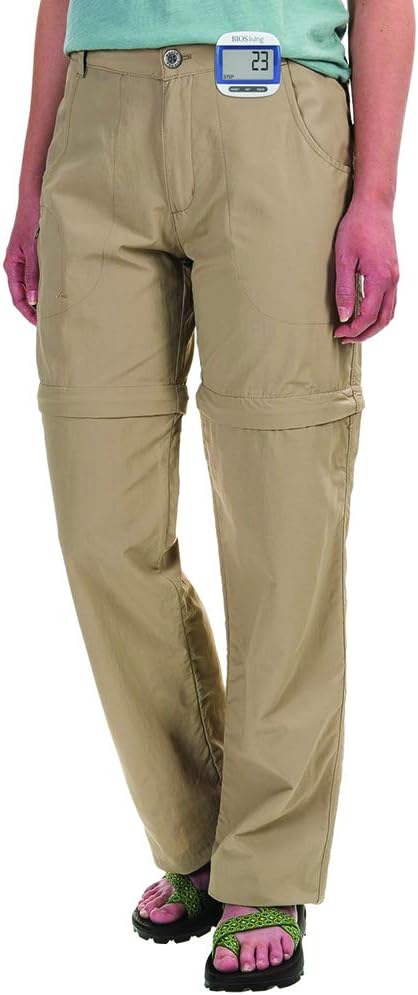
Figure 5.1: Correct Pedometer Placement
This image shows a person wearing the BIOS Living Digital Pedometer 335FC. The pedometer is clipped to the waistband of their khaki pants, positioned on the side of their hip, demonstrating the recommended placement for accurate step counting.
5.2 โหมดการแสดงผล
กดปุ่ม โหมด button to cycle through the following display modes:
- ขั้นตอน: แสดงจำนวนก้าวทั้งหมดที่ดำเนินการ
- ระยะทาง: Displays the total distance traveled (in KM or MI).
- แคลอรี่: Displays the estimated calories burned (in KCAL).
- เวลา: แสดงเวลาปัจจุบัน

Figure 5.2: Time Display Mode
This image shows the BIOS Living Digital Pedometer 335FC displaying the time. The large LCD screen shows "2:34 P", indicating 2:34 PM. A small clock icon is visible on the bottom left of the display.

Figure 5.3: Distance Display Mode
This image shows the BIOS Living Digital Pedometer 335FC displaying distance. The screen shows "1.25" with "DIST" and "KM" below it, indicating a distance of 1.25 kilometers.

Figure 5.4: Calories Display Mode
This image shows the BIOS Living Digital Pedometer 335FC displaying calories burned. The screen shows "4.87" with "KCAL" below it, indicating 4.87 kilocalories.
5.3 การรีเซ็ตข้อมูล
To reset your daily steps, distance, and calorie count to zero, press and hold the รีเซ็ต button until the display clears. This is typically done at the start of a new day or activity.
6. การบำรุงรักษา
6.1 การทำความสะอาด
เช็ดเครื่องนับก้าวด้วยผ้าแห้งนุ่มๆ ห้ามใช้สารทำความสะอาดที่มีฤทธิ์กัดกร่อน หรือจุ่มเครื่องลงในน้ำ
6.2 การเปลี่ยนแบตเตอรี่
When the display becomes dim or the device stops responding, it's time to replace the battery. Follow the battery installation steps in Section 4.1.
7 การแก้ไขปัญหา
| ปัญหา | สาเหตุที่เป็นไปได้ | สารละลาย |
|---|---|---|
| จอแสดงผลว่างเปล่าหรือมืดลง | แบตเตอรี่เหลือน้อยหรือหมด | เปลี่ยนแบตเตอรี่ (ดูหัวข้อ 6.2) |
| จำนวนก้าวไม่แม่นยำ | Incorrect placement of pedometer; irregular walking motion; incorrect stride length setting. | Ensure pedometer is clipped securely and vertically to your belt/waistband. Walk naturally. Re-enter stride length in settings (Section 4.2). |
| ปุ่มต่างๆ ไม่ตอบสนอง | Battery issue; temporary software glitch. | Replace battery. If problem persists, try removing and reinserting the battery to perform a hard reset. |
| ไม่สามารถเปลี่ยนแปลงการตั้งค่าได้ | Not in setting mode. | กดปุ่มค้างไว้ ชุด ปุ่มเพื่อเข้าสู่โหมดการตั้งค่า |
8. ข้อมูลจำเพาะ
| คุณสมบัติ | รายละเอียด |
|---|---|
| หมายเลขรุ่น | 335เอฟซี |
| สี | สีฟ้า |
| วัสดุ | พลาสติก |
| ขนาด (กว้าง x ยาว x สูง) | ประมาณ 5 x 2 x 2 ซม. |
| น้ำหนัก | ประมาณ 31.81 กรัม |
| แสดง | จอ LCD ขนาดใหญ่ |
| ฟังก์ชั่น | Steps, Distance, Calories, Time |
| รูปแบบเวลา | เลือกได้ระหว่าง 12/24 ชั่วโมง |
| หน่วย | Imperial/Metric selectable |
| รวมแบตเตอรี่แล้ว | ใช่ |
| อายุการใช้งานแบตเตอรี่ | 24 Hours (Note: This might refer to continuous operation or a specific test condition, typical pedometer battery life is much longer) |
| ยูพีซี | 057475335632 |
9. การรับประกันและการสนับสนุน
This BIOS Living Digital Pedometer 335FC is covered by a manufacturer's warranty against defects in materials and workmanship. Please refer to the warranty card included with your purchase for specific terms and conditions, including the warranty period and how to make a claim.
For technical support, troubleshooting assistance, or warranty inquiries, please contact BIOS Living customer service. Contact information can typically be found on the product packaging or the manufacturer's official webเว็บไซต์.
โปรดเก็บหลักฐานการซื้อไว้เพื่อวัตถุประสงค์การรับประกัน


