การแนะนำ
Thank you for choosing the Trevi RC 85D8 DAB Digital Alarm Clock Radio. This compact device offers DAB/DAB+ and FM RDS radio reception, a large LED display, dual alarms, snooze, sleep functions, and a unique time projection feature. This manual provides detailed instructions to help you set up and operate your new alarm clock radio effectively.
เนื้อหาแพ็คเกจ
- Trevi RC 85D8 DAB Digital Alarm Clock Radio
- อะแดปเตอร์แปลงไฟ
- คู่มือการใช้งาน (เอกสารนี้)
ข้อมูลด้านความปลอดภัย
Please read all safety instructions before using the device. Keep this manual for future reference.
- อย่าให้อุปกรณ์โดนฝนหรือความชื้น
- Do not disassemble the device. Refer all servicing to qualified personnel.
- ใช้เฉพาะอะแดปเตอร์ที่ให้มาเท่านั้น
- ตรวจสอบให้แน่ใจว่ามีการระบายอากาศที่เหมาะสมรอบๆ อุปกรณ์
- ทิ้งแบตเตอรี่ด้วยความรับผิดชอบ
สินค้าเกินview
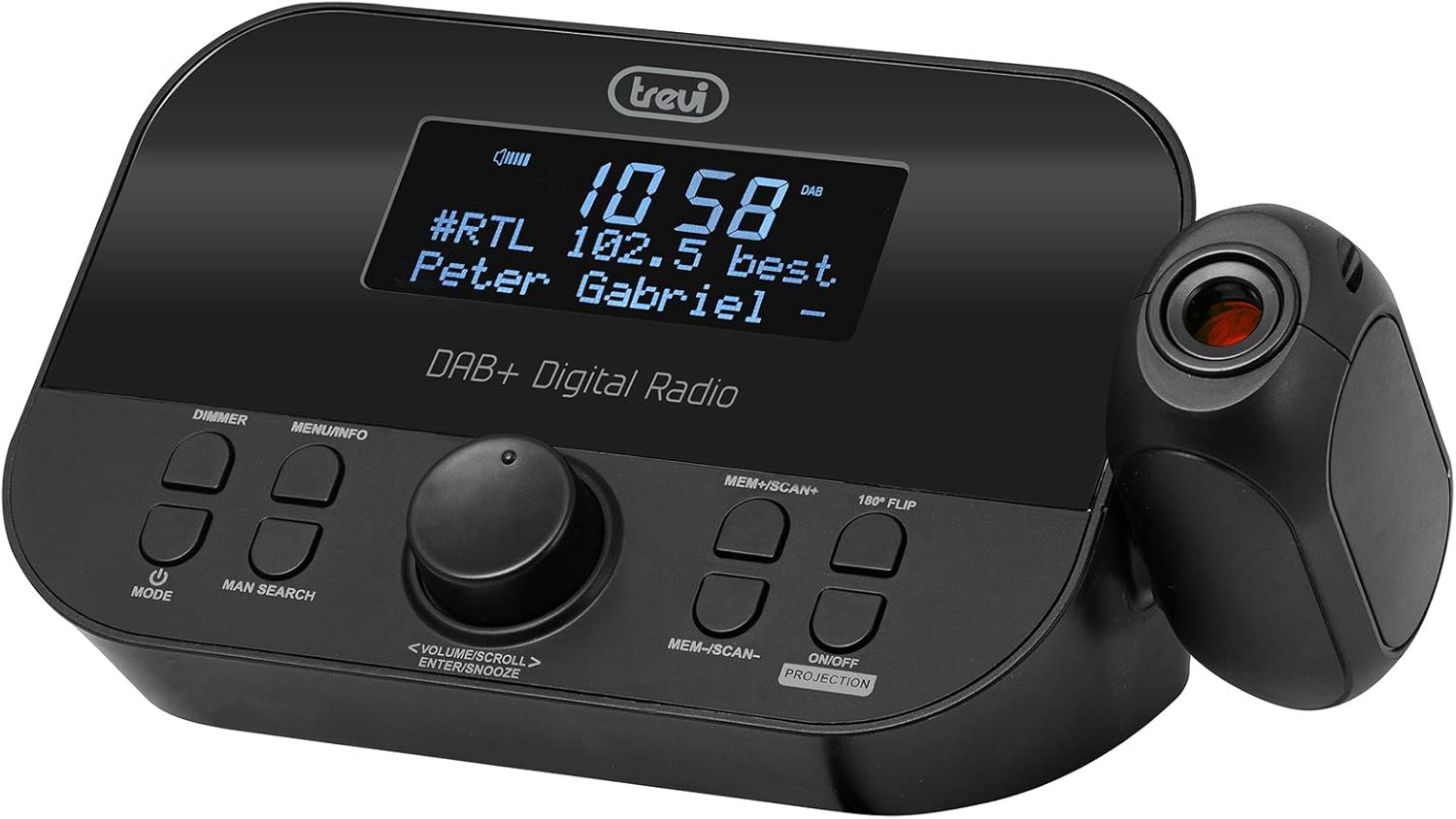
ด้านหน้า view of the Trevi RC 85D8 DAB Digital Alarm Clock Radio, showing the LED display, control buttons, and the time projector.
การควบคุมและการแสดงผล:
- จอแสดงผล LED: Shows time, radio station, song title/artist, volume, and other information.
- ปุ่มหรี่ไฟ: ปรับความสว่างของจอแสดงผล
- ปุ่มเมนู/ข้อมูล: Accesses menu options and displays radio information.
- ปุ่มโหมด: Switches between DAB, FM, and other modes.
- MAN SEARCH Button: Initiates manual station search.
- VOLUME/SCROLL/ENTER/SNOOZE Knob: Multi-function knob for volume control, menu navigation, selection, and snooze activation.
- MEM+/SCAN+ Button: Stores/recalls presets, scans forward.
- MEM-/SCAN- Button: Stores/recalls presets, scans backward.
- 180° FLIP Button: Rotates projected time display.
- ON/OFF PROJECTION Button: Turns the time projection on or off.
- เลนส์ฉายภาพ: ฉายภาพเวลาลงบนพื้นผิว
การตั้งค่า
1. การเชื่อมต่อไฟฟ้า
- Connect the provided power adapter to the DC IN port on the back of the alarm clock radio.
- เสียบอะแดปเตอร์เข้ากับเต้ารับที่ผนังมาตรฐาน
- The device will power on and the display will illuminate.
2. Battery Backup Installation (Optional)
The device has a battery compartment for anti-failure backup (2 AAA batteries, not included). This ensures time and alarm settings are retained during a power outage.
- เปิดฝาช่องใส่แบตเตอรี่ที่ด้านล่างของตัวเครื่อง
- ใส่แบตเตอรี่ AAA 2 ก้อน โดยสังเกตขั้วให้ถูกต้อง (+/-)
- ปิดฝาช่องใส่แบตเตอรี่ให้แน่น
3. การตั้งค่าเสาอากาศ
Extend the telescopic antenna fully for optimal DAB/DAB+ and FM radio reception. Adjust its position for the best signal.

ด้านข้าง view of the Trevi RC 85D8 DAB Digital Alarm Clock Radio, showing the extended telescopic antenna for improved reception.
4. การตั้งเวลาและวันที่เริ่มต้น
Upon first power-on, the device will attempt to synchronize time and date automatically via DAB or FM RDS signal. If automatic synchronization fails or you wish to set it manually:
- กดปุ่ม เมนู/ข้อมูล ปุ่มเพื่อเข้าสู่เมนู
- หมุน VOLUME/SCROLL knob to navigate to "Time/Date" or "Settings".
- กดปุ่ม เข้า (push the knob) to select.
- Follow the on-screen prompts to set the time, date, and 12/24-hour format using the VOLUME/SCROLL ลูกบิดและ เข้า ปุ่ม.
คำแนะนำการใช้งาน
1. เปิด/ปิดเครื่อง
- ในการเปิดเครื่อง ให้กด โหมด ปุ่ม.
- หากต้องการปิดเครื่อง ให้กดปุ่มค้างไว้ โหมด ปุ่ม.
2. Radio Mode Selection (DAB/DAB+ / FM RDS)
- กดปุ่ม โหมด button repeatedly to cycle between DAB/DAB+ and FM radio modes.
3. การปรับแต่งและการสแกน
DAB/DAB+ วิทยุ:
- ในโหมด DAB ให้กด MEM+/SCAN+ or MEM-/SCAN- เพื่อสแกนหาสถานีที่ว่างอยู่โดยอัตโนมัติ
- อีกวิธีหนึ่งคือกด MAN SEARCH to manually tune. Rotate the VOLUME/SCROLL knob to select a station, then press เข้า.
วิทยุ FM RDS:
- ในโหมด FM ให้กด MEM+/SCAN+ or MEM-/SCAN- เพื่อสแกนหาสถานีที่ว่างอยู่ถัดไปโดยอัตโนมัติ
- กด MAN SEARCH to manually tune. Rotate the VOLUME/SCROLL knob to adjust the frequency, then press เข้า.
4. การบันทึกและเรียกใช้ค่าที่ตั้งไว้ล่วงหน้า
- จูนไปยังสถานีที่คุณต้องการ
- กดค้างไว้ MEM+/SCAN+ or MEM-/SCAN- until the display shows "Preset Store".
- หมุน VOLUME/SCROLL knob to select a preset number (e.g., P01, P02).
- กด เข้า เพื่อยืนยันและบันทึกสถานี
- To recall a preset, briefly press MEM+/SCAN+ or MEM-/SCAN- to cycle through stored stations.
5. การควบคุมระดับเสียง
- หมุน VOLUME/SCROLL ปุ่มหมุนสำหรับปรับระดับเสียง
6. การตั้งค่านาฬิกาปลุก (นาฬิกาปลุกคู่)
The Trevi RC 85D8 supports two independent alarms (Alarm 1 and Alarm 2).
- กดปุ่ม เมนู/ข้อมูล ปุ่มเพื่อเข้าสู่เมนู
- หมุน VOLUME/SCROLL knob to navigate to "Alarm 1 Setup" or "Alarm 2 Setup".
- กด เข้า ที่จะเลือก
- Follow the on-screen prompts to set:
- เวลาปลุก: Set the desired wake-up time.
- แหล่งสัญญาณเตือนภัย: Choose between "Buzzer" or "Radio" (DAB or FM).
- ระดับเสียงปลุก: ตั้งระดับเสียงปลุกที่ต้องการ
- ความถี่สัญญาณเตือน: Select "Daily", "Weekdays", "Weekends", or "Once".
- สถานะการเตือน: Turn the alarm "On" or "Off".
- กด เข้า เพื่อยืนยันการตั้งค่าแต่ละรายการ
7. ฟังก์ชั่นเลื่อนปลุก
- เมื่อสัญญาณเตือนดังขึ้น ให้กดปุ่ม VOLUME/SCROLL/ENTER/SNOOZE knob to activate snooze. The alarm will pause for a set period (usually 9 minutes) and sound again.
- To cancel snooze and turn off the alarm, press the โหมด ปุ่ม.
8. ฟังก์ชั่นตั้งเวลาปิดเครื่อง
ตัวตั้งเวลาปิดเครื่องอัตโนมัติช่วยให้วิทยุเล่นได้ตามระยะเวลาที่กำหนดก่อนที่จะปิดเครื่องโดยอัตโนมัติ
- กดปุ่ม เมนู/ข้อมูล ปุ่มเพื่อเข้าสู่เมนู
- หมุน VOLUME/SCROLL knob to navigate to "Sleep Timer".
- กด เข้า ที่จะเลือก
- หมุน VOLUME/SCROLL knob to choose the desired sleep duration (e.g., 15, 30, 60, 90 minutes, or Off).
- กด เข้า เพื่อยืนยัน.
9. Time Projection Feature
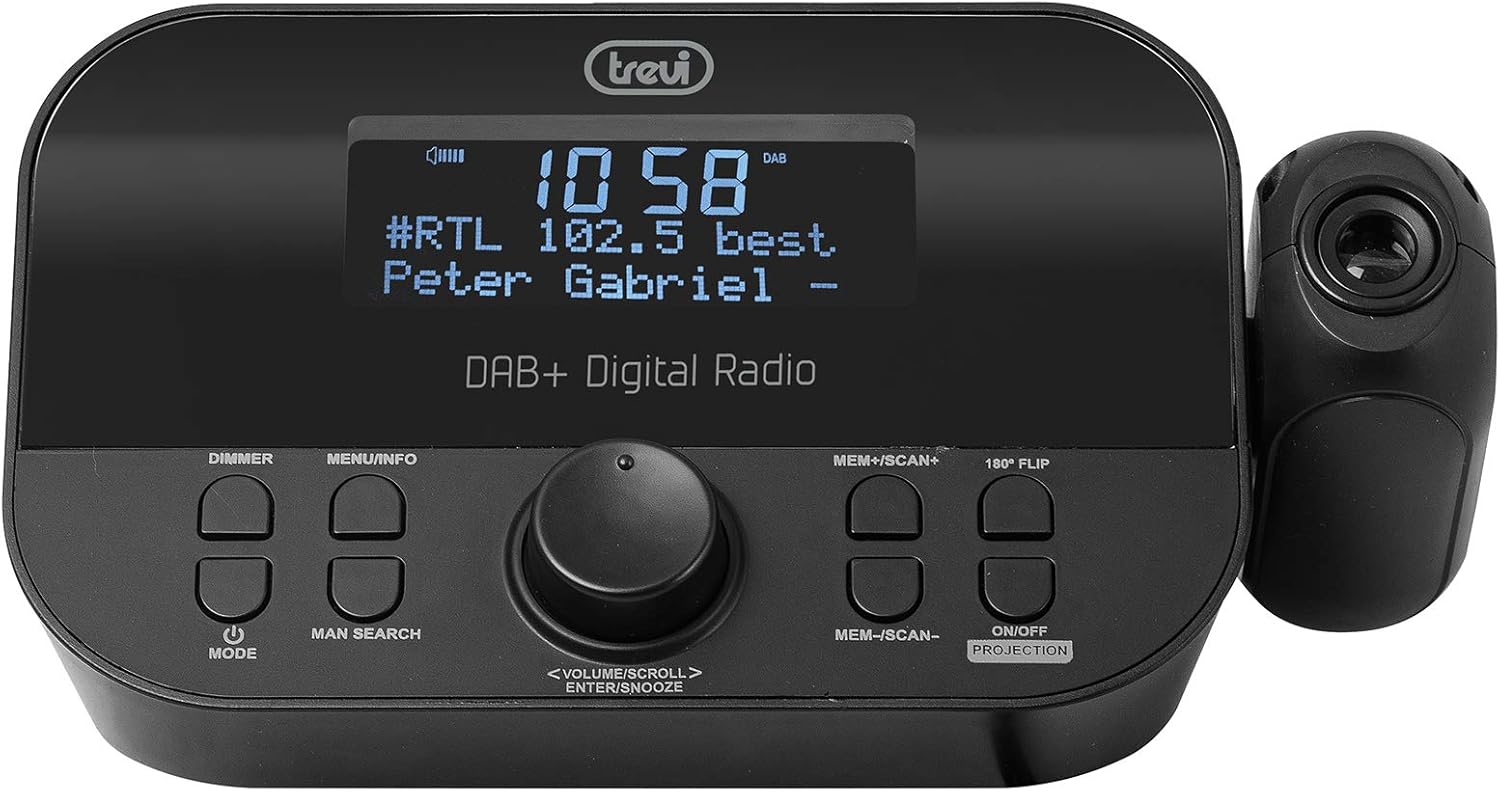
The Trevi RC 85D8 DAB Digital Alarm Clock Radio projecting the time onto a surface, demonstrating the adjustable projection lens.
- Turn Projection On/Off: กดปุ่ม ON/OFF PROJECTION ปุ่ม.
- ปรับมุมฉายภาพ: Manually adjust the projection lens on the side of the unit to direct the time display onto your ceiling or wall.
- Rotate Projected Time: If the projected time is upside down or sideways, press the พลิก 180° button to rotate it for correct viewการไอเอ็นจี
- ปรับโฟกัส: Rotate the ring around the projection lens to sharpen the projected image.
10. ตัวหรี่ไฟจอแสดงผล
- กดปุ่ม หรี่ไฟ button repeatedly to cycle through different brightness levels for the main LED display (e.g., High, Medium, Low, Off).
การซ่อมบำรุง
- การทำความสะอาด: ใช้ผ้าแห้งเนื้อนุ่มเช็ดทำความสะอาดพื้นผิวของอุปกรณ์ ห้ามใช้สารทำความสะอาดที่มีฤทธิ์กัดกร่อนหรือตัวทำละลาย
- การดูแลเสาอากาศ: Handle the telescopic antenna gently to avoid damage.
- การเปลี่ยนแบตเตอรี่: If using battery backup, replace AAA batteries annually or when the low battery indicator appears.
การแก้ไขปัญหา
| ปัญหา | สาเหตุที่เป็นไปได้ | สารละลาย |
|---|---|---|
| ไม่มีไฟ/หน้าจอปิดอยู่ | Power adapter not connected; Power outlet faulty; DIMMER set to Off. | Ensure power adapter is securely connected and outlet is functional. Press หรี่ไฟ ปุ่มสำหรับปรับความสว่างหน้าจอ |
| การรับสัญญาณวิทยุไม่ดี (DAB/FM) | เสาอากาศไม่ได้ยืดออก; บริเวณที่มีสัญญาณอ่อน; มีสัญญาณรบกวนจากอุปกรณ์อิเล็กทรอนิกส์อื่นๆ | Fully extend and adjust the telescopic antenna. Try repositioning the unit. Move away from other electronic devices. Perform a full scan for DAB stations. |
| นาฬิกาปลุกไม่ส่งเสียง | Alarm not activated; Alarm volume too low; Incorrect alarm time/frequency. | Check alarm settings (Alarm 1/2 Setup) to ensure it is "On", time is correct, frequency is set, and volume is audible. |
| Projected time is blurry or unclear | Focus not adjusted; Projection distance too far/close. | Rotate the ring around the projection lens to adjust focus. Ensure the projection surface is within an optimal distance. |
| Projected time is upside down/sideways | Projection orientation incorrect. | กดปุ่ม พลิก 180° button to rotate the projected image. |
| จอแสดงผลสว่างเกินไปในเวลากลางคืน | การตั้งค่าหรี่ไฟสูงเกินไป | กดปุ่ม หรี่ไฟ button repeatedly to select a lower brightness level or turn the display off. |
ข้อมูลจำเพาะ
| คุณสมบัติ | รายละเอียด |
|---|---|
| ยี่ห้อ | เทรวี |
| หมายเลขรุ่น | RC 85D8 (0RC85D800) |
| สี | สีดำ |
| เทคโนโลยีการปรับแต่ง | DAB, FM RDS |
| รองรับคลื่นวิทยุ | ตบเบา ๆ / ตบเบา ๆ +, FM |
| คุณสมบัติพิเศษ | Alarm, Snooze, Sleep Timer, Time Projection, Dual Alarms |
| เทคโนโลยีการเชื่อมต่อ | 3.5 mm Jack (for headphones) |
| แหล่งพลังงาน | AC Power Adapter (included), Battery backup (2x AAA, not included) |
| ขนาดสินค้า | 23L x 13W x 14H centimeters (approx.) |
| แสดง | LED Display with Dimmer |
การรับประกันและการสนับสนุน
For warranty information and technical support, please refer to the documentation provided with your purchase or visit the official Trevi webไซต์นี้ โปรดเก็บหลักฐานการซื้อไว้เพื่อใช้ยืนยันการรับประกัน
ผู้ผลิต: บริษัท เทรวี เอสพีเอ
ประเทศต้นกำเนิด: จีน


