1. บทนำและเรื่องอื่นๆview
The Salind 4G OBD GPS Tracker is a state-of-the-art device designed for real-time tracking and management of vehicles. It connects directly to your vehicle's OBD-II port, ensuring a continuous power supply without the need for frequent recharging. This device utilizes the advanced 4G network for wider coverage and reliable data transmission. It is suitable for a variety of applications, including personal vehicle tracking, fleet management for cars, trucks, and caravans, and logistics services.
This manual provides detailed instructions for setting up, operating, and troubleshooting your Salind 4G OBD GPS Tracker to help you maximize its capabilities and ensure optimal performance.

รูปที่ 1: Salind 4G OBD GPS Tracker, its packaging, and the mobile application interface. This image displays the compact device, its retail box, and a smartphone screen showing the real-time tracking application with a vehicle's location on a map.
2. การตั้งค่าและการติดตั้ง
The Salind 4G OBD GPS Tracker is designed for quick and easy installation. The device comes with a pre-inserted M2M SIM card, meaning no additional SIM purchase or installation is required. Simply register your device online to activate the tracking service.
2.1. เนื้อหาบรรจุภัณฑ์
- Salind 4G OBD GPS Tracker (Model: Salind 08 4G)
- Integrated M2M SIM Card
2.2. Online Registration
Before first use, you must register your device online. Follow the instructions provided with your product or visit the official Salind GPS website to complete the registration process. This step activates the integrated SIM card and enables access to the tracking platform.
2.3. การติดตั้งอุปกรณ์
The tracker connects directly to your vehicle's On-Board Diagnostics II (OBD-II) port. This port is typically located under the dashboard on the driver's side, though its exact position may vary by vehicle model. Consult your vehicle's manual if you cannot locate the OBD-II port.
- Locate the OBD-II port in your vehicle.
- Align the Salind GPS Tracker with the OBD-II port.
- Gently but firmly push the tracker into the port until it is securely connected.
Once connected, the device will draw power directly from the vehicle, eliminating the need for external charging. A small internal battery provides temporary power if the device is disconnected from the OBD-II port.
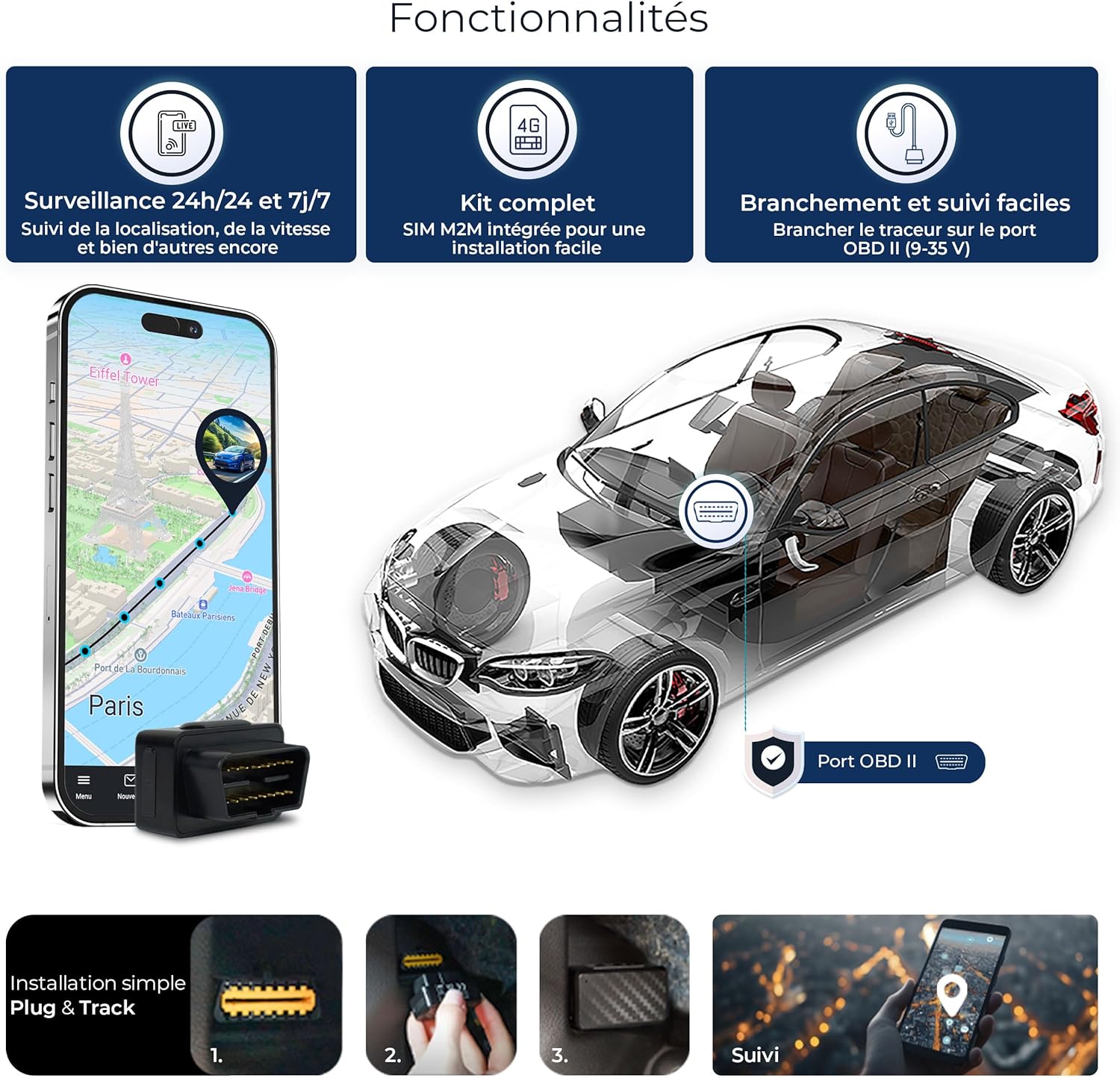
รูปที่ 2: Salind GPS Tracker Functionalities and Installation. This visual illustrates the key functionalities of the Salind GPS tracker, including continuous monitoring, the convenience of a complete kit with an integrated SIM card, and the straightforward plug-and-track installation process via the vehicle's OBD-II port.
3. คู่มือการใช้งาน
The Salind 4G OBD GPS Tracker is operated primarily through its dedicated mobile application, available for both Android and iOS devices, and a web-based portal. These platforms provide access to all tracking features and settings.
3.1. การดาวน์โหลดแอปพลิเคชั่น
ค้นหา the official Salind GPS application in the Google Play Store (for Android) or the Apple App Store (for iOS) and install it on your smartphone or tablet.
3.2. เข้าสู่ระบบ
Use the credentials created during your online registration to log in to the mobile application or web portal. Once logged in, your device should appear on the dashboard.
3.3. การติดตามแบบเรียลไทม์
The application provides real-time location updates of your vehicle. You can view your vehicle's current position on a map, which can be displayed in various modes:
- Outdoor Map Mode: Standard street and terrain view.
- 3D Map Mode: Three-dimensional representation of the environment.
- Satellite Map Mode: Aerial imagery for detailed geographical context.

รูปที่ 3: Multifunctional Map Views. The Salind GPS tracking application provides multiple map viewing options, including standard outdoor maps, detailed 3D maps, and satellite imagery, allowing users to choose their preferred visual representation of vehicle location.
3.4. ประวัติสถานที่ตั้ง
The device records and stores location data, allowing you to review your vehicle's travel history for up to 365 days. This feature is useful for reviewing past routes, speeds, and stops.
3.5. การแจ้งเตือน
Configure various alerts within the application to receive instant notifications via the app or email for specific events:
- สัญญาณเตือนแรงกระแทก: Notifies you if movement is detected while the vehicle is parked, indicating potential tampผลกระทบหรือแรงกระแทก
- สัญญาณเตือนความเร็ว: Alerts you if the vehicle exceeds a predefined speed limit.
- Geofence Alarm: Sends a notification when the vehicle enters or exits a user-defined geographical zone.
- Power Cut Alarm: Informs you if the device is disconnected from the OBD-II port, which could indicate theft or intentional removal.

รูปที่ 4: Situation Alerts. The Salind GPS tracker sends instant notifications for various events, including shock detection when the vehicle is parked, speed limit breaches, entry or exit from defined geofence zones, and power disconnection alerts.
4. Features and Applications
The Salind 4G OBD GPS Tracker offers a robust set of features designed for comprehensive vehicle monitoring and management.
4.1. 4G Network Connectivity
Leveraging the 4G network, the tracker provides superior coverage and faster data transmission, ensuring reliable and accurate location updates across over 100 countries.
4.2. Permanent Power Supply
By connecting directly to the OBD-II port, the device receives continuous power from your vehicle's electrical system. This eliminates the need for manual charging, providing uninterrupted tracking. A small internal battery acts as a backup, offering several hours of operation if the main power is disconnected.
4.3. การใช้งานที่หลากหลาย
The compact design and robust features make the Salind 4G OBD GPS Tracker suitable for a wide range of uses:
- Personal Vehicle Tracking: Monitor your car's location for security or family safety.
- การจัดการกองเรือ: Efficiently manage and track multiple vehicles, including cars, trucks, and vans, for businesses like delivery services or taxi companies.
- Caravan and RV Tracking: Keep an eye on your recreational vehicles, whether parked or in transit.

รูปที่ 5: Multiple Applications. The Salind 4G OBD GPS Tracker is suitable for a wide range of vehicles, including passenger cars, heavy-duty trucks, and commercial vans. It provides extensive coverage across over 42 countries, ensuring reliable tracking for diverse needs.
5. การบำรุงรักษา
The Salind 4G OBD GPS Tracker is designed for minimal maintenance due to its direct connection to the vehicle's OBD-II port, providing continuous power. No battery charging is required under normal operation.
- ตรวจสอบการเชื่อมต่อ: Periodically ensure the device is securely plugged into the OBD-II port to maintain a stable power supply and connection.
- ความสะอาด : Keep the device free from dust and debris. Wipe with a dry, soft cloth if necessary.
- แบตเตอรี่ภายใน: If the device is disconnected from the OBD-II port, its internal battery will provide temporary power for a few hours. Reconnect to the OBD-II port as soon as possible to resume continuous operation and recharge the internal battery.
6 การแก้ไขปัญหา
If you encounter issues with your Salind 4G OBD GPS Tracker, refer to the following common troubleshooting steps:
6.1. Device Not Tracking / No Signal
- ตรวจสอบการเชื่อมต่อ: Ensure the tracker is firmly plugged into the vehicle's OBD-II port.
- พื้นที่ครอบคลุมเครือข่าย: Verify that the vehicle is in an area with adequate 4G network coverage. Signal strength can be affected by location (e.g., underground parking, remote areas).
- การเชื่อมต่อเริ่มต้น: For the first activation or after a long period of inactivity, driving the vehicle for a few kilometers in an open area can help the device establish a stable connection with the network and GPS satellites.
- สิ่งกีดขวาง: Ensure the device is not heavily obstructed by metal components of the vehicle, which can interfere with GPS and cellular signals. If possible, use an OBD extension cable to position the tracker in a less obstructed location (e.g., under the dashboard, away from metal).
6.2. Alerts Too Sensitive (e.g., Shock Alarm)
- ปรับความไว: Access the device settings within the mobile application or web portal and adjust the sensitivity level for specific alerts, such as the shock alarm.
6.3. Power Disconnection Alerts
- This alert indicates that the device has been unplugged from the OBD-II port. Reconnect the device immediately. If the alert persists after reconnection, ensure the port is clean and the connection is secure.
6.4. Subscription Issues
- Check Subscription Status: Verify your subscription status through the Salind GPS web portal or application. Ensure your plan is active and payments are up to date.
- ติดต่อฝ่ายสนับสนุน: For any billing or subscription-related inquiries, contact Salind GPS customer support.
7. ข้อมูลจำเพาะ
| คุณสมบัติ | ข้อมูลจำเพาะ |
|---|---|
| ยี่ห้อ | ซาลินด์ จีพีเอส |
| หมายเลขรุ่น | ซาลินด์ 08 4G |
| เทคโนโลยีการเชื่อมต่อ | OBD-II, 4G Network |
| คุณสมบัติพิเศษ | Virtual Geofencing, Location History, Alert Notifications, Real-time Tracking |
| อุปกรณ์ที่รองรับ | คอมพิวเตอร์ส่วนบุคคล สมาร์ทโฟน แท็บเล็ต |
| ประเภทแบตเตอรี่ | Lithium-ion (internal backup battery) |
| Battery Life (Internal) | Up to 12 hours (when disconnected from OBD) |
| ขนาด (กว้าง x ยาว x สูง) | 28 x 29 x 48 มิลลิเมตร |
| น้ำหนักสินค้า | 30 กรัม |
| วัสดุ | พลาสติก |
| ส่วนประกอบที่รวมอยู่ | Integrated SIM Card |
8. การรับประกันและการสนับสนุน
The Salind 4G OBD GPS Tracker comes with a การรับประกันจากผู้ผลิต 2 ปีเพื่อความอุ่นใจในเรื่องคุณภาพและประสิทธิภาพของผลิตภัณฑ์
For any technical assistance, troubleshooting, or general inquiries, Salind GPS offers 24/7 multi-language customer support. Please refer to the contact information provided on the product packaging or the official Salind GPS website for details on how to reach their support team.
Additionally, Salind GPS provides a 30-day return policy. For details on subscription plans and their terms, please refer to the information available on the Salind GPS website or within the application.

รูปที่ 6: Flexible Subscription Plans. Salind GPS offers flexible subscription plans, including Basic and Premium tiers, with various payment frequencies (monthly, annually, bi-annually) to suit different user requirements for tracking services.


