1. สูงกว่าview
The SONICAKE Fazy Cream is a compact, 100% analog circuit fuzz guitar effect pedal designed to deliver a classic muff-style fuzz sound. It is suitable for both guitar and bass, offering a wide tone control range from dark, smooth fuzz to aggressively blasting distortion. The pedal features a true bypass footswitch to maintain signal integrity when disengaged.

Image 1: The SONICAKE Fazy Cream Fuzz Pedal, highlighting its classic sound capabilities.
2. การตั้งค่า
2.1 แหล่งจ่ายไฟ
The Fazy Cream pedal requires a 9V DC power supply with a center-negative polarity. The power supply is not included with the pedal. Ensure you use a compatible power supply to prevent damage to the unit.
2.2 การเชื่อมต่อแป้นเหยียบ
Connect your guitar to the INPUT jack on the right side of the pedal using a standard 1/4-inch audio cable. Connect the OUTPUT jack on the left side of the pedal to your amplifier or the next effect in your signal chain using another 1/4-inch audio cable. Plug in the 9V DC power supply to the DC 9V input at the top of the pedal.
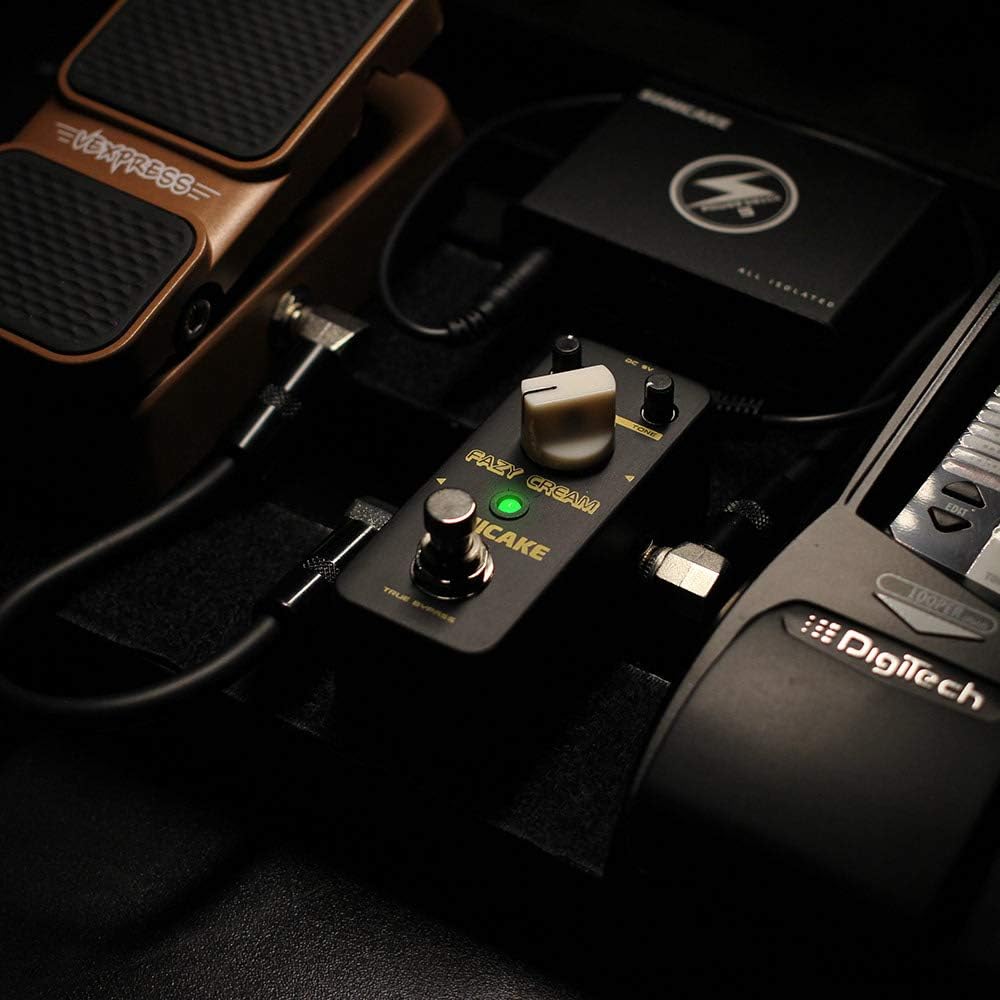
Image 2: The Fazy Cream pedal connected within a typical guitar pedalboard setup.
3. การควบคุมการปฏิบัติงาน
The Fazy Cream pedal features three main control knobs and a footswitch:
- ระดับ: ควบคุมระดับเสียงเอาต์พุตโดยรวมของเอฟเฟกต์
- ฝอย: Adjusts the amount of fuzz/gain. Turning clockwise increases the intensity of the fuzz effect.
- โทนเสียง: Shapes the tonal character of the fuzz, ranging from dark and thick to bright and aggressive.
- ฟุตสวิตช์: เปิดใช้งานหรือข้ามเอฟเฟกต์ ไฟ LED จะสว่างขึ้นเมื่อเอฟเฟกต์ทำงาน

Image 3: Close-up of the Fazy Cream pedal's control knobs.
3.1 Video Demonstration of Controls
Video 1: A demonstration of the SONICAKE Fazy Cream Fuzz Pedal's sound and control adjustments.
4. คุณสมบัติ
- วงจรอนาล็อก 100%: Delivers authentic vintagเสียงฟัซซ์โทน
- Muff Style Fuzz: Designed to produce classic creamy fuzz to high-gain fuzzy distortion, suitable for both guitar and bass.
- Wide Tone Control Range: Allows for versatile sound shaping, from deep, dark tones to bright, aggressively blasting sounds.
- ทรูบายพาสฟุตสวิตช์: Ensures a clean signal path when the effect is disengaged, preserving your instrument's natural tone.

Image 4: The Fazy Cream pedal illustrating its True Bypass feature for a clean signal path.
5. ข้อมูลจำเพาะ
| หมายเลขรุ่น | คิวเอสเอส11-20 |
| น้ำหนักสินค้า | 7.4 ออนซ์ (0.21 กิโลกรัม) |
| ขนาดสินค้า | 3.68 x 1.65 x 2.05 นิ้ว (93.5 x 42 x 52 มม.) |
| วัสดุตัวเครื่อง | Metal (Zinc-alloy die cast casing) |
| ประเภทขั้วต่อ | แจ็คเสียงขนาด 1/4 นิ้ว |
| ฮาร์ดแวร์อินเตอร์เฟซ | เสียงขนาด 1/4 นิ้ว |
| รูปแบบสัญญาณ | อนาล็อก |
| เล่มที่tage | 9 Volts DC (Center Negative) |

Image 5: Dimensions of the SONICAKE Fazy Cream Fuzz Pedal.
6. การบำรุงรักษา
To ensure the longevity and optimal performance of your Fazy Cream pedal, follow these maintenance guidelines:
- รักษาแป้นเหยียบให้สะอาดด้วยการเช็ดด้วยผ้านุ่มและแห้ง หลีกเลี่ยงการใช้น้ำยาทำความสะอาดหรือสารละลายที่มีฤทธิ์กัดกร่อน
- ป้องกันแป้นเหยียบจากอุณหภูมิที่สูงจัด ความชื้นสูง และแสงแดดโดยตรง
- Always use the specified 9V DC center-negative power supply. Using an incorrect power supply can damage the unit and void the warranty.
- ตัดการเชื่อมต่อแหล่งจ่ายไฟเมื่อไม่ได้ใช้งานแป้นเหยียบเป็นเวลานาน
7 การแก้ไขปัญหา
If you encounter issues with your Fazy Cream pedal, try the following steps:
- ไม่มีเสียง:
- ตรวจสอบการเชื่อมต่อสายเคเบิลทั้งหมด (กีตาร์, เอฟเฟ็กต์กีตาร์, amplifier, power supply).
- Ensure the power supply is correctly connected and providing power (LED should light up when engaged).
- ทดสอบด้วยสายเคเบิล กีตาร์ และอื่นๆ ที่แตกต่างกัน ampใช้เครื่องขยายเสียงเพื่อแยกปัญหา
- เสียงรบกวน/เสียงฮัมที่ไม่ต้องการ:
- Ensure you are using a regulated 9V DC center-negative power supply. Unregulated power supplies can introduce noise.
- Check for ground loop issues by trying the pedal in a different power outlet or with an isolated power supply.
- ตรวจสอบให้แน่ใจว่าสายเคเบิลทั้งหมดอยู่ในสภาพดีและมีฉนวนหุ้มอย่างเหมาะสม
- เอฟเฟกต์ไม่ทำงาน:
- Verify the footswitch is functioning correctly (LED should toggle on/off).
- Check power supply as described above.
8. การรับประกันและการสนับสนุน
สำหรับข้อมูลการรับประกันและการสนับสนุนทางเทคนิค โปรดดูที่เว็บไซต์อย่างเป็นทางการของ SONICAKE webหรือติดต่อตัวแทนจำหน่ายในพื้นที่ของคุณ เก็บใบเสร็จรับเงินไว้เป็นหลักฐานการซื้อสำหรับการเรียกร้องการรับประกันใดๆ


