1. บทนำ
The Daytech Caregiver Pager Call Button System is a wireless alert solution designed to provide assistance and peace of mind for caregivers and individuals requiring support. This system enables quick communication when help is needed, enhancing safety and independence within various environments such as homes, hospitals, and nursing facilities.
This manual provides detailed instructions for setting up, operating, and maintaining your Daytech Caregiver Pager Call Button System.
2. ส่วนประกอบผลิตภัณฑ์
The Daytech Caregiver Pager Call Button System typically includes the following components:
- Receiver Units: These units plug into a standard electrical outlet and emit an audible and visual alert when a call button is pressed.
- ปุ่มเรียก: These can be worn as a pendant with a lanyard or mounted on a wall. They are splash-proof.
- เพจเจอร์นาฬิกา: A wearable watch-style button for easy access. Note: The watch pager cannot be immersed in water.
- สายคล้องคอ: For wearing call buttons as pendants.
- กาวสองหน้า: For wall-mounting call buttons.
- แบตเตอรี่: 12V batteries are included for the call buttons and watch pager.

ภาพ: เหนือview of the Daytech Caregiver Pager System components.
3. คำแนะนำในการตั้งค่า
Follow these steps to set up your Daytech Caregiver Pager System:
3.1. การจ่ายไฟให้กับเครื่องรับสัญญาณ
- Plug the receiver unit into a standard electrical wall socket. The receiver will power on.
3.2. Battery Installation (Call Buttons/Watch Pager)
The call buttons and watch pager come with pre-installed 12V batteries. If replacement is needed, refer to the Maintenance section.
3.3. Pairing Call Buttons with Receiver
To ensure the call buttons communicate with the receiver, they must be paired:
- เสียบตัวรับสัญญาณเข้ากับซ็อกเก็ต
- On the receiver, use the Forward (▲) or Backward (▼) buttons to select your desired ringtone.
- Press and hold the Volume Control button on the receiver until it makes a "ding-dong" sound. This indicates the receiver is in pairing mode.
- Immediately press the call button (either the pendant button or the watch pager SOS button). The receiver will make another "ding-dong" sound, confirming successful pairing.

Image: Step-by-step guide for pairing call buttons with the receiver.
4. คู่มือการใช้งาน
4.1. การเริ่มต้นการโทร
When assistance is needed, simply press the large button on the call button unit or the SOS button on the watch pager. This will send a wireless signal to the paired receiver(s).

Image: Demonstrates how pressing a call button alerts the receiver.
4.2. การรับการแจ้งเตือน
เมื่อได้รับสัญญาณแล้ว หน่วยรับสัญญาณจะดำเนินการดังต่อไปนี้:
- Emit an audible alert (ringtone).
- Illuminate its LED light, providing a visual alert.
4.3. Adjusting Ringtone and Volume
The receiver offers customization options for alerts:
- การเลือกเสียงเรียกเข้า: Use the Forward (▲) and Backward (▼) buttons on the side of the receiver to cycle through 20 unique ringtones.
- การปรับระดับเสียง: Press the Volume Control button to select from 5 adjustable volume levels, ranging from 0dB (mute) to 110dB.
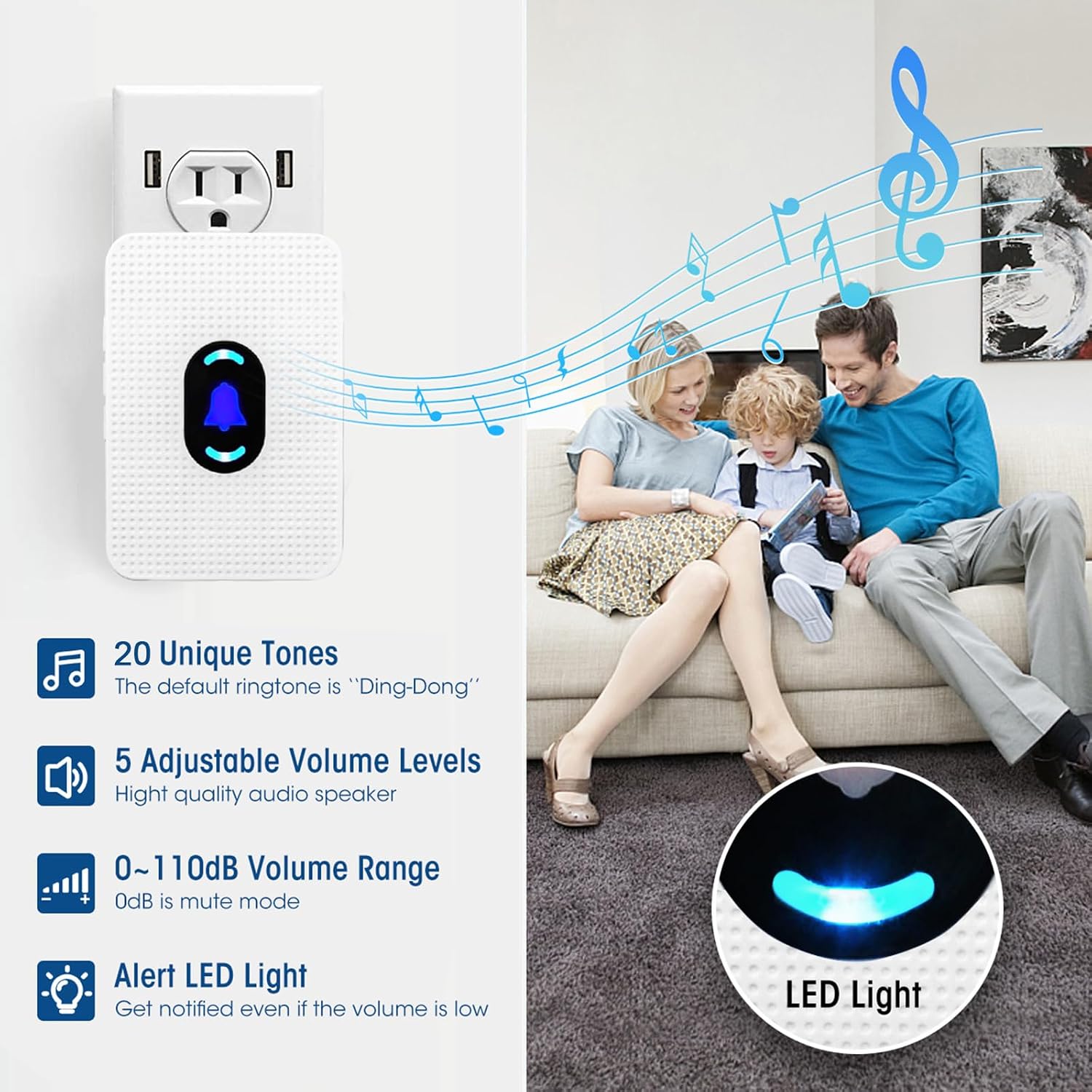
Image: Receiver features including ringtone and volume options.
4.4. Night Light Mode
To activate or deactivate the night light feature on the receiver, press and hold the middle button (bell icon) for 5 seconds.
5. การจัดวางและการใช้งาน
The Daytech Caregiver Pager System offers flexible placement options:
- Wearable Call Buttons: The call buttons can be worn around the neck using the provided lanyard. The watch pager is worn on the wrist.
- การติดตั้งบนผนัง: Call buttons can be affixed to a wall using the included double-sided adhesive. This is particularly useful in areas like bathrooms, as the call button unit is splash-proof (IP55 rated).

Image: Various attachment options for the call buttons.
5.1. ช่วงการดำเนินงาน
The wireless system has an operating range of up to 300 feet (90 meters) in open areas, allowing caregivers to move freely around the house while remaining alert.

Image: Illustration of the system's wireless operating range within a home.
6. การบำรุงรักษา
6.1. การเปลี่ยนแบตเตอรี่
The call buttons and watch pager are powered by 12V batteries. If the signal becomes intermittent or the device stops responding, it may be time to replace the battery. Refer to the device's casinดูที่ช่อง g สำหรับคำแนะนำเกี่ยวกับวิธีการเปิดและเปลี่ยนแบตเตอรี่
6.2. การทำความสะอาด
Wipe the receiver and call buttons with a soft, dry cloth. Avoid using abrasive cleaners or submerging any part of the system in water.
6.3. ความทนทานต่อน้ำ
The call button unit is IP55 splash-proof, meaning it can withstand splashes of water, making it suitable for bathroom installation. However, the watch pager and call button units are not designed to be immersed in water and should be removed before bathing or showering.

Image: Demonstrates water resistance of the call button and proper usage.
7 การแก้ไขปัญหา
If you encounter issues with your Daytech Caregiver Pager System, consider the following:
- ไม่มีการแจ้งเตือนจากเครื่องรับ:
- ตรวจสอบให้แน่ใจว่าได้เสียบเครื่องรับสัญญาณเข้ากับเต้ารับไฟฟ้าที่ใช้งานได้ถูกต้องแล้ว
- ตรวจสอบว่าแบตเตอรี่ของปุ่มโทรหรือนาฬิกาเพจเจอร์จำเป็นต้องเปลี่ยนหรือไม่
- ตรวจสอบให้แน่ใจว่าปุ่มโทร/เพจเจอร์นาฬิกาได้จับคู่กับตัวรับสัญญาณแล้ว (โปรดดูหัวข้อ 3.3)
- Ensure the call button/watch pager is within the operating range of the receiver.
- Intermittent Alerts:
- This often indicates a low battery in the call button or watch pager. Replace the battery.
- Check for potential signal interference from other wireless devices or thick walls/obstructions.
- Receiver Not Responding to Button Presses:
- Re-pair the call button/watch pager with the receiver (refer to Section 3.3).
8. ข้อมูลจำเพาะ
| คุณสมบัติ | ข้อมูลจำเพาะ |
|---|---|
| หมายเลขรุ่น | อี-01ดับบลิว |
| ยี่ห้อ | เดย์เทค |
| ผู้ผลิต | บริษัท เดย์เทค กรุ๊ป จำกัด |
| แหล่งพลังงาน | Battery Powered (Call Buttons/Watch), AC Powered (Receiver) |
| แบตเตอรี่ | ต้องใช้แบตเตอรี่ 12V จำนวน 3 ก้อน (มีให้ในชุด) |
| คำอธิบายแบตเตอรี่ | ด่าง |
| วิธีการควบคุม | สัมผัส |
| ระดับเสียง | 0 - 110 เดซิเบล |
| ประเภทการติดตั้ง | Wall Mount (Call Button) |
| ระยะสูงสุด | 300 ฟุต (90 เมตร) |
| เทคโนโลยีเซ็นเซอร์ | เซนเซอร์สัมผัส |
| ขนาดสินค้า | 2.44 x 3.54 x 1.97 นิ้ว |
| น้ำหนักสินค้า | 13.7 ออนซ์ |
| สี | สีขาว |
| ยูพีซี | 779584901118 |
9. การรับประกันและการสนับสนุน
Daytech provides a full year's warranty and a money-back guarantee for this product. For any questions, troubleshooting assistance, or support, please contact Daytech customer service. Round-the-clock customer service is available to assist you.


