การแนะนำ
ขอบคุณสำหรับการซื้อasing the SAMI RS-11807 3-Band Radio. This portable analog radio offers versatile listening options with FM, AM, and SW bands, along with modern connectivity features including Bluetooth, USB, Micro SD, and Aux-In. It features a telescopic antenna for enhanced reception, an ambient LED light, and can be powered by its rechargeable battery or two UM-1 batteries (not included).
คำแนะนำเพื่อความปลอดภัย
- อ่านคำแนะนำทั้งหมดอย่างละเอียดก่อนใช้อุปกรณ์
- Do not expose the unit to rain, moisture, or direct sunlight for extended periods.
- ควรหลีกเลี่ยงการวางเครื่องไว้ใกล้แหล่งความร้อน เช่น เครื่องทำความร้อน เตา หรือเครื่องใช้ไฟฟ้าอื่นๆ ที่ให้ความร้อน
- ใช้เฉพาะอะแดปเตอร์แปลงไฟหรือแบตเตอรี่ที่ระบุไว้เท่านั้น
- อย่าเปิดcasinง. ส่งต่อการบริการทั้งหมดให้กับบุคลากรที่มีคุณสมบัติ
- เก็บให้พ้นจากมือเด็ก
เนื้อหาแพ็คเกจ
- SAMI RS-11807 3-Band Radio
- สายไฟ AC
- คู่มือการใช้งาน (เอกสารนี้)
การจัดวางผลิตภัณฑ์
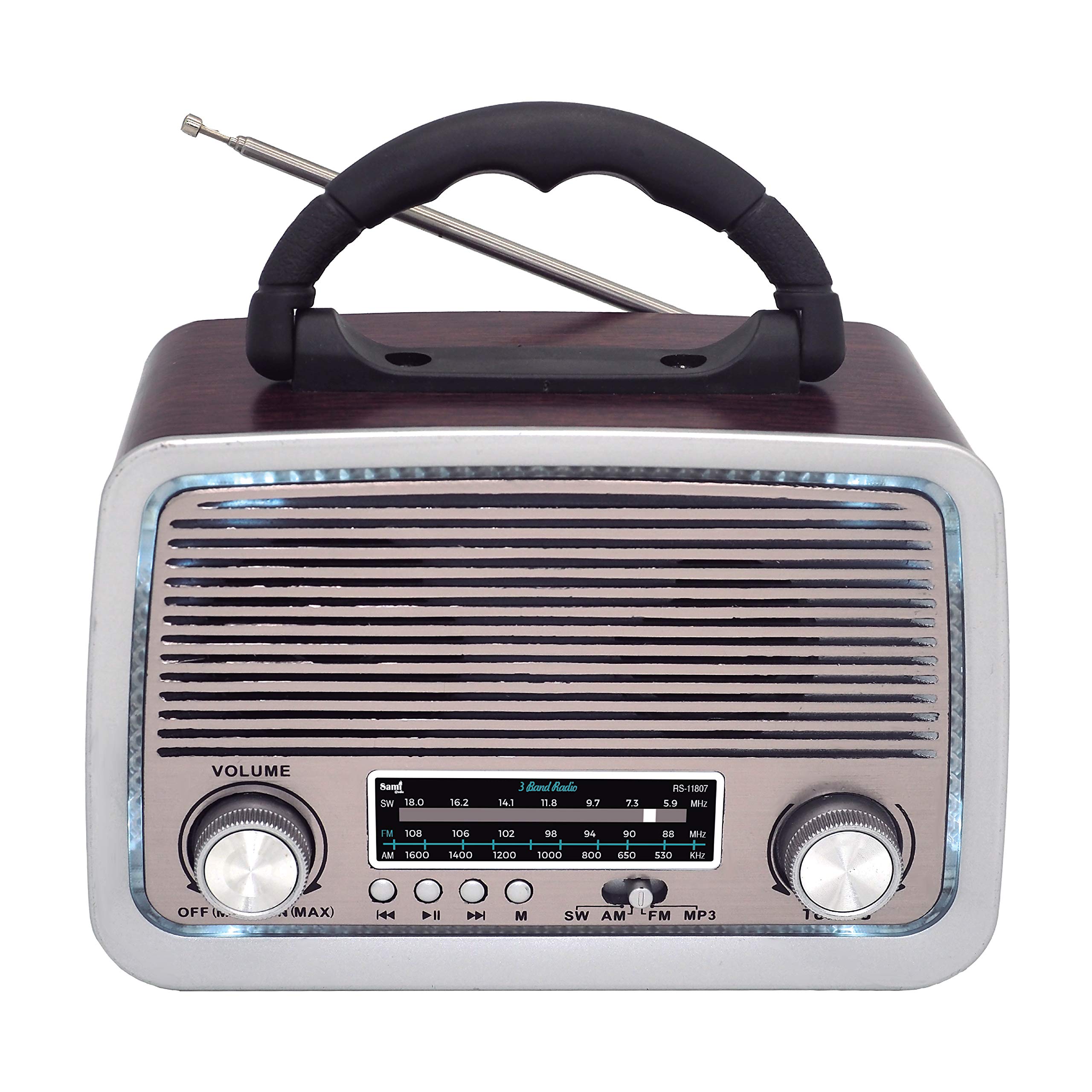
รูปที่ 1 : ด้านหน้า View of SAMI RS-11807 Radio. Displays the main speaker, frequency display, volume control (left), tuning control (right), and playback buttons (rewind, play/pause, fast forward, mode).
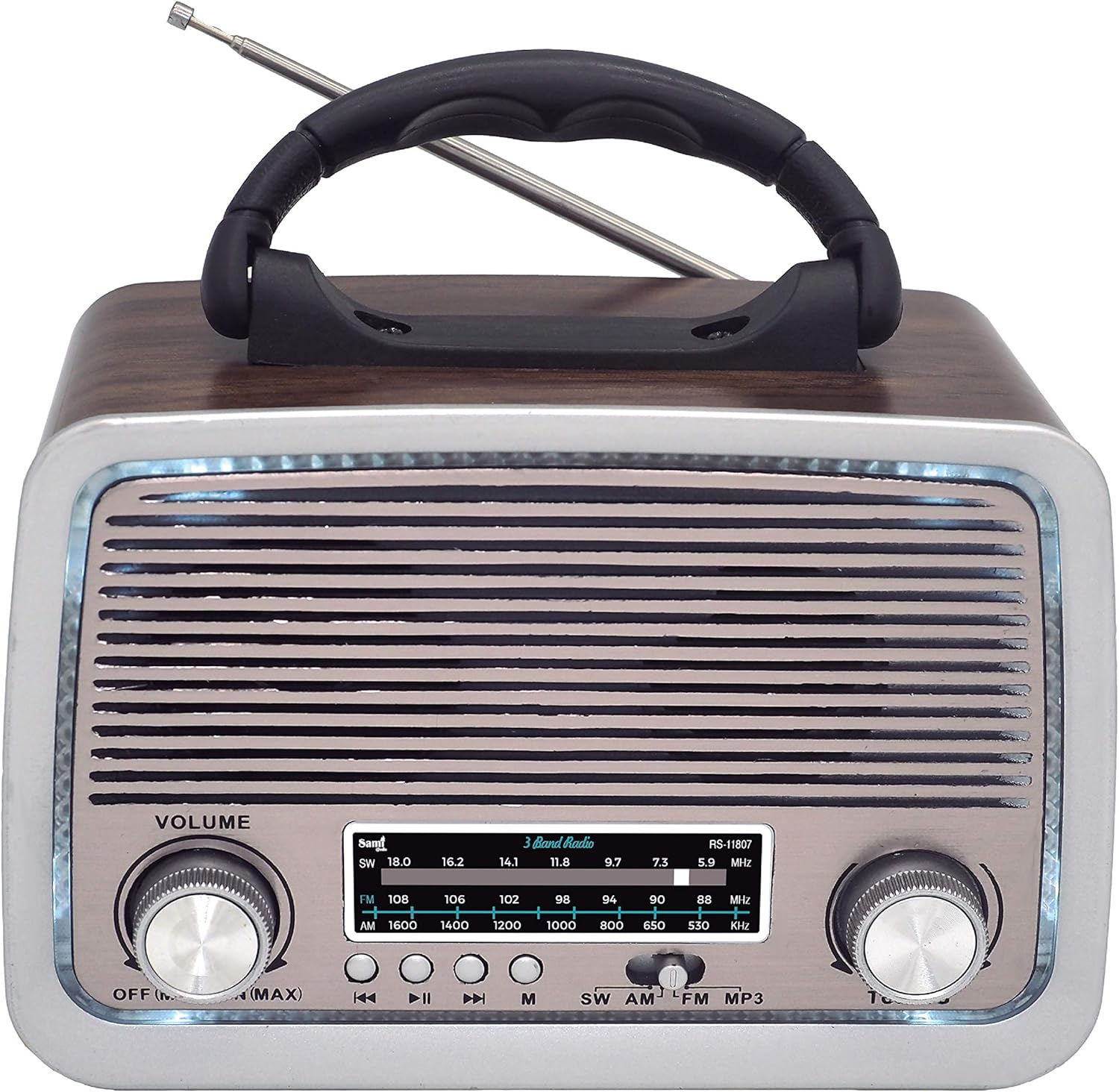
รูปที่ 2: ด้านข้าง View of SAMI RS-11807 Radio. Shows the telescopic antenna extended, the carry handle, and the various input ports on the side: USB, Micro SD card slot, Aux-In, and the DC charging port.
การควบคุมและพอร์ต:
- ปุ่มปรับระดับเสียง: Rotate to adjust sound level.
- ปุ่มปรับ: Rotate to select radio frequencies.
- ตัวเลือกคลื่นความถี่: Switch between FM, AM, SW, BT, USB/SD, and Aux modes.
- การควบคุมการเล่น: For USB/Micro SD/Bluetooth modes (Previous Track, Play/Pause, Next Track).
- พอร์ต USB: สำหรับแฟลชไดรฟ์ USB
- ช่องเสียบการ์ด Micro SD: สำหรับเมมโมรี่การ์ด Micro SD
- พอร์ต Aux-In: สำหรับเชื่อมต่ออุปกรณ์เสียงภายนอก
- พอร์ตชาร์จ DC: For connecting the AC power cable to charge the internal battery or power the unit.
- เสาอากาศยืดไสลด์: ยืดออกเพื่อการรับสัญญาณวิทยุที่ดีขึ้น
- ช่องใส่แบตเตอรี่: Located on the back/bottom for UM-1 batteries.
การตั้งค่า
1. การเปิดเครื่อง
- แบตเตอรี่แบบชาร์จไฟได้ภายใน: The radio has a built-in rechargeable battery. Connect the provided AC power cable to the DC charging port on the radio and plug the other end into a wall outlet to charge the battery. The LED indicator will show charging status.
- UM-1 Batteries (Not Included): For portable use without recharging, open the battery compartment and insert two UM-1 size batteries, ensuring correct polarity (+/-).
2. เสาอากาศ
For optimal radio reception, fully extend the telescopic antenna. Adjust its direction for the clearest signal.
คำแนะนำการใช้งาน
1. การใช้งานวิทยุ (FM/AM/SW)
- Turn the Volume knob clockwise to power on the radio and set a low volume.
- Use the Band Selector to choose your desired band: FM, AM, or SW.
- Extend the telescopic antenna and adjust its position for best reception.
- Rotate the Tuning knob to scan for radio stations. The frequency display will show the selected frequency.
- Adjust the Volume knob to your preferred listening level.
2. ฟังก์ชั่นบลูทูธ (BT)
- Turn on the radio and set the Band Selector to 'BT' mode. A voice prompt will indicate Bluetooth pairing mode.
- เปิดใช้งานบลูทูธบนอุปกรณ์เคลื่อนที่ของคุณ (สมาร์ทโฟน แท็บเล็ต ฯลฯ)
- ค้นหา available devices and select 'SAMI RS-11807' (or similar name) from the list.
- Once paired, a confirmation sound will be heard. You can now play audio from your device through the radio.
- Use the playback controls on the radio or your device to manage music.
3. การเล่น USB/Micro SD
- Insert a USB flash drive into the USB port or a Micro SD card into the Micro SD slot.
- Set the Band Selector to 'USB/SD' mode. The radio will automatically detect and begin playing audio files (แนะนำรูปแบบ MP3)
- Use the playback controls (Previous Track, Play/Pause, Next Track) to navigate your music.
4. ช่องต่อ Aux-In
- Connect one end of a 3.5mm audio cable (not included) to the Aux-In port on the radio.
- ต่อปลายอีกด้านของสายเคเบิลเข้ากับช่องเสียบหูฟังหรือช่องสัญญาณเสียงออกของอุปกรณ์ภายนอกของคุณ (เช่น เครื่องเล่น MP3, สมาร์ทโฟน)
- Set the Band Selector to 'Aux In' mode.
- เล่นไฟล์เสียงจากอุปกรณ์ภายนอกของคุณ เสียงจะถูกส่งออกทางลำโพงของวิทยุ
5. Ambient LED Light
The radio features an ambient LED light. This light typically activates automatically when the radio is powered on. There may be a dedicated switch or a long press on a mode button to toggle it on/off, depending on the specific model variant.
การซ่อมบำรุง
- การทำความสะอาด: เช็ดวิทยุด้วยผ้านุ่มและแห้ง ห้ามใช้น้ำยาทำความสะอาดที่มีฤทธิ์กัดกร่อนหรือตัวทำละลาย
- การดูแลแบตเตอรี่ If using UM-1 batteries, remove them if the radio will not be used for an extended period to prevent leakage. For the rechargeable battery, charge it regularly to maintain its lifespan.
- พื้นที่จัดเก็บ: เก็บวิทยุไว้ในที่แห้งและเย็น หลีกเลี่ยงแสงแดดโดยตรงและอุณหภูมิที่สูงหรือต่ำเกินไป
การแก้ไขปัญหา
| ปัญหา | สาเหตุที่เป็นไปได้ | สารละลาย |
|---|---|---|
| ไม่มีไฟฟ้า | Battery depleted or incorrectly installed; AC cable not connected. | Charge the internal battery, check UM-1 battery polarity, or ensure AC cable is securely connected. |
| การรับสัญญาณวิทยุไม่ดี | เสาอากาศไม่ได้ยืดออกหรืออยู่ในตำแหน่งที่ไม่เหมาะสม ส่งผลให้สัญญาณอ่อน | ยืดและปรับเสาอากาศแบบยืดหดได้จนสุด ลองย้ายวิทยุไปยังตำแหน่งอื่นดู |
| บลูทูธไม่เชื่อมต่อ | Radio not in BT mode; device Bluetooth off; already connected to another device. | Ensure radio is in BT mode. Turn on Bluetooth on your device. Disconnect from other devices. |
| USB/Micro SD เล่นไม่ได้ | ไม่ถูกต้อง file format; media not inserted correctly; radio not in USB/SD mode. | รับรองเสียง files are MP3. Reinsert media. Select USB/SD mode. |
ข้อมูลจำเพาะ
| คุณสมบัติ | รายละเอียด |
|---|---|
| ยี่ห้อ | ซามิ |
| แบบอย่าง | อาร์เอส-11807 |
| แบนด์วิทยุ | FM, AM, SW (3 Bands) |
| เทคโนโลยีจูนเนอร์ | AM, FM, SW |
| การเชื่อมต่อ | Bluetooth, USB, Micro SD, Aux-In |
| แหล่งพลังงาน | Rechargeable Battery, 2 x UM-1 Batteries (not included), AC Power Cable |
| คุณสมบัติพิเศษ | Telescopic Antenna, Ambient LED Light, Portable Design |
| อุปกรณ์ที่รองรับ | สมาร์ทโฟน, เครื่องเล่น MP3, แล็ปท็อป |
| สี | ไม้ |
การรับประกันและการสนับสนุน
This product comes with a standard manufacturer's warranty. For specific warranty details, please refer to the documentation provided at the time of purchase or contact your retailer. If you encounter any issues or require technical assistance, please contact Sami customer support through their official webเว็บไซต์หรือข้อมูลการติดต่อที่ให้มาพร้อมกับการซื้อของคุณ


