1. บทนำ
Thank you for choosing the STRONG SRT 24HC3023 24-inch TV. This television is designed for versatile use, offering a triple tuner for DVB-T2 HD, DVB-C, and DVB-S2 reception, making it suitable for both home entertainment and mobile applications such as motorhomes, caravans, or boats, thanks to its 12 Volt compatibility. This manual provides essential information for setting up, operating, and maintaining your new television. Please read it thoroughly before use to ensure proper functionality and safety.

Figure 1.1: STRONG SRT 24HC3023 24-inch TV
2. ข้อมูลด้านความปลอดภัย
เพื่อให้มั่นใจถึงการทำงานที่ปลอดภัยและป้องกันความเสียหาย โปรดปฏิบัติตามข้อควรระวังด้านความปลอดภัยต่อไปนี้:
- อย่านำโทรทัศน์ไปวางไว้กลางฝนหรือความชื้น เพื่อป้องกันไฟไหม้หรือไฟฟ้าช็อต
- อย่าปิดกั้นช่องระบายอากาศ ควรมีพื้นที่รอบทีวีเพียงพอเพื่อให้อากาศถ่ายเทได้สะดวก
- Use only the power adapter supplied with the TV. For 12V operation, ensure the power source is stable and within the specified voltagช่วงอี
- ปกป้องสายไฟไม่ให้ถูกเหยียบหรือถูกหนีบ โดยเฉพาะที่ปลั๊ก เต้ารับไฟฟ้า และจุดที่สายไฟออกจากเครื่อง
- อย่าพยายามให้บริการผลิตภัณฑ์นี้ด้วยตนเอง ส่งต่อการบริการทั้งหมดไปยังช่างบริการที่ผ่านการรับรอง
- Clean the TV only with a dry cloth. Do not use liquid cleaners or aerosol cleaners.
- Keep batteries for the remote control out of reach of children.
3. เนื้อหาบรรจุภัณฑ์
Carefully unpack your TV and check that all items listed below are included and undamaged. If any items are missing or damaged, contact your retailer.
- สตรอง SRT 24HC3023 LED TV
- Remote Control (including 2x AAA Batteries)
- Stand (Base and Screws)
- Power Adapter (Standard Euro; 12V power cable not included)
- คู่มือการใช้งาน

รูปที่ 3.1: บรรจุภัณฑ์ของผลิตภัณฑ์

รูปที่ 3.2: รีโมทคอนโทรล
4. การตั้งค่า
4.1 การติดตั้งขาตั้ง
- Place the TV face down on a soft, clean surface to prevent scratching the screen.
- จัดวางขาตั้งให้ตรงกับรูยึดที่ด้านล่างของทีวี
- ยึดขาตั้งด้วยสกรูที่ให้มา อย่าขันแน่นเกินไป
4.2 การเชื่อมต่ออุปกรณ์ต่อพ่วง
Your TV offers a variety of connection ports for different devices.
- เสาอากาศ/ดาวเทียม: Connect your DVB-T/T2 antenna to the "ANT In" port or your satellite dish to the "SAT In" port.
- ช่องต่อ HDMI: For high-definition devices like Blu-ray players, game consoles, or streaming sticks.
- สการ์ต: For older devices like DVD players or VCRs.
- ยูเอสบี: สำหรับการเล่นสื่อจากไดรฟ์ USB
- AV In / Mini YPbPr: For analog video and audio sources.
- หูฟัง: สำหรับการฟังส่วนตัว
- ส/พีดีเอฟ: For digital audio output to external sound systems.
- สล็อต CI: For CI+ modules (e.g., for freenet-TV).
- กำลังไฟ 12V: This TV is 12V compatible, ideal for mobile use. A 12V power cable is not included and must be purchased separately.

รูปที่ 4.1: ขนาดของทีวี
4.3 การเปิดเครื่องครั้งแรกและการสแกนช่องสัญญาณ
- Connect the TV to a power source (either the supplied AC adapter or a compatible 12V source).
- กดปุ่มเปิดปิดบนทีวีหรือรีโมทคอนโทรล
- Follow the on-screen instructions for initial setup, including language selection and channel scanning. The triple tuner allows you to scan for DVB-T/T2, DVB-C, and DVB-S2 channels.
5. คู่มือการใช้งาน
5.1 ฟังก์ชั่นพื้นฐาน
- เปิด/ปิดเครื่อง: กดปุ่ม พลัง ปุ่มบนรีโมทคอนโทรล
- การเลือกช่อง: ใช้ ช+/- buttons to change channels sequentially, or enter channel numbers directly using the numeric keypad.
- การควบคุมระดับเสียง: ใช้ ฉบับ+/- ปุ่มปรับระดับเสียง
- การเลือกแหล่งที่มา: กดปุ่ม แหล่งที่มา button to switch between input sources (HDMI, SCART, TV, etc.).
5.2 การทำงานของจูนเนอร์สามตัว
The integrated triple tuner supports DVB-T/T2 (terrestrial), DVB-C (cable), and DVB-S2 (satellite) reception. During the initial setup, you will be prompted to select your preferred reception type and perform a channel scan. You can switch between these modes via the input source menu.
5.3 คู่มือรายการอิเล็กทรอนิกส์ (EPG)
กดปุ่ม อีพีจี button on the remote control to access the Electronic Program Guide. This displays program schedules for upcoming broadcasts and allows you to set timers for recording or viewการไอเอ็นจี
5.4 การเล่น USB
Insert a USB storage device into the USB port. The TV will typically detect the device and prompt you to access its media content (photos, music, videos). Navigate through the fileโดยใช้รีโมทคอนโทรล
5.5 CI+ Slot
The CI+ slot allows you to insert a Conditional Access Module (CAM) and a smart card (e.g., for freenet-TV in Germany) to decrypt encrypted channels. Follow the instructions provided with your CI+ module for installation and activation.
วิดีโอ 5.1: วิดีโอแสดงผลิตภัณฑ์อย่างเป็นทางการasing the STRONG 24HC3023 TV's features, including its 12V compatibility for mobile use in settings like camping or motorhomes.

Figure 5.1: STRONG TV in a mobile setting, highlighting 12V compatibility.
6. การบำรุงรักษา
Proper maintenance helps extend the life of your TV.
- การทำความสะอาดหน้าจอ: เช็ดหน้าจอเบาๆ ด้วยผ้านุ่มๆ ที่ไม่เป็นขุย สำหรับคราบฝังแน่น ให้ใช้น้ำยาทำความสะอาดเฉพาะสำหรับหน้าจอ เช็ดลงบนผ้า อย่าเช็ดลงบนหน้าจอโดยตรง
- ทำความสะอาดตู้: ใช้ผ้าแห้งนุ่มเช็ดทำความสะอาดตู้ทีวี ห้ามใช้สารทำความสะอาดที่มีฤทธิ์กัดกร่อนหรือตัวทำละลาย
- การระบายอากาศ : Ensure the ventilation openings are clear of dust and debris. Do not place the TV in an enclosed space without adequate airflow.
- หมดแรง: ควรดึงปลั๊กทีวีออกจากเต้ารับไฟฟ้าทุกครั้งก่อนทำความสะอาดหรือเมื่อไม่ได้ใช้งานเป็นเวลานาน
7 การแก้ไขปัญหา
If you encounter problems with your TV, refer to the following common issues and solutions.
| ปัญหา | สาเหตุที่เป็นไปได้ | สารละลาย |
|---|---|---|
| ไม่มีไฟฟ้า | ไม่ได้เสียบสายไฟ ไม่มีไฟจากปลั๊กไฟ | ตรวจสอบการเชื่อมต่อสายไฟ ทดสอบเต้ารับกับอุปกรณ์อื่น |
| ไม่มีภาพแต่มีเสียง | เลือกแหล่งสัญญาณเข้าไม่ถูกต้อง สายวิดีโอหลวม | Press SOURCE button to select correct input. Check video cable connections. |
| ไม่มีเสียงแต่มีภาพ | Volume too low or muted; incorrect audio output setting. | Increase volume or unmute. Check audio settings in the menu. |
| คุณภาพของภาพไม่ดี | Weak signal; antenna/cable issue; picture settings. | ตรวจสอบการเชื่อมต่อเสาอากาศ/สายเคเบิล ปรับการตั้งค่าภาพ (ความสว่าง ความคมชัด) |
| รีโมตคอนโทรลไม่ทำงาน | Batteries are dead or incorrectly inserted; obstruction. | Replace batteries. Ensure no obstruction between remote and TV. |
หากปัญหายังคงอยู่หลังจากลองวิธีแก้ไขเหล่านี้แล้ว โปรดติดต่อเจ้าหน้าที่บริการที่มีคุณสมบัติเหมาะสม
8. ข้อมูลจำเพาะ
| คุณสมบัติ | รายละเอียด |
|---|---|
| หมายเลขรุ่น | SRT24HC3023 |
| ขนาดหน้าจอ | 24 นิ้ว (61 ซม.) |
| เทคโนโลยีการแสดงผล | นำ |
| ปณิธาน | 720p (1366 x 768 พิกเซล) |
| อัตราการรีเฟรช | 60 เฮิรตซ์ |
| จูนเนอร์ | DVB-T2 HD, DVB-C, DVB-S2 (Triple Tuner) |
| การเชื่อมต่อ | HDMI, SCART, USB, AV In, Mini YPbPr, Headphone, S/PDIF, PC Audio In, ANT In, SAT In, CI Slot |
| แหล่งจ่ายไฟ | AC 220-240V, 50/60Hz; 12V DC compatible |
| การใช้พลังงาน (โหมดเปิด) | 25 วัตต์ |
| ระดับประสิทธิภาพการใช้พลังงาน | F |
| ขนาด (กว้าง x ลึก x สูง) | 55.07 x 16.1 x 36.73 ซม. (พร้อมขาตั้ง) |
| น้ำหนัก | 2.66 กก. |
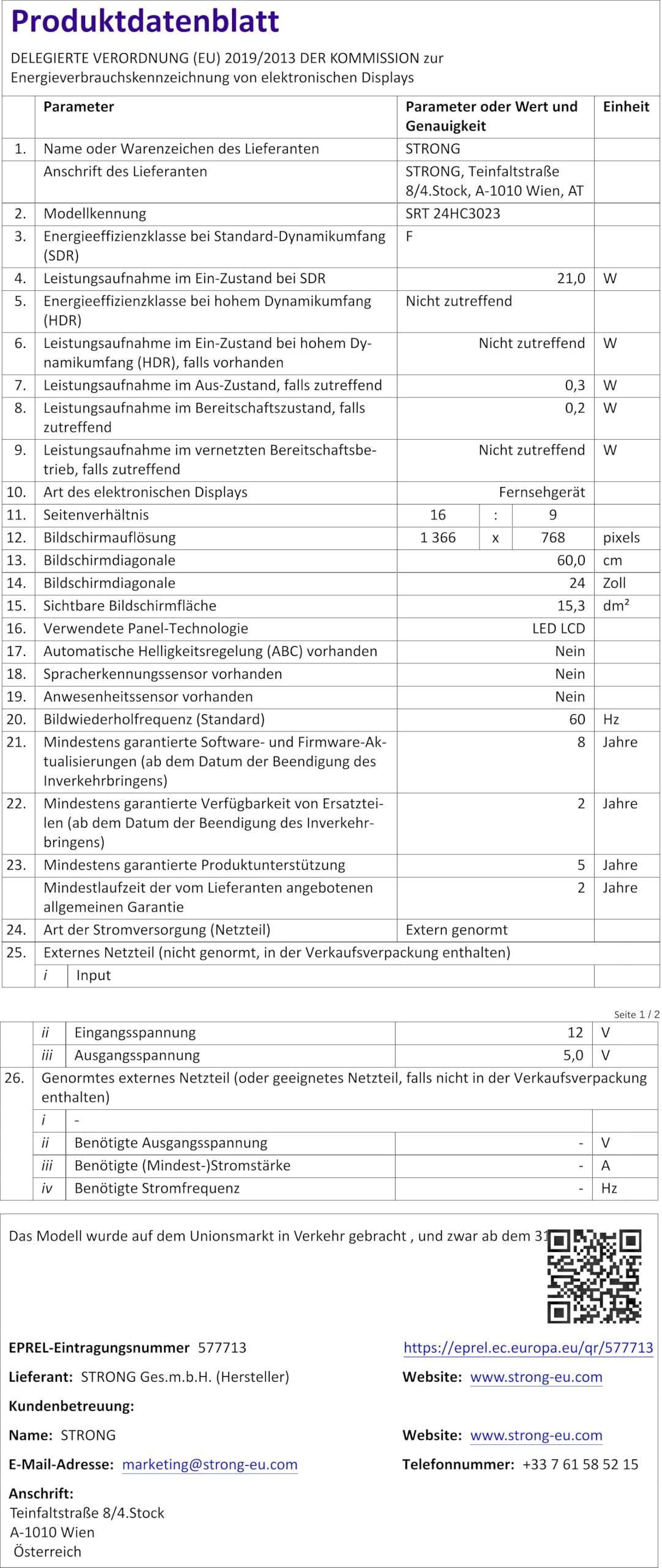
Figure 8.1: Product Fiche (Energy Label Information)
สำหรับข้อมูลพลังงานโดยละเอียดเพิ่มเติม โปรดดูที่ ฐานข้อมูล EPREL (ลิงก์ QR Code).

รูปที่ 8.2: ฉลากประสิทธิภาพการใช้พลังงาน
9. การรับประกันและการสนับสนุน
Your STRONG SRT 24HC3023 TV comes with a standard manufacturer's warranty. Please refer to the warranty card included in your package for specific terms and conditions. For technical support, troubleshooting assistance beyond this manual, or warranty claims, please contact STRONG customer service or your local retailer.
You can find more information and support on the official STRONG webเว็บไซต์: www.strong.tv


