1. บทนำ
This manual provides detailed instructions for the installation, operation, maintenance, and troubleshooting of your ASRock B460M PRO4 Motherboard. Designed to support 10th Generation Intel Core Processors (Socket 1200), this motherboard offers a robust platform for personal computing with features like DDR4 2933MHz memory support, multiple PCIe 3.0 slots, and M.2 connectivity.

Image 1.1: ASRock B460M PRO4 Motherboard and its retail packaging.
2. เนื้อหาบรรจุภัณฑ์
ตรวจสอบให้แน่ใจว่าอุปกรณ์ทั้งหมดที่ระบุไว้ด้านล่างนั้นรวมอยู่ในแพ็คเกจเมนบอร์ดของคุณ หากมีอุปกรณ์ใดขาดหายหรือเสียหาย โปรดติดต่อผู้ค้าปลีกของคุณ
- ASRock B460M PRO4 Motherboard
- คู่มือการติดตั้งแบบด่วน
- Support CD (containing drivers and utilities)
- I / O Shield
- สายเคเบิลข้อมูล SATA 2 เส้น
- 3 x Screws for M.2 Sockets
- 1 x Standoff for M.2 Socket
3. การตั้งค่า
3.1. การติดตั้งซีพียู
The ASRock B460M PRO4 motherboard features an LGA 1200 socket, compatible with 10th Generation Intel Core Processors. Carefully align the CPU with the socket, ensuring the gold triangle on the CPU matches the triangle on the socket. Gently lower the CPU into place without forcing it, then secure the retention arm.
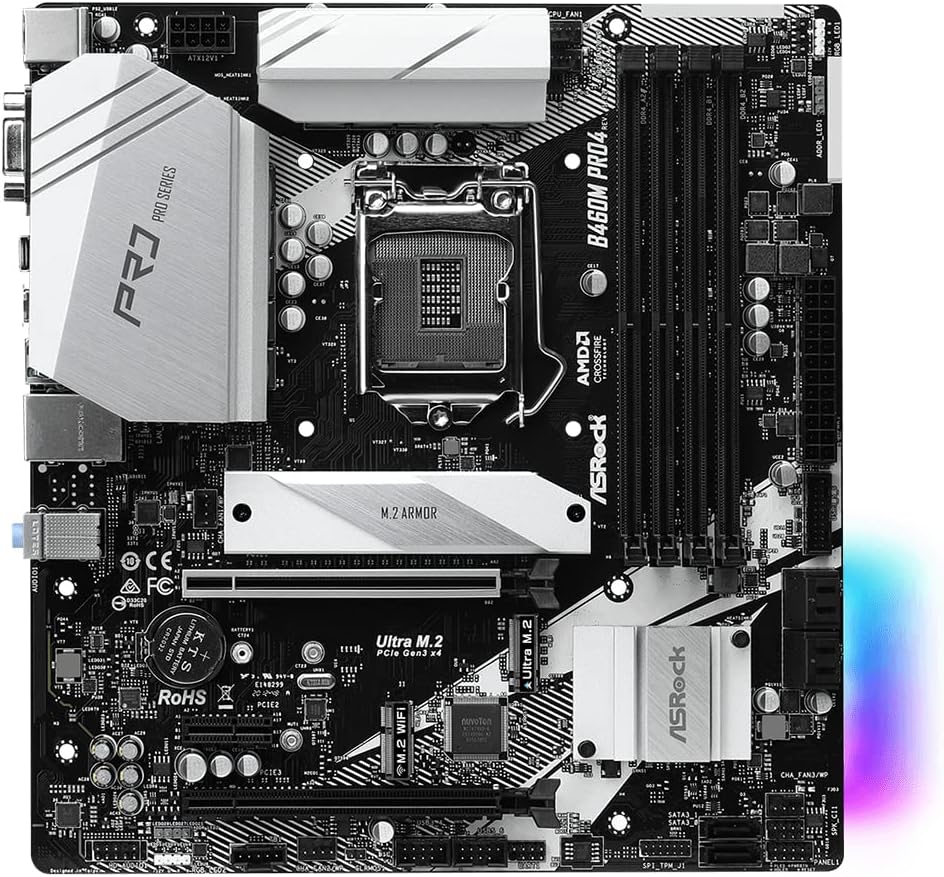
ภาพที่ 3.1: จากบนลงล่าง view of the ASRock B460M PRO4 Motherboard, highlighting the LGA 1200 CPU socket.
3.2. การติดตั้งหน่วยความจำ (RAM)
This motherboard supports DDR4 memory modules up to 2933MHz. It features four DIMM slots. For optimal performance, install memory modules in matched pairs into the designated primary slots as indicated in the motherboard's detailed manual. Open the retention clips, align the memory module notch with the slot key, and press firmly until the clips snap into place.
3.3. การติดตั้งอุปกรณ์จัดเก็บข้อมูล
The B460M PRO4 includes M.2 slots for high-speed NVMe SSDs and SATA ports for traditional hard drives or SSDs. Use the provided M.2 screws and standoffs for M.2 drive installation. Connect SATA data cables (included) from your storage devices to the SATA ports on the motherboard.

ภาพที่ 3.2: มุม view of the ASRock B460M PRO4 Motherboard, illustrating the M.2 slots and SATA ports for storage devices.
3.4. การติดตั้งการ์ดขยาย
The motherboard provides 2 PCIe 3.0 x16 slots for graphics cards and 1 PCIe 3.0 x1 slot for other expansion cards. Additionally, it includes 1 M.2 (Key E) slot specifically for a WiFi module. Ensure expansion cards are properly seated in their respective slots and secured with chassis screws.

Image 3.3: ASRock B460M PRO4 Motherboard, showcasing the various PCIe expansion slots.
3.5. การต่อสายไฟ
Connect the 24-pin ATX power connector and the 8-pin CPU power connector from your power supply unit (PSU) to the corresponding ports on the motherboard. The 9 Power Phase Design ensures stable power delivery to critical components.
4. ปฏิบัติการ
4.1. การตั้งค่า BIOS/UEFI
Upon initial boot, press the designated key (usually DEL or F2) to enter the BIOS/UEFI setup utility. Here, you can configure system settings, boot order, and monitor hardware status. Refer to the ASRock website for a detailed BIOS/UEFI user manual specific to your model.
4.2. การติดตั้งไดร์เวอร์
After installing your operating system (Microsoft Windows 10 64-bit / 11 64-bit), install the necessary drivers from the included Support CD or download the latest versions from the official ASRock website. This ensures optimal performance and compatibility for all motherboard components.
4.3. ยูทิลิตี้ซอฟต์แวร์
ASRock provides various software utilities to enhance your system's functionality, including monitoring tools, fan control, and system tuning options. These can be found on the Support CD or ASRock's official webเว็บไซต์.
5. การบำรุงรักษา
5.1. การทำความสะอาด
ทำความสะอาดภายในคอมพิวเตอร์เป็นประจำเพื่อป้องกันการสะสมของฝุ่น ซึ่งอาจทำให้เกิดความร้อนสูงเกินไปและประสิทธิภาพลดลง ใช้ลมอัดเพื่อกำจัดฝุ่นออกจากพัดลม ฮีตซิงก์ และส่วนประกอบอื่นๆ ตรวจสอบให้แน่ใจว่าได้ปิดเครื่องและถอดปลั๊กออกก่อนทำความสะอาด
5.2. การอัปเดต BIOS
ตรวจสอบ ASRock เป็นระยะ website for BIOS/UEFI updates. Updates can improve system stability, add support for new hardware, or fix bugs. Follow the instructions provided by ASRock carefully when performing a BIOS update to avoid system damage.
6 การแก้ไขปัญหา
If you encounter issues with your ASRock B460M PRO4 Motherboard, consider the following basic troubleshooting steps:
- ไม่มีพลังงาน/ไม่บูต: Double-check all power connections (24-pin ATX, 8-pin CPU, GPU). Ensure the power supply is functioning correctly.
- ไม่มีจอแสดงผล: Verify that your monitor is connected to the correct graphics output (either integrated graphics or a dedicated graphics card). Reseat your graphics card and RAM modules.
- ความไม่เสถียรของระบบ/การขัดข้อง: Check RAM seating and compatibility. Ensure all drivers are up-to-date. Monitor CPU and GPU temperatures to rule out overheating.
- ปัญหาอุปกรณ์ต่อพ่วง: Test peripherals in different USB ports. Ensure relevant drivers are installed.
For more advanced troubleshooting or persistent issues, consult the detailed troubleshooting section in the full user manual available on the ASRock support webเข้าชมเว็บไซต์หรือติดต่อฝ่ายสนับสนุนด้านเทคนิคของ ASRock
7. ข้อมูลจำเพาะ
Below are the key technical specifications for the ASRock B460M PRO4 Motherboard:
| คุณสมบัติ | ข้อมูลจำเพาะ |
|---|---|
| ยี่ห้อ | เอเอสร็อค |
| ชื่อรุ่น | B460M PRO4 |
| ซ็อคเก็ตซีพียู | แอลจีเอ 1200 |
| โปรเซสเซอร์ที่เข้ากันได้ | โปรเซสเซอร์ Intel Core รุ่นที่ 10 |
| ประเภทชิปเซ็ต | อินเทล B460 |
| เทคโนโลยีหน่วยความจำ RAM | แรม DDR4 |
| ความเร็วสัญญาณนาฬิกาหน่วยความจำ | 2933 เมกะเฮิรตซ์ |
| จำนวนพอร์ต USB 2.0 | 2 |
| การรองรับระบบปฏิบัติการ | Microsoft Windows 10 64-bit / 11 64-bit |
| ขนาดสินค้า (กxยxส) | 10.9 x 10.3 x 2.5 นิ้ว |
| น้ำหนักสินค้า | 2.2 ปอนด์ |

Image 7.1: Rear I/O panel of the ASRock B460M PRO4 Motherboard, showing various connectivity ports.
8. การสนับสนุนและการรับประกัน
For technical assistance, driver downloads, BIOS updates, and detailed product information, please visit the official ASRock support website. You can find comprehensive FAQs and contact information for customer service there.
For specific warranty terms and conditions applicable to your ASRock B460M PRO4 Motherboard, please refer to the warranty card included in your product packaging or visit the ASRock official website. Warranty policies may vary by region and retailer.
บันทึก: สินค้าหมดview video provided in the source data is for a different motherboard (MSI B760M-P) and is not relevant to the ASRock B460M PRO4. Therefore, no video content has been embedded in this manual.
9. ข้อมูลด้านความปลอดภัยที่สำคัญ
Always observe the following safety precautions when handling or operating your motherboard:
- Disconnect the power cord from the wall outlet before touching any components inside the computer.
- สวมสายรัดข้อมือป้องกันไฟฟ้าสถิตย์หรือสัมผัสวัตถุโลหะที่ต่อลงดินบ่อยๆ เพื่อระบายไฟฟ้าสถิตย์ก่อนจัดการกับส่วนประกอบต่างๆ
- เก็บเมนบอร์ดให้ห่างจากความชื้นและอุณหภูมิที่สูงหรือต่ำเกินไป
- อย่าพยายามซ่อมเมนบอร์ดด้วยตนเอง โปรดติดต่อช่างผู้ชำนาญการ


