1. บทนำ
This manual provides essential instructions for the safe and effective use of your ORDRO AZ50 4K Camcorder. Please read this manual thoroughly before operating the device and retain it for future reference.
The ORDRO AZ50 is a high-performance 4K camcorder designed for capturing high-quality video and photos. It features a 1/2.3 inch image CMOS sensor, 3.1-inch IPS touch screen, night vision capabilities, and supports external accessories like a stereo microphone and LED light.
2. เนื้อหาบรรจุภัณฑ์
ตรวจสอบว่ารายการทั้งหมดที่ระบุไว้ด้านล่างนี้รวมอยู่ในแพ็คเกจของคุณ:
- ORDRO AZ50 camera x1
- แบตเตอรี่ x2
- HDMI/USB cable x1
- เครื่องชาร์จ x1
- คู่มือการใช้งาน x1
- 64GB SD card x1
- รีโมตคอนโทรล x1
- ไมโครโฟน x1
- Wide Angle Lens x1
- ไฟ LED x1
- เลนส์ฮูดx1
- ผู้ถือ x1
- Carrying case x1
- Telescope x1
3. สินค้าหมดview
Familiarize yourself with the components and controls of your ORDRO AZ50 camcorder.

รูปที่ 3.1: ด้านหน้า view of the ORDRO AZ50 camcorder, highlighting its aluminum alloy lens and brushed panel design.
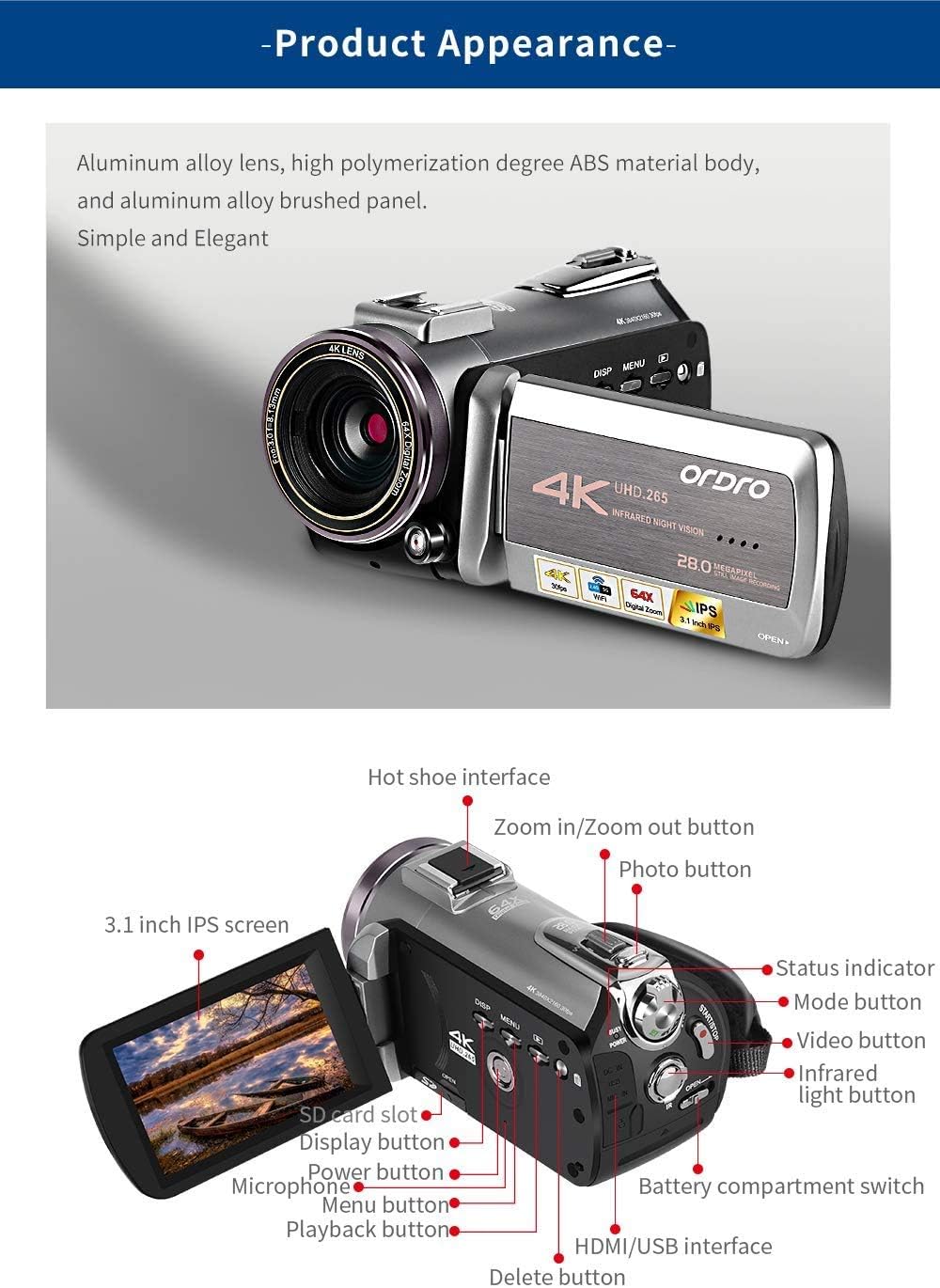
รูปที่ 3.2: รายละเอียด view of the ORDRO AZ50 camcorder, showing the 3.1-inch IPS screen, hot shoe interface, zoom buttons, photo button, mode button, video button, infrared light button, SD card slot, display button, power button, microphone port, menu button, playback button, delete button, HDMI/USB interface, and battery compartment switch.
คุณสมบัติหลัก:
- การบันทึกวิดีโอ 4K: Supports resolutions up to 3840x2160 at 30 frames per second (fps), 1080P at 60fps, and 720P at 120fps.
- ภาพถ่ายความละเอียดสูง: Captures still images with a maximum of 28 megapixels.
- เซ็นเซอร์ขั้นสูง: Equipped with a 1/2.3 inch image CMOS sensor from Sony.
- หน้าจอสัมผัสที่ใช้งานง่าย: Features a 3.1-inch IPS touch screen that can be flipped for versatile viewการไอเอ็นจี
- การมองเห็นตอนกลางคืน: Utilizes 850nm infrared flash technology for clear recording in low-light or dark conditions.
- รองรับเสียงภายนอก: Includes a high-performance stereo microphone with a built-in 200mAh polymer lithium battery for extended use.
- ไฟ LED ปรับได้: Comes with a High Power Panel Video Light featuring a 3000mAh battery and adjustable color temperature from 2700K to 6500K.
- การควบคุมแอพ: Supports Wi-Fi connectivity for app control, enabling video editing and sharing functionalities.
- พื้นที่เก็บข้อมูลที่ขยายได้: Compatible with SD cards up to 256GB (U3 class recommended).
4. การตั้งค่า
4.1. การติดตั้งและการชาร์จแบตเตอรี่
- Open the battery compartment switch on the camcorder.
- Insert the provided Lithium Polymer battery, ensuring correct polarity.
- Close the battery compartment switch securely.
- Connect the camcorder to the charger using the HDMI/USB cable.
- เสียบที่ชาร์จเข้ากับเต้ารับไฟฟ้า ไฟแสดงสถานะการชาร์จจะสว่างขึ้น
- ชาร์จแบตเตอรี่ให้เต็มก่อนใช้งานครั้งแรก (ประมาณ 2-3 ชั่วโมง)
4.2. การติดตั้งการ์ด SD
The camcorder supports up to a 256GB U3 SD card.
- Locate the SD card slot on the camcorder.
- Insert the 64GB SD card (or another compatible SD card) into the slot until it clicks into place.
- ในการถอด ให้ค่อยๆ ดันการ์ดเข้าไปด้านในจนกว่ามันจะเด้งออกมา
4.3. Attaching Accessories (Microphone, LED Light, Wide Angle Lens, Lens Hood, Telescope)
The ORDRO AZ50 features a hot shoe interface for external accessories.
- ไมโครโฟน: Slide the stereo microphone onto the hot shoe mount. Connect the microphone's audio output cable to the camcorder's 3.5mm audio input port. Ensure the microphone is powered on.
- ไฟ LED: Slide the LED light onto the hot shoe mount. Power on the LED light as needed.
- Wide Angle Lens/Telescope: Attach the wide-angle lens or telescope to the front of the camcorder's main lens by screwing it into place.
- เลนส์ฮูด: Attach the lens hood to the front of the lens to reduce glare.
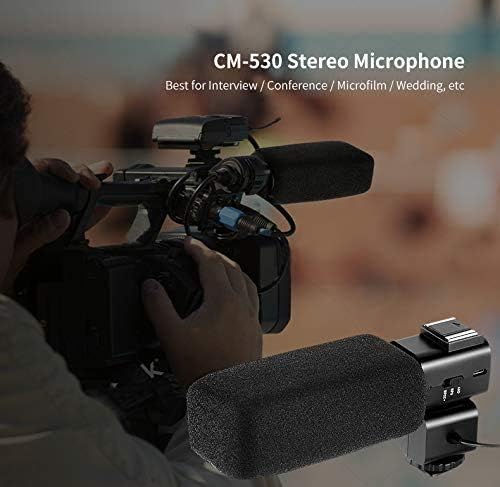
รูปที่ 4.1: The CM-530 Stereo Microphone attached to the camcorder's hot shoe, ideal for interviews and conferences.
4.1 วิดีโอ: This video demonstrates the setup and use of the ORDRO HDR-AC3, which shares similar accessory attachment mechanisms with the AZ50, including the external microphone and LED light. It shows how to connect the microphone and use the camcorder for classroom recording.
5. คู่มือการใช้งาน
5.1. การเปิด/ปิดเครื่อง
- ในการเปิดเครื่อง ให้กดปุ่มเปิด/ปิดค้างไว้จนกว่าหน้าจอจะสว่างขึ้น
- หากต้องการปิดเครื่อง ให้กดปุ่มเปิด/ปิดค้างไว้จนกว่าหน้าจอจะดับลง
5.2. การบันทึกวิดีโอ
- Ensure an SD card is inserted and the battery is charged.
- เปิดเครื่องกล้องวิดีโอ
- Press the Mode button to select video recording mode.
- Press the Video button (Start/Stop) to begin recording. A red indicator will typically appear on the screen.
- Press the Video button again to stop recording.
5.3.การถ่ายภาพ
- เปิดเครื่องกล้องวิดีโอ
- Press the Mode button to select photo mode.
- Press the Photo button to capture an image.
5.4. การใช้หน้าจอสัมผัส
The 3.1-inch IPS touch screen allows for intuitive navigation and settings adjustments. Tap icons to select options, and swipe to navigate menus or review สื่อ
5.5. การใช้งานกล้องมองกลางคืน
- In low-light conditions, activate the infrared light button.
- The camcorder will switch to IR night vision mode, displaying images in monochrome for enhanced visibility.
5.1 วิดีโอ: This video showcases the ORDRO AZ50's capabilities, including its night vision feature. It demonstrates the camcorder being used in various settings, such as classroom recording and outdoor vlogging, and highlights the IR night vision mode.
5.6. App Control and Wi-Fi
Connect your ORDRO AZ50 to a smartphone or tablet via Wi-Fi to access additional features like remote control, video editing, and sharing. Refer to the specific app instructions for detailed usage.
5.7. การใช้ไฟ LED

รูปที่ 5.1: The external LED light showing three light modes and adjustable color temperatures (2700K, 4800K, 6500K) to suit different lighting conditions.
The High Power Panel Video Light offers adjustable color temperature from 2700K (warm) to 6500K (cold). Use the controls on the LED light to select the desired brightness and color temperature for optimal illumination.
6. การบำรุงรักษา
- การทำความสะอาด: Use a soft, dry cloth to clean the camcorder body. For the lens and screen, use a specialized lens cleaning cloth and solution. Avoid abrasive materials or harsh chemicals.
- พื้นที่จัดเก็บ: เก็บกล้องวิดีโอไว้ในที่แห้งและเย็น หลีกเลี่ยงแสงแดดโดยตรงและอุณหภูมิที่สูงหรือต่ำเกินไป ถอดแบตเตอรี่ออกหากเก็บไว้เป็นเวลานาน
- การดูแลแบตเตอรี่ Charge batteries regularly, even if not in use, to maintain their lifespan. Avoid fully discharging batteries.
- การ์ด SD: Format the SD card periodically to ensure optimal performance and prevent data corruption. Back up important data before formatting.
7 การแก้ไขปัญหา
| ปัญหา | สาเหตุที่เป็นไปได้ | สารละลาย |
|---|---|---|
| กล้องวิดีโอไม่สามารถเปิดได้ | แบตเตอรี่หมดหรือติดตั้งไม่ถูกต้อง | ชาร์จแบตเตอรี่ให้เต็ม ตรวจสอบให้แน่ใจว่าใส่แบตเตอรี่ถูกต้องแล้ว |
| ไม่สามารถบันทึกวีดีโอ/ถ่ายภาพได้ | SD card is full, not inserted, or corrupted. Incorrect mode selected. | Insert a compatible SD card. Check available storage. Format the SD card if necessary (after backing up data). Ensure video/photo mode is selected. |
| คุณภาพวิดีโอ/ภาพถ่ายต่ำ | Lens is dirty. Insufficient lighting. Incorrect settings. | Clean the lens. Use the LED light in low light. Adjust exposure or white balance settings. |
| ปัญหาการเชื่อมต่อ Wi-Fi | Incorrect Wi-Fi settings. Distance from device. | Ensure Wi-Fi is enabled on both camcorder and device. Re-enter Wi-Fi password. Move closer to the camcorder. |
| ไมโครโฟนภายนอกใช้งานไม่ได้ | Microphone not powered on. Incorrectly connected. | Ensure the microphone is powered on and fully charged. Verify the 3.5mm audio cable is securely connected to both the microphone and the camcorder. |
8. ข้อมูลจำเพาะ
- ยี่ห้อ: ออร์โดร
- แบบอย่าง: AZ50
- ความละเอียดการจับภาพวิดีโอ: 4K (3840x2160/30fps), 1080P/60fps, 720P/120fps
- เทคโนโลยีโฟโต้เซนเซอร์: CMOS (1/2.3 inch Sony sensor)
- Max Pixel: 28MP
- ขนาดหน้าจอ: 3.1 Inches (IPS Touch Screen)
- ประเภทหน่วยความจำแฟลช: SD (supports up to 256GB U3)
- เทคโนโลยีการเชื่อมต่อ: ไวไฟ
- คุณสมบัติพิเศษ: Digital Camera, Infrared Night Vision
- แบตเตอรี่: แบตเตอรี่ลิเธียมโพลิเมอร์ 2 ก้อน (รวมอยู่ด้วย)
- น้ำหนักสินค้า: 5.28 ปอนด์
- ขนาดแพ็คเกจ: 14.8 x 11.26 x 3.82 นิ้ว
- External LED Light: 3000mAh 3.7V Battery, 2700K-6500K Color Temperature
- ไมโครโฟนภายนอก: 200mAh Polymer lithium battery, 50-60 hours continuous use
9. การรับประกันและการสนับสนุน
For warranty information and technical support, please refer to the contact details provided with your product packaging or visit the official ORDRO webไซต์ โปรดเก็บใบเสร็จรับเงินไว้เป็นหลักฐานการซื้อสำหรับการเรียกร้องการรับประกัน


