การแนะนำ
Thank you for choosing the Waykar 296 Pints Commercial Dehumidifier. This manual provides essential information for the safe operation, installation, maintenance, and troubleshooting of your dehumidifier. Please read it thoroughly before use and retain it for future reference.
This commercial-grade dehumidifier is designed for large spaces up to 9,000 square feet, effectively removing up to 296 pints (37 gallons) of moisture per day. It is suitable for basements, industrial or commercial spaces, garages, cellars, workshops, libraries, laboratories, and flood restoration.
ข้อมูลด้านความปลอดภัยที่สำคัญ
เพื่อลดความเสี่ยงจากการเกิดไฟไหม้ ไฟฟ้าช็อต หรือการบาดเจ็บ ควรปฏิบัติตามข้อควรระวังพื้นฐานเหล่านี้เสมอ:
- อ่านคำแนะนำทั้งหมดก่อนใช้เครื่องใช้ไฟฟ้า
- ตรวจสอบให้แน่ใจว่าแหล่งจ่ายไฟตรงกับฉลากการจัดอันดับบนอุปกรณ์
- ห้ามใช้งานเครื่องลดความชื้นหากสายไฟหรือปลั๊กชำรุด
- ถอดปลั๊กเครื่องทุกครั้งก่อนทำความสะอาดหรือซ่อมบำรุง
- ห้ามปิดกั้นช่องรับหรือช่องระบายอากาศ
- Keep the unit on a level surface to prevent water leakage.
- เครื่องใช้ไฟฟ้าตัวนี้ไม่ได้มีวัตถุประสงค์เพื่อให้บุคคล (รวมทั้งเด็ก) ที่มีความบกพร่องทางร่างกาย ทางประสาทสัมผัส หรือทางจิตใจ หรือขาดประสบการณ์และความรู้ ใช้งาน เว้นแต่จะมีการดูแลหรือคำแนะนำเกี่ยวกับการใช้เครื่องใช้ไฟฟ้าโดยบุคคลที่รับผิดชอบด้านความปลอดภัยของบุคคลดังกล่าว
สินค้าเกินview
ส่วนประกอบและคุณสมบัติ
The Waykar 296 Pints Commercial Dehumidifier features a robust design with intelligent controls for efficient moisture removal.
รูปที่ 1: แผงควบคุมระบบสัมผัสอัจฉริยะ
Displays humidity, temperature, and allows setting adjustments.

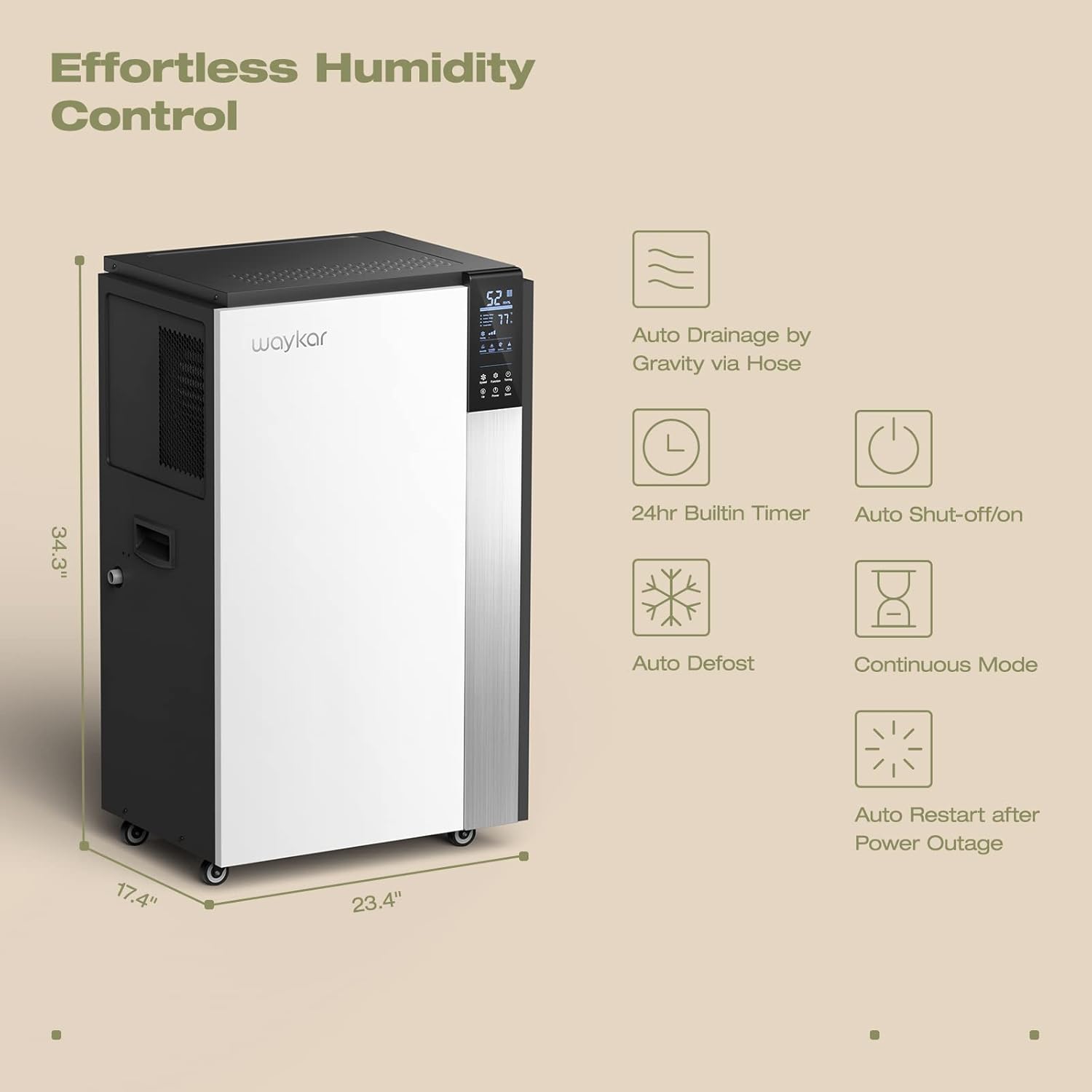
Figure 2: Dehumidifier Dimensions and Key Features
Illustrates the unit's dimensions (34.3" H x 23.4" W x 17.4" D) and highlights features like auto drainage, 24hr timer, auto shut-off/on, auto defrost, continuous mode, and auto restart after power outage.
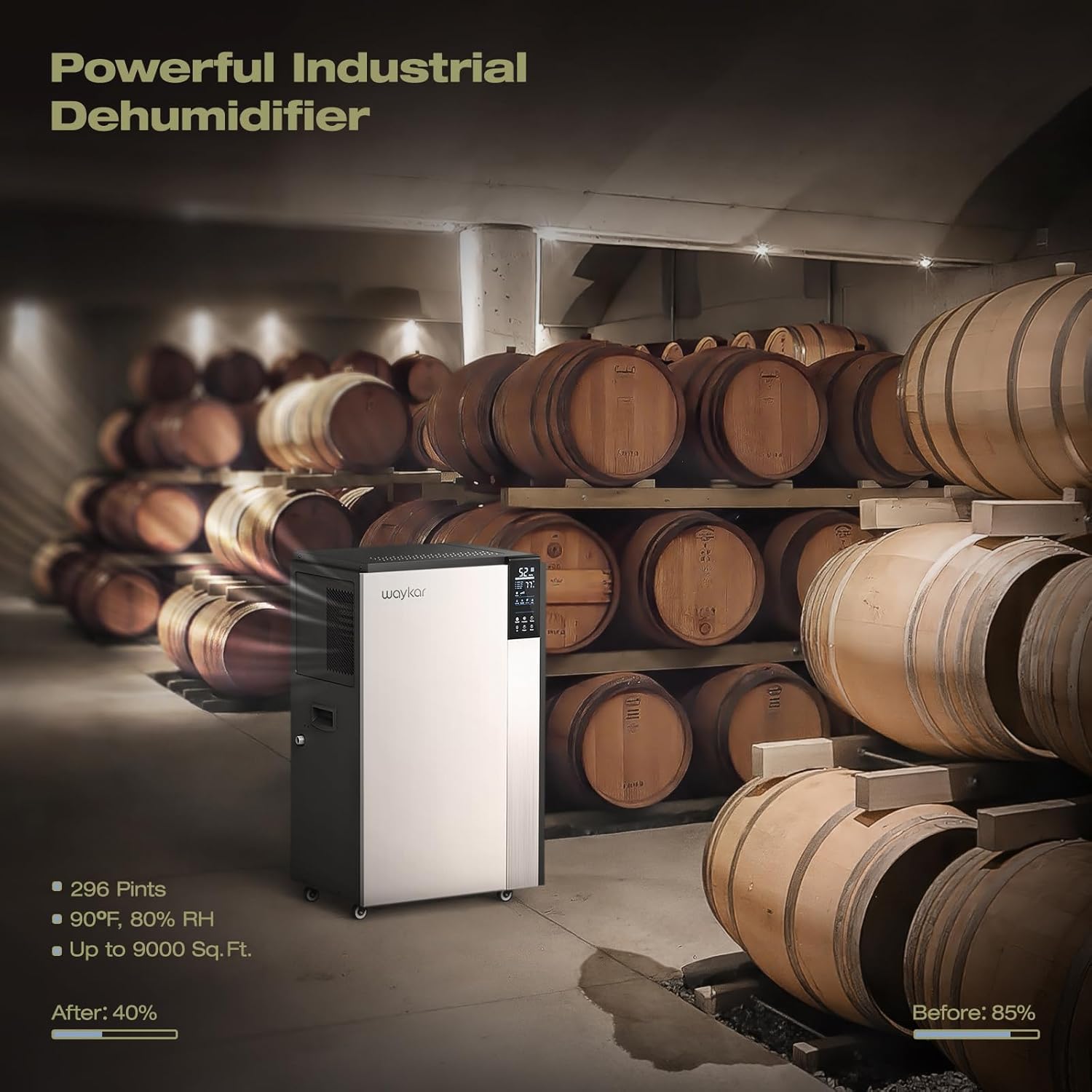
Figure 3: Continuous Drainage Setup and Detachable Filter
Shows the connection for the continuous drain hose and the location of the washable air filter.
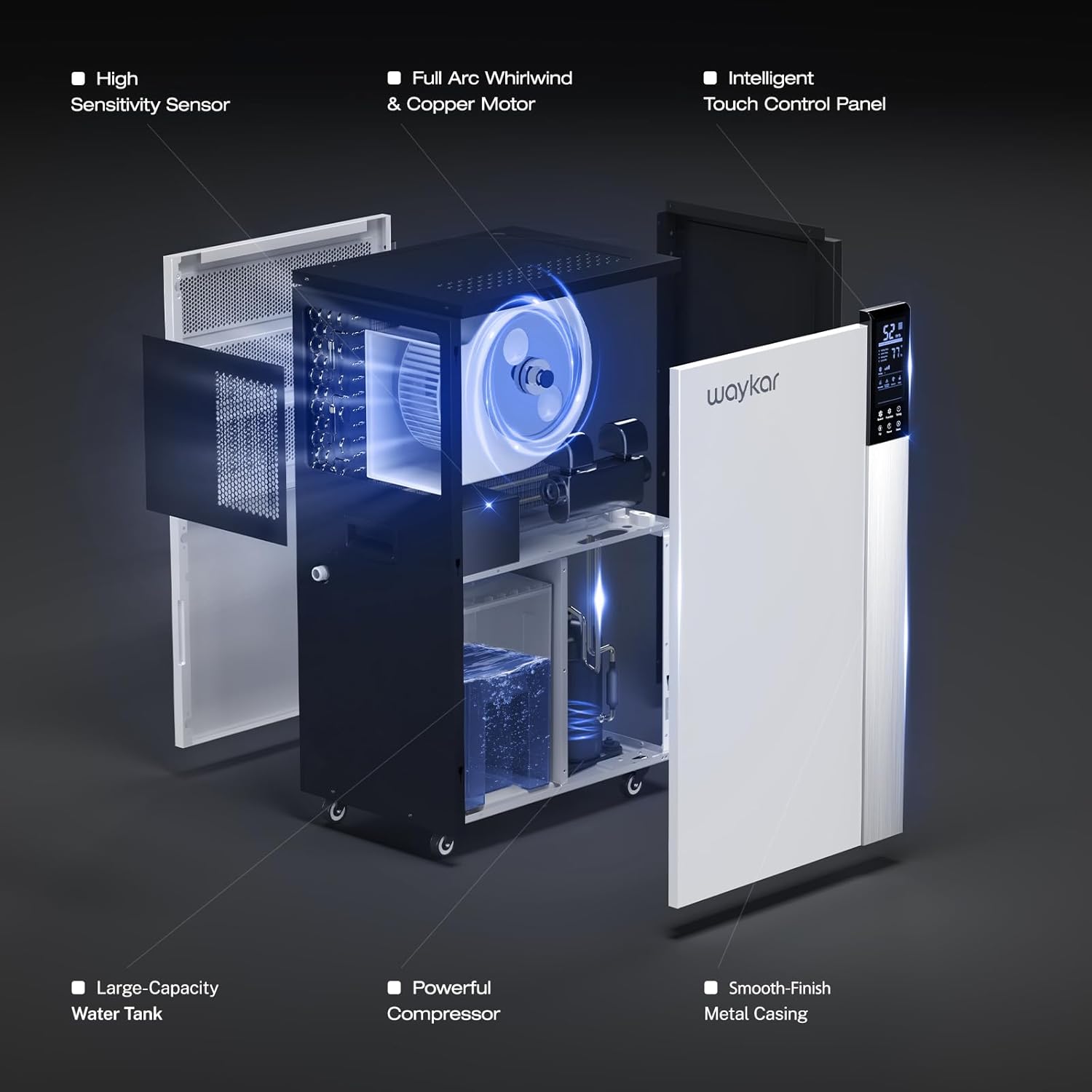
Figure 4: Internal Structure and Components
เกิดการระเบิดขึ้น view showing the high sensitivity sensor, full arc whirlwind & copper motor, intelligent touch control panel, large-capacity water tank, powerful compressor, and smooth-finish metal casing.
คำแนะนำการตั้งค่า
- การแกะกล่อง: นำเครื่องลดความชื้นออกจากบรรจุภัณฑ์อย่างระมัดระวัง ตรวจสอบดูว่ามีรอยเสียหายจากการขนส่งหรือไม่
- การจัดวาง: Position the dehumidifier on a level, stable surface in the desired area. Ensure there is at least 8 inches (20 cm) of space around the unit for proper airflow. The unit is equipped with four universal wheels and two ergonomically placed handles for easy movement.
- การสแตนด์บายเริ่มต้น: After transport, allow the unit to stand upright for at least 24 hours before plugging it in. This allows the refrigerant to settle.
- การเชื่อมต่อไฟฟ้า: เสียบสายไฟเข้ากับเต้ารับไฟฟ้าที่มีสายดินและมีแรงดันไฟฟ้าที่ถูกต้องtage (refer to the rating label).
- การตั้งค่าการระบายน้ำ:
- Continuous Drainage (Recommended): For continuous operation without manual emptying, connect the included 40-inch (100 cm) drain hose to the drainage port on the unit. Ensure the hose is sloped downwards to allow gravity drainage to a suitable floor drain or container.
- Water Bucket (Internal): If continuous drainage is not used, the unit will collect water in its internal bucket. The unit will automatically shut off when the bucket is full.
คำแนะนำการใช้งาน
ฟังก์ชั่นแผงควบคุม
The intelligent touch control panel allows for easy operation and monitoring.
- ปุ่มเปิด/ปิด: กดเพื่อเปิดหรือปิดเครื่อง
- Humidity Setting (Up/Down Buttons): Adjust the desired humidity level between 10% and 90% Relative Humidity (RH). The unit will automatically operate to maintain this level.
- ปุ่มปรับความเร็วพัดลม: เลือกความเร็วพัดลมได้ระหว่างระดับสูงและระดับต่ำ
- ปุ่มตั้งเวลา: ตั้งเวลา 24 ชั่วโมงสำหรับการเปิด/ปิดอัตโนมัติ
- แสดง: Shows current room humidity, set humidity, and operating temperature.
โหมดการทำงาน
- ควบคุมความชื้นอัตโนมัติ: Set your desired humidity level. The dehumidifier will sense the room's humidity and automatically turn on or off to maintain the pre-set level.
- โหมดต่อเนื่อง: For maximum dehumidification, select continuous mode. The unit will run continuously regardless of the humidity level. This mode is typically used with continuous drainage.
- ละลายน้ำแข็งอัตโนมัติ: The unit features an automatic defrost function that activates when frost builds up on the evaporator coils, ensuring efficient operation in low-temperature environments.
- รีสตาร์ทอัตโนมัติ: กรณีไฟดับtage เครื่องจะรีสตาร์ทโดยอัตโนมัติด้วยการตั้งค่าก่อนหน้าเมื่อไฟกลับมาอีกครั้ง
การซ่อมบำรุง
การบำรุงรักษาตามปกติจะช่วยให้เครื่องลดความชื้นทำงานได้อย่างเหมาะสมที่สุดและยืดอายุการใช้งานของเครื่องลดความชื้นของคุณ
- การทำความสะอาดตัวกรองอากาศ:
- The unit has a "Clean Reminder" feature for the filter.
- ปิดเครื่องลดความชื้นและถอดปลั๊ก
- Remove the detachable air filter (refer to Figure 3 for location).
- Wash the filter with warm, soapy water. Rinse thoroughly and allow it to air dry completely before reinstalling.
- ทำความสะอาดแผ่นกรองทุกสองสัปดาห์ หรือบ่อยกว่านั้นขึ้นอยู่กับการใช้งานและคุณภาพอากาศ
- การทำความสะอาดภายนอกตัวเครื่อง:
- เช็ดภายนอกด้วยผ้านุ่มๆamp ผ้า. อย่าใช้สารเคมีที่รุนแรงหรือน้ำยาทำความสะอาดที่มีฤทธิ์กัดกร่อน
- Drainage System Check:
- Periodically check the drain hose for kinks, blockages, or algae growth if using continuous drainage.
- If using the internal water bucket, empty and clean it regularly to prevent mold and mildew growth.
- พื้นที่จัดเก็บ:
- หากต้องเก็บรักษาเครื่องไว้เป็นเวลานาน ควรตรวจสอบให้แน่ใจว่าเครื่องสะอาดและแห้งสนิท
- Drain any remaining water from the internal bucket and hose.
- Store the unit upright in a cool, dry place. The back housing can be opened to store the drain hose and other accessories inside.
คู่มือการแก้ไขปัญหา
ก่อนที่จะติดต่อฝ่ายสนับสนุนลูกค้า โปรดดูปัญหาทั่วไปและวิธีแก้ไขต่อไปนี้:
| ปัญหา | สาเหตุที่เป็นไปได้ | สารละลาย |
|---|---|---|
| เครื่องลดความชื้นไม่เปิด | No power, power cord loose, full water bucket. | Check power connection, ensure outlet is functional. Empty water bucket if full. |
| Unit runs but does not remove moisture. | Air filter clogged, room temperature too low, humidity setting too high. | Clean air filter. Ensure room temperature is above 5°C (41°F). Lower the desired humidity setting. |
| น้ำรั่วออกจากตัวเครื่อง | Unit not level, drain hose kinked or blocked, drain hose not properly connected. | Place unit on a level surface. Check and clear drain hose. Ensure hose connection is secure. |
| หน่วยมีเสียงดัง | Air filter clogged, unit not on a stable surface, internal component issue. | Clean air filter. Ensure unit is on a firm, level surface. If noise persists, contact customer support. |
| Error Code E6 (as mentioned in reviewส). | Defrost sensor issue or other internal fault. | Refer to specific troubleshooting steps provided by Waykar customer service, potentially involving disconnecting a low voltage wire. Contact customer support for guidance. |
ข้อมูลจำเพาะ
| คุณสมบัติ | รายละเอียด |
|---|---|
| แบบอย่าง | Waykar 296 Pints Commercial Dehumidifier |
| ความสามารถในการกำจัดความชื้น | 296 Pints (37 Gallons) per day |
| พื้นที่ให้บริการ | มากถึง 9,000 ตร.ว. ฟุต |
| น้ำหนักสินค้า | 50.8 กก. |
| สี | สีขาว |
| คุณสมบัติพิเศษ | Portable, Intelligent Touch Control, Auto Defrost, 24H Timer, Auto Shut-off/on, Auto Restart, Continuous Drainage |
| ส่วนประกอบที่รวมอยู่ | Waykar 296 Pints Dehumidifier x 1, Drain Hose |
| ความยาวท่อระบายน้ำ | 40 นิ้ว (100 ซม.) |
การรับประกันและการสนับสนุนลูกค้า
Waykar stands behind its products with comprehensive warranty and support services:
- การรับประกันคืนเงิน: 30-Days Money Back if you are not satisfied with the product.
- การรับประกัน: 1-year warranty, with an option for a 2nd-year warranty extension.
- การสนับสนุนด้านเทคนิค: Lifetime expert technical support is available.
- ติดต่อ: For any questions or issues, please contact Waykar customer support. They aim to reply within 12 hours to assist with problem resolution.


