1. บทนำ
This user manual provides comprehensive instructions for the MoesGo Wi-FI Floor Heating Thermostat, Model BHT-002-GBLWW-MG. This device is designed to control electric underfloor heating systems, offering both manual and smart control options. Please read this manual thoroughly before installation and operation to ensure proper use and optimal performance.
2. สินค้าหมดview
2.1 คุณสมบัติหลัก
- Manual and Automatic Control: Operate the thermostat manually or connect to a Wi-Fi network for control via a smartphone application.
- ระบบทำความร้อนใต้พื้นแบบไฟฟ้า: Specifically designed for 16A electric underfloor heating systems.
- การเก็บรักษาข้อมูล: Features anti-stop protection to retain date, language, address, and time zone settings during power interruptions.
- Voice Control and Device Sharing: Compatible with voice assistants like Amazon Alexa and Google Home. Supports device sharing for multi-user access.
- การกำหนดตารางเวลาแบบตั้งโปรแกรมได้: Offers six programmable intervals for weekdays and weekends (5+1+1 day modes) to optimize heating schedules.
- การควบคุมอุณหภูมิที่แม่นยำ: Provides accurate temperature control within 0.5°C, with a programming range of 5-35°C.
- อินเทอร์เฟซผู้ใช้: Equipped with an LCD display and touch buttons for clear readability and ease of use.

Image: MoesGo Thermostat displaying its key features such as LCD display, temperature setting, 6-period programming, 5+2 programmable mode, app control, device sharing, power-off memory, and manual/auto mode.
2.2 เนื้อหาบรรจุภัณฑ์
- เทอร์โมสตัท (1 ชิ้น)
- Screws (1 pc)
- คู่มือผู้ใช้ (1 ชิ้น)
- QC Certificate (1 pc)
- Floor Sensor (2.5m) (1 pc)
2.3 ขนาดสินค้า
The thermostat measures approximately 86mm x 86mm x 50.1mm (3.39in x 3.39in x 1.97in) with a mounting depth of 24.4mm (0.96in).
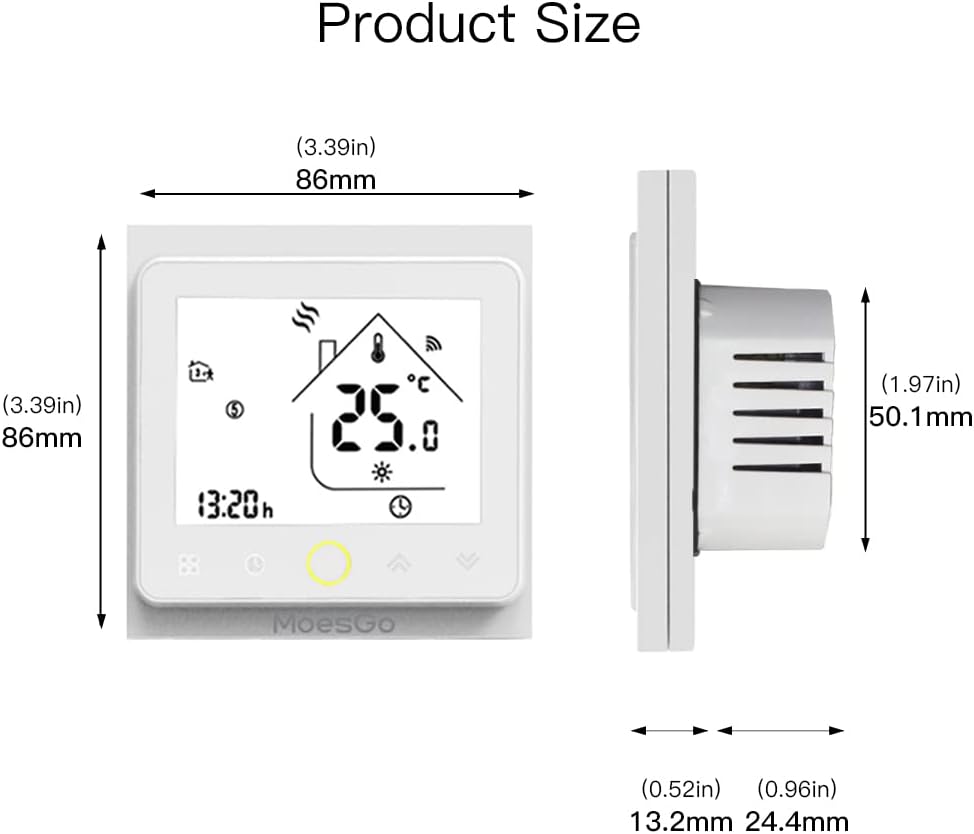
Image: Diagram showing the front and side dimensions of the MoesGo thermostat, indicating 86mm width and height, and 50.1mm total depth with a 24.4mm mounting depth.
3. การติดตั้งและการตั้งค่า
3.1 แนวทางการติดตั้งทั่วไป
The thermostat requires a 2.4GHz Wi-Fi connection for smart features. It can be installed in a standard junction box or a 60 mm European format connection box. For optimal display visibility, install the thermostat at a height of 1.2 to 1.4 meters from the floor.

Image: Illustration demonstrating the recommended installation height for the thermostat, showing it positioned between 1.2 and 1.4 meters from the floor for clear viewการไอเอ็นจี
3.2 คำแนะนำในการเดินสายไฟ
This thermostat is designed for electric heating systems (GB type). Refer to the wiring diagram for correct connection. Ensure power is disconnected before performing any wiring.

Image: Wiring diagram for the MoesGo GB type thermostat for electric heating, showing connections for AC90-240V (N, L), Load (1, 2), and NTC sensor (3, 4).
3.3 System Type Identification
The MoesGo thermostat series includes different models for various heating systems:
- จีเอ: For underfloor water heating systems.
- GB: For underfloor electric heating systems (this model).
- ก.ก.: สำหรับระบบทำน้ำอุ่น/หม้อต้มแก๊ส
Ensure you have the correct model (GB) for your electric underfloor heating.

Image: Visual representation of different heating system types (GA for water, GB for electric, GC for boiler) and their corresponding thermostat applications.
4. การดำเนินการ
4.1 การควบคุมด้วยตนเอง
The thermostat can be operated directly using the touch buttons on its front panel to adjust temperature settings and modes.
4.2 การควบคุมแอป Smart Life
Connect the thermostat to your Wi-Fi network to enable remote control via the Smart Life app on your smartphone. This allows you to adjust heating settings from anywhere.

Image: A person using a smartphone app to remotely control the MoesGo thermostat, illustrating the Wi-Fi connectivity and convenience of app-based temperature management.
4.3 การบูรณาการการควบคุมด้วยเสียง
Integrate the thermostat with Amazon Alexa or Google Home systems for hands-free voice control of your heating. Simply use voice commands to adjust the room temperature.

Image: A person interacting with smart speakers (Amazon Alexa and Google Home) to control the MoesGo thermostat using voice commands, demonstrating its compatibility with popular voice assistants.
4.4 โหมดที่ตั้งโปรแกรมได้
The thermostat supports programmable modes (5+2, 6+1, or 7 days) allowing you to set specific heating schedules for different times of the day and week. This helps maintain comfort and manage energy consumption.
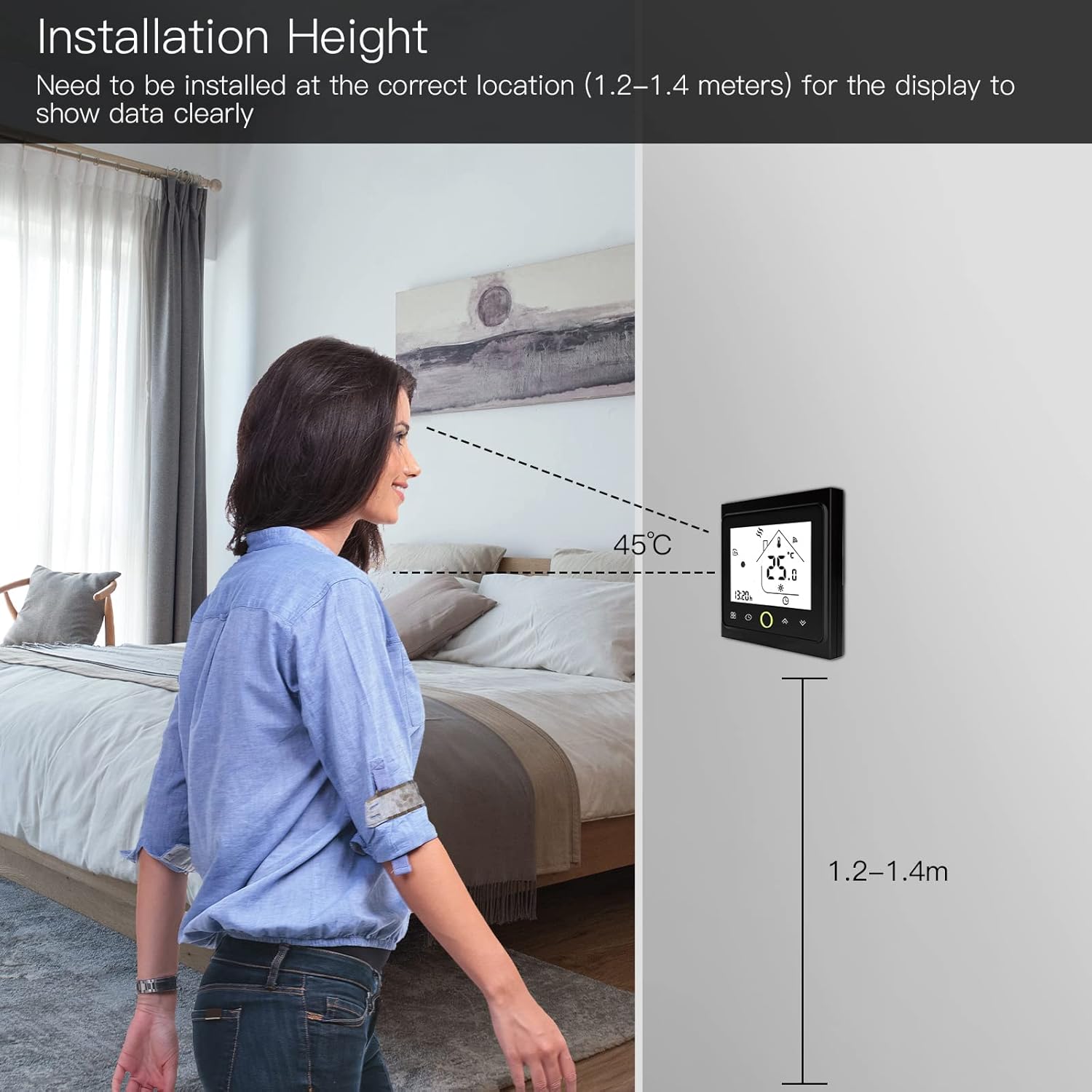
Image: A visual representation of the thermostat's programmable mode, showing time slots (e.g., 6:00-8:00, 11:00-12:00) and an accompanying smartphone app interface for setting timers and schedules.
5. การบำรุงรักษา
To maintain the thermostat, gently wipe the screen and casing with a soft, dry cloth. Avoid using abrasive cleaners or solvents. Ensure no liquids enter the device. Regular cleaning helps maintain optimal performance and appearance.
6 การแก้ไขปัญหา
If the thermostat is not functioning as expected, first check the power supply and Wi-Fi connection. Ensure the device is correctly wired according to the installation instructions. For persistent issues, consult the manufacturer's support resources or a qualified electrician.
7. ข้อมูลจำเพาะทางเทคนิค
| ข้อมูลจำเพาะ | ค่า |
|---|---|
| ยี่ห้อ | โมเอสโก |
| หมายเลขรุ่น | BHT-002-GBLWW-MG |
| สี | white&blue |
| ขนาดสินค้า | 3.76 x 8.6 x 8.6 ซม.; 282 กรัม |
| เพาเวอร์/วัตต์tage | 3.84E+3 W |
| เล่มที่tage | 240 โวลต์ |
| วัสดุ | โพลีคาร์บอเนต (พีซี) |
| คุณสมบัติพิเศษ | สามารถตั้งโปรแกรมได้ |
| ผู้ผลิต | เหวินโจว NOVA ใหม่พลังงาน CO.,LTD |
| การใช้งานเฉพาะสำหรับผลิตภัณฑ์ | Warmth, Heating |
| เทคโนโลยีการเชื่อมต่อ | ไวไฟ |
| ส่วนประกอบที่รวมอยู่ | Thermostat, screws, user guide, QC certificate, floor sensor (2.5m) |
| แหล่งพลังงาน | สายไฟ |
8. การรับประกันและการสนับสนุน
For warranty information and technical support, please refer to the documentation provided with your purchase or contact MoesGo customer service. Keep your purchase receipt for warranty claims.


