การแนะนำ
The Logitech Z407 Bluetooth Computer Speakers system delivers immersive sound for your desktop setup. Featuring a powerful down-firing subwoofer and digital signal processing, it ensures clear audio across the entire sound spectrum, from crisp highs to deep, rich bass. The system includes stylish oval satellite speakers that can be positioned horizontally or vertically to suit your space, and a convenient wireless control dial for easy management of audio settings.
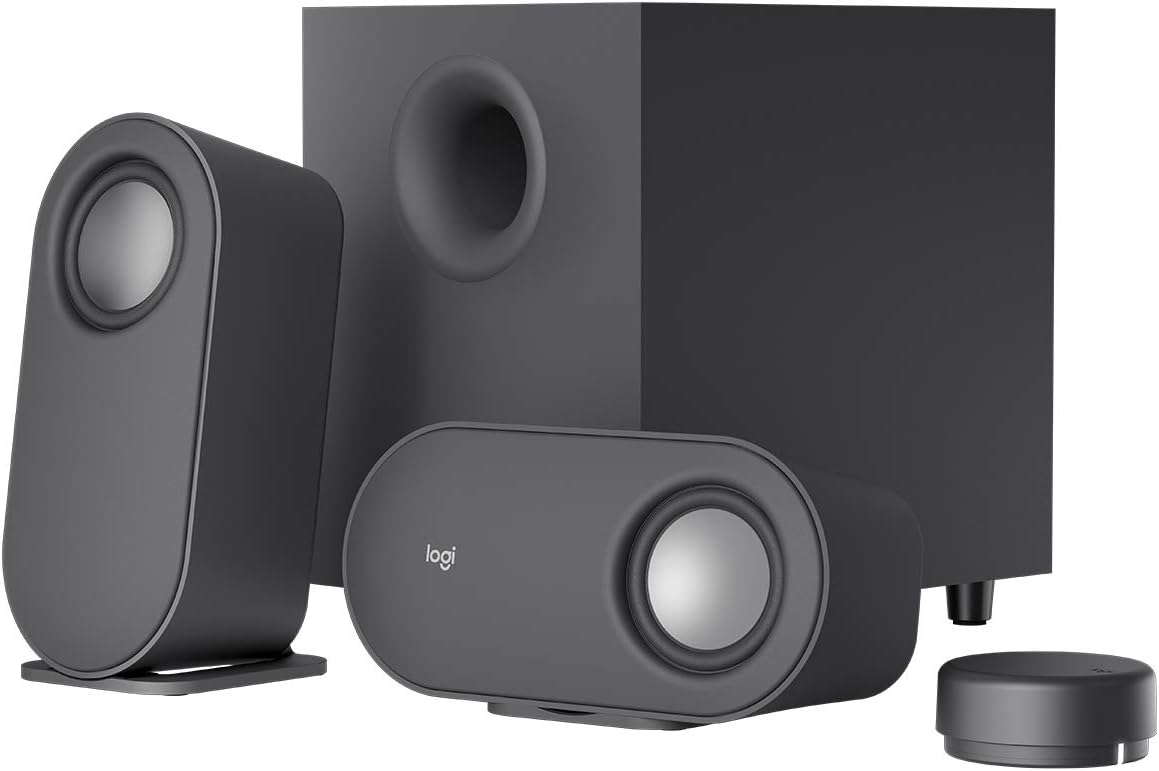
Image: The complete Logitech Z407 speaker system, showcasing the two satellite speakers, the central subwoofer, and the compact wireless control dial.
This manual provides detailed instructions for setting up, operating, maintaining, and troubleshooting your Z407 speaker system to ensure optimal performance and longevity.
มีอะไรอยู่ในกล่อง
ก่อนที่คุณจะเริ่มต้น โปรดตรวจสอบว่าบรรจุภัณฑ์มีส่วนประกอบทั้งหมดอยู่:
- Two (2) Satellite Speakers
- ซับวูฟเฟอร์หนึ่ง (1) ตัว
- One (1) Wireless BLE Control Dial (requires 2 AAA batteries, included)
- One (1) 3.5 mm Audio Cable
- เอกสารประกอบการใช้งาน

Image: All components included in the Logitech Z407 package, neatly arranged for inspection.
การตั้งค่า
1. การวางตำแหน่งลำโพง
Position the subwoofer on the floor or a sturdy surface, ensuring the down-firing port is unobstructed. Place the two satellite speakers on your desktop or desired surface. The satellite speakers can be oriented vertically or horizontally to best fit your setup and aesthetic preference.

Image: The versatile satellite speakers of the Z407 system, shown in both vertical and horizontal orientations.
2. การเชื่อมต่อส่วนประกอบ
- Connect the satellite speakers to the corresponding left (L) and right (R) audio output ports on the back of the subwoofer.
- เสียบสายไฟของซับวูฟเฟอร์เข้ากับเต้ารับที่ผนัง
- Insert the included AAA batteries into the wireless control dial.

Image: The rear panel of the Z407 subwoofer, highlighting the various input and output ports for connectivity.
3 การเชื่อมต่อกับแหล่งกำเนิดเสียง
The Z407 offers multiple connectivity options:
- บลูทูธ:
- Press and hold the Bluetooth button on the wireless control dial until the LED indicator blinks rapidly.
- On your device (computer, smartphone, tablet), go to Bluetooth settings and select "Logitech Z407" from the list of available devices.
- Once connected, the LED on the dial will turn solid blue.
- ยูเอสบี-เอ: Connect a USB-A cable (not included) from your computer's USB port to the USB input on the back of the subwoofer.
- 3.5 mm Audio Jack (AUX): Use the included 3.5 mm audio cable to connect your device's headphone jack to the AUX input on the back of the subwoofer.
You can connect up to three devices simultaneously and switch between them using the input selection buttons on the wireless control dial.
คำแนะนำการใช้งาน
Wireless Control Dial Functions
The wireless control dial provides convenient control over your audio from up to 20 meters line of sight. Ensure the dial is within range and has fresh batteries.

Image: The sleek, compact wireless control dial, designed for intuitive audio management.
- เปิด/ปิดเครื่อง: กดปุ่มหลักบนหน้าปัดค้างไว้ 3 วินาที
- การควบคุมระดับเสียง: Rotate the outer ring of the dial clockwise to increase volume, counter-clockwise to decrease.
- เล่น/หยุดชั่วคราว: กดปุ่มหลักหนึ่งครั้งเพื่อเล่นหรือหยุดเสียงชั่วคราว
- ข้ามแทร็ก: กดปุ่มหลักสองครั้งเพื่อข้ามไปยังเพลงถัดไป
- แทร็กก่อนหน้า: Triple-press the main button to go to the previous track.
- การปรับเสียงเบส: Press the bass button (located on the side of the dial) once. The LED will change color. Rotate the dial to adjust bass level. Press the bass button again to return to volume control.
- การเลือกอินพุต: Press the input button (located on the side of the dial) to cycle through Bluetooth, USB, and 3.5mm inputs. The LED indicator will change color to reflect the active input.
การซ่อมบำรุง
Proper care will help extend the life and performance of your Logitech Z407 speakers:
- การทำความสะอาด: Use a soft, dry cloth to wipe down the speakers, subwoofer, and control dial. Avoid using abrasive cleaners, solvents, or aerosol sprays, as these can damage the surfaces.
- การจัดวาง: Keep the speakers and subwoofer away from direct sunlight, heat sources, and excessive moisture. Ensure adequate ventilation around the subwoofer.
- Wireless Control Dial Batteries: Replace the AAA batteries in the wireless control dial when the indicator light starts to dim or the dial becomes unresponsive.
- การจัดการสายเคเบิล: Ensure cables are not kinked or pinched, which can lead to damage over time.
การแก้ไขปัญหา
| ปัญหา | วิธีแก้ปัญหาที่เป็นไปได้ |
|---|---|
| ไม่มีเสียงออกจากลำโพง |
|
| ปัญหาการเชื่อมต่อบลูทูธ |
|
| Wireless control dial unresponsive. |
|
| คุณภาพเสียงผิดเพี้ยนหรือไม่ดี |
|
ข้อมูลจำเพาะ
| คุณสมบัติ | รายละเอียด |
|---|---|
| ชื่อรุ่น | Z407 |
| หมายเลขรุ่นสินค้า | 980-001347 |
| ประเภทลำโพง | Subwoofer, Satellite (2.1 System) |
| เทคโนโลยีการเชื่อมต่อ | บลูทูธ, USB, ช่องต่อ AUX 3.5 มม. |
| เทคโนโลยีการสื่อสารไร้สาย | บลูทูธ |
| ช่วงบลูทูธ | Up to 65 Feet (20 meters line of sight) |
| กำลังขับสูงสุดของลำโพง | สูงสุด 80 วัตต์ / 40 วัตต์ RMS |
| การตอบสนองความถี่ | 40 เฮิรตซ์ (ขั้นต่ำ) |
| การเชื่อมต่อซับวูฟเฟอร์ | Wired (to satellites), Wireless (control dial) |
| วิธีการควบคุม | Wireless Control Dial (Button, Touch) |
| ขนาดสินค้า (ซับวูฟเฟอร์) | ลึก 12.4 นิ้ว x กว้าง 9.6 นิ้ว x สูง 7.3 นิ้ว |
| น้ำหนักสินค้า | 1.83 Ounces (likely for a component, not entire system) |
| แบตเตอรี่ที่จำเป็น | 2 AAA batteries (included for control dial) |
| สี | สีดำ |
การรับประกันและการสนับสนุน
ข้อมูลการรับประกัน
The Logitech Z407 Bluetooth Computer Speakers come with a Limited Warranty. For specific terms and conditions, please refer to the warranty documentation included with your product or visit the official Logitech support webเว็บไซต์.
ความช่วยเหลือเพิ่มเติม
For additional support, frequently asked questions, or to download the official User Manual in PDF format, please visit the Logitech support page or the product's Amazon page.
- คู่มือผู้ใช้อย่างเป็นทางการ (PDF): ดาวน์โหลด PDF
- Visit the Logitech Store: ร้านค้า Logitech Amazon


