1. บทนำ
This manual provides detailed instructions for the proper operation and maintenance of your WOUXUN KG-UV2D Dual Band Two-Way Radio. Please read this manual thoroughly before using the radio to ensure safe and efficient operation. Keep this manual for future reference.
2. ข้อมูลด้านความปลอดภัย
เพื่อป้องกันการบาดเจ็บหรือความเสียหายต่อทรัพย์สิน โปรดปฏิบัติตามข้อควรระวังด้านความปลอดภัยดังต่อไปนี้:
- ห้ามใช้งานวิทยุในบรรยากาศที่อาจเกิดการระเบิดได้ (เช่น ก๊าซไวไฟ อนุภาคฝุ่น ผงโลหะ)
- ห้ามส่งสัญญาณหากไม่มีเสาอากาศติดตั้งอยู่
- Use only WOUXUN approved batteries and chargers. Improper use may cause fire, explosion, or injury.
- อย่าให้วิทยุโดนแสงแดดโดยตรงเป็นเวลานานหรือวางไว้ใกล้กับเครื่องทำความร้อน
- เก็บวิทยุให้ห่างจากอุปกรณ์ทางการแพทย์เพื่อหลีกเลี่ยงการรบกวน
- ห้ามถอดประกอบหรือดัดแปลงวิทยุ การซ่อมแซมควรดำเนินการโดยช่างเทคนิคผู้เชี่ยวชาญเท่านั้น
3. เนื้อหาบรรจุภัณฑ์
ตรวจสอบว่ามีรายการทั้งหมดอยู่ในแพ็คเกจของคุณ:
- WOUXUN KG-UV2D Transceiver
- แบตเตอรี่ลิเธียมไอออน 7.4V 1700mAh
- เสาอากาศ
- Smart Desktop Charger (220 VAC)
- Quick Charge Clip
- Microphone/Headset
- English User Manual (Printed)
4. สินค้าหมดview
The WOUXUN KG-UV2D is a robust dual-band two-way radio designed for reliable communication. It features a durable construction and an advanced menu system for various functions. Key features include:
- การทำงานแบบ Dual Band: รองรับทั้งความถี่ VHF (136-174 MHz) และ UHF (400-480 MHz)
- Extended Receive Band: Capable of receiving 88-108 MHz (FM radio), 136-174 MHz, and 400-480 MHz.
- ฟังก์ชั่นนาฬิกาคู่: Allows simultaneous monitoring of two frequencies (VV, VU, UU) with on-screen indication.
- ตัวเข้ารหัส DTMF: เพื่อการส่งสัญญาณและการควบคุมขั้นสูง
- โทนเสียง CTCSS/DCS: Programmable sub-audio and digital codes for selective calling.
- สัญญาณเตือนฉุกเฉิน: Dedicated button activates a loud alarm and flashing LEDs, transmitting a digital identification signal.
- ฟังก์ชั่น VOX: Voice-activated transmission with adjustable sensitivity.
- จอแสดงผล LCD ย้อนแสง: Clear display with blue illumination during transmission.
- พีซีที่ตั้งโปรแกรมได้: Customize settings and channels via optional PC software and cable.
- Customizable Welcome Message: Personalize the radio's power-on display.
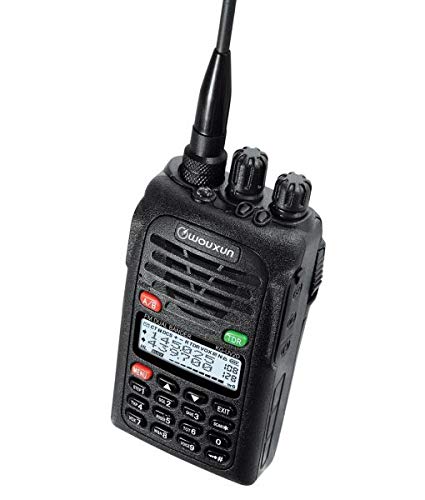
Image 1: The WOUXUN KG-UV2D Dual Band Two-Way Radio. This image shows the front of the radio, including the antenna, control knobs, speaker grille, LCD display, and keypad. The display shows frequency information, and the keypad includes numeric buttons and function keys.
5. การตั้งค่า
5.1 การติดตั้งแบตเตอรี่
- จัดชุดแบตเตอรี่ให้ตรงกับร่องที่ด้านหลังวิทยุ
- เลื่อนชุดแบตเตอรี่ขึ้นจนกระทั่งล็อคเข้าที่
- ในการถอดออก ให้กดสลักปลดแบตเตอรี่ (ถ้ามี) แล้วเลื่อนแบตเตอรี่ลง
5.2 การติดเสาอากาศ
- ขันเสาอากาศตามเข็มนาฬิกาเข้าไปในขั้วต่อที่ด้านบนของวิทยุจนกระทั่งแน่นสนิท
- อย่าขันแน่นจนเกินไป
5.3 การชาร์จเริ่มต้น
ก่อนใช้งานครั้งแรก ให้ชาร์จแบตเตอรี่ให้เต็ม
- Place the radio with the battery installed into the smart desktop charger.
- Ensure the charging indicator light on the charger illuminates (typically red).
- Charge for approximately 4-5 hours, or until the indicator light turns green, indicating a full charge.
6. การทำงานพื้นฐาน
6.1 เปิด/ปิดเครื่อง
หมุน ปุ่มเปิด/ปิดเครื่อง/ปรับระดับเสียง (top-left knob) clockwise to turn the radio on. Continue rotating to adjust the volume. Rotate counter-clockwise until a click is heard to turn the radio off.
6.2 การเลือกความถี่/ช่องสัญญาณ
- โหมด VFO (โหมดความถี่): Directly enter frequencies using the numeric keypad. Use the ปุ่มลูกศรขึ้น/ลง เพื่อปรับแต่งความถี่ให้ละเอียดยิ่งขึ้น
- โหมดช่อง: ใช้ ปุ่มลูกศรขึ้น/ลง to scroll through programmed memory channels.
- กดปุ่ม VFO/MR button (often labeled A/B or similar) to switch between VFO and Channel modes.
6.3 การส่งสัญญาณ (PTT)
หากต้องการส่งสัญญาณ ให้กดปุ่มค้างไว้ ปุ่ม PTT (Push-To-Talk) on the side of the radio. Speak clearly into the microphone. Release the PTT button to stop transmitting and return to receive mode.
6.4 การรับ
When the radio is on and tuned to an active frequency or channel, you will hear incoming transmissions through the speaker. Adjust the ปุ่มเปิด/ปิดเครื่อง/ปรับระดับเสียง for desired audio level.
7. คุณสมบัติขั้นสูง
7.1 Dual Watch (TDR)
The Dual Watch function allows the radio to monitor two different frequencies or channels simultaneously. If a signal is detected on either frequency, the radio will switch to that frequency. To activate/deactivate, press the TDR button (often green, located near the display).
7.2 โทนเสียง CTCSS/DCS
CTCSS (Continuous Tone-Coded Squelch System) and DCS (Digital Coded Squelch) tones are used to filter out unwanted signals and allow for private group communication. These can be programmed via the radio's menu or PC software. Refer to the detailed menu section in the printed manual for specific programming steps.
7.3 ฟังก์ชั่น VOX
VOX (Voice Operated Transmit) enables hands-free operation. When VOX is active, the radio will automatically transmit when it detects your voice. The sensitivity of the VOX function can be adjusted through the radio's menu.
7.4 การแจ้งเตือนฉุกเฉิน
Pressing the dedicated ปุ่มฉุกเฉิน (often red, labeled 'MENU' or 'EMG') will activate a loud audible alarm and cause the radio's LEDs to flash. It will also transmit a digital identification signal. Press the button again to deactivate the alarm.
7.5 การเขียนโปรแกรมพีซี
The WOUXUN KG-UV2D can be programmed using a computer and optional programming software/cable. This allows for easier management of memory channels, CTCSS/DCS settings, and other advanced parameters. Software is typically available for download from the manufacturer's webเว็บไซต์.
8. การบำรุงรักษา
8.1 การทำความสะอาด
เช็ดพื้นผิววิทยุด้วยผ้านุ่มๆamp ใช้ผ้าเช็ดทำความสะอาด อย่าใช้สารเคมีรุนแรงหรือน้ำยาทำความสะอาดที่มีฤทธิ์กัดกร่อน ตรวจสอบให้แน่ใจว่าวิทยุแห้งสนิทก่อนใช้งาน
8.2 การดูแลแบตเตอรี่
- ควรใช้เครื่องชาร์จตามที่ระบุไว้เสมอ
- อย่าลัดวงจรขั้วแบตเตอรี่
- หากจะไม่ใช้วิทยุเป็นเวลานาน ให้ถอดแบตเตอรี่ออกและเก็บไว้ในที่แห้งและเย็น
- หลีกเลี่ยงการปล่อยแบตเตอรี่จนหมดบ่อยครั้งเพื่อยืดอายุการใช้งาน
9 การแก้ไขปัญหา
| ปัญหา | สาเหตุที่เป็นไปได้ | สารละลาย |
|---|---|---|
| วิทยุไม่เปิด | แบตเตอรี่เหลือน้อยหรือติดตั้งไม่ถูกต้อง | ชาร์จแบตเตอรี่ แล้วใส่แบตเตอรี่กลับเข้าไปให้แน่น |
| ไม่สามารถส่งต่อได้ | Incorrect frequency/channel. PTT button not pressed. Transmit power too low. | Verify frequency/channel. Press PTT firmly. Check transmit power settings. |
| Poor reception or no audio | Volume too low. Squelch level too high. Antenna not connected. Incorrect CTCSS/DCS. | Increase volume. Adjust squelch level. Ensure antenna is attached. Verify CTCSS/DCS settings. |
| ปุ่มกดไม่ตอบสนอง | การล็อคแป้นพิมพ์เปิดใช้งานอยู่ | Deactivate keypad lock (refer to the printed manual for specific key combination). |
10. ข้อมูลจำเพาะ
| คุณสมบัติ | ข้อมูลจำเพาะ |
|---|---|
| ยี่ห้อ | WOUXUN |
| หมายเลขรุ่น | KG-UV2D |
| สี | สีดำ |
| ช่วงความถี่ | VHF: 136-174 MHz; UHF: 400-480 MHz |
| จำนวนช่องสัญญาณ | 32 |
| เล่มที่tage | 7.4 โวลต์ |
| ความจุของแบตเตอรี่ | 1700 mAh ลิเธียมไอออน |
| อิมพีแดนซ์ | 50 โอห์ม |
| ระดับความต้านทานต่อน้ำ | ไม่กันน้ำ |
| อุปกรณ์ที่รองรับ | Microphone, Headset |
| คุณสมบัติพิเศษ | Dual band, DTMF encoder, Tone scan, Dual watch, CTCSS/DCS tones, Sub-audio tones, Emergency alarm with flashing LEDs, VOX |
11. การรับประกันและการสนับสนุน
Information regarding specific warranty terms for the WOUXUN KG-UV2D is not available in the provided product details. For warranty claims, technical support, or service inquiries, please contact your authorized WOUXUN dealer or the manufacturer directly. Keep your purchase receipt as proof of purchase.


