การแนะนำ
The Nitecore MH12 v2 is a high-performance tactical flashlight designed for various applications, including everyday carry, outdoor activities, and professional use. It features a 1200 lumen output, USB-C recharging capability, and multiple lighting modes. This manual provides essential information for the safe and effective use of your MH12 v2 flashlight.

Image: The Nitecore MH12 v2 flashlight, shown with its included USB-C charging cable and tactical holster.
เนื้อหาแพ็คเกจ
- Nitecore MH12 v2 Flashlight
- Nitecore 21700 Li-ion Battery (NL2150 5000mAh)
- สายชาร์จ USB-C
- ซองปืนยุทธวิธี NTH10
- ลูเมนแทค ออร์แกไนเซอร์
- คลิป
- สายคล้องคอ
- อะไหล่โอริง
- 18650 Battery Magazine

Image: The included LumenTac battery organizer, designed for safe storage of batteries.
การตั้งค่า
1. การติดตั้งแบตเตอรี่
- หมุนฝาปิดท้ายไฟฉายทวนเข็มนาฬิกาเพื่อคลายออก
- Insert the included Nitecore 21700 Li-ion battery with the positive (+) terminal facing towards the head of the flashlight.
- หมุนฝาครอบท้ายกลับตามเข็มนาฬิกาจนกระทั่งขันแน่นสนิท
- The MH12 v2 can also use 18650 batteries with the included battery magazine. Insert the 18650 battery into the magazine, then insert the magazine into the flashlight.
2. การชาร์จไฟ
The MH12 v2 features a USB-C charging port for convenient recharging.
- Locate the USB-C charging port cover on the side of the flashlight head.
- ยกฝาครอบยางขึ้นเพื่อให้เห็นพอร์ต USB-C
- Connect one end of the included USB-C charging cable to the flashlight's port and the other end to a USB power source (e.g., USB adapter, computer, power bank).
- The power indicator light under the side switch will flash slowly during charging and become steady when charging is complete.
- Ensure the rubber cover is securely closed after charging to maintain water and dust resistance.

ภาพ: ระยะใกล้ view of the Nitecore MH12 v2 flashlight showing the USB-C charging port with the protective cover open.
คำแนะนำการใช้งาน
1. เปิด/ปิดเครื่อง
- เปิด: Fully press the tail switch until a click is heard.
- วิธีปิด: Fully press the tail switch again until a click is heard.
- แสงสว่างชั่วขณะ: Half-press and hold the tail switch. Release to turn off.
2. Brightness Levels and Special Modes
With the flashlight turned on, press the side switch to cycle through the brightness levels: Ultralow → Low → Mid → High → Turbo.
- Accessing Special Modes (Strobe/Beacon/SOS): With the flashlight turned on, press and hold the side switch to activate Strobe mode. Press and hold the side switch again to cycle through Beacon and SOS modes. Release the side switch to exit special modes.
- โหมดหน่วยความจำ: The MH12 v2 has a mode memory function. When reactivated, the flashlight will automatically access the previously memorized brightness level (excluding special modes).
3. User Modes
The MH12 v2 offers two user modes: Daily Mode and Tactical Mode. The default setting is Daily Mode.
- โหมดรายวัน: Provides access to all 4 brightness levels (Ultralow, Low, Mid, High, Turbo) and special modes (Strobe, Beacon, SOS).
- โหมดยุทธวิธี: Provides access to 4 brightness levels (Ultralow, Low, Mid, High, Turbo) and Strobe mode only. This mode is optimized for quick access to tactical functions.
To Switch User Modes: With the flashlight turned off, loosen the tail cap. Hold the side switch while simultaneously tightening the tail cap. The flashlight will indicate the current mode by flashing once for Daily Mode or twice for Tactical Mode.
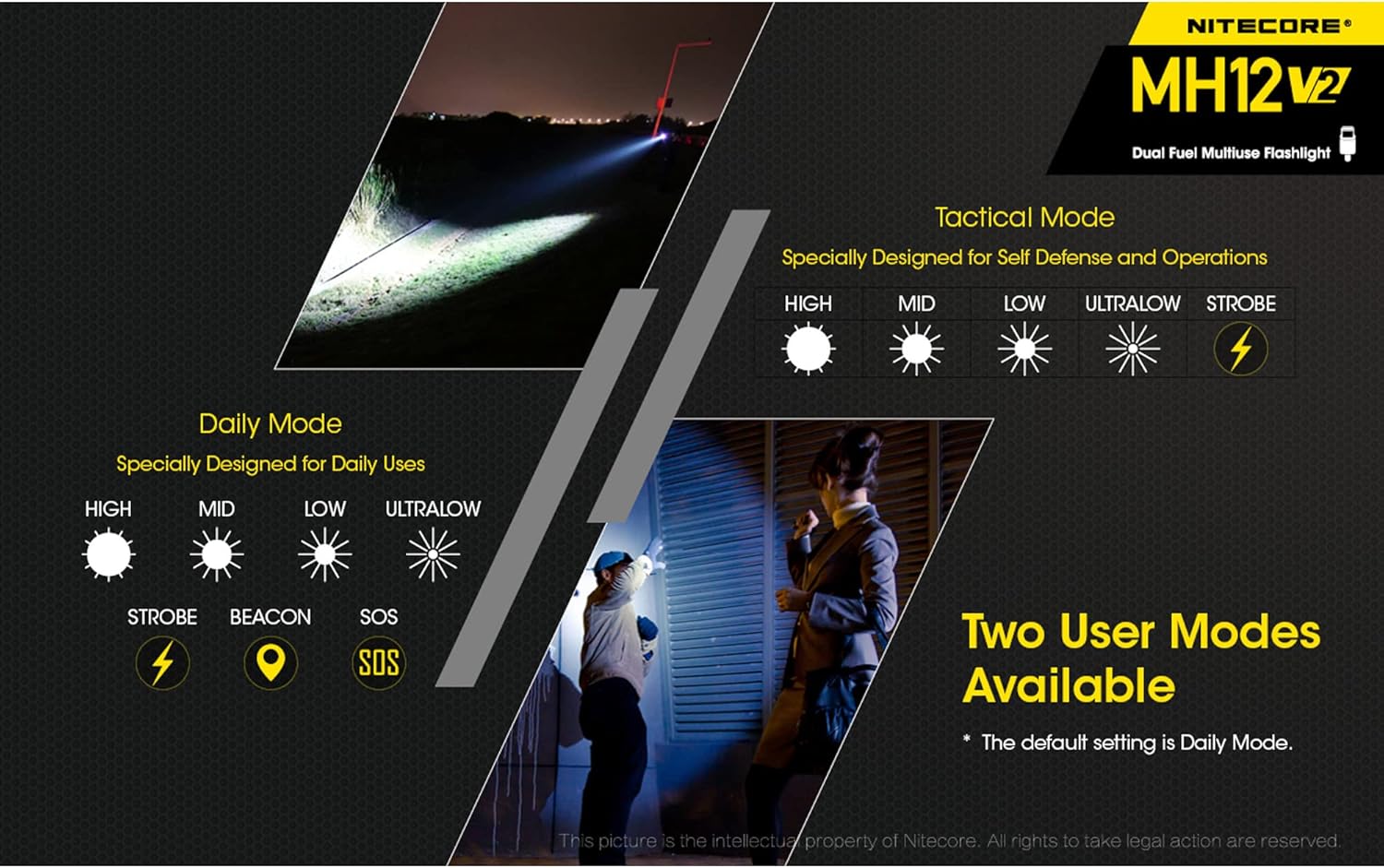
Image: Illustration comparing the available brightness levels and special functions in Daily Mode and Tactical Mode for the Nitecore MH12 v2.
การซ่อมบำรุง
- การทำความสะอาด: Periodically clean the threads and O-rings with a clean cloth. Lubricate threads with silicone grease to maintain water resistance.
- ความต้านทานน้ำ: The MH12 v2 is rated IPX8, meaning it is waterproof and submersible up to 2 meters. Ensure the USB-C port cover is securely closed before exposing the flashlight to water.
- การดูแลแบตเตอรี่ If the flashlight is not used for an extended period, remove the battery to prevent leakage. Store batteries in a cool, dry place.
- การกระจายความร้อน: During prolonged use at high brightness levels, the flashlight head may become warm. This is normal and indicates efficient heat dissipation.
การแก้ไขปัญหา
- ไฟฉายไม่ติด:
- ตรวจสอบให้แน่ใจว่าใส่แบตเตอรี่อย่างถูกต้องโดยให้ขั้วบวก (+) หันเข้าที่หัว
- Check if the tail cap is fully tightened.
- Verify the battery has sufficient charge.
- ปัญหาการชาร์จ:
- ตรวจสอบให้แน่ใจว่าได้เชื่อมต่อสาย USB-C เข้ากับไฟฉายและแหล่งจ่ายไฟอย่างถูกต้องแล้ว
- ลองใช้สาย USB-C หรือแหล่งจ่ายไฟอื่น
- ตรวจสอบว่าพอร์ตชาร์จสะอาดและไม่มีสิ่งสกปรก
- Intermittent operation or flickering:
- ทำความสะอาดขั้วแบตเตอรี่และเกลียวของไฟฉาย
- ตรวจสอบให้แน่ใจว่าแบตเตอรี่ชาร์จเต็มและติดตั้งอย่างถูกต้อง
- Replace the O-ring if it appears damaged.
If problems persist, please contact Nitecore customer support or your local distributor for assistance.
ข้อมูลจำเพาะ

Image: A table detailing the technical specifications of the Nitecore MH12 v2, including brightness levels, runtime, beam distance, and impact resistance.
| คุณสมบัติ | รายละเอียด |
|---|---|
| เอาท์พุตสูงสุด | 1200 ลูเมน |
| ระยะลำแสงสูงสุด | 202 เมตร (220 หลา) |
| Max Peak Beam Intensity | 10,200 ซีดี |
| รันไทม์สูงสุด | 1500 ชั่วโมง (ในโหมดประหยัดพลังงานพิเศษ) |
| นำ | CREE XP-L2 V6 LED |
| แบตเตอรี่ | 1 × 21700 Li-ion (included), compatible with 1 × 18650 or 2 × CR123/RCR123 |
| ชาร์จไฟได้ | ยูเอสบี-ซี |
| ความยาว | 158 มม. (6.22 นิ้ว) |
| เส้นผ่านศูนย์กลางหัว | 25.4 มม. (1 นิ้ว) |
| เส้นผ่านศูนย์กลางท่อ | 25.4 มม. (1 นิ้ว) |
| เส้นผ่านศูนย์กลางหาง | 27.2 มม. (1.07 นิ้ว) |
| น้ำหนัก | 84.5 g (2.98 oz) (without battery) |
| ความต้านทานต่อแรงกระแทก | 1 เมตร |
| ความต้านทานต่อน้ำ | IPX8 (ดำน้ำลึก 2 เมตร) |
| วัสดุ | Aero grade aluminum alloy with HA III military grade hard-anodized finish |

Image: The Nitecore MH12 v2 flashlight held in a hand, illustrating its compact and lightweight design, alongside its detailed dimensions.
ข้อมูลการรับประกัน
The Nitecore MH12 v2 is covered by a manufacturer's warranty. For detailed warranty terms and conditions, please refer to the official Nitecore webเข้าชมเว็บไซต์หรือติดต่อตัวแทนจำหน่าย Nitecore ที่ได้รับอนุญาตของคุณ เก็บใบเสร็จรับเงินไว้เพื่อใช้ในการเคลมประกัน
การสนับสนุนลูกค้า
For further assistance, technical support, or inquiries regarding your Nitecore MH12 v2 flashlight, please visit the official Nitecore website or contact their customer service department. Contact information can typically be found on the Nitecore official webเว็บไซต์.


