การแนะนำ
This manual provides detailed instructions for the safe and effective use of your UBeesize 60-inch Phone Tripod, Model TBC001. Please read this manual thoroughly before operation and retain it for future reference.
The UBeesize 60-inch Phone Tripod is designed for stability and versatility, supporting various devices such as smartphones, action cameras, and entry-level DSLRs. Its adjustable height, 3-way pan head, and wireless remote control make it suitable for diverse photography and videography needs.
เนื้อหาแพ็คเกจ
- UBeesize 60-inch Phone Tripod
- Cell Phone Mount Holder
- รีโมทคอนโทรลไร้สาย
- Carry Bag
- CR2 Battery (for remote)
สินค้าเกินview
ทำความคุ้นเคยกับส่วนประกอบต่อไปนี้:

This diagram illustrates the main components of the UBeesize 60-inch Phone Tripod, including the 3-way head, device locking knob, vertical tilt locking knob, pan locking knob, handle, center column locking knob, aluminum alloy legs, quick release leg locks, and flip locks.
- 3-Way Pan Head: Allows for precise control over pan, tilt, and horizontal to vertical camera direction.
- Device Locking Knob: Secures your device to the tripod head.
- Vertical Tilt Locking Knob: Adjusts and locks the vertical tilt angle.
- Pan Locking Knob: Controls the horizontal panning movement.
- รับมือ: Provides ergonomic control for adjusting the tripod head.
- Center Column Locking Knob: Secures the extendable center column.
- Aluminum Alloy Legs: Lightweight yet sturdy support for the tripod.
- Quick Release Leg Locks (Flip Locks): Enable quick adjustment of leg height.
- 1/4 Universal Screw Mount: Standard screw for attaching cameras and phone holders.
- ฐานยางกันลื่น: Provides stability on various surfaces.
- ที่วางโทรศัพท์มือถือ: Adjustable mount for smartphones (2.16-3.93 inches).
- รีโมทคอนโทรลไร้สาย: Bluetooth remote for capturing photos/videos from a distance (up to 33 ft).
คำแนะนำการตั้งค่า
1. การกางขาตั้งกล้อง
- วางขาตั้งกล้องบนพื้นผิวที่เรียบและมั่นคง
- Release the flip locks on each leg and extend the legs to the desired height. Secure the flip locks.
- Loosen the Center Column Locking Knob and extend the center column for additional height. Tighten the knob to secure.

The tripod can be adjusted from a minimum height of 16.8 inches (42.7 cm) to a maximum height of 60 inches (152.4 cm) by extending the legs and center column.
2. Attaching the Phone Holder or Camera
- Ensure the Device Locking Knob on the 3-way head is tightened.
- For smartphones: Screw the Cell Phone Holder onto the 1/4 universal screw mount on the tripod head. Place your smartphone securely into the holder.
- For cameras (GoPro, DSLR): Directly screw your camera onto the 1/4 universal screw mount.

The tripod features a standard 1/4 inch screw interface for attaching the phone holder or a camera. The phone holder is adjustable to fit various smartphone sizes.

The UBeesize tripod fully assembled with a smartphone in the mount, ready for use. The wireless remote and carry bag are also shown.
3. Pairing the Wireless Remote Control
- Ensure the CR2 battery is correctly inserted into the remote control.
- Turn on the remote control (if applicable, some remotes are always on or have a small switch).
- On your smartphone, go to Bluetooth settings and search for new devices.
- Select 'UBeesize' or a similar name from the list of available devices to pair.
- Once paired, the remote can be used to trigger your phone's camera shutter.
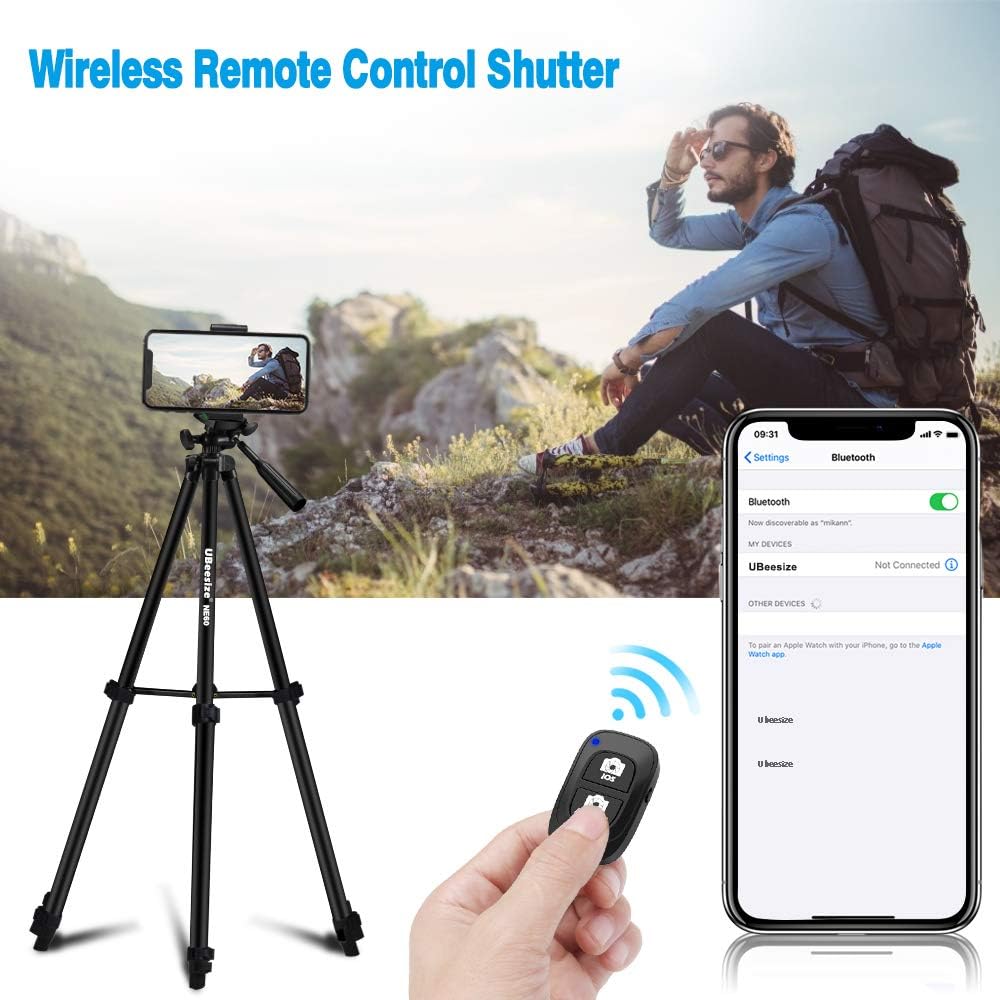
The wireless remote control connects via Bluetooth to your smartphone, allowing you to remotely trigger the camera shutter for photos and videos.
คำแนะนำการใช้งาน
Adjusting the 3-Way Pan Head
- การปรับแพน: Loosen the Pan Locking Knob to rotate the head horizontally. Tighten to secure.
- การปรับเอียง: Loosen the Vertical Tilt Locking Knob to adjust the vertical angle. Tighten to secure.
- Horizontal/Vertical Orientation: Use the handle to smoothly adjust the camera's orientation. The built-in bubble level assists in achieving a level shot.

The 3-way pan head allows for 360-degree rotation and precise pan direction adjustments, ideal for panoramic photography.
การใช้รีโมทไร้สาย
After successful pairing, press the appropriate button on the remote (iOS or Android) to capture photos or start/stop video recording on your smartphone.
การซ่อมบำรุง
- Clean the tripod with a soft, dry cloth. Avoid abrasive cleaners or solvents.
- Ensure all locking mechanisms are free of dust and debris for smooth operation.
- Store the tripod in its carry bag in a dry, cool place when not in use.
- Replace the CR2 battery in the remote control when its performance diminishes.
การแก้ไขปัญหา
Tripod Stability Issues
Ensure all leg flip locks and the center column locking knob are fully tightened. Verify the tripod is placed on a stable, level surface. Do not exceed the maximum weight limit of 6.6 pounds.
Wireless Remote Not Connecting
Check if the remote control battery is inserted correctly and has sufficient charge. Ensure Bluetooth is enabled on your smartphone and the remote is within the 33 ft operating range. Re-pair the remote if necessary.
Phone Holder Not Secure
Ensure your phone is within the adjustable range of 2.16-3.93 inches. Verify the phone is seated firmly in the holder and the holder is securely screwed onto the tripod's 1/4 mount.
ข้อมูลจำเพาะ
| คุณสมบัติ | รายละเอียด |
|---|---|
| หมายเลขรุ่น | TBC001 |
| ยี่ห้อ | UBesize |
| ขนาดสินค้า (พับ) | 3.54 x 3.54 x 16.93 นิ้ว (8.99 x 8.99 x 43 ซม.) |
| น้ำหนักสินค้า | 1.4 ปอนด์ (0.64 กก.) |
| ความสูงสูงสุด | 60 นิ้ว (152.4 ซม.) |
| ความสูงขั้นต่ำ | 16.8 นิ้ว (42.7 ซม.) |
| จำกัด น้ำหนัก | 6.6 ปอนด์ (3 กก.) |
| ประเภทหัวขาตั้งกล้อง | หัวแพน 3 ทิศทาง |
| อุปกรณ์ที่รองรับ | Smartphones (2.16-3.93 inch width), GoPro, Entry-level DSLRs |
| วัสดุ | Aluminum Alloy (legs), Rubber (feet) |
| แบตเตอรี่รีโมทคอนโทรล | 1 x CR2 (รวมอยู่ด้วย) |
การรับประกันและการสนับสนุน
For warranty information or technical support, please refer to the UBeesize official webหรือติดต่อฝ่ายบริการลูกค้าโดยตรง เก็บใบเสร็จรับเงินไว้เพื่อใช้ในการเคลมประกัน


