1. บทนำและเรื่องอื่นๆview
The Samsung 75-inch Q60T QLED 4K UHD HDR Smart TV delivers ultra-sharp UHD resolution, rich HDR color, and smart hub features for an immersive viewing experience. This manual provides essential information for setting up, operating, and maintaining your television.
คุณสมบัติหลัก:
- ปริมาตรสี 100% ด้วย Quantum Dot: Quantum dots produce over a billion shades of color that remain true-to-life.
- ไฟ LED คู่: ระบบไฟแบ็คไลท์ LED แบบวอร์มและเย็นโดยเฉพาะช่วยเพิ่มรายละเอียดคอนทราสต์
- ควอนตัม HDR: Expands the range of color and detail beyond standard HDTVs.
- สมาร์ททีวีขับเคลื่อนโดย Tizen: Offers next-generation apps, easy control, and enhancements for the TV watching experience.
- โปรเซสเซอร์ควอนตัม 4K ไลท์: This ultra-fast processor optimizes content for QLED and transforms content into stunning 4K.
- Alexa ในตัว: ควบคุมฟังก์ชั่นต่างๆ ของทีวีและอุปกรณ์สมาร์ทโฮมด้วยเสียง

รูปที่ 1 : ด้านหน้า view of the Samsung 75-inch Q60T QLED 4K UHD HDR Smart TV.
2. การตั้งค่า
2.1 การแกะและการประกอบ
Carefully remove the television and all components from the packaging. It is recommended to have at least two people for safe handling due to the size and weight of the TV.
การประกอบขาตั้ง:
Attach the included stand legs to the bottom of the television. Ensure they are securely fastened according to the instructions provided in the quick setup guide. The stand legs are designed for stability on a flat surface.
การติดตั้งบนผนัง:
If you choose to wall mount your TV, use a VESA-compliant wall mount kit (sold separately). The TV supports M8 screws for mounting. Consult a professional for wall mounting to ensure proper installation and safety.
2.2 การพิจารณาการจัดวาง
Place the TV on a stable, level surface or mount it securely on a wall. Ensure adequate ventilation around the TV to prevent overheating. Avoid placing the TV in direct sunlight or near heat sources.
Video 1: This video demonstrates the TV's size and how it fits into a living space, offering a visual reference for placement.
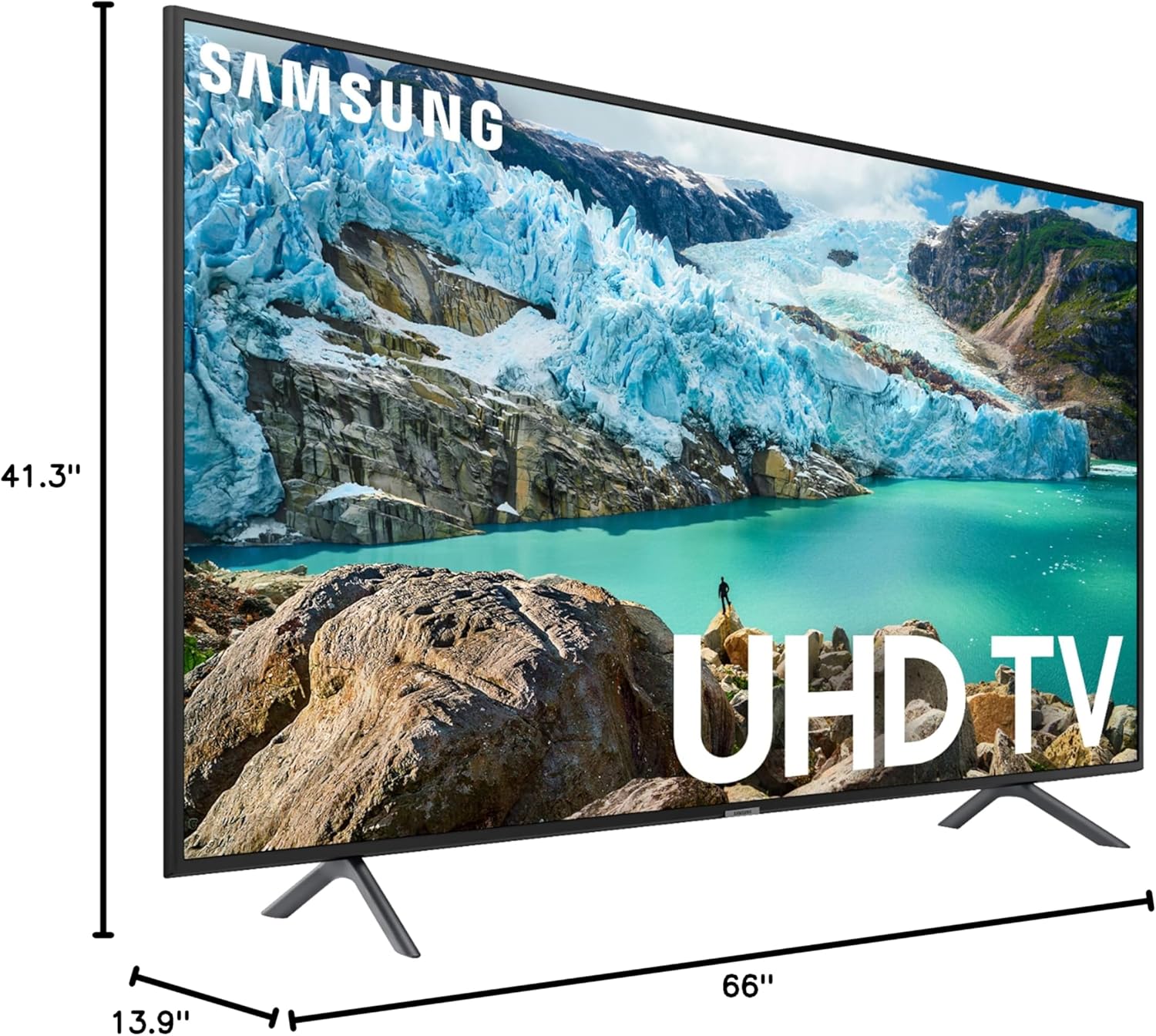
รูปที่ 2: ขนาดของทีวีสำหรับการวางแผนจัดวาง
2.3 การเชื่อมต่อ
Connect your external devices to the TV using the appropriate ports. The TV features multiple connectivity options:
- พอร์ต HDMI: For connecting devices like gaming consoles, Blu-ray players, and set-top boxes.
- พอร์ต USB: สำหรับการเชื่อมต่ออุปกรณ์จัดเก็บข้อมูล USB เข้ากับ view สื่อ files.
- พอร์ตอีเธอร์เน็ต: สำหรับการเชื่อมต่ออินเตอร์เน็ตแบบใช้สาย
- การเชื่อมต่อไร้สาย: Built-in Wi-Fi for internet access.
- บลูทูธ: สำหรับเชื่อมต่อหูฟังไร้สายหรืออุปกรณ์เสียงอื่นๆ ที่รองรับบลูทูธ
3. คู่มือการใช้งาน
3.1 Smart Hub และ Tizen OS
The Samsung Smart TV is powered by the Tizen operating system, providing a user-friendly interface for accessing apps, streaming services, and live TV. Navigate the Smart Hub using your Samsung Smart Control remote.
Key Smart Hub Features:
- การเข้าถึงแอป: Download and manage a wide range of streaming and utility applications.
- ซัมซุงทีวีพลัส: เพลิดเพลินกับช่องทีวีสดพร้อมโฆษณาและเนื้อหาตามต้องการได้ฟรี
- คู่มือสากล: Get personalized recommendations for content across various apps and live TV.
3.2 การควบคุมด้วยเสียง (มี Alexa ในตัว)
Your Samsung Q60T TV includes Alexa built-in, allowing you to control your TV and smart home devices using voice commands. Simply press the microphone button on your remote and speak your command.
3.3 Picture Quality Overview
The QLED display offers vibrant colors and sharp details. The Quantum Processor 4K Lite enhances content to 4K resolution, providing an optimized viewการสร้างประสบการณ์
Video 2: This short video demonstrates the clear picture quality of the Samsung TV while displaying content.
3.4 คุณสมบัติการเล่นเกม
The Q60T is designed to enhance your gaming experience with features like a 120Hz refresh rate and support for Variable Refresh Rate (VRR) when connected to compatible gaming PCs or consoles. Quantum HDR provides a wider range of colors and contrast for more realistic gameplay.
การตั้งค่าโหมดเกม:
- โหมดเกมอัตโนมัติ: ปรับการตั้งค่าให้เหมาะสมสำหรับการเล่นเกมโดยอัตโนมัติเมื่อตรวจพบเครื่องเล่นเกม
- เกมโมชั่นพลัส: Adjusts blur and judder reduction for smoother motion.
- อีควอไลเซอร์สีดำแบบไดนามิก: Enhances visibility in dark game scenes.
3.5 การตั้งค่าภาพและเสียง
Access the TV's settings menu to customize picture and sound to your preferences.
การตั้งค่ารูปภาพ:
- โหมดภาพ: Choose from Standard, Dynamic, Movie, or Eco modes.
- โหมดถนอมสายตา: Adjusts screen color tone based on ambient light.
- การสอบเทียบอัจฉริยะ: Calibrates picture quality using a compatible smartphone.
- การตั้งค่าผู้เชี่ยวชาญ: Fine-tune advanced picture parameters like brightness, contrast, sharpness, and color.
การตั้งค่าเสียง:
- เอาต์พุตเสียง: Select TV Speaker, Optical Receiver, or Bluetooth Speaker.
- โหมดเสียง: Choose from Standard or Amplified
- Equalizer: ปรับระดับเสียงเบสและเสียงแหลม
- HDMI-eARC Mode: Enable for enhanced audio return channel functionality with compatible sound systems.
- ปริมาณอัตโนมัติ: Automatically equalizes sound levels across different channels and sources.
4. การบำรุงรักษา
4.1 การทำความสะอาดทีวี
To clean the screen, gently wipe it with a soft, lint-free cloth. For the exterior, use a soft, dry cloth. Avoid using harsh chemicals, abrasive cleaners, or waxes, as these can damage the TV's finish.
4.2 การดูแลทั่วไป
Unplug the TV from the power outlet during lightning storms or when it will be left unattended for long periods. Do not block ventilation openings. Keep the TV away from moisture and extreme temperatures.
5 การแก้ไขปัญหา
หากคุณประสบปัญหาเกี่ยวกับทีวี โปรดดูวิธีแก้ไขทั่วไปต่อไปนี้:
- ไม่มีไฟฟ้า: Ensure the power cable is securely connected to the TV and a working power outlet. Check the remote control's battery.
- ไม่มีภาพ/เสียง: ตรวจสอบว่าเลือกแหล่งสัญญาณเข้าที่ถูกต้อง ตรวจสอบการเชื่อมต่อสายเคเบิลทั้งหมดกับอุปกรณ์ภายนอก
- ระยะไกลไม่ทำงาน: Ensure there are no obstructions between the remote and the TV. Replace the remote's batteries if necessary.
- ปัญหาการเชื่อมต่ออินเทอร์เน็ต: Check your router and modem. Reconnect the TV to your Wi-Fi network or try a wired Ethernet connection.
For more detailed troubleshooting, consult the full user manual available on the Samsung support webเว็บไซต์.
6. ข้อมูลจำเพาะ
| คุณสมบัติ | ข้อมูลจำเพาะ |
|---|---|
| ยี่ห้อ | ซัมซุง |
| หมายเลขรุ่น | QN75Q60TAFXZARB |
| ขนาดหน้าจอ | 75 นิ้ว |
| เทคโนโลยีการแสดงผล | คิวแอลอีดี |
| ปณิธาน | 4K UHD (3840 x 2160) |
| อัตราการรีเฟรช | 120 เฮิรตซ์ |
| คุณสมบัติพิเศษ | แบน |
| เทคโนโลยีการเชื่อมต่อ | บลูทูธ, อีเทอร์เน็ต, HDMI, USB, ไร้สาย |
| อัตราส่วนภาพ | 16:9 น. |
| ขนาดสินค้า | 64.96 x 13.78 x 39.37 นิ้ว (พร้อมขาตั้ง) |
| น้ำหนักสินค้า | 79.3 ปอนด์ |
| ชื่อสี | สีดำ |
| เล่มที่tage | 100 โวลต์ (AC) |
| วัดtage | 150 วัตต์ |

รูปที่ 3: โปรด้านข้างfile ของโทรทัศน์
7. อะไรอยู่ในกล่อง
The following items are included with your Samsung 75-inch Q60T QLED 4K UHD HDR Smart TV:
- Samsung 75-inch Q60T QLED 4K UHD HDR Smart TV
- สายไฟ
- Standard Smart Remote
- ซัมซุง สมาร์ท คอนโทรล
- คู่มือ (เอกสารนี้)
8. การรับประกันและการสนับสนุน
This product is offered as an Amazon Renewed item and comes with a 90-day return policy for refunds or replacements. For technical assistance or customer support, please refer to the contact information provided by Amazon Renewed or Samsung's official support channels.
หากต้องการความช่วยเหลือเพิ่มเติม โปรดไปที่เว็บไซต์ฝ่ายสนับสนุนของ Samsung webหรือติดต่อฝ่ายบริการลูกค้าโดยตรง