การแนะนำ
This manual provides instructions for the Elekpia NS-RC4NA-14 remote control, designed as a replacement for various Insignia LCD LED TV models. This remote control is pre-programmed and does not require any additional setup or pairing. Simply insert batteries, and it is ready for immediate use.
The NS-RC4NA-14 remote control is compatible with most 2013 and 2014 Insignia TV models, including but not limited to:
- NS-28ED200NA14, NS-50D400NA14, NS-19ED200NA14, 55E4400A14, NS-58E4400A14, NS-24E400NA14, NS-60E4400A14, NS-65E4400A14, NS-50L440NA14, NS-46D400NA14, NS-65D4400A14, NS-22E400NA14, NS-46L400NA14, NS-46E440NA14, NS-32E2000A14, NS-39D400NA14, NS-32DD2000A14, NS-39L400NA14, NS-55E4400A14, NS-19E200NA14, NS-50E440NA14, NS-24E200NA14, NS-32E400NA14, NS-32D200NA14, NS-55D440NA14
- NS-39D310NA15, NS-48D510NA15, NS-19E310NA15, NS-24D510NA15, NS-28D310NA15, NS-32D310NA15, NS-32D510NA15, NS-50D550NA15, NS-42D510NA15, NS-40D510NA15, NS-32D311NA15, NS-55D550NA15, NS-29D310NA15, NS-32D512NA15, NS-32D312NA15, NS-65D550NA15
- NS-32D200NA14, NS-46D400NA14, NS-28E200NA14, NS-32E830N14, NS-42E860N14, NS-50E860N14, NS-39E850N14, NS-50L440NA14, NS-39L700A12, NS-40D40SNA14, NS-24E40SNA14, NS-37D20SNA14, NS-32D20SNA14, NS-39D40SNA14, NS-32D201NA14, NS-46D40SNA14, NS-50DSNA14, NS-42D40SNA14, NS-19E310A13
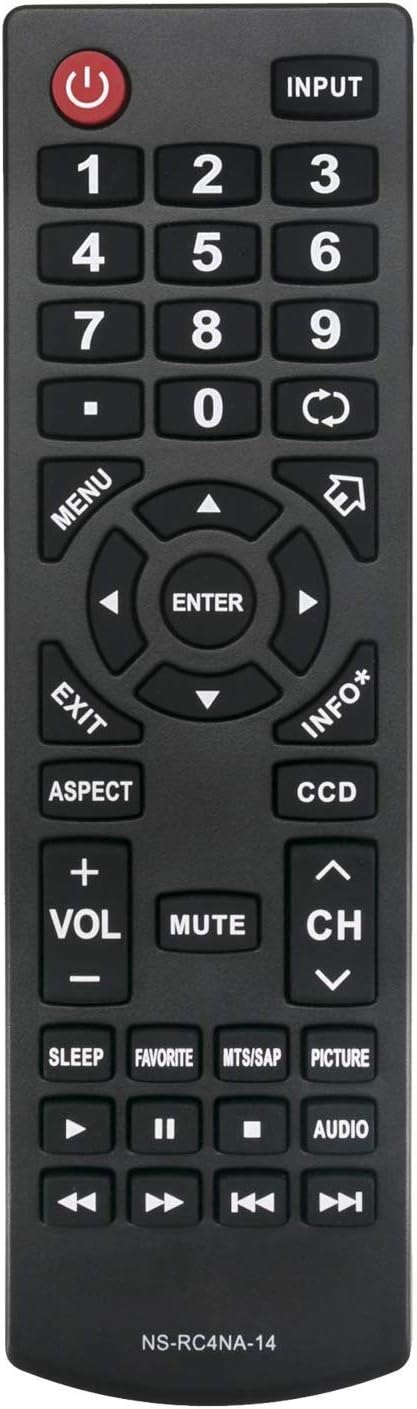
รูปที่ 1 : ด้านหน้า view of the NS-RC4NA-14 Remote Control.
การตั้งค่า
การติดตั้งแบตเตอรี่
The NS-RC4NA-14 remote control requires two (2) 1.5V AAA alkaline batteries for operation. Batteries are not included with the remote control.
- ค้นหาช่องใส่แบตเตอรี่ที่ด้านหลังของรีโมทคอนโทรล
- เลื่อนฝาปิดช่องใส่แบตเตอรี่ลงหรือตามทิศทางที่ระบุด้วยลูกศรเพื่อเปิด
- Insert two AAA batteries, ensuring that the positive (+) and negative (-) terminals align correctly with the markings inside the compartment. Incorrect insertion can prevent the remote from functioning.
- เลื่อนฝาปิดช่องใส่แบตเตอรี่กลับเข้าที่จนกระทั่งล็อคเข้าที่อย่างแน่นหนา
Once batteries are installed, the remote control is ready for use with your compatible Insignia TV without any further programming or pairing.
คำแนะนำการใช้งาน
This section details the functions of the buttons on your NS-RC4NA-14 remote control.

รูปที่ 2: มุม view of the NS-RC4NA-14 Remote Control, showing button layout.
ฟังก์ชั่นพื้นฐาน
- พลัง (⏻): เปิดหรือปิดทีวี
- อินพุต: Cycles through available input sources (e.g., HDMI 1, AV, Component).
- ปุ่มตัวเลข (0-9): เลือกช่องสัญญาณโดยตรงหรือป้อนค่าตัวเลข
- Volume (+VOL-): Adjusts the sound volume. Press +ฉบับ เพื่อเพิ่ม, -ฉบับที่ ให้ลดลง
- ใบ้: Silences the TV audio. Press again to restore audio.
- Channel (CH ∧/∨): Changes the TV channel. Press ช ∧ to go up, ช ∨ to go down.
การควบคุมการนำทางและเมนู
- เมนู: เปิดเมนูหลักของทีวี
- Arrow Buttons (◄ ▲ ► ▼): นำทางผ่านตัวเลือกเมนูและการตั้งค่า
- เข้า: ยืนยันการเลือกหรือเข้าสู่เมนูย่อย
- EXIT: Closes the current menu or on-screen display.
- ข้อมูล*: แสดงข้อมูลเกี่ยวกับโปรแกรมหรืออินพุตปัจจุบัน
Special Functions and Playback Controls
- ด้าน: เปลี่ยนอัตราส่วนภาพหน้าจอ (เช่น 16:9, 4:3)
- ดีซีซี: เปิดใช้งานหรือปิดใช้งานคำบรรยายภาพ
- นอน: ตั้งเวลาให้ทีวีปิดเองโดยอัตโนมัติ
- ที่ชื่นชอบ: เข้าถึงรายการช่องโปรด
- MTS/SAP: Selects Multi-channel Television Sound (MTS) or Secondary Audio Program (SAP) audio tracks.
- ภาพ: Adjusts picture modes (e.g., Standard, Movie, Dynamic).
- เสียง: Adjusts audio modes or settings.
- Playback Controls (◄◄, ►►, ❚❚, ■, ►): Used for controlling media playback (e.g., rewind, fast forward, pause, stop, play) when connected to compatible devices or media.
การซ่อมบำรุง
การทำความสะอาดรีโมทคอนโทรล
เพื่อรักษารูปลักษณ์และฟังก์ชันการทำงานของรีโมทคอนโทรล ควรทำความสะอาดเป็นประจำ:
- ใช้ผ้าแห้งนุ่มเช็ดทำความสะอาดพื้นผิวของรีโมทคอนโทรล
- สำหรับสิ่งสกปรกฝังแน่น ให้เช็ดออกเล็กน้อยampชุบผ้าด้วยน้ำหรือน้ำยาทำความสะอาดอ่อนๆ ที่ไม่กัดกร่อน หลีกเลี่ยงความชื้นที่มากเกินไป
- ห้ามใช้สารเคมีรุนแรง น้ำยาทำความสะอาดที่มีฤทธิ์กัดกร่อน หรือตัวทำละลาย เพราะอาจทำให้สีหรือส่วนประกอบภายในของรีโมตเสียหายได้
การดูแลแบตเตอรี่
- Replace batteries when the remote control's response becomes sluggish or stops working.
- Always replace both batteries at the same time with new ones. Do not mix old and new batteries, or different types of batteries.
- หากจะไม่ใช้รีโมทคอนโทรลเป็นเวลานาน ควรถอดแบตเตอรี่ออกเพื่อป้องกันการรั่วไหลและความเสียหายที่อาจเกิดขึ้น
- ทิ้งแบตเตอรี่ที่ใช้แล้วตามระเบียบข้อบังคับของท้องถิ่น
การแก้ไขปัญหา
If you experience issues with your NS-RC4NA-14 remote control, refer to the following common problems and solutions:
| ปัญหา | สาเหตุที่เป็นไปได้ | สารละลาย |
|---|---|---|
| รีโมทคอนโทรลไม่ทำงาน. | แบตเตอรี่หมดหรือใส่ไม่ถูกต้อง | Replace batteries with new 1.5V AAA alkaline batteries. Ensure correct polarity (+/-). |
| รีโมทคอนโทรลมีระยะการใช้งานจำกัดหรือตอบสนองไม่สม่ำเสมอ | Low battery power; Obstruction between remote and TV; Infrared sensor on TV is blocked. | Replace batteries. Ensure a clear line of sight between the remote and the TV's infrared sensor. Remove any obstructions. |
| Remote control does not control the TV. | TV is not a compatible Insignia model; Remote control is faulty. | Verify your TV model is listed in the compatible models section. This remote does not require programming; if it's not working with a compatible TV after new batteries, the remote may be defective. |
บันทึก: This remote control is designed to work out of the box with compatible Insignia TVs and does not require any programming or pairing procedures.
ข้อมูลจำเพาะ
- หมายเลขรุ่น: NS-RC4NA-14 (Elekpia Insignia-14)
- ยี่ห้อ: เอเล็คเปีย
- อุปกรณ์ที่รองรับ: Insignia LCD LED Televisions (specific models listed in Introduction)
- แหล่งจ่ายไฟ: แบตเตอรี่อัลคาไลน์ AAA 2 x 1.5V (ไม่รวม)
- ขนาดสินค้า : 6.5 x 2 x 0.7 นิ้ว (โดยประมาณ)
- น้ำหนักสินค้า: 2.64 ออนซ์ (โดยประมาณ)
- สี: สีดำ
- คุณสมบัติพิเศษ: การออกแบบตามหลักสรีรศาสตร์
การรับประกันและการสนับสนุน
Information regarding specific warranty terms or direct customer support contact for the Elekpia NS-RC4NA-14 remote control was not provided in the product details. For any issues or inquiries, please refer to the retailer or the original point of purchase for assistance.


