1. บทนำ
The OONO PWRshield F-1009 module is a programmable Low Voltage Disconnect (LVD) and High Voltage Disconnect (HVD) power protection system. It features programmable voltage settings for LVD and HVD when the rocker switch is set to AUTO. Additionally, it includes an emergency ON or OFF function for immediate output control. Designed with a microcontroller and low-loss MOSFETs, this module ensures efficient power management and protection for your electronic devices.
2. คุณสมบัติของผลิตภัณฑ์
- Programmable LVD/HVD Protection: Offers customizable low voltage disconnect and high voltage disconnect settings for comprehensive power protection.
- โหมดการทำงานที่ยืดหยุ่น: Features AUTO mode for programmable voltage settings, and emergency ON or OFF functions for immediate output control.
- High Efficiency Design: Utilizes a microcontroller and low-loss MOSFETs (on-state resistance <0.002 ohm) to ensure minimal power dissipation, even at 30 Amps continuous current, eliminating the need for external heatsinks.
- การเชื่อมต่อมาตรฐาน: Equipped with standard 30 Amps Power Pole connectors for easy and secure connections.
- โครงสร้างทนทาน: Housed in a high-quality aluminum enclosure with a thickness of 1.5mm/0.06".
- แพ็คเกจสมบูรณ์: Includes the PWRshield module, 2x black power pole housings, 2x red power pole housings, 2x PVC cover flame retardant sleeves, and 4x silver-plated copper 30A 14-12AWG power pole contacts.
3. ข้อมูลจำเพาะ
| ข้อมูลจำเพาะ | ค่า |
|---|---|
| ปฏิบัติการฉบับที่tage | DC 6.5 ~ 30V |
| Programmable HVD Value | 14V/15V, 15V-16V, 16V/17V, 17V/18V |
| Programmable LVD Value | 10V/11V, 10V/12V, 11V/12V, 11V/13V |
| Quiescent Current (Output OFF) | 2.5มิลลิแอมป์ |
| Quiescent Current (Output ON) | 13มิลลิแอมป์ |
| Disconnect/Reconnect Voltagอี ความอดทน | <0.1โวลต์ |
| Max. Output Current (<5 seconds) | 40เอ |
| สูงสุด กระแสไฟขาออกต่อเนื่อง | 30เอ |
| เล่มที่tage Drop (at 10A) | 0.025โวลต์ |
| เล่มที่tage Drop (at 30A) | 0.070โวลต์ |
| โมสเฟต | 30V 60A P-Channel, on-state resistance <0.002 ohm |
| ตัวเชื่อมต่อ | Compatible 45A Power Pole connectors (Red is positive, Black is negative) |
4. การตั้งค่า
This section guides you through the initial setup of your OONO PWRshield F-1009 module.
4.1. การติดตั้งทางกายภาพ
The module features mounting tabs for secure installation. Ensure it is placed in a location with adequate ventilation and away from direct heat or moisture.

Figure 1: Dimensions of the OONO PWRshield F-1009 module (all measurements in millimeters).
4.2. การเชื่อมต่อไฟฟ้า
Connect your power source and load using the provided 30 Amps Power Pole connectors. Pay close attention to polarity: Red is positive (+) และ Black is negative (-).
- การเชื่อมต่ออินพุต: Connect your DC power source (e.g., battery, power supply) to the ป้อนข้อมูล ขั้วต่อ
- การเชื่อมต่อเอาท์พุต: Connect your load (e.g., radio, electronic device) to the เอาท์พุต ขั้วต่อ
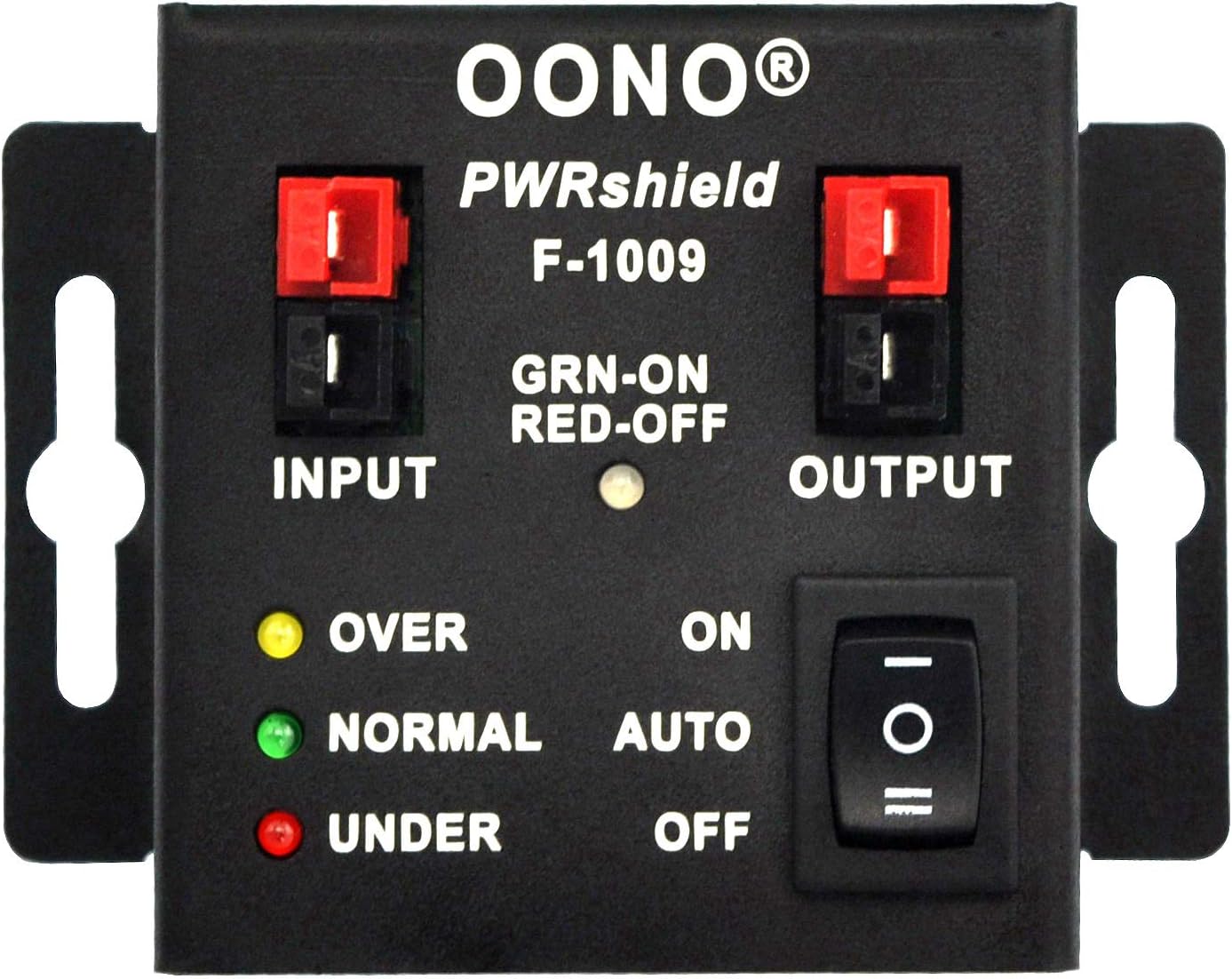
Figure 2: Front panel of the PWRshield F-1009, illustrating input/output connections and controls.

Figure 3: The PWRshield F-1009 module shown with its included Power Pole connectors and PVC protective sleeves.
4.3. Initial Dip Switch Configuration
Before applying power, configure the LVD (Low Voltage Disconnect) and HVD (High Voltage Disconnect) trigger voltages using the dip switches located on the side of the module. Refer to the table in the Operating Instructions section for specific voltagการตั้งค่าอี
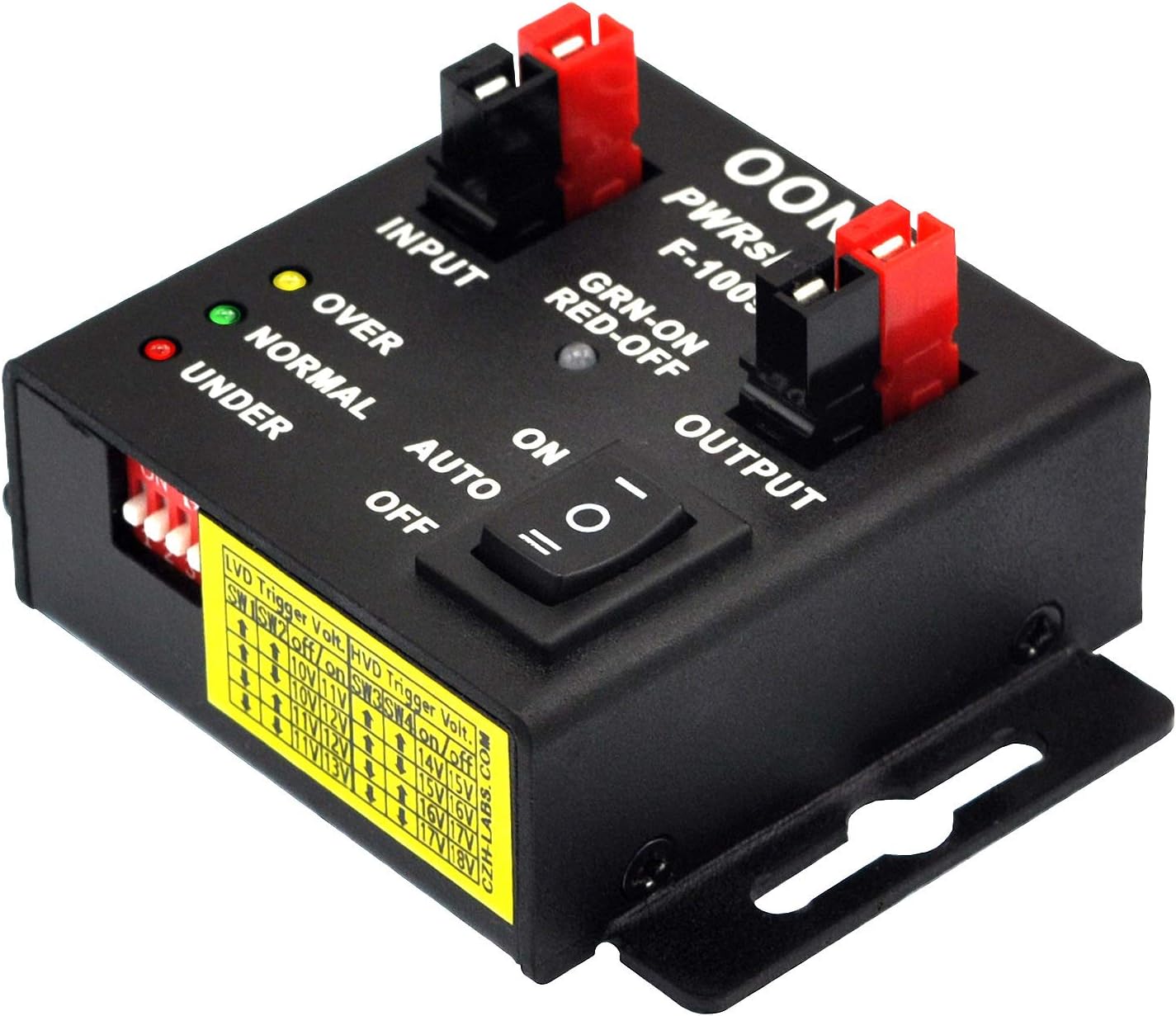
รูปที่ 4: ด้านข้าง view of the PWRshield F-1009, highlighting the dip switches for voltagอีการกำหนดค่า
5. คู่มือการใช้งาน
The PWRshield F-1009 offers flexible operation modes and voltagการตั้งค่าการป้องกัน
5.1. Setting LVD and HVD Trigger Voltages
Use the four dip switches (SW1-SW4) to set the desired Low Voltage Disconnect (LVD) and High Voltage Disconnect (HVD) trigger voltages. Switches 1 and 2 control LVD, while switches 3 and 4 control HVD. Refer to the table below for specific configurations.
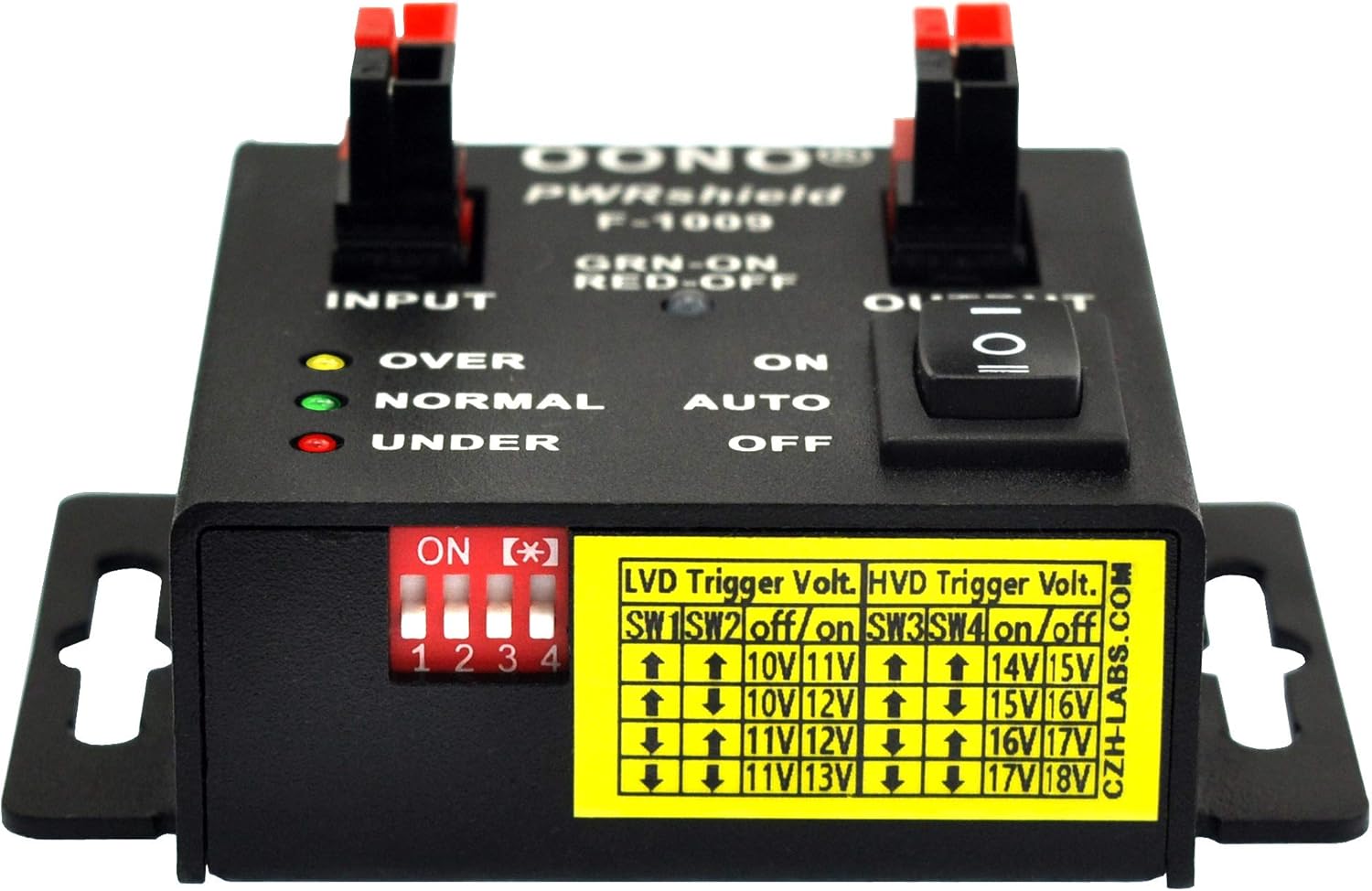
Figure 5: Dip switch configuration table for LVD and HVD trigger voltagใช่
5.2. Rocker Switch Modes (ON/AUTO/OFF)
The rocker switch on the front panel controls the output behavior:
- โหมดอัตโนมัติ: (Middle position) In this mode, the module operates according to the LVD and HVD settings configured via the dip switches. The output will automatically disconnect if the input voltage falls below the LVD trigger or rises above the HVD trigger. It will reconnect when the voltage returns to the safe operating range (LVD Restore/HVD Restore).
- โหมดเปิด: (Up position) Forces the output to remain ON, regardless of the input voltage. This bypasses the LVD/HVD protection. Use with caution, as it can lead to over-discharge or over-voltage damage to your connected devices.
- โหมดปิด: (Down position) Forces the output to remain OFF, regardless of the input voltage. This completely disconnects the load.
5.3. ไฟ LED
The module features three LED indicators for real-time status feedback:
- OVER (Yellow): Illuminates when the input voltage exceeds the High Voltage Disconnect (HVD) threshold.
- NORMAL (Green): Illuminates when the input voltage is within the safe operating range (above LVD and below HVD).
- UNDER (Red): Illuminates when the input voltage falls below the Low Voltagเกณฑ์การตัดการเชื่อมต่อ (LVD)
5.4. Operational Flowchart
The following flowchart illustrates the operational logic of the PWRshield F-1009 module in AUTO mode.

Figure 6: Operational flowchart for the PWRshield F-1009 in AUTO mode.
5.5. สินค้าหมดview วีดีโอ
สำหรับการมองเห็นมากกว่าview of the OONO PWRshield F-1009 module, please watch the following video:
วิดีโอ 1: จบแล้วview of the MD-F1009-1 Low Loss PWRshield LVD-HVD Power Guard Module, demonstrating its features and functionality.
6. การบำรุงรักษา
The OONO PWRshield F-1009 module is designed for durability and requires minimal maintenance. To ensure optimal performance and longevity:
- รักษาความสะอาด: Periodically wipe the module with a dry, soft cloth to remove dust and debris. Avoid using harsh chemicals or abrasive materials.
- ตรวจสอบการเชื่อมต่อ: Regularly inspect all Power Pole connections to ensure they are secure and free from corrosion. Loose connections can lead to voltage drops or intermittent operation.
- สภาพแวดล้อม : Ensure the module is operated within its specified temperature and humidity ranges. Avoid exposing it to extreme conditions.
7 การแก้ไขปัญหา
If you encounter issues with your OONO PWRshield F-1009 module, refer to the following troubleshooting tips:
- ไม่มีกำลังขับ:
- Check if the rocker switch is in the 'OFF' position. Switch it to 'AUTO' or 'ON' as required.
- ตรวจสอบปริมาณอินพุตtage is within the normal operating range (not triggering LVD or HVD). The 'OVER', 'NORMAL', or 'UNDER' LEDs will indicate the current voltagสถานะอี
- Ensure all Power Pole connections are secure and correctly polarized (Red to positive, Black to negative).
- Vol .ไม่ถูกต้องtage Cutoff/Reconnect:
- Double-check the dip switch settings against the provided table (Figure 5) to ensure they match your desired LVD and HVD trigger voltagใช่
- Confirm that the rocker switch is in 'AUTO' mode for the programmable protection to be active.
- Continuous Beeping/Alarm:
- A continuous or intermittent beep indicates a voltage condition (OVER or UNDER) that has triggered the protection. Refer to the LED indicators to identify the specific issue.
- The module has a built-in delay for disconnect/reconnect (e.g., ~5 seconds for low voltage disconnect/reconnect). This is normal behavior to prevent nuisance tripping from momentary voltagความผันผวนของอี
- Switch Behavior Appears Reversed (ON/OFF):
- The rocker switch has three positions: 'ON' (up), 'AUTO' (middle), and 'OFF' (down). Ensure you are selecting the intended mode. 'ON' forces output, 'OFF' forces no output, and 'AUTO' enables voltagการป้องกันอี
8. การรับประกันและการสนับสนุน
For warranty information, technical support, or service inquiries, please refer to the product packaging or contact OONO customer service directly. Keep your purchase receipt as proof of purchase.


