1. บทนำ
Thank you for choosing the TechniSat DIGITRADIO 371 CD BT. This versatile stereo digital radio system offers a wide range of audio entertainment options, including DAB+ digital radio, FM radio, a CD player, Bluetooth audio streaming, and USB playback. This manual provides detailed instructions to help you set up, operate, and maintain your device for optimal performance.
2. คำแนะนำด้านความปลอดภัยที่สำคัญ
- อ่านคำแนะนำทั้งหมดอย่างละเอียดก่อนใช้งานอุปกรณ์
- เก็บคู่มือนี้ไว้เพื่อใช้อ้างอิงในอนาคต
- อย่าวางอุปกรณ์ไว้ในที่ที่มีฝนหรือความชื้น เพื่อป้องกันไฟไหม้หรือไฟฟ้าช็อต
- ตรวจสอบให้แน่ใจว่ามีการระบายอากาศที่เหมาะสม อย่าปิดกั้นช่องระบายอากาศใดๆ
- วางอุปกรณ์บนพื้นผิวเรียบและมั่นคง
- ใช้เฉพาะอุปกรณ์เสริม/สิ่งที่แนบตามที่ผู้ผลิตกำหนดเท่านั้น
- ถอดปลั๊กอุปกรณ์ในระหว่างที่มีพายุฝนฟ้าคะนองหรือเมื่อไม่ได้ใช้งานเป็นเวลานาน
- ส่งต่อการบริการทั้งหมดไปยังบุคลากรบริการที่มีคุณสมบัติเหมาะสม
- The device may only be operated within the specified environmental conditions.
3. เนื้อหาบรรจุภัณฑ์
กรุณาตรวจสอบว่าสินค้าทั้งหมดมีอยู่ในแพ็คเกจ:
- TechniSat DIGITRADIO 371 CD BT unit
- รีโมทคอนโทรล
- คู่มือการใช้งาน (เอกสารนี้)
- แบตเตอรี่ AAA 2 ก้อน (สำหรับรีโมทคอนโทรล)
4. สินค้าหมดview
4.1 แผงด้านหน้า

The front panel features a clear color display, control buttons for mode selection, information, menu navigation, and preset access. Two rotary knobs are provided for volume control and tuning/entering selections.
4.2 แผงด้านหลัง
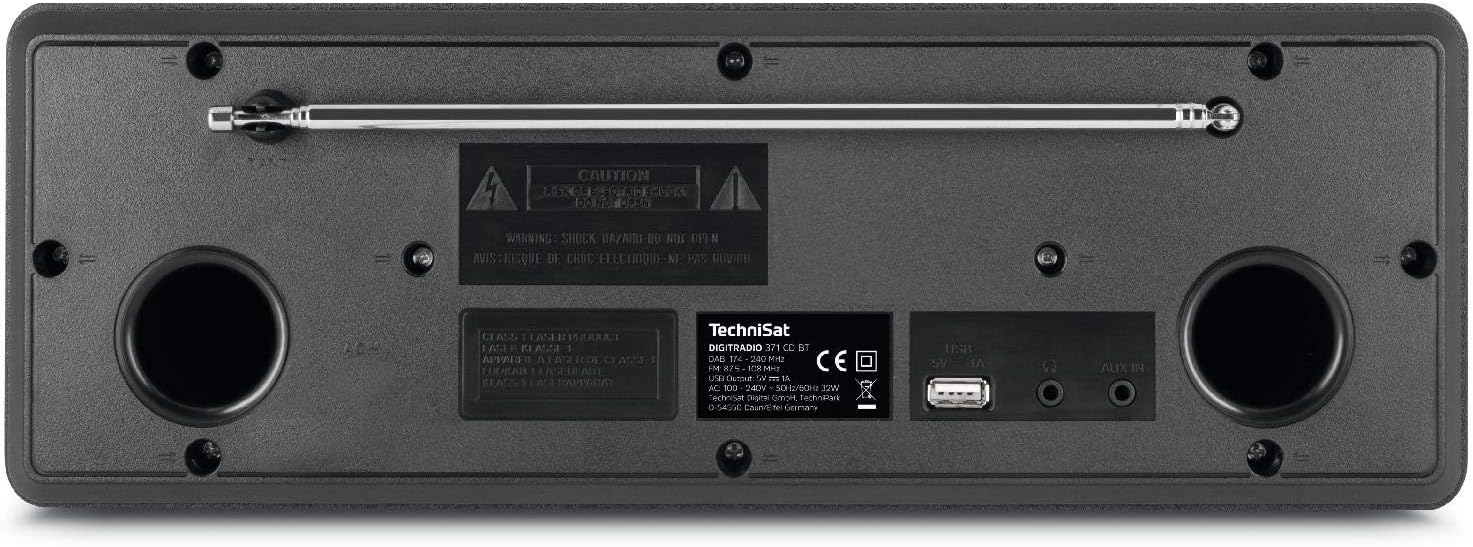
The rear panel includes the telescopic antenna for radio reception, a USB port for MP3 playback and device charging, and a 3.5mm AUX input for connecting external audio sources.
4.3 การควบคุมระยะไกล

The included remote control provides convenient access to all functions of the DIGITRADIO 371 CD BT, including power, mode selection, volume, tuning, and preset management.
5. การตั้งค่า
5.1 การเชื่อมต่อสายไฟ
- ตรวจสอบให้แน่ใจว่าวางอุปกรณ์บนพื้นผิวที่มั่นคง
- Connect the power cable to the AC inlet on the rear of the unit.
- Plug the other end of the power cable into a standard wall outlet (230V).
5.2 การปรับเสาอากาศ
For optimal DAB+ and FM radio reception, fully extend the telescopic antenna located on the rear of the unit. Adjust its position and angle to achieve the best signal quality.
5.3 Initial Power On and Scan
- Press the Power button on the front panel or remote control to turn on the device.
- Upon first use, the radio will typically initiate an automatic scan for DAB+ stations. This process may take a few minutes.
- Once the scan is complete, the first available DAB+ station will begin playing.
6. คู่มือการใช้งาน
การเลือกโหมด 6.1
กดปุ่ม โหมด button on the front panel or remote control to cycle through available modes: DAB+, FM, CD, Bluetooth, and AUX.
วิทยุ 6.2 DAB+
- เลือกโหมด DAB+ โดยใช้ โหมด ปุ่ม.
- If an automatic scan has not been performed or you wish to rescan, navigate to the menu and select 'Full Scan'.
- ใช้ การปรับจูน/ป้อน knob or the navigation buttons on the remote to browse available stations. Press เข้า เพื่อเลือกสถานี
- หากต้องการบันทึกสถานีเป็นสถานีโปรด ให้กดปุ่มค้างไว้ พรีเซ็ต button, then select a preset number (1-20) and confirm.
6.3 วิทยุ FM
- เลือกโหมด FM โดยใช้ โหมด ปุ่ม.
- To automatically scan for stations, press the สแกน button on the remote or navigate through the menu.
- To manually tune, rotate the การปรับจูน/ป้อน ลูกบิด
- หากต้องการบันทึกสถานีเป็นสถานีโปรด ให้กดปุ่มค้างไว้ พรีเซ็ต button, then select a preset number (1-20) and confirm.
เครื่องเล่นซีดี 6.4
- เลือกโหมดซีดีโดยใช้ โหมด ปุ่ม.
- Gently insert an audio CD or MP3 CD into the CD slot. The device will automatically load and begin playback.
- Use the playback control buttons (Play/Pause, Skip Forward/Backward) on the front panel or remote control.
6.5 การสตรีมเสียงบลูทูธ
- เลือกโหมดบลูทูธโดยใช้ โหมด กดปุ่ม หน้าจอจะแสดงคำว่า 'กำลังจับคู่'
- On your Bluetooth-enabled device (e.g., smartphone, tablet), search for available Bluetooth devices and select 'DIGITRADIO 371 CD BT'.
- Once paired, you can stream audio from your device to the DIGITRADIO 371 CD BT.
6.6 การเล่นและการชาร์จผ่าน USB
- ใส่แฟลชไดรฟ์ USB ที่มี MP3 fileเสียบเข้ากับพอร์ต USB ที่แผงด้านหลัง
- Select USB mode (if available, otherwise it may automatically switch).
- Use the navigation and playback controls to browse and play MP3 files.
- The USB port also provides a charging function for compatible devices like smartphones.
อินพุต AUX 6.7 ช่อง
- Connect an external audio device (e.g., MP3 player) to the 3.5mm AUX IN jack on the rear panel using an appropriate audio cable (not included).
- เลือกโหมด AUX โดยใช้ โหมด ปุ่ม.
- Audio from the external device will now play through the DIGITRADIO 371 CD BT speakers. Control playback from the external device.
6.8 นาฬิกาปลุกและตัวตั้งเวลาปิดเครื่อง
- นาฬิกาปลุก: Access the alarm settings via the เมนู button. Follow the on-screen prompts to set alarm time, source (buzzer, radio), and volume.
- เวลานอน: Access the sleep timer settings via the เมนู button. Set a duration after which the radio will automatically turn off.
7. การบำรุงรักษา
7.1 การทำความสะอาด
- ถอดปลั๊กอุปกรณ์ออกจากเต้าเสียบทุกครั้งก่อนทำความสะอาด
- ใช้ผ้าแห้งนุ่มเช็ดพื้นผิวภายนอก
- ห้ามใช้สารทำความสะอาดที่มีฤทธิ์กัดกร่อน ขี้ผึ้ง หรือตัวทำละลาย เพราะอาจทำให้พื้นผิวเสียหายได้
- For the display, use a soft, lint-free cloth.
7.2 การดูแลรักษาเครื่องเล่นซีดี
- จับซีดีโดยจับที่ขอบเพื่อหลีกเลี่ยงรอยนิ้วมือ
- ทำความสะอาดซีดีด้วยผ้านุ่มที่ไม่เป็นขุย เช็ดจากตรงกลางออกด้านนอก
- Do not use scratched or damaged CDs, as they may harm the player mechanism.
8 การแก้ไขปัญหา
| ปัญหา | สาเหตุที่เป็นไปได้ | สารละลาย |
|---|---|---|
| ไม่มีไฟฟ้า | สายไฟไม่ได้เชื่อมต่อ เต้ารับไฟฟ้าไม่ทำงาน | ตรวจสอบการเชื่อมต่อสายไฟ; ลองเสียบปลั๊กเข้ากับเต้ารับอื่นดู |
| การรับสัญญาณวิทยุไม่ดี | เสาอากาศไม่ขยายออก พื้นที่สัญญาณอ่อน | Fully extend and adjust antenna; Try repositioning the unit |
| ซีดีไม่เล่น | CD inserted incorrectly; CD is dirty or scratched | Reinsert CD correctly; Clean or replace CD |
| บลูทูธไม่เชื่อมต่อ | Device not in pairing mode; Bluetooth disabled on external device | Ensure radio is in Bluetooth mode; Enable Bluetooth on your device and search again |
| ไม่มีเสียงออกจากช่อง AUX | Cable not connected; Incorrect mode selected | Check AUX cable connection; Select AUX mode |
9. ข้อมูลจำเพาะ
- หมายเลขรุ่น:
- DIGITRADIO 371 CD BT (0000/2948)
- ขนาด (กว้าง x สูง x ลึก):
- 34.5 x 12.3 x 21 ซม.
- น้ำหนัก:
- 2.7 กิโลกรัม
- แหล่งพลังงาน:
- Wired, internal power supply
- เล่มที่tage:
- 230 โวลต์
- วัดtage:
- 10 watts (speaker output)
- จำนวนผู้พูด:
- 2 (สเตอริโอ)
- เครื่องรับวิทยุ:
- ตบเบา ๆ +, เอฟเอ็ม
- การเชื่อมต่อ:
- Bluetooth (reception), USB (MP3 playback, charging), 3.5mm AUX In, 3.5mm Headphone Jack
- แสดง:
- 2.4 inch color display (dimmable)
- เครื่องเล่นซีดี:
- Plays Audio CDs, MP3 CDs, CD-R, CD-RW
- คุณสมบัติ:
- Alarm clock, Sleep timer, Station memory (20x DAB+/20x FM), EQ Predefined
- ภาษา OSD:
- อังกฤษ, เยอรมัน, ฝรั่งเศส, อิตาลี
10. การรับประกันและการสนับสนุน
For warranty information, please refer to the warranty card included with your product or contact your local TechniSat dealer or customer support. If you encounter any issues not covered in the troubleshooting section, please visit the official TechniSat webเว็บไซต์หรือติดต่อฝ่ายบริการลูกค้าเพื่อขอความช่วยเหลือ


