การแนะนำ
The EVOLVEO EASYPHONE FM is a user-friendly mobile phone designed for straightforward communication. It features large, separated keys, a clear display, and essential functions to ensure ease of use. This manual provides instructions for setting up, operating, and maintaining your device.
1. เนื้อหาบรรจุภัณฑ์
กรุณาตรวจสอบแพ็คเกจสำหรับรายการต่อไปนี้:
- EVOLVEO EASYPHONE FM Mobile Phone
- แท่นชาร์จ
- อะแดปเตอร์ AC
- Li-ion 1000 mAh Battery
- คู่มือการใช้งาน
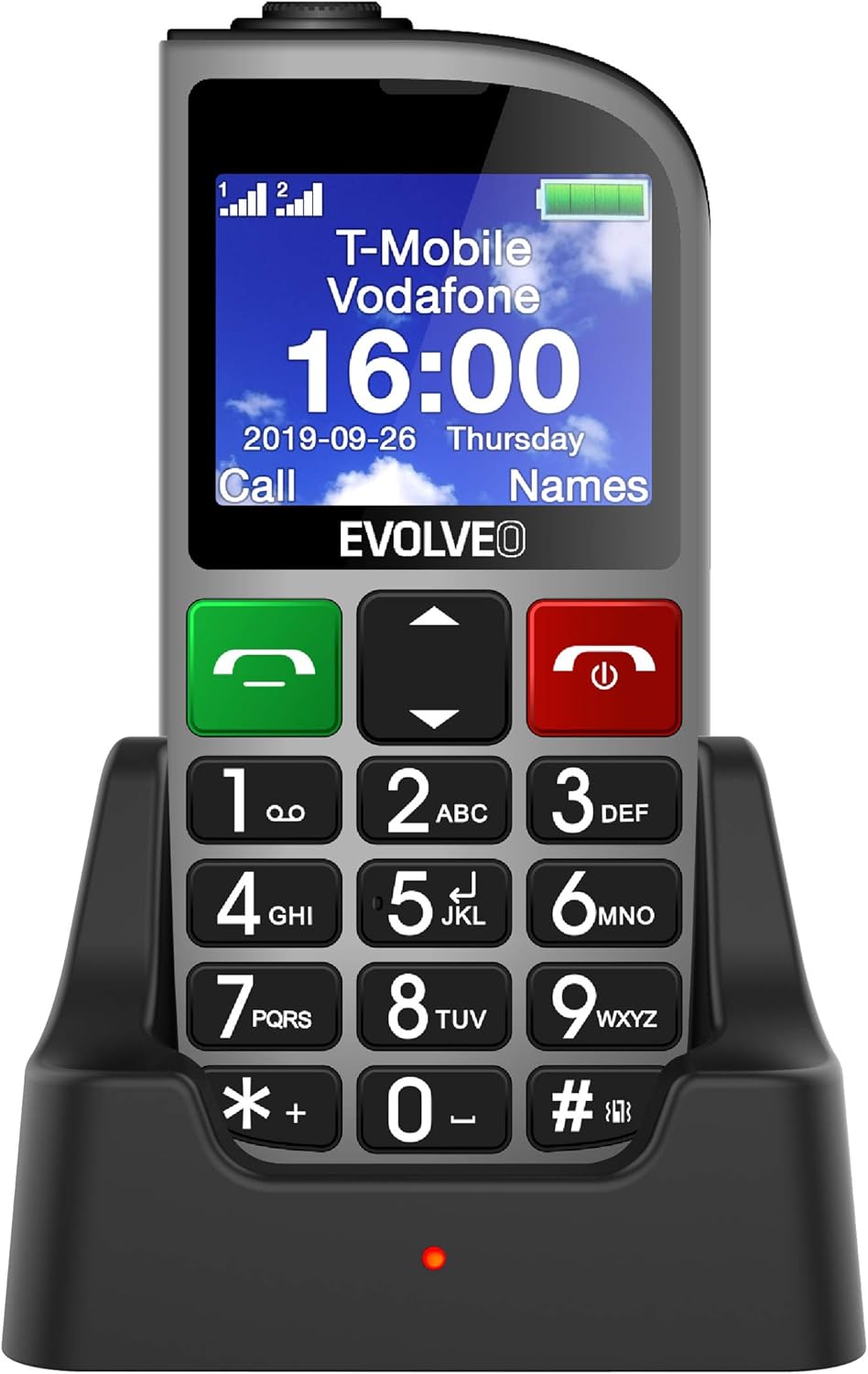
รูปที่ 1.1: EVOLVEO EASYPHONE FM placed in its charging dock. The phone features a large display showing time and network information, with prominent green call and red end call buttons, and a numeric keypad below.
2. การตั้งค่า
2.1. การติดตั้งและการชาร์จแบตเตอรี่
- ถอดฝาครอบด้านหลังของโทรศัพท์ออก
- Insert the Li-ion 1000 mAh battery, ensuring the contacts align correctly.
- เปลี่ยนฝาหลัง
- Connect the AC adapter to the charging dock.
- Place the phone into the charging dock. The charging indicator light will illuminate.
- ควรชาร์จโทรศัพท์ให้เต็มก่อนใช้งานครั้งแรก
2.2. การใส่ซิมการ์ด
The phone supports two SIM cards (Dual SIM) for GSM/GPRS 850/900/1800/1900 MHz networks.
- ตรวจสอบให้แน่ใจว่าโทรศัพท์ปิดอยู่
- ถอดฝาหลังและแบตเตอรี่ออก
- หาตำแหน่งช่องใส่ซิมการ์ด
- Insert your SIM card(s) into the designated slots, ensuring correct orientation.
- ใส่แบตเตอรี่และฝาครอบด้านหลังกลับเข้าไปใหม่
2.3. Inserting a MicroSDHC Card
You can expand the phone's storage for music, photos, and other files by inserting a MicroSDHC card.
- ตรวจสอบให้แน่ใจว่าโทรศัพท์ปิดอยู่
- ถอดฝาหลังและแบตเตอรี่ออก
- Locate the MicroSDHC card slot.
- Gently insert the MicroSDHC card until it clicks into place.
- ใส่แบตเตอรี่และฝาครอบด้านหลังกลับเข้าไปใหม่
3. คู่มือการใช้งาน
3.1. เปิด/ปิดเครื่อง
- เพื่อเปิดเครื่อง: กดปุ่มค้างไว้ Red End Call/Power ปุ่มจนกว่าหน้าจอจะสว่างขึ้น
- วิธีปิดเครื่อง: กดปุ่มค้างไว้ Red End Call/Power button until the power off options appear, then confirm.

รูปที่ 3.1: ด้านหน้า view of the EVOLVEO EASYPHONE FM, highlighting the large display, call buttons, and numeric keypad for easy dialing.
3.2. การโทรออกและรับสาย
- การโทร: Dial the number using the numeric keypad and press the กรีนคอล ปุ่ม.
- สายความเร็ว: The phone supports quick access to 8 popular contacts. Assign numbers to keys 2-9 for speed dialing. Press and hold the assigned key to dial.
- รับสาย: กดปุ่ม กรีนคอล ปุ่มสำหรับรับสายเรียกเข้า
- การวางสาย: กดปุ่ม Red End Call/Power button to end an active call.
3.3 การส่งและรับข้อความ SMS
The separated keyboard keys facilitate easy writing of SMS messages.
- Navigate to the Messaging menu.
- Select "Write Message" to compose a new SMS.
- ระบุหมายเลขผู้รับหรือเลือกจากรายชื่อติดต่อ
- พิมพ์ข้อความของคุณโดยใช้ปุ่มกด
- กด "ส่ง" เพื่อส่งข้อความ
3.4. การควบคุมระดับเสียง
Adjust the call and ringtone volume using the dedicated volume control button located on the left side of the phone.

รูปที่ 3.2: Left side of the phone, showing the volume control buttons and the FM radio activation button.
3.5. ปุ่มฉุกเฉิน SOS
The SOS button, located on the back of the device, allows for quick emergency calls and messages.
- Before use, configure up to five emergency contact numbers in the phone settings.
- ในกรณีฉุกเฉิน ให้กดปุ่มค้างไว้ สัญญาณขอความช่วยเหลือ ปุ่ม.
- The phone will automatically dial the predefined emergency numbers sequentially and send an emergency message to these contacts.

รูปที่ 3.3: หลัง view of the EVOLVEO EASYPHONE FM, showing the prominent red SOS emergency button and the camera lens.
3.6. วิทยุ FM
The phone includes an FM radio with a dedicated activation button.
- To turn on the FM radio, press the independent FM button on the side of the device.
- The radio can play in the background, allowing you to use other phone functions.
- During an incoming or outgoing call, the radio will automatically mute and resume playback after the call ends.
3.7.ไฟฉาย
A powerful flashlight is integrated into the phone, activated by a dedicated button.
- Press the dedicated flashlight button on the side of the phone to turn the flashlight on or off.

รูปที่ 3.4: Right side of the phone, showing the dedicated flashlight button.
3.8. คุณสมบัติอื่น ๆ
- กล้อง: The phone includes a VGA camera for basic photo capture.
- เครื่องเล่นเพลง: เล่นเพลง files stored on your MicroSDHC card.
- Digital Recorder (Dictaphone): บันทึกข้อความเสียง
- ปฏิทิน: ติดตามวันและเหตุการณ์สำคัญ
- นาฬิกาปลุก: ตั้งปลุกเพื่อเตือนความจำ
- เครื่องคิดเลข: ดำเนินการคำนวณขั้นพื้นฐาน
- แว่นขยาย: Utilize the screen as a magnifying glass.
4. การบำรุงรักษา
4.1. การทำความสะอาดอุปกรณ์
- Use a soft, dry cloth to clean the phone's surface and screen.
- Avoid using liquid cleaners or abrasive materials, as they may damage the device.
- ตรวจสอบให้แน่ใจว่าไม่มีความชื้นเข้าไปในพอร์ตชาร์จหรือช่องเปิดอื่นๆ
4.2. การดูแลแบตเตอรี่
- เพื่อยืดอายุการใช้งานแบตเตอรี่ ควรหลีกเลี่ยงการวางโทรศัพท์ไว้ในที่ที่มีอุณหภูมิสูงหรือต่ำเกินไป
- ควรชาร์จแบตเตอรี่เป็นประจำ แต่ควรหลีกเลี่ยงการชาร์จเกินหรือปล่อยให้แบตเตอรี่หมดเกลี้ยงเป็นเวลานาน
- If the phone will not be used for a long time, charge the battery to about 50% before storing it.
5 การแก้ไขปัญหา
If you encounter issues with your EVOLVEO EASYPHONE FM, refer to the following common problems and solutions:
5.1. โทรศัพท์เปิดไม่ติด
- ตรวจสอบให้แน่ใจว่าแบตเตอรี่ได้รับการติดตั้งและชาร์จอย่างถูกต้อง
- Connect the phone to the charger and wait a few minutes before attempting to power it on again.
- ตรวจสอบว่าหน้าสัมผัสแบตเตอรี่สะอาดหรือไม่
5.2. Cannot Make or Receive Calls
- Check if the SIM card(s) are correctly inserted and activated.
- Ensure you have network coverage.
- Verify that the phone is not in airplane mode (if applicable).
- Check your account balance or subscription status with your service provider.
5.3. วิทยุ FM ใช้งานไม่ได้
- ตรวจสอบให้แน่ใจว่าคุณอยู่ในพื้นที่ที่มีการรับสัญญาณ FM ได้ดี
- Check if the FM radio is properly activated using its dedicated button.
5.4. ปัญหาการแสดงผล
- หากหน้าจอแสดงผลมืดเกินไป ให้ตรวจสอบการตั้งค่าความสว่าง
- If the screen is unresponsive, try restarting the phone.
6. ข้อมูลจำเพาะ
| ยี่ห้อ | วิวัฒนาการ |
| แบบอย่าง | EASYPHONE FM |
| ขนาดจอแสดงผล | 1.8 นิ้ว |
| ความละเอียดการแสดงผล | 320 x 240 พิกเซล |
| เทคโนโลยีเซลลูล่าร์ | 2G (GSM/GPRS 850/900/1800/1900 MHz) |
| การรองรับซิม | ซิมคู่ |
| การเชื่อมต่อ | บลูทูธ, แจ็ค 3.5 มม. |
| แบตเตอรี่ | ลิเธียมไออน 1000 mAh |
| ขนาด | 130 × 61 × 16.5 มม. |
| น้ำหนัก | 105 กรัม (รวมแบตเตอรี่) |
| กล้อง | วีจีเอ |
| การขยายพื้นที่เก็บข้อมูล | ช่องเสียบการ์ด MicroSDHC |
หมายเหตุ: ข้อมูลจำเพาะอาจมีการเปลี่ยนแปลงได้โดยไม่ต้องแจ้งให้ทราบล่วงหน้า
7. การรับประกันและการสนับสนุน
For warranty information and technical support, please refer to the warranty card included in your package or visit the official Evolveo webไซต์นี้ โปรดเก็บหลักฐานการซื้อไว้เพื่อใช้ยืนยันการรับประกัน


