การแนะนำ
The Fender Mustang LT50 is a versatile 50-watt guitar amplifier designed for both practice and performance. It features a high-quality 12-inch speaker, a user-friendly interface with a full-color display, and a comprehensive collection of presets and effects. This amplifier is equipped with a USB audio interface for recording and can be managed with the free Fender TONE 3.0 software.
คุณสมบัติหลัก
- กำลังไฟ 50 วัตต์: จัดเตรียมให้ ample volume for home practice, rehearsals, and small to medium-sized gigs.
- 12-inch Speaker: Delivers clear and full sound across various volume levels.
- อินเทอร์เฟซที่เป็นมิตรกับผู้ใช้: Features a full-color display for easy navigation and control.
- 30 Preloaded Presets: Offers a wide range of electric guitar tones suitable for various music genres.
- 25 Onboard Effects: Includes multiple distortion, overdrive, compression, modulation, reverb, delay, and octave effects.
- อินเตอร์เฟซเสียง USB: Enables direct recording to a computer and integration with Fender TONE 3.0 software for editing and managing presets.
- อินพุตเสริม: Allows connection of external audio devices for playing along with music.
- เอาท์พุตหูฟัง: สำหรับการปฏิบัติเงียบ
การตั้งค่า
- การแกะกล่อง: นำไฟล์ amplifier from its packaging. Ensure all components are present and undamaged.
- การเชื่อมต่อไฟฟ้า: ต่อสายไฟเข้ากับ amplifier's input and then to a grounded electrical outlet.
- การเชื่อมต่อกีตาร์: เสียบกีตาร์ของคุณเข้า ป้อนข้อมูล แจ็คบน amplifier's control panel using a standard 1/4-inch instrument cable.
- อุปกรณ์เสริม (ไม่บังคับ): For playing along with external audio, connect your device to the อ๊อกซ์ input using a 1/8-inch stereo cable.
- หูฟัง (ไม่จำเป็น): For silent practice, plug headphones into the หูฟัง แจ็ค.
- การเชื่อมต่อ USB (ทางเลือก): เชื่อมต่อ amplifier to your computer via the ยูเอสบี port for recording or using Fender TONE 3.0 software.
Before powering on, ensure all connections are secure and volume knobs are set to a low level.
คำแนะนำการใช้งาน
ควบคุมมากกว่าview

This image displays the top control panel of the Fender Mustang LT50, highlighting the various knobs and buttons for sound shaping and navigation.
- อินพุต: แจ็คขนาด 1/4 นิ้ว สำหรับเชื่อมต่อกีตาร์ของคุณ
- ช่องเสริม: 1/8-inch stereo input for external audio sources.
- หูฟัง: ช่องต่อหูฟังแบบสเตอริโอขนาด 1/8 นิ้ว
- ได้รับ: Adjusts the input sensitivity and amount of overdrive/distortion.
- ปริมาณ: Controls the overall output volume of the selected preset.
- TREBLE, MIDDLE, BASS: Tone controls to shape the high, mid, and low frequencies.
- MASTER: ควบคุมปริมาณการส่งออกโดยรวมของ ampชีวิต.
- DATA WHEEL: Used to scroll through presets, adjust parameters, and navigate menus. Press to confirm selections.
- กลับ: กลับไปยังเมนูหรือหน้าจอก่อนหน้า
- บันทึก: Saves current amplifier settings as a preset.
- เมนู: Accesses the main menu for advanced settings and options.
- แท็ป/จูนเนอร์: Tap to set delay/tremolo tempo; hold to activate the built-in tuner.
- สวิตช์เปิด/ปิด: ขับเคลื่อน amplifier เปิดหรือปิด
- ยูเอสบี: Connects to a computer for recording and software control.
Selecting and Saving Presets
The Mustang LT50 comes with 30 preloaded presets and offers 30 user-programmable slots. To select a preset, rotate the ล้อข้อมูล. The display will show the preset number and name. To save your customized settings as a new preset or overwrite an existing one, press the บันทึก และปฏิบัติตามคำแนะนำบนหน้าจอ
Using Onboard Effects
การ amplifier includes 25 different effects. These effects are integrated into the presets. You can edit the effects within a preset by navigating through the menu using the เมนู ปุ่มและ ล้อข้อมูล. Adjust individual effect parameters to customize your sound.
USB Audio Interface and Fender TONE 3.0
The integrated USB audio interface allows you to connect the amplifier directly to your computer for recording your guitar. Additionally, you can download the free Fender TONE 3.0 software for Mac or PC. This software provides an intuitive platform to edit, store, and manage your amplifier's presets, and access a community of user-created tones.
การซ่อมบำรุง
- การทำความสะอาด: ใช้ผ้าแห้งเนื้อนุ่มทำความสะอาดด้านนอกของตัวเครื่อง ampใช้สารเพิ่มความคมชัด หลีกเลี่ยงน้ำยาทำความสะอาดที่มีฤทธิ์กัดกร่อนหรือตัวทำละลาย
- พื้นที่จัดเก็บ: จัดเก็บ ampควรเก็บเครื่องขยายเสียงไว้ในที่แห้ง หลีกเลี่ยงอุณหภูมิที่สูงหรือต่ำเกินไป และแสงแดดโดยตรง
- การระบายอากาศ : ตรวจสอบให้แน่ใจว่ามีการระบายอากาศที่เหมาะสมรอบ ๆ ampใช้เครื่องขยายเสียงเพื่อป้องกันความร้อนสูงเกินไป อย่าปิดกั้นช่องระบายอากาศ
- การดูแลสายเคเบิล: Regularly inspect all cables for damage. Replace frayed or damaged cables immediately.
- การป้องกันลำโพง: Avoid placing heavy objects on the speaker grille.
การแก้ไขปัญหา
| ปัญหา | สาเหตุที่เป็นไปได้ | สารละลาย |
|---|---|---|
| ไม่มีเสียง | Power not connected, amplifier off, volume low, guitar cable faulty, incorrect input selected. | Check power connection, turn on amplifier, increase volume (Gain, Volume, Master), test guitar cable, ensure guitar is plugged into INPUT. |
| เสียงผิดเพี้ยน | Gain too high, faulty cable, speaker damage. | Reduce GAIN setting, test with a different cable, contact support if speaker damage is suspected. |
| ควบคุมไม่ตอบสนอง | ซอฟต์แวร์มีปัญหาชั่วคราว | หมุน amplifier off, wait 10 seconds, then turn it back on. |
If you encounter issues not covered here, or if solutions do not resolve the problem, please contact Fender customer support for assistance.
ข้อมูลจำเพาะ
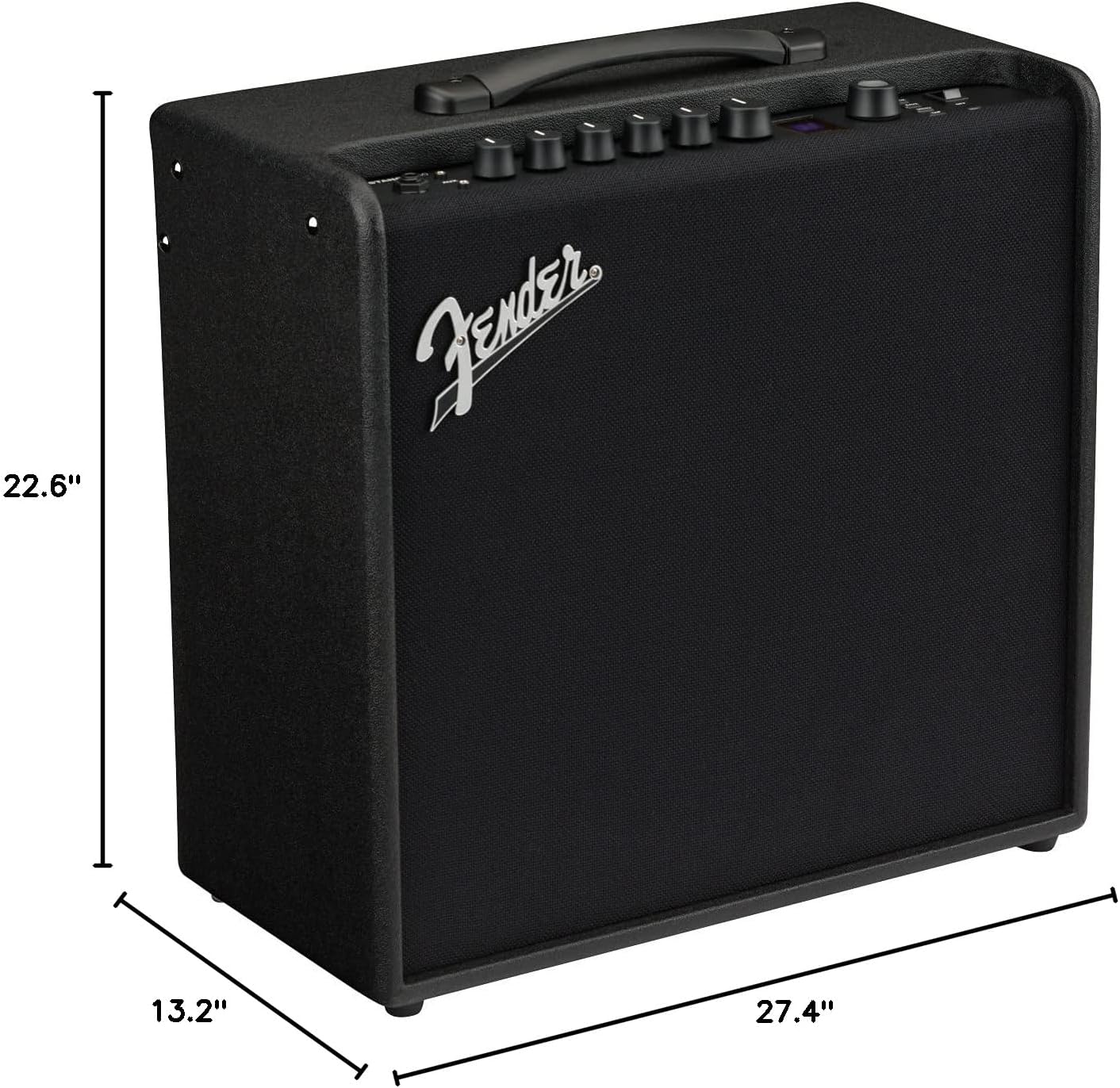
This image illustrates the physical dimensions of the Fender Mustang LT50 ampชีวิต.
- หมายเลขรุ่น: 2311200000
- เอาท์พุต วัดtage: 50 วัตต์
- ขนาดลำโพง: 12 นิ้ว
- น้ำหนักสินค้า: 23.5 ปอนด์
- ขนาดสินค้า : ขนาด 27.4 x 22.6 x 13.2 นิ้ว (กว้าง x สูง x ลึก)
- ประเภทวัสดุ : ไม้
- ประเภทของตัวเชื่อมต่อ: 6.35 mm jack (Input), USB, 1/8-inch Aux, 1/8-inch Headphone
- แหล่งพลังงาน: สายไฟ
การรับประกันและการสนับสนุน
The Fender Mustang LT50 Guitar Ampเครื่องขยายเสียงมาพร้อมกับ รับประกันจำกัด 2 ปี. This warranty covers defects in materials and workmanship from the original purchase date. For detailed warranty terms, service, or technical support, please visit the official Fender website or contact Fender customer service directly.
For additional resources and community support, consider exploring the Fender TONE community online.


