1. บทนำ
ขอบคุณสำหรับการซื้อasing the TWS i17 Dual Earbuds. This manual provides essential information for setting up, operating, and maintaining your new wireless earbuds. Please read this manual thoroughly before use to ensure optimal performance and longevity of your device.
2. ข้อมูลด้านความปลอดภัย
To prevent damage to your earbuds or injury to yourself or others, please observe the following precautions:
- ห้ามให้หูฟังหรือกล่องชาร์จสัมผัสกับอุณหภูมิที่สูงหรือความชื้นสูงหรือของเหลว
- หลีกเลี่ยงการทำตก กระแทก หรือถอดประกอบอุปกรณ์
- Do not use abrasive cleaners or solvents. Clean with a soft, dry cloth.
- ฟังในระดับเสียงปานกลางเพื่อป้องกันความเสียหายต่อการได้ยิน
- เก็บให้พ้นจากมือเด็ก
- This product is not water resistant. Avoid exposure to water or excessive moisture.
3. เนื้อหาบรรจุภัณฑ์
ตรวจสอบว่ามีรายการทั้งหมดอยู่ในแพ็คเกจของคุณ:
- TWS i17 Dual Earbuds (Left and Right)
- เคสชาร์จไฟ
- สายชาร์จ USB
- คู่มือการใช้งาน

Image: The TWS i17 Dual Earbuds, with one earbud partially removed from its charging case, showcasinดีไซน์สีดำเงาเรียบหรู
4. การตั้งค่า
4.1 การชาร์จหูฟังและเคส
ก่อนใช้งานครั้งแรก ควรชาร์จหูฟังและเคสชาร์จให้เต็ม
- ใส่หูฟังทั้งสองข้างลงในกล่องชาร์จ ตรวจสอบให้แน่ใจว่าใส่เข้าที่อย่างถูกต้อง
- Connect the USB charging cable to the charging port on the bottom of the case and the other end to a USB power source (e.g., computer, wall adapter).
- The indicator light on the case will show charging status. It will turn off or change color when fully charged.
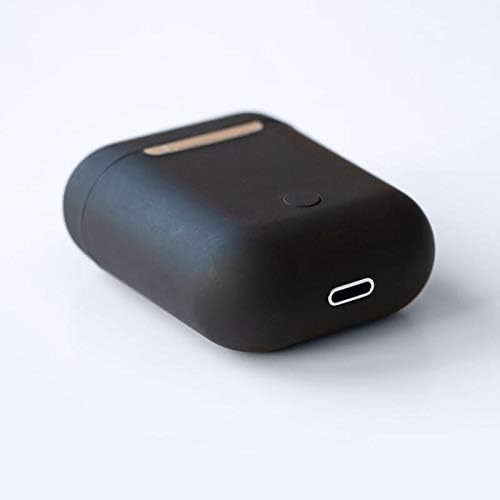
ภาพ: ภาพระยะใกล้ view of the bottom of the TWS i17 charging case, highlighting the USB charging port and a small button.
4.2 การจับคู่กับอุปกรณ์ของคุณ
The i17 earbuds use Bluetooth for wireless connection.
- ตรวจสอบให้แน่ใจว่าได้ชาร์จเอียร์บัดแล้ว
- เปิดกล่องชาร์จ หูฟังจะเข้าสู่โหมดจับคู่โดยอัตโนมัติ (ไฟแสดงสถานะจะกะพริบ)
- On your mobile phone or Bluetooth-enabled device, go to Bluetooth settings and turn Bluetooth on.
- ค้นหา available devices. Select "i17" from the list.
- Once connected, the indicator lights on the earbuds will stop flashing. You are now ready to use your earbuds.

Image: The TWS i17 Dual Earbuds resting inside their open charging case, ready for pairing or use.
5. คู่มือการใช้งาน
5.1 เปิด/ปิดเครื่อง
- เปิดเครื่อง: Take the earbuds out of the charging case. They will automatically power on and connect to the last paired device.
- หมดแรง: วางหูฟังกลับเข้าไปในกล่องชาร์จ หูฟังจะปิดเครื่องและเริ่มชาร์จโดยอัตโนมัติ
5.2 การเล่นเพลง
- เล่น/หยุดชั่วคราว: แตะหูฟังเอียร์บัดข้างใดข้างหนึ่งหนึ่งครั้ง
- เพลงถัดไป: แตะสองครั้งที่หูฟังเอียร์บัดด้านขวา
- แทร็กก่อนหน้า: แตะสองครั้งที่หูฟังเอียร์บัดด้านซ้าย
5.3 การจัดการการโทร
- รับ/วางสาย: แตะหูฟังเอียร์บัดข้างใดข้างหนึ่งหนึ่งครั้ง
- ปฏิเสธสาย: กดเอียร์บัดข้างใดข้างหนึ่งค้างไว้ 2 วินาที
5.4 ผู้ช่วยเสียง
- เปิดใช้งานผู้ช่วยเสียง (Siri/Google Assistant): แตะสามครั้งที่หูฟังเอียร์บัดข้างใดข้างหนึ่ง
6. การบำรุงรักษา
Proper maintenance ensures the longevity of your earbuds:
- การทำความสะอาด: Use a soft, dry, lint-free cloth to clean the earbuds and charging case. Do not use liquids or sprays.
- พื้นที่จัดเก็บ: เมื่อไม่ใช้งาน ควรเก็บหูฟังไว้ในกล่องชาร์จเพื่อป้องกันและรักษาระดับประจุไฟ ควรเก็บไว้ในที่แห้งและเย็น
- การดูแลแบตเตอรี่ เพื่อยืดอายุการใช้งานแบตเตอรี่ ควรหลีกเลี่ยงการปล่อยประจุแบตเตอรี่จนหมดบ่อยๆ ควรชาร์จหูฟังเป็นประจำ

Image: The TWS i17 Dual Earbuds securely stored within their closed charging case, ready for transport or charging.
7 การแก้ไขปัญหา
| ปัญหา | สาเหตุที่เป็นไปได้ | สารละลาย |
|---|---|---|
| หูฟังเอียร์บัดไม่จับคู่ | Low battery; Out of range; Not in pairing mode; Bluetooth off on device. | Charge earbuds; Move closer to device; Ensure case is open for pairing; Turn on Bluetooth on device. |
| เอียร์บัดตัวเดียวเท่านั้นที่ใช้งานได้ | หูฟังข้างหนึ่งชาร์จไม่เข้า; หูฟังเชื่อมต่อกันไม่ถูกต้อง | ตรวจสอบให้แน่ใจว่าหูฟังทั้งสองข้างชาร์จไฟเต็มแล้ว ใส่หูฟังทั้งสองข้างกลับเข้าไปในเคส ปิดฝา แล้วเปิดฝาอีกครั้งเพื่อซิงค์ข้อมูล |
| ไม่มีเสียง | Volume too low; Not connected; Media paused. | Increase volume on device; Reconnect earbuds; Check media playback status. |
| เคสชาร์จไม่ชาร์จ | Faulty cable/adapter; Loose connection. | Try a different USB cable or power adapter; Ensure cable is securely plugged in. |
8. ข้อมูลจำเพาะ
| คุณสมบัติ | รายละเอียด |
|---|---|
| หมายเลขรุ่น | ไอ17 |
| ยี่ห้อ | ทไวซ์ |
| เทคโนโลยีการเชื่อมต่อ | ไร้สาย (Bluetooth) |
| ปัจจัยรูปแบบหูฟัง | อินเอียร์ |
| รวมไมโครโฟน | ใช่ |
| การตัดเสียงรบกวน | เลขที่ |
| เข้ากันได้กับ | โทรศัพท์มือถือ |
| สี | สีดำ |
| วัสดุ | พลาสติก |
| คุณสมบัติสายเคเบิล | ไร้สาย |
| ระดับความต้านทานต่อน้ำ | ไม่ทนน้ำ |
| ขนาดการจัดส่ง | 12.6 x 8.8 x 3.6 ซม. |
| น้ำหนัก | 96 กรัม |
| วันที่พร้อมใช้งานครั้งแรก | 15 มกราคม 2020 |
9. การรับประกันและการสนับสนุน
For warranty information and customer support, please refer to the contact details provided on the product packaging or the official TWS webไซต์นี้ โปรดเก็บหลักฐานการซื้อไว้เพื่อใช้ยืนยันการรับประกัน
For further assistance, please contact TWS customer service.


