1. บทนำ
ขอบคุณสำหรับการซื้อasing the ICON 12-inch Bluetooth Speaker. This manual provides detailed instructions for the safe and efficient operation of your new speaker. Please read this manual thoroughly before use and retain it for future reference.
2. เนื้อหาบรรจุภัณฑ์
- ICON 12-inch Bluetooth Speaker
- สายไฟ
- ไมโครโฟนไร้สาย
- รีโมทคอนโทรล
- คู่มือการใช้งาน

Image: The ICON Bluetooth speaker shown with its included wireless microphone and remote control, highlighting the complete package contents.
3. สินค้าหมดview
The ICON 12-inch Bluetooth Speaker is a versatile audio system designed for various applications, offering powerful sound output and multiple connectivity options. It features a built-in rechargeable battery for portability and integrated wheels and a retractable handle for easy transport.

ภาพ: ด้านหน้า view of the ICON 12-inch Bluetooth Speaker, showcasing its robust design and blue illuminated woofer.

ภาพ: ด้านหลัง view of the ICON 12-inch Bluetooth Speaker, displaying the main control panel and retractable handle.
คุณสมบัติหลัก:
- Powerful 6000W PMPO Output
- Bluetooth Connectivity for Wireless Streaming
- การเล่นไฟล์ผ่าน USB และการ์ด SD
- อินพุต AUX 3.5 มม.
- วิทยุ FM ในตัว
- อินพุตไมโครโฟนและกีตาร์
- Rechargeable Battery for Extended Playtime
- Integrated Equalizer for Sound Customization
- TWS (True Wireless Stereo) Functionality for connecting multiple speakers
- เอฟเฟกต์ไฟ LED

Image: Visual representation of the ICON Bluetooth Speaker's key features, including excellent sound quality, Bluetooth compatibility, AUX input, rechargeable battery, FM radio, and equalizer.
4. การตั้งค่า
4.1 การชาร์จเริ่มต้น
Before first use, fully charge the speaker's internal battery. Connect the power cable to the AC INPUT port on the rear panel and plug it into a standard wall outlet. The charging indicator will illuminate. Charging time may vary.
4.2 แผงควบคุมโอเวอร์view
Familiarize yourself with the control panel located on the rear of the speaker.
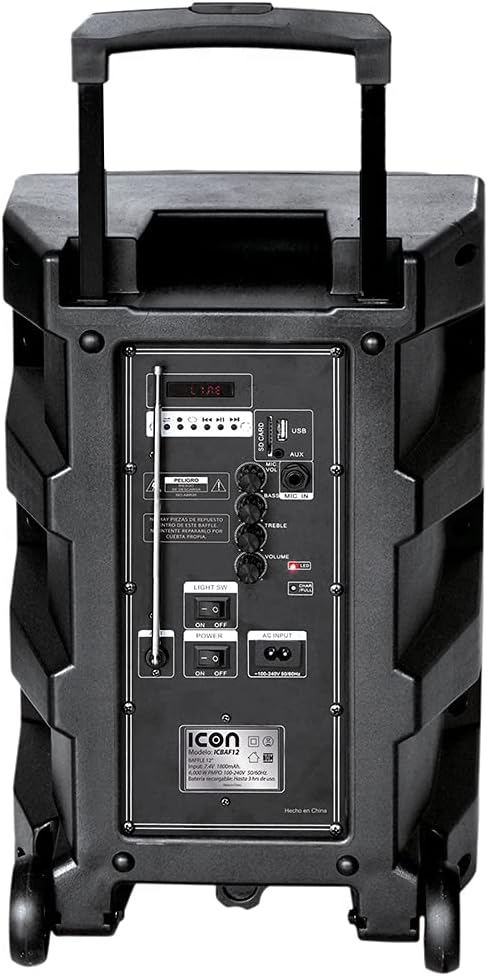
ภาพ: รายละเอียด view of the ICON speaker's rear control panel, showing various inputs, volume, treble, and bass controls.
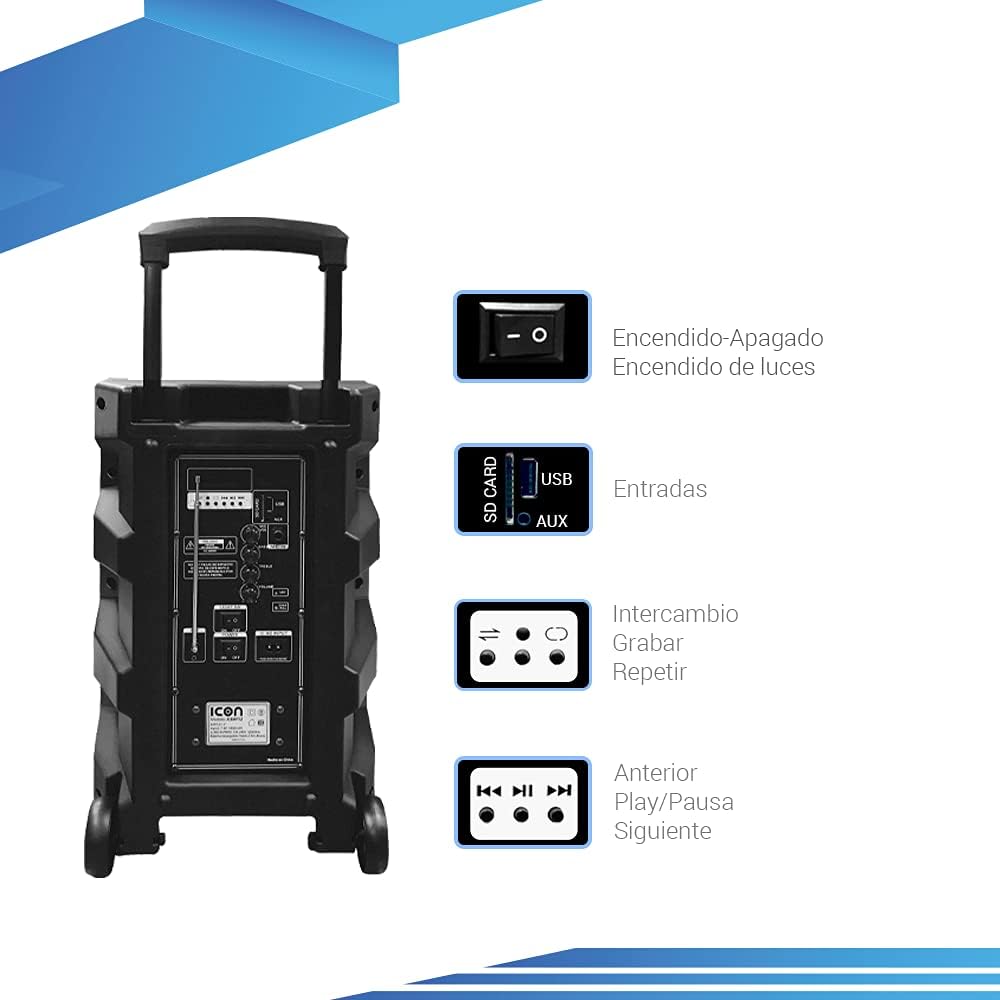
Image: Diagram illustrating key controls on the ICON speaker, including the power switch, light switch, input ports (SD Card, USB, AUX), and playback control buttons (Mode Switch, Record, Repeat, Previous, Play/Pause, Next).
- สวิตช์เพาเวอร์: Turns the speaker On or Off.
- SW แสง: Toggles the LED light effects On or Off.
- SD CARD / USB / AUX Inputs: For connecting external media or devices.
- สวิตช์โหมด: Cycles through input modes (Bluetooth, USB, SD, AUX, FM).
- ปุ่มบันทึก: Initiates recording (e.g., microphone input to USB/SD).
- ปุ่ม REPEAT: ทำซ้ำเพลงหรือรายการเพลงปัจจุบัน
- PREVIOUS / PLAY/PAUSE / NEXT Buttons: ปุ่มควบคุมการเล่นสื่อมาตรฐาน
- ปุ่มปรับระดับเสียง: ปรับระดับเสียงหลัก
- TREBLE / BASS Knobs: Adjusts high and low frequencies.
- MIC INPUT / GUITAR INPUT: For connecting microphones and guitars.
5. คู่มือการใช้งาน
5.1 การเปิด/ปิดเครื่อง
To turn the speaker ON, flip the พลัง switch to the 'ON' position. To turn it OFF, flip the switch to 'OFF'.
5.2 การจับคู่บลูทูธ
- เปิดลำโพง ลำโพงจะเข้าสู่โหมดจับคู่บลูทูธโดยอัตโนมัติ ซึ่งจะแสดงด้วยไอคอนบลูทูธกะพริบที่หน้าจอ
- บนอุปกรณ์พกพาของคุณ (สมาร์ทโฟน แท็บเล็ต แล็ปท็อป) เปิดใช้งานบลูทูธและค้นหาอุปกรณ์ที่ใช้งานได้
- Select "ICON Speaker" (or similar name) from the list of devices.
- Once paired, the speaker will emit a confirmation sound, and the Bluetooth icon will stop flashing. You can now play audio wirelessly from your device.
5.3 การเล่นไฟล์ผ่าน USB/การ์ด SD
- Insert a USB flash drive or SD card (with MP3 audio fileเสียบ (s) เข้าไปในพอร์ตที่เกี่ยวข้อง
- The speaker will automatically switch to USB/SD mode and begin playing the first compatible track. If not, press the โหมด button to select USB/SD mode.
- ใช้ ก่อนหน้า, เล่น/หยุดชั่วคราว, และ ต่อไป ปุ่มเพื่อควบคุมการเล่น
อินพุต AUX 5.4 ช่อง
เชื่อมต่ออุปกรณ์เสียงภายนอก (เช่น เครื่องเล่น MP3, คอมพิวเตอร์) เข้ากับ อ๊อกซ์ input using a 3.5mm audio cable. Press the โหมด button until AUX mode is selected.
การใช้งานวิทยุ FM 5.5
- กดปุ่ม โหมด กดปุ่มเพื่อสลับไปยังโหมดวิทยุ FM
- กดปุ่มค้างไว้ เล่น/หยุดชั่วคราว ปุ่มสแกนและบันทึกสถานี FM ที่มีอยู่โดยอัตโนมัติ
- ใช้ ก่อนหน้า และ ต่อไป ปุ่มสำหรับนำทางระหว่างสถานีที่บันทึกไว้
5.6 Microphone and Guitar Usage
Plug your microphone or guitar into the respective INPUT MIC or อินพุตกีต้าร์ jacks. Adjust the volume using the main ปริมาณ knob and any dedicated microphone/guitar volume controls if present.
5.7 ฟังก์ชั่น TWS (True Wireless Stereo)
The TWS function allows you to connect two ICON speakers wirelessly for a true stereo sound experience.
- ตรวจสอบให้แน่ใจว่าลำโพงทั้งสองเปิดอยู่และไม่ได้เชื่อมต่อกับอุปกรณ์ Bluetooth ใดๆ
- On one speaker (this will be the master), press and hold the TWS button (if available, or a combination of buttons as per specific model instructions, often the 'Mode' button or a dedicated TWS button).
- The speaker will search for another TWS-compatible speaker. Once connected, you will hear a confirmation sound.
- ตอนนี้ ให้เชื่อมต่ออุปกรณ์มือถือของคุณกับลำโพงหลักผ่านบลูทูธตามที่อธิบายไว้ในหัวข้อ 5.2 เสียงจะเล่นผ่านลำโพงทั้งสองตัวในระบบสเตอริโอ
6. การบำรุงรักษา
6.1 การทำความสะอาด
Wipe the speaker's exterior with a soft, dry cloth. Do not use abrasive cleaners, waxes, or solvents. Ensure no liquids enter the speaker's openings.
6.2 การดูแลแบตเตอรี่
- เพื่อยืดอายุการใช้งานแบตเตอรี่ ควรหลีกเลี่ยงการปล่อยแบตเตอรี่จนหมดบ่อยครั้ง
- Recharge the battery regularly, even if the speaker is not in use for extended periods (e.g., every 3 months).
- เก็บลำโพงไว้ในที่เย็นและแห้งเมื่อไม่ได้ใช้งาน
6.3 พื้นที่จัดเก็บ
When storing the speaker for a long time, ensure it is turned off and disconnected from the power source. Store it in a clean, dry environment away from extreme temperatures and direct sunlight.
7 การแก้ไขปัญหา
| ปัญหา | สาเหตุที่เป็นไปได้ | สารละลาย |
|---|---|---|
| ลําโพงไม่เปิดขึ้น | Battery is depleted; Power cable not connected; Power switch is OFF. | Charge the speaker; Ensure power cable is securely connected; Flip POWER switch to ON. |
| ไม่มีเสียง. | ระดับเสียงต่ำเกินไป เลือกโหมดอินพุตไม่ถูกต้อง อุปกรณ์ไม่ได้เชื่อมต่ออย่างถูกต้อง | Increase volume; Press MODE button to select correct input; Reconnect device/re-pair Bluetooth. |
| การเชื่อมต่อบลูทูธล้มเหลว | ลำโพงไม่ได้อยู่ในโหมดจับคู่ อุปกรณ์อยู่ไกลเกินไป มีสัญญาณรบกวน | Ensure speaker is in pairing mode; Move device closer; Turn off other Bluetooth devices. |
| เสียงเพี้ยน | ระดับเสียงสูงเกินไป คุณภาพแหล่งเสียงไม่ดี | ลดระดับเสียง ลองใช้แหล่งเสียงอื่น |
| ไมโครโฟนไม่ทำงาน | Microphone not plugged in correctly; Microphone volume too low; Microphone batteries dead (if wireless). | Ensure microphone is fully inserted; Adjust microphone volume; Replace microphone batteries. |
8. ข้อมูลจำเพาะ
| คุณสมบัติ | ข้อมูลจำเพาะ |
|---|---|
| หมายเลขรุ่น | US-ICBAF12 |
| กำลังขับ | PMPO 6000 วัตต์ |
| ขนาดลำโพง | 12 นิ้ว |
| เทคโนโลยีการเชื่อมต่อ | บลูทูธ, USB, AUX, การ์ด SD |
| อุปกรณ์ที่รองรับ | แล็ปท็อป สมาร์ทโฟน |
| แหล่งพลังงาน | Rechargeable Battery, AC Input |
| ขนาดสินค้า (กว้าง x ยาว x สูง) | 38 x 36.5 x 54 ซม. |
| น้ำหนักผลิตภัณฑ์ | 7.62 กก. |
| คุณสมบัติพิเศษ | Bluetooth, FM Radio, Microphone Input, Guitar Input, TWS Function, LED Lights |

Image: Packaging of the ICON Bluetooth Speaker, displaying key features and product dimensions (37.5 cm x 36 cm x 54 cm).
9. การรับประกันและการสนับสนุน
This product is covered by a limited warranty. Please refer to the warranty card included in your package for specific terms and conditions. For technical support, troubleshooting assistance, or warranty claims, please contact your retailer or the manufacturer's customer service department. Keep your purchase receipt as proof of purchase.
For more information, visit the official ICON store on Amazon: ICON Store


