การแนะนำ
The ROOFULL 5 Port 4K HDMI Switch is designed to expand the HDMI input capabilities of your display, allowing up to five HDMI source devices to share a single HDMI input on your television or monitor. This device supports advanced video and audio technologies, including 4K@60Hz resolution, HDR10, Dolby Vision, Dolby Atmos, and HDCP 2.2, ensuring high-quality signal transmission. It offers convenient switching options via remote control, manual button, and intelligent auto-switching.
เนื้อหาแพ็คเกจ
ตรวจสอบว่ามีรายการทั้งหมดอยู่ในแพ็คเกจ:
- ROOFULL 5 Port 4K HDMI Switch Unit
- รีโมทคอนโทรลอินฟราเรด
- US Power Supply (UL-certified power adapter)
- คู่มือการใช้งาน
รูปที่ 1: Contents of the ROOFULL 5 Port 4K HDMI Switch package, including the main unit, remote, power adapter, and manual.
สินค้าเกินview
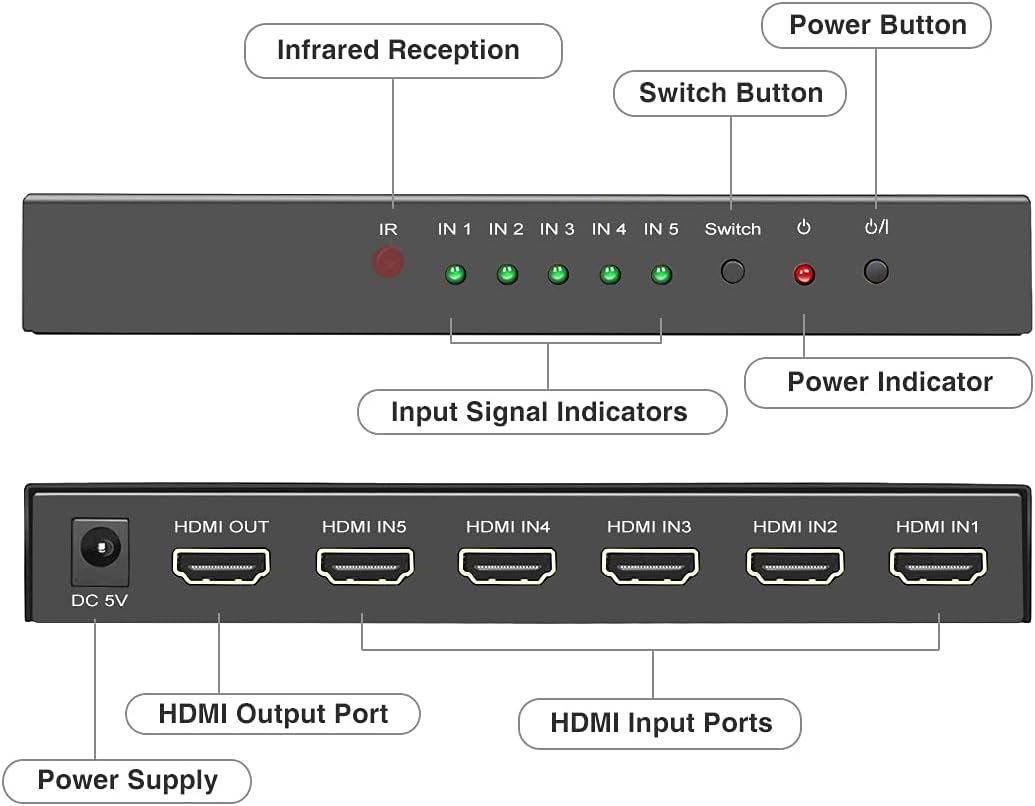
Familiarize yourself with the components and ports of the HDMI switch.

รูปที่ 2: Front and rear panel layout of the HDMI switch.
คุณสมบัติแผงด้านหน้า:
- IR (Infrared Reception): รับสัญญาณจากรีโมทคอนโทรล
- IN 1-5 (Input Signal Indicators): Green LEDs illuminate to indicate which HDMI input port is currently active.
- ปุ่มสวิตช์: Press to manually cycle through the HDMI input sources.
- ไฟแสดงสถานะพลังงาน: Red LED illuminates when the device is powered on.
- ปุ่มเปิด/ปิด: กดเพื่อเปิดหรือปิดเครื่อง
คุณสมบัติแผงด้านหลัง:
- DC 5V (Power Supply): เสียบอะแดปเตอร์แปลงไฟ 5V ที่ให้มาเข้ากับช่องนี้
- HDMI OUT (HDMI Output Port): Connect this port to the HDMI input of your TV, monitor, or projector.
- HDMI IN 1-5 (HDMI Input Ports): Connect your HDMI source devices (e.g., gaming consoles, Blu-ray players, streaming devices) to these ports.
คำแนะนำการตั้งค่า
Follow these steps to connect your ROOFULL HDMI Switch:
- ปิดอุปกรณ์: Ensure all HDMI source devices and your display (TV/monitor) are powered off before making connections.
- เชื่อมต่ออุปกรณ์ต้นทาง: Connect up to five HDMI source devices (e.g., PS5, Xbox, Blu-ray player, PC) to the HDMI IN 1-5 ports on the rear of the ROOFULL HDMI Switch using high-quality HDMI 2.0/2.1 cables.
- เชื่อมต่อกับจอแสดงผล: Connect the HDMI OUT port on the ROOFULL HDMI Switch to an HDMI input port on your TV, monitor, or projector using a high-quality HDMI 2.0/2.1 cable. For optimal performance with 4K@60Hz, ensure the total length of input and output HDMI cables is within 10 feet (approximately 3 meters).
- เชื่อมต่อพลังงาน: Plug the included 5V power adapter into the DC 5V port on the switch, then plug the adapter into a power outlet. The power indicator LED on the front panel will illuminate.
- เปิดอุปกรณ์: Power on your display and then your HDMI source devices.

รูปที่ 3: Typical connection diagram for the HDMI switch.
คำแนะนำการใช้งาน
The ROOFULL HDMI Switch offers multiple methods for selecting your desired input source:
1. การสลับด้วยตนเอง:
กดปุ่ม "Switch" button on the front panel of the unit to cycle through the connected HDMI input sources (IN 1, IN 2, IN 3, IN 4, IN 5). The corresponding green LED will light up to indicate the active input.
2. Remote Control Switching:
Use the included IR remote control for convenient switching from a distance (within 33 feet). Point the remote towards the IR receiver on the front panel of the switch.
- Press the numbered buttons "1" ผ่าน "5" to directly select the corresponding HDMI input.
- ใช้ "ขึ้น" และ "ลง" arrow buttons to cycle sequentially through the inputs.
- การ เปิด/ปิด button controls the power of the switch.
3. Auto-Switching Functionality:
The switch supports an auto-switching feature that detects the voltage of connected source devices. When enabled, if the currently active device is turned off (not in standby mode), the switch will automatically attempt to jump to another active device.
Important Note on Auto-Switching: Some devices, such as PS5/4/4 Pro, Amazon Fire TV, Apple TV, Xbox One/S/Series X, and Nintendo Switch, may continue to emit a weak voltage even when powered off. This can prevent the auto-switching function from correctly identifying and switching to another active device. In such cases, manual or remote switching will be required.

รูปที่ 4: Switching methods: Auto-Switch, IR Remote, and Manual Button.
การแก้ไขปัญหา
If you encounter issues with your ROOFULL HDMI Switch, refer to the following common problems and solutions:
| ปัญหา | สาเหตุที่เป็นไปได้ / วิธีแก้ไข |
|---|---|
| ไม่มีสัญญาณวิดีโอหรือเสียงออก |
|
| หน้าจอกะพริบหรือสัญญาณไม่เสถียร |
|
| Auto-switching does not work or switches unexpectedly. |
|
| รีโมทคอนโทรลไม่มีการตอบสนอง |
|
| 4K@60Hz or HDR is not displaying correctly. |
|
ข้อมูลจำเพาะ
Key technical specifications for the ROOFULL 5 Port 4K HDMI Switch:
- หมายเลขรุ่น: HDSW0015M1B
- เวอร์ชัน HDMI: HDMI2.0a อินเตอร์เฟซ
- รุ่น HDCP: HDCP2.2 ขึ้นไป
- ความละเอียดสูงสุด: 4K@60Hz (4096x2160)
- ความเข้ากันได้แบบย้อนกลับ: 4K@30Hz, 2K@120Hz, 1080P@240/120/144Hz
- Data Transmission Bandwidth: 18Gbps
- คุณสมบัติที่รองรับ: HDR10, Dolby Vision, Dolby Atmos, 3D, CEC
- พอร์ตอินพุต: 5 * HDMI XNUMX *
- พอร์ตเอาท์พุต: 1 * HDMI XNUMX *
- แหล่งจ่ายไฟ: DC 5V (UL-certified power adapter included)
- วิธีการควบคุม: Manual button, IR Remote Control, Auto-Switching
- ขนาดสินค้า : 6.73 x 4.88 x 1.22 นิ้ว (17.1 x 12.4 x 3.1 ซม.)
- น้ำหนักสินค้า: 13.4 ออนซ์ (380 กรัม)
- วัสดุเปลือก: โลหะแข็ง

รูปที่ 5: Supported video and audio technologies.

รูปที่ 6: Build quality and design features.
การรับประกันและการสนับสนุน
ROOFULL is committed to providing high-quality products and customer satisfaction. Your ROOFULL 5 Port 4K HDMI Switch comes with comprehensive support:
- บริการหลังการขาย: ROOFULL provides up to 2 years of after-sale support without limitations.
- Exchange/Return Policy: Enjoy an 18-month exchange or return period.
- บริการลูกค้า: 24 hours online service is available for assistance.
If your equipment fails or you encounter any issues, please contact ROOFULL customer support directly. You can typically find contact information by searching "ROOFULL support" online or by using the "Contact Seller" option within your Amazon order history for a free replacement, even if the standard return window has closed.

รูปที่ 7: ROOFULL customer support and warranty information.


