1. บทนำ
Thank you for choosing the FeinTech LED Desk Lamp LTL00600. This high-quality desk lamp is designed to provide optimal lighting for your workspace while offering convenient features such as a USB charging port, adjustable brightness, and customizable color temperature. Please read this manual thoroughly before use to ensure proper operation and to maximize the lifespan of your product.
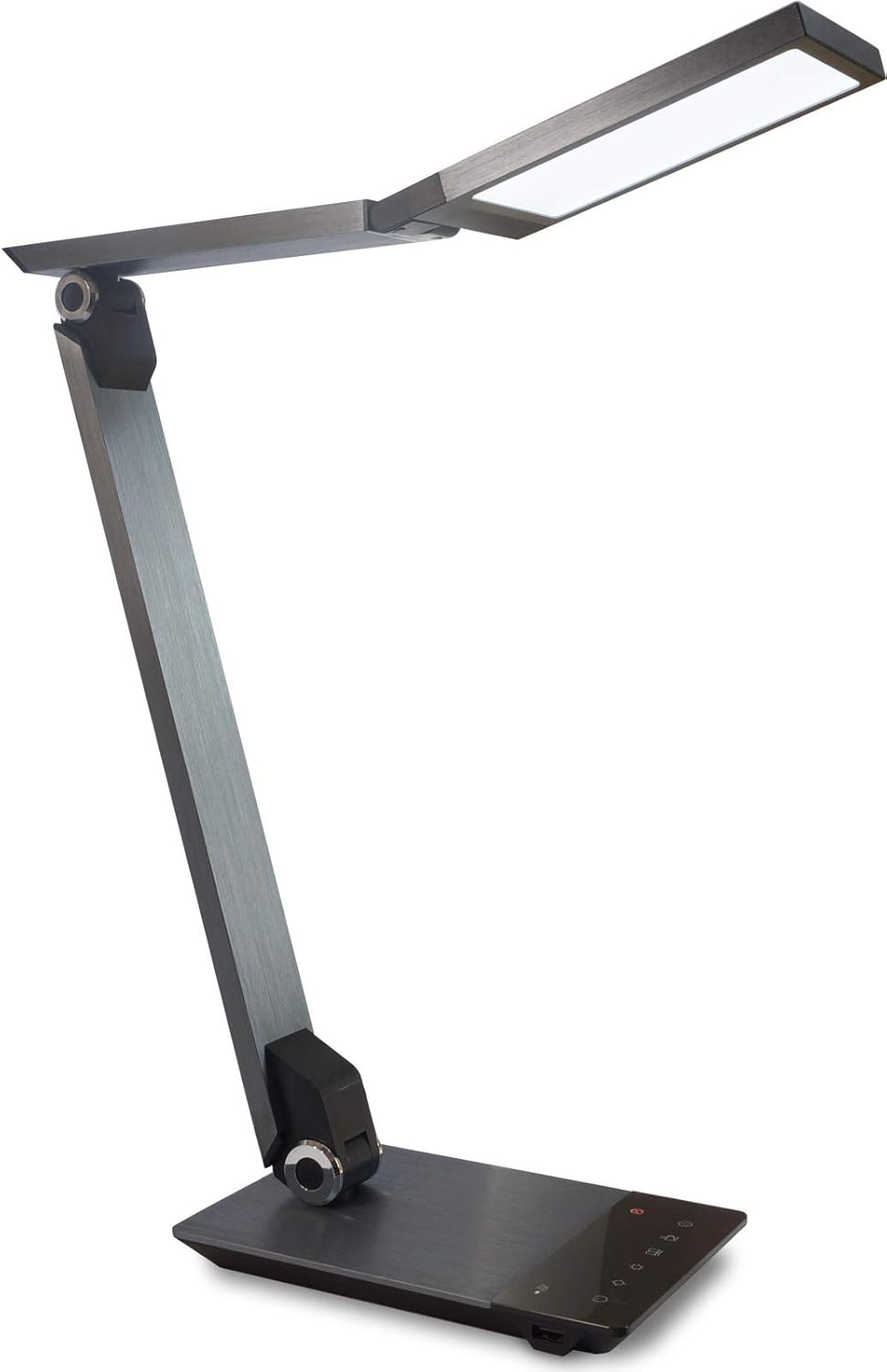
Image 1.1: FeinTech LED Desk Lamp LTL00600. This image displays the lamp in its upright position, showcasing its brushed aluminum finish and sleek design.
2. คำแนะนำด้านความปลอดภัย
เพื่อป้องกันความเสียหายหรือการบาดเจ็บ โปรดปฏิบัติตามข้อควรระวังด้านความปลอดภัยดังต่อไปนี้:
- ตรวจสอบให้แน่ใจว่าได้เสียบอะแดปเตอร์แปลงไฟเข้ากับเต้ารับไฟฟ้าที่เหมาะสมแล้ว
- อย่าเปิดเผยลamp เนื่องจากน้ำหรือความชื้นสูงเกินไป
- Avoid disassembling or modifying the lampการซ่อมแซมควรดำเนินการโดยบุคลากรที่มีคุณสมบัติเหมาะสมเท่านั้น
- เก็บไว้ลamp ห่างจากแหล่งความร้อนและแสงแดดโดยตรง
- ทำความสะอาดลamp only with a soft, dry cloth. Do not use abrasive cleaners or solvents.
- อย่าจ้องมองแหล่งกำเนิดแสง LED โดยตรงเป็นเวลานาน
3. เนื้อหาบรรจุภัณฑ์
กรุณาตรวจสอบว่าสินค้าทั้งหมดมีอยู่ในแพ็คเกจ:
- โต๊ะ LED FeinTech Lamp (Model: LTL00600)
- อะแดปเตอร์แปลงไฟ (12V/2A)
4. สินค้าหมดview
Familiarize yourself with the components of your FeinTech LED Desk Lamp:
- Lamp ศีรษะ: Contains the LED light source.
- แขนปรับได้: Multiple joints for flexible positioning.
- ฐาน: Provides stability and houses the control panel and USB port.
- แผงควบคุม: Touch-sensitive buttons for power, brightness, color temperature, and timer.
- พอร์ตชาร์จ USB: Located on the side of the base for device charging.

ภาพที่ 4.1: จากบนลงล่าง view ของลamp's base and control panel. This image highlights the touch-sensitive buttons for various functions.

ภาพที่ 4.2: ด้านข้าง view ของลamp's base, showing the integrated USB charging port. This port allows for convenient charging of compatible devices.
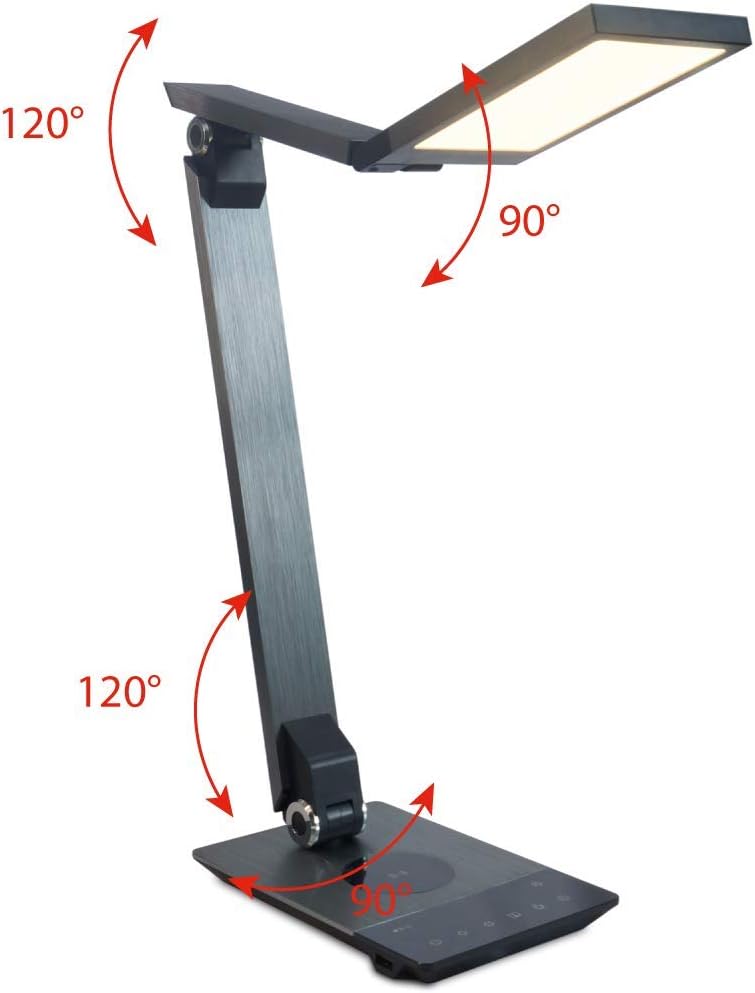
Image 4.3: Diagram illustrating the articulation angles of the lamp's joints. The lamp head can rotate 90 degrees, the upper arm 120 degrees, and the lower arm 120 degrees, allowing for flexible positioning.
5. การตั้งค่า
ทำตามขั้นตอนเหล่านี้สำหรับการตั้งค่าเริ่มต้น:
- แกะ: นำส่วนประกอบทั้งหมดออกจากบรรจุภัณฑ์อย่างระมัดระวัง
- การจัดวาง: วางลamp base on a stable, flat surface. Ensure there is enough space for the lamp to be adjusted without obstruction.
- เชื่อมต่อพลังงาน: เสียบสายอะแดปเตอร์แปลงไฟเข้ากับพอร์ตอินพุต DC ที่ด้านหลังของเครื่องamp ฐานเสียบอะแดปเตอร์แปลงไฟเข้ากับเต้ารับไฟฟ้ามาตรฐาน
6. คู่มือการใช้งาน
The FeinTech LED Desk Lamp features intuitive touch controls on its base.
6.1 เปิด/ปิดเครื่อง
- สัมผัส ปุ่มเปิดปิด on the control panel (refer to Image 4.1) to turn the lamp เปิดหรือปิด
6.2 Brightness Adjustment (Dimming)
- ด้วยลamp on, touch and hold the เพิ่มความสว่าง or ลดความสว่าง buttons (refer to Image 4.1) to steplessly adjust the light intensity.
- ลamp base will vibrate slightly when the minimum or maximum brightness level is reached.
6.3 การปรับอุณหภูมิสี
- ด้วยลamp on, touch and hold the เพิ่มอุณหภูมิสี or ลดอุณหภูมิสีลง buttons (refer to Image 4.1) to steplessly adjust the light color from warm white (2700K) to cool white (6500K).
- ลamp base will vibrate slightly when the minimum or maximum color temperature is reached.
6.4 Favorite Settings
- ลamp allows you to store and recall 3 favorite light settings (brightness and color temperature).
- To save a setting: Adjust the brightness and color temperature to your desired level. Then, touch and hold one of the ปุ่มโปรด (refer to Image 4.1) until the lamp flashes briefly, indicating the setting is saved.
- To recall a setting: Simply touch the corresponding ปุ่มโปรด.
- The last used brightness and color temperature settings are automatically saved even after the lamp ถูกปิดอยู่
6.5 ฟังก์ชั่นการชาร์จ USB
- Connect your smartphone or other compatible device to the USB charging port on the side of the lamp base (refer to Image 4.2) using a suitable USB cable.
- The intelligent USB port delivers up to 2.4A for fast charging.
- An LED indicator will signal ongoing and completed charging status.
6.6 ฟังก์ชั่นจับเวลา
- สัมผัส ปุ่มตั้งเวลา (refer to Image 4.1) to activate the timer function.
- The first touch activates a 3-minute timer.
- A second touch activates a 1-hour timer.
- ลamp will automatically turn off after the selected time period.
7. การบำรุงรักษา
เพื่อรักษาแอลของคุณamp's appearance and functionality:
- ถอดสาย l ออกเสมอamp จากแหล่งจ่ายไฟก่อนทำความสะอาด
- เช็ดลamp ด้วยผ้านุ่มแห้งไม่เป็นขุย
- ห้ามใช้น้ำยาทำความสะอาดชนิดเหลวหรือแบบสเปรย์ เนื่องจากอาจทำให้พื้นผิวหรือชิ้นส่วนภายในเสียหายได้
- Avoid scratching the brushed aluminum surface.
8 การแก้ไขปัญหา
หากคุณพบปัญหาเกี่ยวกับลของคุณamp, อ้างอิงถึงปัญหาทั่วไปและวิธีแก้ไขต่อไปนี้:
| ปัญหา | สาเหตุที่เป็นไปได้ | สารละลาย |
|---|---|---|
| Lamp ไม่เปิด | ไม่มีแหล่งจ่ายไฟ | Check if the power adapter is securely connected to the lamp and the electrical outlet. Test the outlet with another device. |
| การชาร์จผ่าน USB ไม่ทำงาน | อุปกรณ์ไม่รองรับหรือสายเคเบิลมีปัญหา | Ensure your device is compatible with USB charging. Try a different USB cable. Verify the lamp เปิดเครื่องอยู่ |
| การควบคุมแบบสัมผัสไม่ตอบสนอง | ปัญหาซอฟต์แวร์ชั่วคราวหรือปัญหาพลังงาน | Disconnect the power adapter for 30 seconds, then reconnect it. Ensure your fingers are clean and dry when operating the touch controls. |
9. ข้อมูลจำเพาะ
| หมายเลขรุ่น | LTL00600 |
| ขนาด (กว้าง x ยาว x สูง) | 36 x 13.5 x 44 ซม. (ประมาณ 14.2 x 5.3 x 17.3 นิ้ว) |
| น้ำหนัก | 1.84 กก. (ประมาณ 4.06 ปอนด์) |
| วัสดุ | อลูมิเนียมขัดเงา |
| แหล่งกำเนิดแสง | นำ |
| Max. Light Output | 500 lumens (1000 lux at 40 cm distance) |
| อุณหภูมิสี (CCT) | 2700 K (Warm White) to 6500 K (Cool White) |
| Power Consumption (Lamp เท่านั้น) | สูงสุด 10 วัตต์ |
| Power Consumption (Lamp & Charging) | สูงสุด 22 วัตต์ |
| เอาท์พุต USB | สูงถึง 2.4 แอมป์ |
| อินพุต Voltagอี (อะแดปเตอร์) | 12 โวลต์ / 2 แอมป์ |
| ประเภทสวิตซ์ | สัมผัส |

Image 9.1: Diagram showing the dimensions of the FeinTech LED Desk Lamp. เดอะ lamp measures approximately 36 cm in length, 13.5 cm in width, and 44 cm in height.
10. การรับประกันและการสนับสนุน
FeinTech products are designed for reliability and performance. For warranty information or technical support, please refer to the warranty card included with your purchase or visit the official FeinTech webไซต์ โปรดเก็บหลักฐานการซื้อไว้เพื่อใช้ในการเรียกร้องการรับประกัน


