การแนะนำ
ขอบคุณสำหรับการซื้อasing the Retro Fighters BrawlerGen 2-in-1 Controller. This controller is designed to enhance your gaming experience on both Sega Genesis/Mega Drive and Sega Saturn systems, offering a modern ergonomic design with versatile compatibility. Please read this manual thoroughly to ensure proper setup and operation.
คุณสมบัติหลัก
- 2-in-1 Connector: Compatible with both Sega Genesis/Mega Drive and Sega Saturn consoles.
- Modern Ergonomics: Designed for comfortable extended gameplay sessions.
- การควบคุมที่ตอบสนองได้ดี: Features a precise D-pad, analog stick, and responsive buttons.
- สายเคเบิลขยาย: Includes a 10-foot (3-meter) cable for flexible gaming setups.
- ความเข้ากันได้ในวงกว้าง: Works with original Sega Genesis/Mega Drive, 32X, Sega CD, Sega Master System, Sega Saturn, and most third-party Genesis systems.
เนื้อหาแพ็คเกจ
ตรวจสอบให้แน่ใจว่ามีรายการทั้งหมดอยู่ก่อนดำเนินการตั้งค่า:
- Retro Fighters BrawlerGen 2-in-1 Controller
- คู่มือการใช้งาน (เอกสารนี้)
คอนโทรลเลอร์โอเวอร์view
Familiarize yourself with the controller's layout and button functions.
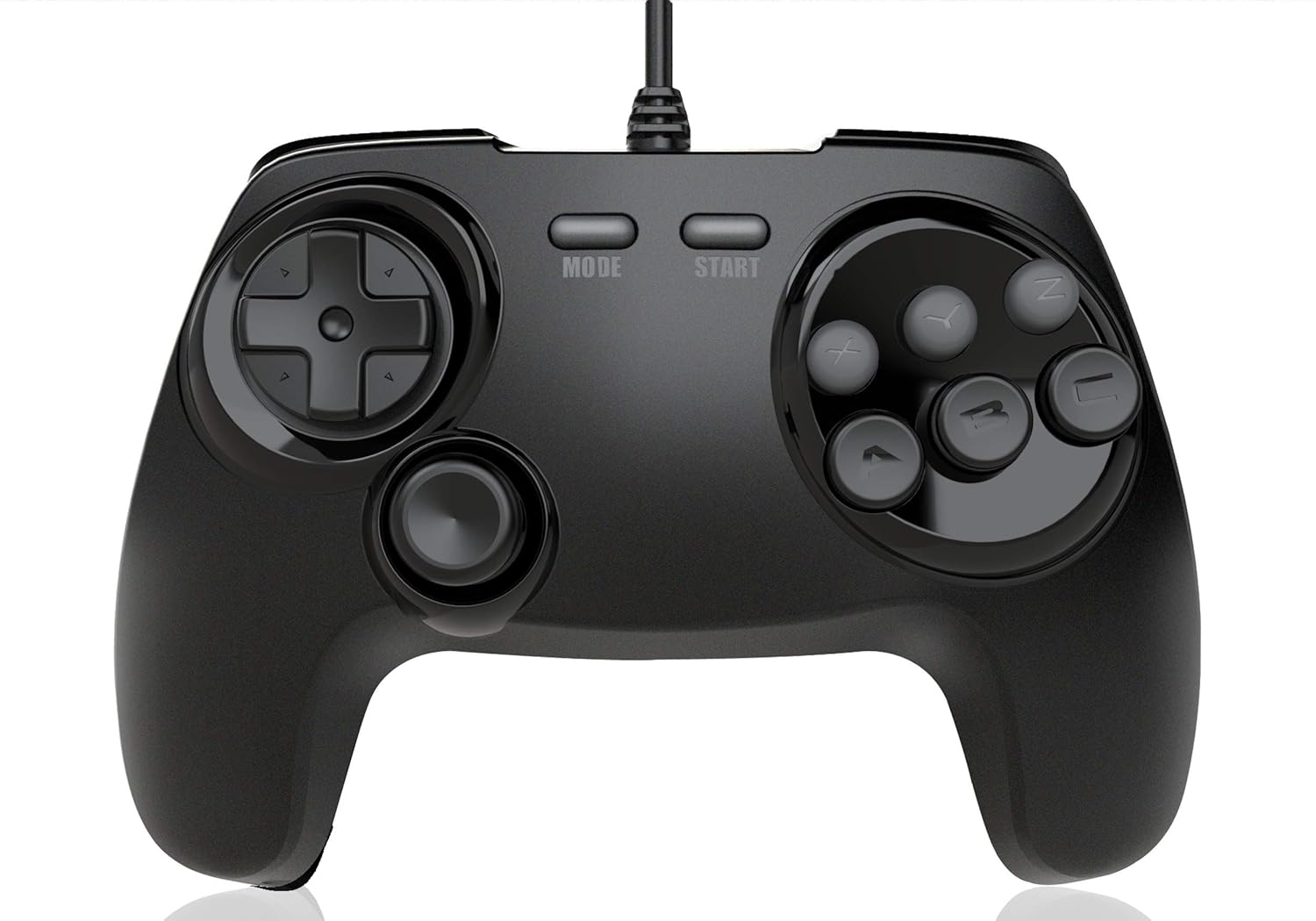
ภาพที่ 1: ด้านหน้า view of the Retro Fighters BrawlerGen controller. Shows the D-pad on the left, analog stick below it, MODE and START buttons in the center, and six face buttons (X, Y, Z, A, B, C) on the right. This image illustrates the primary control layout.
- ดี-แพด: การป้อนทิศทางสำหรับการเคลื่อนที่และการนำทางเมนู
- แท่งอนาล็อก: Provides analog movement input, primarily for Sega Saturn 3D games.
- ปุ่มโหมด: System-specific function (e.g., pause, menu access).
- ปุ่มเริ่มต้น: Pauses games or confirms selections.
- ปุ่มกดด้านหน้า (A, B, C, X, Y, Z): ปุ่มการดำเนินการหลัก
- กระดุมไหล่ (ซ้ายและขวา): Additional action buttons located on the top of the controller.
คำแนะนำการตั้งค่า
- Identify Console Port: Locate the controller port on your Sega Genesis/Mega Drive or Sega Saturn console.
- ตัวควบคุมการเชื่อมต่อ: Insert the 2-in-1 connector firmly into the console's controller port. The connector is designed to fit both Genesis and Saturn ports.
- เปิดเครื่องคอนโซล: เปิดคอนโซลเกมของคุณ
- ทดสอบฟังก์ชันการทำงาน: Start a game and test all buttons, the D-pad, and the analog stick to ensure proper operation.
บันทึก: The controller's 2-in-1 connector automatically adapts to the connected system (Sega Genesis/Mega Drive or Sega Saturn).

ภาพที่ 2: ด้านข้าง view of the Retro Fighters BrawlerGen controller, showing the integrated 2-in-1 connector cable. This image helps in identifying the correct connection point for the console.
การใช้งานคอนโทรลเลอร์
Sega Genesis/Mega Drive Mode
- The D-pad provides directional input.
- Buttons A, B, C, X, Y, Z function as standard Genesis buttons. The X, Y, Z buttons typically map to the C, B, A buttons on a 3-button Genesis controller, or provide additional functionality in 6-button compatible games.
- The START button functions as the game's start/pause button.
- The MODE button may have specific functions in certain Genesis games, similar to the original 6-button controller.
Sega Saturn Mode
- The D-pad provides directional input.
- The Analog Stick provides analog input for compatible Sega Saturn 3D games.
- Buttons A, B, C, X, Y, Z function as standard Saturn face buttons.
- The L and R shoulder buttons provide additional input.
- The START button functions as the game's start/pause button.
- The MODE button may have specific functions in certain Saturn games, such as accessing in-game menus.

ภาพที่ 3: มุม view of the Retro Fighters BrawlerGen controller, highlighting the ergonomic grip and the placement of the analog stick and D-pad. This perspective shows the comfortable contours of the controller.
การดูแลรักษา
- การทำความสะอาด: ใช้ผ้านุ่มและแห้งเช็ดทำความสะอาดคอนโทรลเลอร์ สำหรับสิ่งสกปรกฝังแน่น ให้เช็ดเบาๆamp สามารถใช้ผ้าเช็ดทำความสะอาดได้ แล้วเช็ดให้แห้งทันที หลีกเลี่ยงสารเคมีรุนแรงหรือน้ำยาทำความสะอาดที่มีฤทธิ์กัดกร่อน
- พื้นที่จัดเก็บ: เก็บตัวควบคุมไว้ในที่แห้งและเย็น ห่างจากแสงแดดโดยตรงและอุณหภูมิที่สูงหรือต่ำมาก
- การดูแลสายเคเบิล: Avoid sharply bending or twisting the controller cable. Do not pull the cable to disconnect it from the console; always grasp the connector itself.
- หลีกเลี่ยงของเหลว: ควรเก็บตัวควบคุมให้ห่างจากของเหลวเพื่อป้องกันความเสียหายต่อชิ้นส่วนภายใน
การแก้ไขปัญหา
| ปัญหา | สาเหตุที่เป็นไปได้ | สารละลาย |
|---|---|---|
| ตัวควบคุมไม่ตอบสนอง | Loose connection, console not powered on, or incompatible system. |
|
| Buttons or D-pad are unresponsive/sticky. | Debris under buttons, or internal component issue. |
|
| Analog stick not working in Saturn games. | Game does not support analog input, or controller not recognized correctly. |
|
ข้อมูลจำเพาะ
- แบบอย่าง: BrawlerGen 2-in-1 Controller
- ความเข้ากันได้: Sega Genesis/Mega Drive, 32X, Sega CD, Sega Master System, Sega Saturn, most 3rd party Genesis systems.
- ความยาวสายเคเบิล: 10 ฟุต (ประมาณ 3 เมตร)
- ขนาด : ประมาณ 7.24 x 5.91 x 3.35 นิ้ว (18.39 x 15.01 x 8.51 ซม.)
- น้ำหนัก: ประมาณ 12.8 ออนซ์ (362.87 กรัม)
- ผู้ผลิต: Retro Fighters
ข้อมูลการรับประกัน
Retro Fighters products are typically covered by a manufacturer's warranty against defects in materials and workmanship. For specific warranty terms, duration, and claim procedures, please refer to the official Retro Fighters webหรือติดต่อฝ่ายสนับสนุนลูกค้าโดยตรง โปรดเก็บหลักฐานการซื้อไว้เพื่อใช้ในการเคลมประกัน
การสนับสนุนลูกค้า
If you encounter any issues not covered in the troubleshooting section or require further assistance, please contact Retro Fighters customer support:
- Webเว็บไซต์: www.retrofighters.com/support (อดีตampลิงค์จริงอาจแตกต่างกัน)
- อีเมล: support@retrofighters.com (Examp(อีเมลต้นฉบับอาจแตกต่างกันไป)
When contacting support, please have your product model (BrawlerGen 2-in-1 Controller) and proof of purchase ready.