1. บทนำ
The Elitech Tlog B100EH is a wireless temperature and humidity data logger designed for precise environmental monitoring. It features an external sensor, a large recording capacity of 32,000 points, and the ability to generate PDF reports. This manual provides detailed instructions for the setup, operation, maintenance, and troubleshooting of your device.

Image 1.1: Elitech Tlog B100EH Data Logger with external temperature and humidity sensor.
2. สินค้าหมดview
Familiarize yourself with the components of your Tlog B100EH data logger.

Image 2.1: Key components of the Elitech Tlog B100EH, including the external sensor, LED indicators, LCD screen, control buttons, and USB cover.
- เซ็นเซอร์ภายนอก: วัดอุณหภูมิและความชื้น
- LED Indicator (Mode): Indicates device status (e.g., logging, stopped).
- LED Indicator (Alarm): Indicates if recorded data exceeds set alarm thresholds.
- หน้าจอ LCD: Displays current readings, battery status, and logging status.
- ปุ่มเริ่มต้น: Initiates data logging.
- ปุ่มหยุด: Halts data logging.
- ฝาครอบ USB: Protects the integrated USB connector for PC connection.
3. การตั้งค่า
3.1 การติดตั้งแบตเตอรี่
The Tlog B100EH uses a replaceable lithium battery (included). Ensure the battery is correctly installed before first use.

ภาพที่ 3.1: ด้านหลัง view of the data logger showing the battery compartment. Ensure proper battery orientation.
3.2 การติดตั้งซอฟต์แวร์และแอป
To configure the data logger and view detailed reports, install the Elitech software on your computer or the Elitech App on your iOS/Android device.
- ซอฟต์แวร์พีซี: Download the Elitech data management software from the official Elitech webไซต์ ทำตามคำแนะนำบนหน้าจอเพื่อการติดตั้ง
- แอปมือถือ: ค้นหา 'Elitech' in the Apple App Store or Google Play Store and install the application.
3.3 การกำหนดค่าเริ่มต้น
Before starting a new logging session, connect the device to your computer via USB or pair it with the Elitech App via Bluetooth to set parameters.

Image 3.2: The data logger connected to a computer via USB and displaying data on a mobile application.
Using the software/app, you can configure:
- ช่วงเวลาการบันทึก
- Start/Stop mode
- Alarm thresholds for temperature and humidity
- เวลาเริ่มต้นล่าช้า
- Unit of measurement (°C/°F)
4. คู่มือการใช้งาน
4.1 Starting and Stopping Logging
The Tlog B100EH features a button recess design to prevent accidental activation or deactivation during transport.
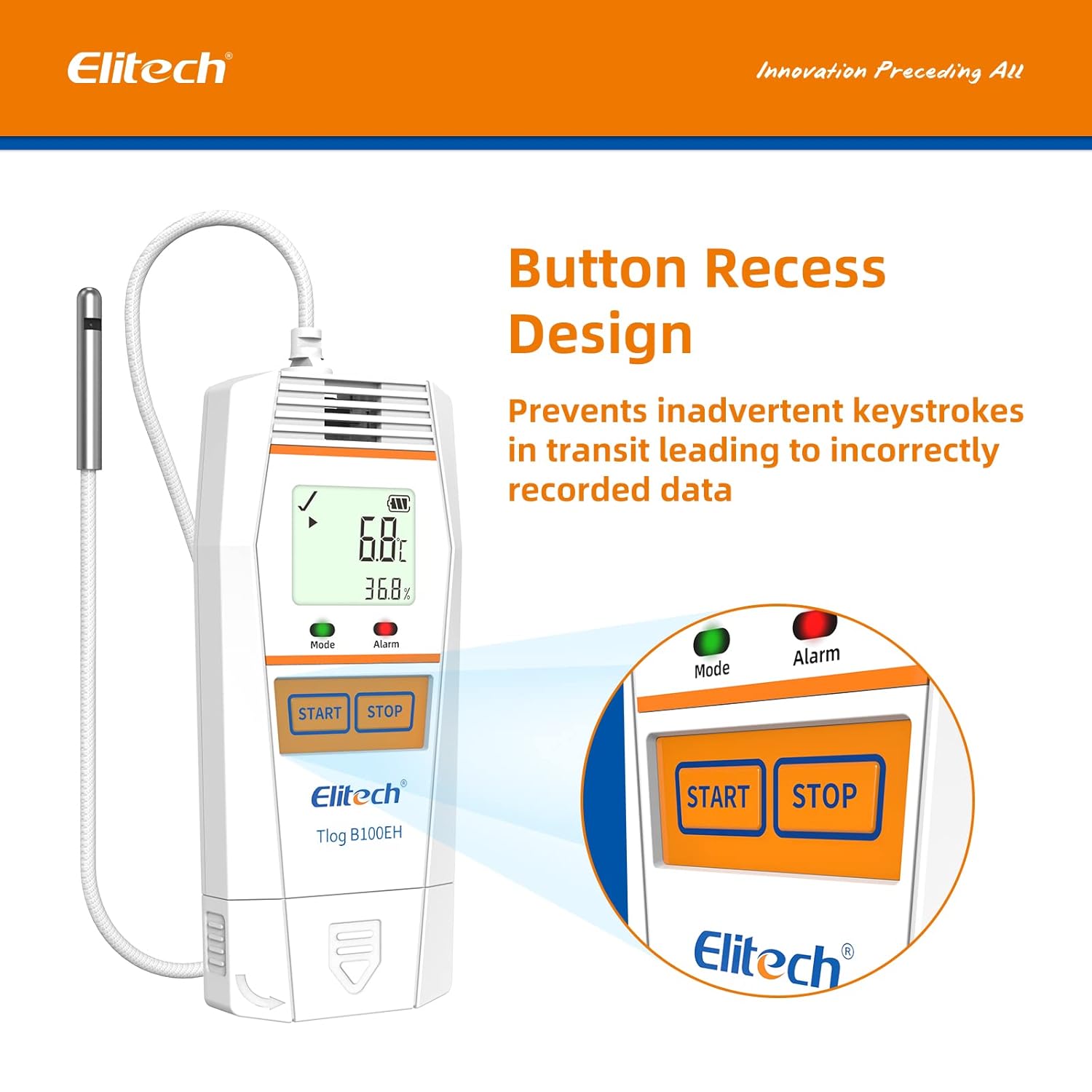
ภาพที่ 4.1: ภาพระยะใกล้ view of the recessed START and STOP buttons on the data logger.
- วิธีเริ่มต้นการบันทึกข้อมูล: กดปุ่มค้างไว้ เริ่ม button until the 'Mode' LED flashes green, indicating logging has begun.
- วิธีหยุดการบันทึกข้อมูล: กดปุ่มค้างไว้ หยุด button until the 'Mode' LED stops flashing, indicating logging has ceased.
4.2 Monitoring Data
The LCD screen displays real-time temperature and humidity readings, battery level, and logging status. The 'Alarm' LED will illuminate if readings exceed configured thresholds.
4.3 Data Export and Report Generation
After logging is complete, connect the data logger to a computer via USB or use the Elitech App to download the recorded data.

Image 4.2: Data export interface showing the data logger connected to a computer and a mobile device, illustrating multi-format data export options.

Image 4.3: Icons representing the available data report formats: PDF, Excel, and TXT.
The software/app allows you to generate reports in various formats, including PDF, Excel, and TXT, for analysis and record-keeping.
5. การบำรุงรักษา
5.1 การเปลี่ยนแบตเตอรี่
When the battery indicator on the LCD shows low power, replace the lithium battery to ensure continuous operation. Refer to Section 3.1 for battery access.
5.2 การทำความสะอาด
เช็ดอุปกรณ์ด้วยผ้านุ่มและแห้ง ห้ามใช้น้ำยาทำความสะอาดที่มีฤทธิ์กัดกร่อนหรือจุ่มอุปกรณ์ลงในน้ำ
5.3 พื้นที่จัดเก็บ
ควรเก็บเครื่องบันทึกข้อมูลไว้ในที่แห้งและเย็น หลีกเลี่ยงแสงแดดโดยตรงและอุณหภูมิที่สูงหรือต่ำเกินไปเมื่อไม่ได้ใช้งาน
6 การแก้ไขปัญหา
- อุปกรณ์ไม่เปิด: ตรวจสอบการติดตั้งแบตเตอรี่และระดับประจุไฟ เปลี่ยนแบตเตอรี่หากจำเป็น
- ไม่สามารถเชื่อมต่อผ่านบลูทูธได้: Ensure Bluetooth is enabled on your mobile device and the data logger is within range. Restart both devices and try pairing again.
- Data not logging: Verify that logging was initiated correctly by checking the 'Mode' LED. Ensure sufficient memory is available.
- การอ่านค่าที่ไม่ถูกต้อง: Ensure the external sensor is clean and unobstructed. Avoid placing the sensor in direct sunlight or near heat sources.
- ปัญหาเกี่ยวกับซอฟต์แวร์/แอปพลิเคชัน: Ensure you have the latest version of the software/app. Refer to the Elitech support website for common software issues.
For further assistance, contact Elitech customer support.
7. ข้อมูลจำเพาะ

Image 7.1: Physical dimensions and operational temperature/humidity ranges of the data logger.

Image 7.2: Details on sensor accuracy, resolution, and total data logging capacity.

Image 7.3: Visual representation of the temperature and humidity sensor accuracy.
| คุณสมบัติ | รายละเอียด |
|---|---|
| หมายเลขรุ่น | Tlog B100EH |
| ช่วงอุณหภูมิ | -40°F ถึง 185°F (-40°C ถึง 85°C) |
| ช่วงความชื้น | ความชื้นสัมพัทธ์ 10% ถึง 90% |
| ความแม่นยำของอุณหภูมิ | ±0.6℉ (±0.3°C) |
| ความแม่นยำของความชื้น | ±3%ความชื้นสัมพัทธ์ |
| ความจุในการบันทึก | 32,000 คะแนน |
| ประเภทแบตเตอรี่ | แบตเตอรี่ลิเธียมโลหะ 1 ก้อน (รวมอยู่ด้วย) |
| ขนาดสินค้า | 6.12 x 1.85 x 0.64 นิ้ว |
| น้ำหนักสินค้า | 4.97 ออนซ์ (0.14 กิโลกรัม) |
| ประเภทการติดตั้ง | โต๊ะวางของ |
7.1 Quality Certifications

ภาพที่ 7.4: จบแล้วview of Elitech's quality certifications, including WHO PQS, FDA, and NIST compliance.
The Elitech Tlog B100EH complies with various quality standards, including:
- World Health Organization PQS Approved
- FDA21 CFR Part 11 Compliance
- ISO9001:2015

ภาพที่ 7.5: อดีตample of a calibration certificate, showing calibration and expiration dates.
Calibration certificates are available upon request. Please contact Elitech customer support for details.
8. การรับประกัน
Elitech provides a standard manufacturer's warranty for this product. Please refer to the warranty card included with your purchase or visit the official Elitech webเว็บไซต์สำหรับข้อกำหนดและเงื่อนไขการรับประกันโดยละเอียด
9. การสนับสนุน
For technical assistance, troubleshooting, or any inquiries regarding your Elitech Tlog B100EH data logger, please contact Elitech customer support. 24/7 US Technician Support is available via email and phone.
- อีเมล: โปรดดูที่บรรจุภัณฑ์ของผลิตภัณฑ์หรือเว็บไซต์ของ Elitech webเว็บไซต์สำหรับข้อมูลการติดต่อ
- โทรศัพท์: โปรดดูที่บรรจุภัณฑ์ของผลิตภัณฑ์หรือเว็บไซต์ของ Elitech webเว็บไซต์สำหรับข้อมูลการติดต่อ
- แหล่งข้อมูลออนไลน์: เยี่ยมชมเว็บไซต์อย่างเป็นทางการของ Elitech webเว็บไซต์นี้รวบรวมคำถามที่พบบ่อย (FAQ) ไฟล์ดาวน์โหลดซอฟต์แวร์ และเอกสารสนับสนุนเพิ่มเติม


