1. บทนำ
The ULTRALOQ U-Bolt Pro is a versatile 7-in-1 keyless entry smart lock designed for enhanced home security and convenience. It offers multiple unlocking methods, remote control capabilities, and robust construction.
This manual provides essential information for the installation, operation, maintenance, and troubleshooting of your U-Bolt Pro Smart Lock.
2. สินค้าหมดview

Figure 1: ULTRALOQ U-Bolt Pro Smart Lock, U Home App, and WiFi Bridge.
The image displays the ULTRALOQ U-Bolt Pro Smart Lock, featuring a numeric keypad and fingerprint sensor, alongside a smartphone showing the U Home app interface and the compact WiFi Bridge. This setup highlights the lock's keyless entry options and remote connectivity.
คุณสมบัติหลัก:
- ระบบเปิดประตูแบบไม่ต้องใช้กุญแจ 7-in-1: Touch and Go 360° Fingerprint ID, Anti-peep Keypad, Smartphone App, Auto Unlock, Shake to Open, Apple Watch compatibility, Voice control (Alexa, Google Assistant), and Mechanical Key.
- การเข้าถึงระยะไกล: Control and monitor your lock from anywhere via the smartphone app with the included WiFi Bridge.
- Responsive Fingerprint Recognition: Unlocks in 0.3 seconds with 99.8% accuracy, storing up to 100 fingerprints.
- Auto Lock and Auto Unlock: Automatically locks on a preset timer and unlocks upon smartphone approach.
- High Security & Durability: Meets ANSI Grade 1 Commercial Level Standard, made of sturdy zinc alloy, IP65 rated dust and weatherproof.
3. การตั้งค่าและการติดตั้ง
3.1 ความเข้ากันได้กับประตู
The ULTRALOQ U-Bolt Pro Smart Lock is designed to fit most US standard left or right-handed doors. It replaces your current deadbolt.

Figure 2: Door compatibility and lock dimensions.
This diagram illustrates the various door types (left-handed, right-handed) and critical dimensions (backset, bore hole, door thickness) required for proper installation of the U-Bolt Pro Smart Lock, ensuring compatibility with standard door preparations.
3.2 DIY Installation
Installation typically takes about 10 minutes and requires only a screwdriver. For detailed step-by-step instructions, please refer to the official Installation Manual (PDF) available on the product page or the manufacturer's webเว็บไซต์.
Ensure the door frame hole has at least 1 inch depth to prevent "doorlock jammed" errors, as noted by some users.
3.3 Initial Setup & App Pairing
After physical installation, download the U Home app to your smartphone. The lock connects via 2.4GHz WiFi only. Follow the in-app instructions to pair your lock and set up initial access methods, including fingerprints and user codes.

Figure 3: Control your lock at your fingertips with the U Home app.
This image shows a smartphone screen displaying the U Home app, illustrating various control options such as sharing ekeys/codes, managing users, locking/unlocking, viewing log records, and receiving smart notifications, all accessible remotely.
4. การใช้งานสมาร์ทล็อคของคุณ
4.1 วิธีการปลดล็อค
- การตรวจสอบลายนิ้วมือ: Place your registered finger on the sensor for quick access. The lock recognizes fingerprints in 0.3 seconds.
- แป้นพิมพ์ป้องกันการแอบมอง: Enter your passcode on the backlit keypad. You can add random digits before or after your actual code to prevent others from guessing it.
- แอพสมาร์ทโฟน: Use the U Home app to remotely lock or unlock your door from anywhere.
- ปลดล็อคอัตโนมัติ: The lock can automatically unlock when you approach with your smartphone. Ensure location services are enabled for the U Home app.
- เขย่าเพื่อเปิด: Configure the app to unlock the door by shaking your phone.
- Apple Watch & Voice Control: Compatible with Apple Watch for unlocking, and integrates with Alexa and Google Assistant for voice commands.
- กุญแจเครื่องกล: For traditional backup, use the physical key provided.

Figure 4: Various methods to open your door.
This composite image demonstrates the multiple ways to unlock the U-Bolt Pro: via smartphone app, fingerprint scan, keypad entry, and traditional mechanical key, offering diverse access options for users.
4.2 Auto Lock Function
The lock can be set to automatically lock after a preset time (e.g., 10 seconds to 30 minutes) for added security. This feature is configurable within the U Home app.

Figure 5: Smart Auto Unlock & Lock in action.
This image depicts a person approaching a door equipped with the U-Bolt Pro Smart Lock, emphasizing the auto-unlock feature that activates as the user's smartphone comes into proximity, followed by automatic locking upon departure.
4.3 User Management & Notifications
The U Home app allows you to manage access rights, share ekeys or temporary codes with family, guests, or service providers. You can also view real-time access logs to see who entered and when. Low battery alerts are also sent via the app.

Figure 6: Facilitating access for trusted individuals.
This visual demonstrates how the smart lock system facilitates access for various trusted individuals, including family members, renters, dog walkers, and repairmen, by allowing customized access schedules and temporary codes.

Figure 7: Real-time monitoring and alerts.
This image illustrates real-time notifications from the U Home app on a smartphone, showing alerts for events such as the door being unlocked and low battery warnings, providing immediate status updates to the user.
4.4 การบูรณาการการควบคุมด้วยเสียง
The U-Bolt Pro Smart Lock works seamlessly with popular smart home ecosystems like Amazon Alexa, Google Assistant, SmartThings, and IFTTT, allowing for convenient voice-activated control.

Figure 8: Smart Home Ecosystem & Voice Control.
This image showcases the U-Bolt Pro's compatibility with various smart home platforms, including U Home, Alexa, Google Home, Samsung SmartThings, and IFTTT, demonstrating its integration into a broader smart home ecosystem for voice control and automation.
5. การบำรุงรักษา
5.1 การเปลี่ยนแบตเตอรี่
The lock requires 4 AA alkaline batteries (included). The U Home app will provide low battery alerts. Replace batteries promptly to ensure continuous operation.
5.2 ความทนทานและการทนต่อสภาพอากาศ
The U-Bolt Pro is IP65 rated for dust and weather resistance, designed to withstand various environmental conditions. It is constructed from sturdy zinc alloy, offering enhanced strength and a longer lifespan compared to standard residential locks.
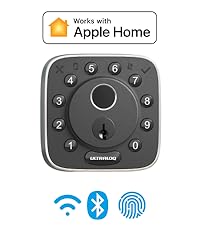
Figure 9: IP65 Weatherproof and Temperature Tolerance.
This image highlights the U-Bolt Pro's robust design, indicating its IP65 weatherproof rating and ability to operate within a wide temperature range (-22°F to 149°F), ensuring reliable performance in diverse climates.
6 การแก้ไขปัญหา
6.1 ปัญหาทั่วไป
- "Doorlock Jammed" Error: This often occurs if the bolt does not fully extend or retract. Ensure the hole in the door frame has at least 1 inch depth and that the lock is properly aligned.
- ปัญหาการจดจำลายนิ้วมือ: Ensure your finger is clean and dry. When registering fingerprints, place your finger at different angles to capture a comprehensive scan. If issues persist, try re-registering your fingerprint.
- ปัญหาการเชื่อมต่อ: Verify your WiFi network is 2.4GHz. Ensure the WiFi Bridge is properly connected and within range of the lock.
6.2 รีเซ็ตเป็นค่าโรงงาน
A factory reset erases all user data and restores the lock to its original, out-of-the-box settings. Any fingerprints or codes can unlock the lock in factory default mode. This is useful for resolving persistent issues or preparing the lock for a new user.
Video 1: How to reset the ULTRALOQ U-Bolt Pro Smart Lock.
This video demonstrates the process of performing a factory reset on the ULTRALOQ U-Bolt Pro Smart Lock, guiding users through the steps to clear all stored data and restore default settings.
6.3 การสนับสนุนลูกค้า
If you encounter issues not covered in this manual, please contact ULTRALOQ customer support. They offer lifetime online phone support from Monday to Friday, 7 AM to 6 PM PST, and 24/7 after-sales email service.
7. ข้อมูลจำเพาะ
| คุณสมบัติ | รายละเอียด |
|---|---|
| ยี่ห้อ | อัลตร้าล็อก |
| ชื่อรุ่น | U-Bolt Pro |
| ประเภทล็อค | Biometric, Deadbolt, Keypad, Fingerprint Smart Deadbolt Lock |
| การเชื่อมต่อ | Bluetooth, 2.4G Wi-Fi (with WiFi Bridge) |
| แหล่งพลังงาน | แบตเตอรี่อัลคาไลน์ AA 4 ก้อน (มีให้ในชุด) |
| วัสดุ | สังกะสี |
| ขนาด (กว้าง x ยาว x สูง) | 2.95 x 2.95 x 1.22 นิ้ว |
| น้ำหนักสินค้า | 3.06 ปอนด์ |
| ทนทานต่อสภาพอากาศ | IP65 Rated Dust and Weatherproof |
| การรับรอง | ANSI Grade 1 Commercial Level Standard |
| ระบบที่เข้ากันได้ | Alexa, Google Assistant, SmartThings, IFTTT, Apple Watch |
8. การรับประกันและการสนับสนุน
ULTRALOQ provides a lifetime mechanical warranty และ รับประกันระบบอิเล็กทรอนิกส์ 18 เดือน for the U-Bolt Pro Smart Lock.
For any inquiries or support, please contact ULTRALOQ customer service:
- บริการช่วยเหลือทางโทรศัพท์ออนไลน์: วันจันทร์ถึงวันศุกร์ เวลา 7 - 6 น. PST
- บริการอีเมล: 24/7 after-sales support
Refer to the official ULTRALOQ webเว็บไซต์สำหรับข้อมูลติดต่อและทรัพยากรสนับสนุนล่าสุด


