1. บทนำ
This manual provides detailed instructions for the installation, operation, and maintenance of your BINIZE Android 13 Car Stereo. This 9-inch touchscreen head unit is designed for Toyota Camry models from 2006 to 2011, offering advanced features such as Wireless CarPlay, Android Auto, GPS navigation, WiFi connectivity, and support for a backup camera.
โปรดอ่านคู่มือนี้อย่างละเอียดก่อนใช้งานผลิตภัณฑ์ เพื่อให้มั่นใจได้ถึงการทำงานที่ถูกต้องและความปลอดภัย
2. การตั้งค่าและการติดตั้ง
การติดตั้งอย่างถูกต้องเป็นสิ่งสำคัญอย่างยิ่งต่อประสิทธิภาพสูงสุด หากคุณไม่แน่ใจเกี่ยวกับขั้นตอนใดๆ ขอแนะนำให้ขอความช่วยเหลือจากผู้เชี่ยวชาญ
2.1 เนื้อหาบรรจุภัณฑ์
ตรวจสอบว่ามีส่วนประกอบทั้งหมดอยู่ในแพ็คเกจ:
- BINIZE Android 13 Car Stereo Head Unit (9-inch)
- สายไฟ
- สายอินพุต/เอาต์พุต RCA
- สาย USB 2 เส้น
- เสาอากาศ GPS
- คู่มือการใช้งาน (เอกสารนี้)
- สายเคเบิลอินพุตกล้อง
- กล้องสำรอง

Figure 2.1: Included components of the BINIZE Android 13 Car Stereo.
2.2 ความเข้ากันได้ของยานพาหนะ
This head unit is specifically designed for Toyota Camry models manufactured between 2006 and 2011.

Figure 2.2: BINIZE Car Stereo installed in a compatible Toyota Camry dashboard.

รูปที่ 2.3: ก่อนและหลังการติดตั้ง view of the BINIZE Car Stereo in a Toyota Camry.
2.3 การเดินสายและการเชื่อมต่อ
Connect the power harness, RCA cables, USB cables, GPS antenna, and backup camera input as per the wiring diagram provided with your unit. Ensure all connections are secure to prevent malfunctions.
บันทึก: If the provided wiring harness is incompatible with your vehicle, contact customer service for an appropriate replacement.
2.4 การเปิดเครื่องครั้งแรก
After installation, turn on your vehicle's ignition. The head unit should power on automatically. Follow any on-screen prompts for initial setup.
3. คู่มือการใช้งาน
3.1 หน้าจอหลักและการนำทาง
The home screen provides access to all main functions and applications. Swipe left or right to navigate through app pages. Tap on an icon to launch the corresponding application.

Figure 3.1: Main interface of the BINIZE Android 13 Car Stereo.
3.2 CarPlay ไร้สายและ Android Auto
The unit supports both Wireless CarPlay and Wireless Android Auto for seamless smartphone integration. Connect your phone via Bluetooth and Wi-Fi to access navigation, music, calls, and messaging apps directly on the car stereo.

รูปที่ 3.2: ฟังก์ชัน CarPlay ไร้สายและ Android Auto
3.3 ฟังก์ชันการเชื่อมโยงกระจก
For apps not supported by CarPlay or Android Auto, use the Mirror Link function to display your smartphone screen (both iOS and Android) on the car stereo. This allows for viewing videos and other content.

Figure 3.3: Mirror Link feature in action.
Video 3.1: Demonstration of the Binize car stereo's features, including screen mirroring.
3.4 ระบบนำทาง GPS
The unit features a built-in GPS receiver and antenna. You can use pre-installed navigation apps or download others from the Play Store. Both online and offline maps are supported.

รูปที่ 3.4: อินเทอร์เฟซการนำทาง GPS
3.5 วิทยุ FM
Access FM radio stations with a tuning range of 87.5-108 MHz. Save your favorite stations for quick access.
รูปที่ 3.5: อินเทอร์เฟซวิทยุ FM
3.6 Music and Video Playback
Enjoy lossless music playback and high-definition video. The unit supports various audio and video formats. You can download media apps from the Play Store.
Figure 3.6: Music and Video playback interfaces.
3.7 Digital Signal Processor (DSP) and Equalizer
Customize your audio experience with the built-in DSP. Adjust multi-band EQ settings, equal loudness, and sound field to achieve true stereo surround sound through the 6-speaker output.

รูปที่ 3.7: การตั้งค่า DSP และอีควอไลเซอร์
วิดีโอ 3.2: จบview of the Binize 10 Inch Double Din Touchscreen Android Car Stereo features.
3.8 ฟังก์ชันกล้องมองหลัง
The unit supports AHD HD reversing cameras. When the vehicle is in reverse, the screen automatically displays the camera feed with reversing guidelines for safer parking.
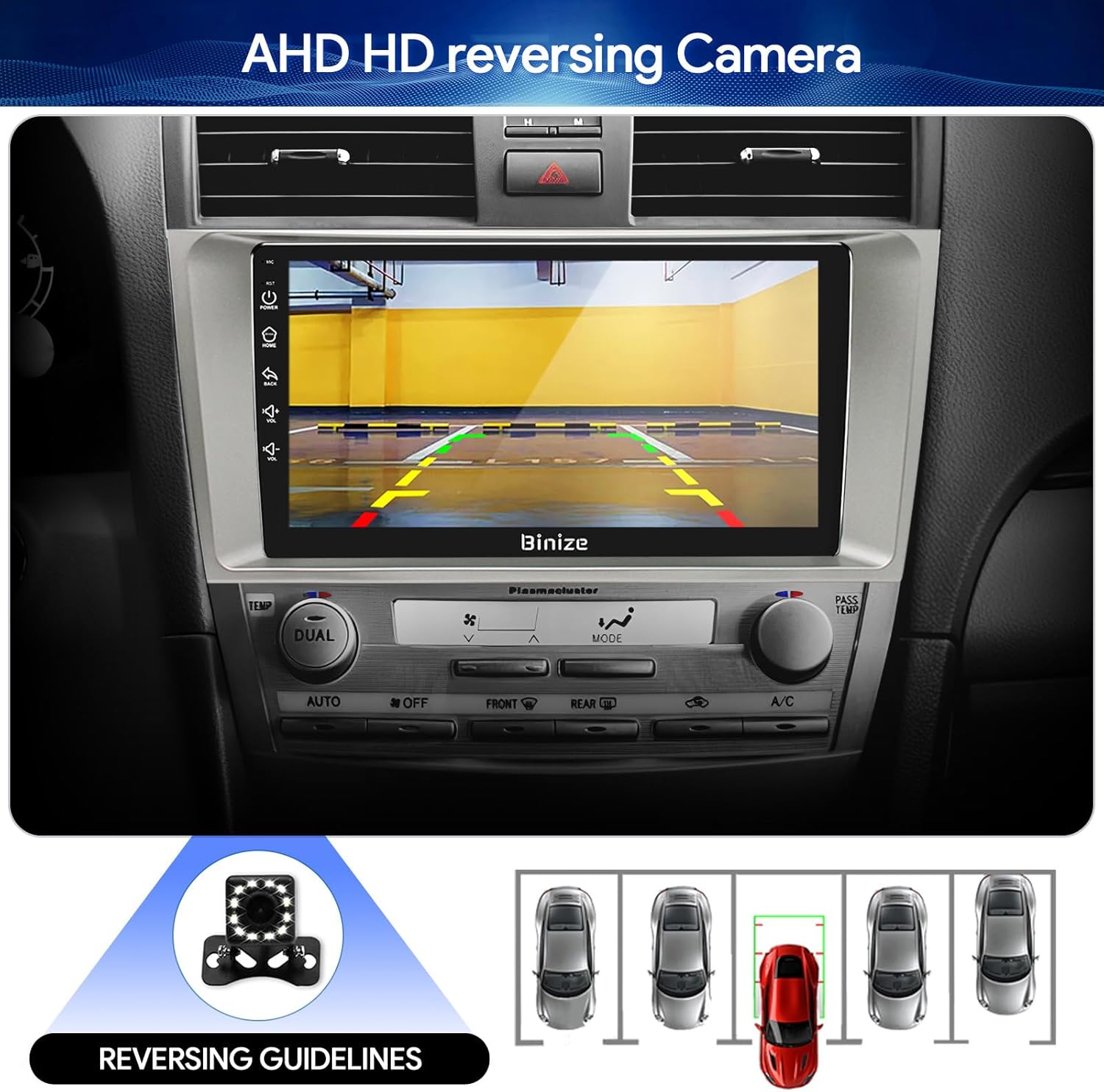
Figure 3.8: Backup camera display with reversing guidelines.
3.9 Bluetooth 5.0 for Hands-Free Calling
Connect your phone via Bluetooth 5.0 for faster network transmission and hands-free calling. Dial, answer, or receive calls directly from the head unit.
รูปที่ 3.9: อินเทอร์เฟซการโทรแบบแฮนด์ฟรีผ่านบลูทูธ
4. การบำรุงรักษา
4.1 การทำความสะอาดหน้าจอ
ใช้ผ้านุ่มไม่เป็นขุยเช็ดหน้าจอสัมผัสเบาๆ หลีกเลี่ยงน้ำยาทำความสะอาดที่มีฤทธิ์กัดกร่อนหรือสารเคมีรุนแรงที่อาจทำลายหน้าจอได้
4.2 การอัปเดตซอฟต์แวร์
Periodically check for software updates to ensure optimal performance and access to new features. Updates can typically be performed via Wi-Fi or USB.
5 การแก้ไขปัญหา
- ไม่มีไฟฟ้า: ตรวจสอบจุดเชื่อมต่อไฟฟ้าทั้งหมดและกล่องฟิวส์ของรถ ตรวจสอบให้แน่ใจว่ากุญแจสตาร์ทติด
- ไม่มีเสียง: Verify speaker connections, volume levels, and EQ settings. Check if the unit is muted.
- ปัญหาสัญญาณ GPS: ตรวจสอบให้แน่ใจว่าติดตั้งเสาอากาศ GPS อย่างถูกต้องและมีความชัดเจน view ของท้องฟ้า
- ปัญหาการเชื่อมต่อบลูทูธ: ตรวจสอบให้แน่ใจว่าได้เปิดใช้งานบลูทูธทั้งบนเครื่องเล่นในรถและโทรศัพท์ของคุณแล้ว ลองยกเลิกการจับคู่และจับคู่ใหม่อีกครั้ง
- การควบคุมพวงมาลัยไม่ทำงาน: Refer to the "SW Learning" or "Steering Wheel Setting" in the unit's settings menu to configure the controls.
- Screen Lag/Unresponsiveness: Restart the unit. If issues persist, consider a factory reset (note: this will erase personal data).
- Wiring Harness Incompatibility: If the provided wiring harness does not fit your vehicle, contact BINIZE customer service for assistance.
6. ข้อมูลจำเพาะ
| คุณสมบัติ | ข้อมูลจำเพาะ |
|---|---|
| น้ำหนักสินค้า | 2.84 ปอนด์ |
| ขนาดแพ็คเกจ | 11.2 x 7.2 x 3.7 นิ้ว |
| ขนาดจอแสดงผล | 10.1 นิ้ว |
| คำสั่งเสียง | ปุ่มกด, ไมโครโฟน, หน้าจอสัมผัส |
| ยี่ห้อ | BINIZE |
| ประเภทบริการยานพาหนะ | รถ |
| คุณสมบัติพิเศษ | บลูทูธ, หน้าจอสัมผัส |
| เทคโนโลยีการเชื่อมต่อ | บลูทูธ, ยูเอสบี, ไวไฟ |
| ประเภทแผนที่ | Online and Offline |
| โหมดเอาต์พุตเสียง | ลำโพงสเตอริโอ |
| ประเภทการติดตั้ง | แผงหน้าปัด |
| ปณิธาน | 1024 x 600 |
| ระบบปฏิบัติการ | แอนดรอยด์ |
7. การรับประกันและการสนับสนุน
BINIZE offers top-notch customer service. If you encounter any problems before or after sale, please contact the BINIZE customer service team via Amazon email. They are committed to assisting you with any issues and can provide support for online updates and warranty information.
For further assistance, please refer to the contact information provided with your purchase or visit the official BINIZE store on Amazon.


