1. บทนำ
This manual provides detailed instructions for the YuanLey YS082G-P 10-Port PoE Switch. This unmanaged network switch is designed for various applications, offering 8 Power over Ethernet (PoE+) ports and 2 Gigabit uplink ports for efficient network connectivity and power delivery.

ภาพที่ 1.1: ด้านหน้า view of the YuanLey YS082G-P 10-Port PoE Switch.
2. คุณสมบัติหลัก
- การกำหนดค่าพอร์ต: Features 8 PoE ports (10/100Mbps) and 2 Gigabit uplink Ethernet ports (1000Mbps) for high-bandwidth connections.
- จ่ายไฟผ่านอีเธอร์เน็ต (PoE+): Supports IEEE 802.3af/at standards with a maximum total power budget of 120W, delivering up to 30W per port.
- ปลั๊กแอนด์เพลย์: Unmanaged switch design allows for automatic device detection and requires no configuration for easy setup.
- ฟังก์ชันขยาย: Enables single PoE ports to support transmission distances up to 250m at 10Mbps when activated.
- การรองรับ VLAN: Ports 1-8 support VLAN isolation to reduce network congestion and enhance security.
- การออกแบบที่ทนทาน: Constructed with a metal case for bilateral heat dissipation, fanless operation for quiet performance, and 4KV lightning protection.
- อุณหภูมิการทำงานกว้าง: Designed to operate reliably in environments ranging from -10°C to +55°C.
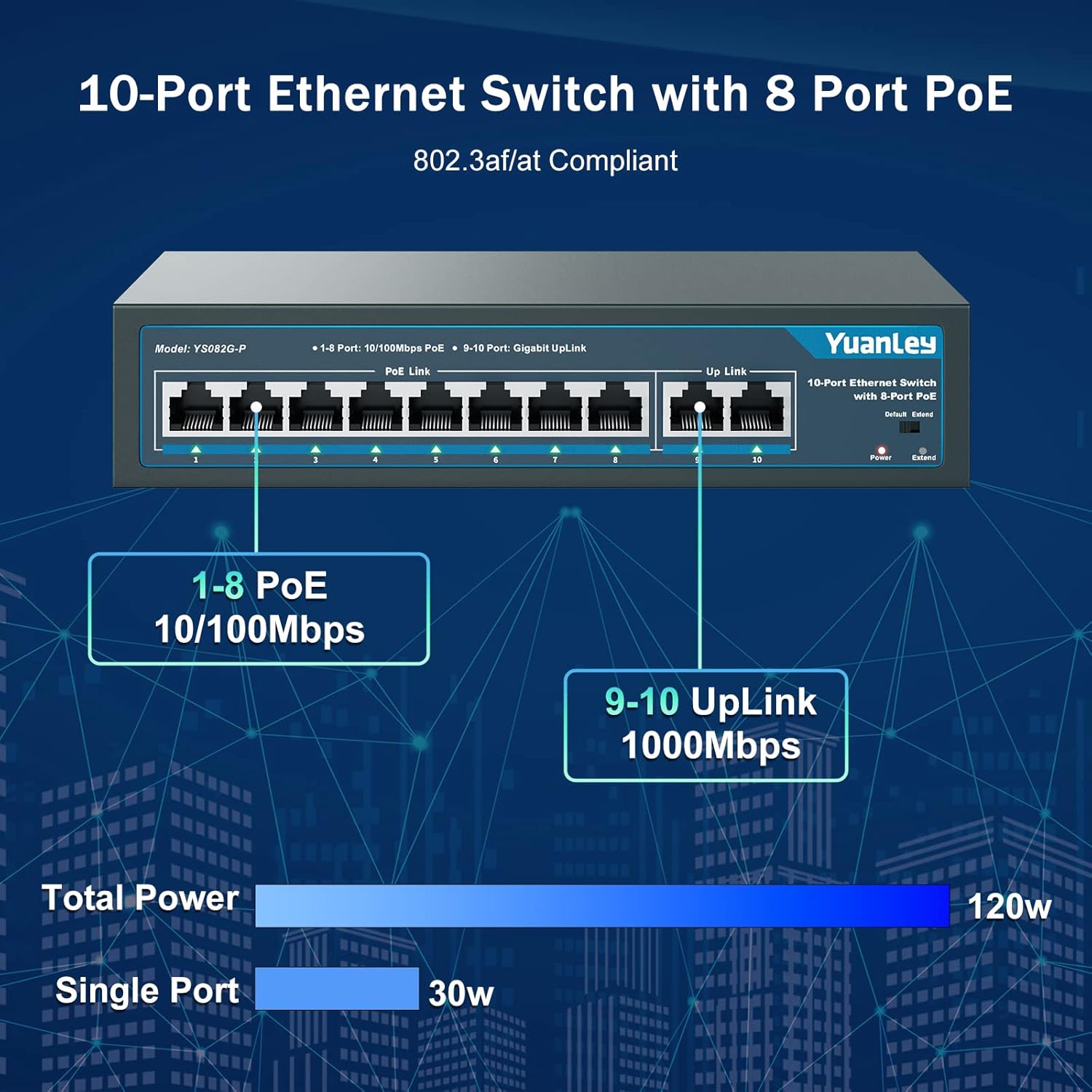
Image 2.1: Port configuration showing 8 PoE ports (10/100Mbps) and 2 Gigabit uplink ports (1000Mbps).

Image 2.2: Diagram illustrating the One Key VLAN function, isolating ports 1-8 while allowing communication with uplink ports.

Image 2.3: Comparison of Extend Mode (250m, 10Mbps) and Default Mode (100m, 100Mbps) for PoE transmission.
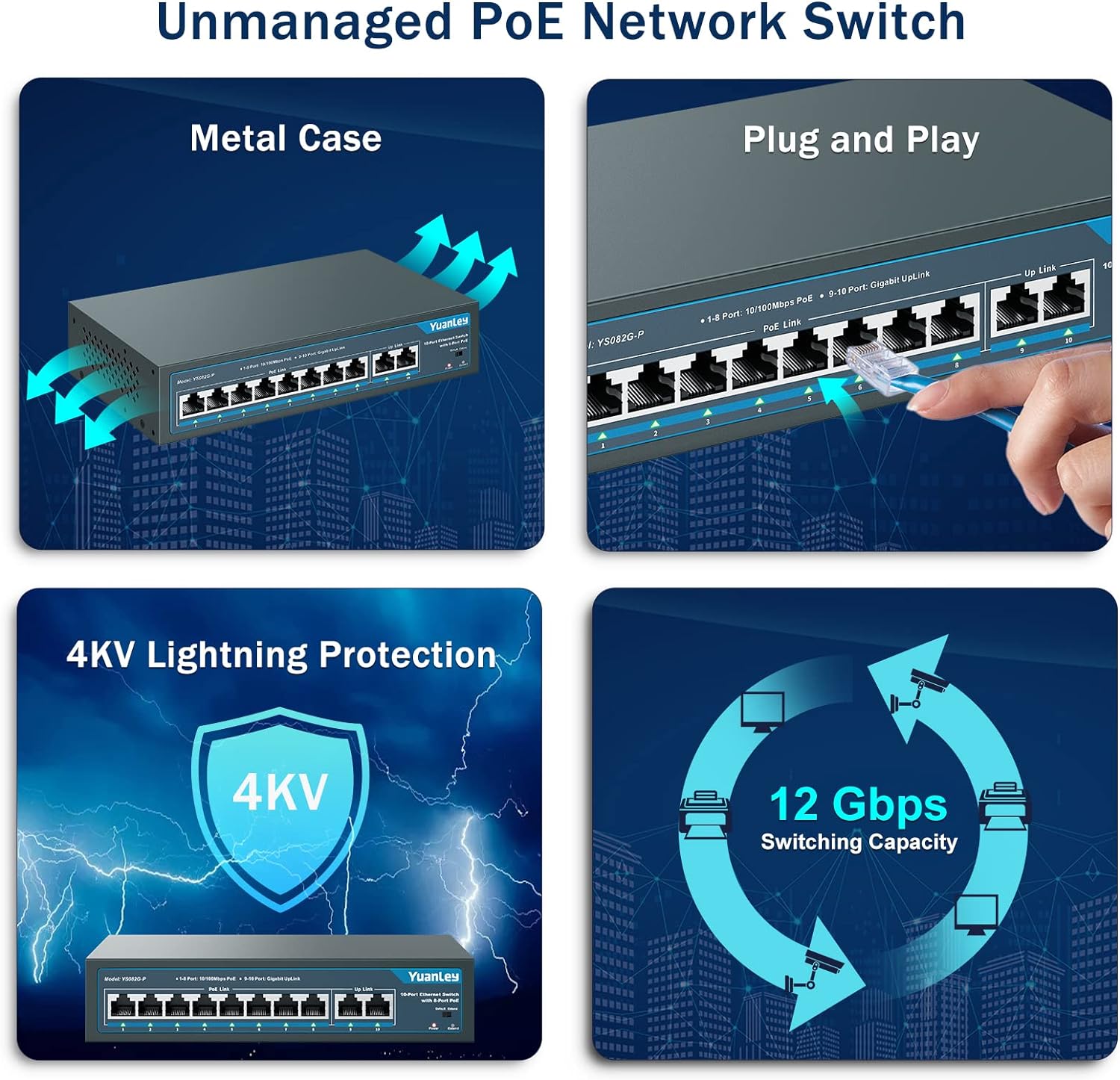
ภาพที่ 2.4: จบแล้วview of the switch's unmanaged features including metal case, plug and play, 4KV lightning protection, and 12 Gbps switching capacity.

Image 2.5: Illustration of the switch's fanless design and wide operating temperature range (-10°C to +55°C).
3. เนื้อหาบรรจุภัณฑ์
ตรวจสอบว่ามีรายการทั้งหมดอยู่ในแพ็คเกจ:
- YuanLey YS082G-P 10-Port PoE Switch
- สายไฟ
- Mounting Brackets (for rackmount or wall mount)
- สกรูสำหรับติดตั้ง
- คู่มือเริ่มต้นอย่างรวดเร็ว
4. คำแนะนำในการตั้งค่า
The YuanLey YS082G-P is a plug-and-play unmanaged switch, requiring minimal setup.
- เชื่อมต่อพลังงาน: Plug the provided power cord into the AC IN port on the back of the switch and then into a standard electrical outlet. The Power LED on the front panel should illuminate.
- เชื่อมต่ออัปลิงก์: Connect your router or main network device to one of the two Gigabit uplink ports (ports 9 or 10) using a standard Ethernet cable.
- เชื่อมต่ออุปกรณ์ PoE: Connect your PoE-compatible devices (e.g., IP cameras, wireless access points, IP phones) to any of the 8 PoE ports (ports 1-8) using Ethernet cables. The switch will automatically detect and power these devices.
- การติดตั้ง (ทางเลือก): Use the included mounting brackets and screws to install the switch in a 19-inch rack or mount it on a wall.
วิดีโอ 4.1: สรุปสั้นๆview of the YuanLey 10 Port PoE Switch, demonstrating its physical appearance and basic connectivity.

Image 4.2: Visual guide for the simple plug-and-play setup process: Connect to Power, Connect Devices, and Enjoy.
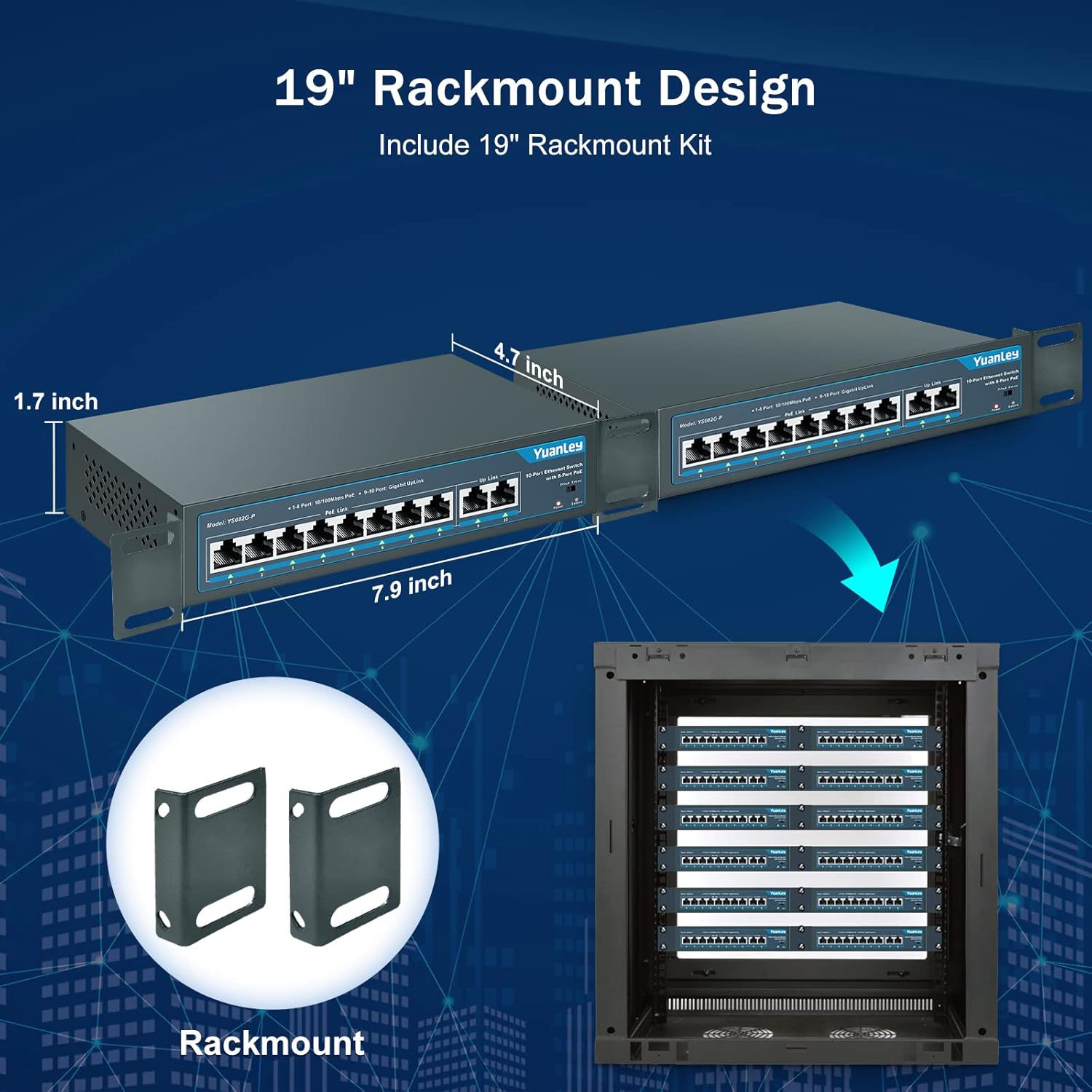
Image 4.3: Illustration of the rackmount design and included brackets for installation.
5. โหมดการทำงาน
The switch features a mode switch on the front panel to select between Default and Extend modes.
- โหมดเริ่มต้น: In this mode, all ports operate at their standard speeds (10/100Mbps for PoE ports, 1000Mbps for uplink ports) with a maximum transmission distance of 100 meters.
- โหมดขยาย: When the switch is set to Extend mode, PoE ports 1-8 can transmit data and power up to 250 meters, but the speed for these ports will be reduced to 10Mbps. This mode is ideal for long-distance deployments of devices like IP cameras where higher bandwidth is not critical.
- VLAN Functionality: The switch supports VLAN isolation on ports 1-8. When enabled, these ports are isolated from each other but can still communicate with the uplink ports (9-10). This helps in segmenting the network, reducing broadcast storms, and improving overall network security and performance.
Image 5.1: The physical switch for selecting between Default and Extend modes.

Image 5.2: Diagram illustrating the functionality of One Key VLAN and the Extend mode for longer PoE distances.
6. การบำรุงรักษา
To ensure optimal performance and longevity of your YuanLey PoE Switch:
- Keep the device in a well-ventilated area to prevent overheating. The fanless design relies on natural convection.
- Regularly inspect cables for damage and ensure secure connections.
- Clean the exterior of the switch with a soft, dry cloth. Avoid using liquid cleaners or aerosols.
- Ensure the power source is stable and within the specified voltagช่วง e (AC 100-240V)
7 การแก้ไขปัญหา
| ปัญหา | สาเหตุที่เป็นไปได้ | สารละลาย |
|---|---|---|
| ไม่มีไฟ LED แสดงสถานะการทำงาน | No power supply or faulty power cord. | Check power cord connection and power outlet. Ensure the power source is active. |
| PoE device not receiving power or data. | Incorrect cable, non-PoE device, or device exceeding power budget. | Verify the device is PoE-compatible (IEEE 802.3af/at). Check Ethernet cable for damage. Ensure total power consumption does not exceed 120W and individual port consumption does not exceed 30W. |
| Slow network speed on PoE ports. | เปิดใช้งานโหมดขยาย | If high speed is required for short distances (under 100m), switch the mode to Default. Extend mode reduces speed to 10Mbps for longer distances. |
| Network congestion or security concerns. | No network segmentation. | Enable VLAN isolation for ports 1-8 to segment traffic and improve security. |
8. ข้อมูลจำเพาะ
| คุณสมบัติ | รายละเอียด |
|---|---|
| แบบอย่าง | YS082G-P |
| พอร์ต | 8 x 10/100Mbps PoE+ Ports, 2 x 1000Mbps Gigabit Uplink Ports |
| PoE มาตรฐาน | IEEE 802.3af / at |
| งบประมาณด้านพลังงาน PoE ทั้งหมด | 120วัตต์ |
| พลังงานสูงสุดต่อพอร์ต | 30วัตต์ |
| อัตราการถ่ายโอนข้อมูล | 1000 Megabits Per Second (Uplink), 100 Megabits Per Second (PoE Ports) |
| ความสามารถในการสลับ | 12 กิกะบิตต่อวินาที |
| Extend Function | Up to 250m transmission distance at 10Mbps on PoE ports 1-8 |
| การรองรับ VLAN | Ports 1-8 isolation, communication with uplink ports |
| ประเภทอินเทอร์เฟซ | RJ45 |
| กำลังไฟเข้า | AC 100-240V, 50/60Hz (Built-in Power Supply) |
| วัสดุตัวเรือน | โลหะ |
| การทำให้เย็น | ไร้พัดลม |
| อุณหภูมิในการทำงาน | -10°C ถึง +55°C |
| ขนาดสินค้า | ยาว 7.9 นิ้ว x กว้าง 4.7 นิ้ว x สูง 1.7 นิ้ว |
| น้ำหนักสินค้า | 0.96 กิโลกรัม (2.11 ปอนด์) |
| ระบบป้องกันฟ้าผ่า | 4KV |
9. การรับประกันและการสนับสนุน
For any questions, technical assistance, or warranty inquiries, please contact YuanLey official support. Refer to the product packaging or the official YuanLey webเว็บไซต์สำหรับข้อมูลการติดต่อล่าสุด


