1. บทนำ
This manual provides detailed instructions for the safe and effective use of your Alecto DVM-150 Video Baby Monitor. Please read this manual thoroughly before installation and operation, and retain it for future reference. The Alecto DVM-150 is designed to provide reliable monitoring of your baby with a 5-inch display, two-way communication, and night vision capabilities.
2. เนื้อหาบรรจุภัณฑ์
ตรวจสอบให้แน่ใจว่าสิ่งของทั้งหมดครบถ้วนและอยู่ในสภาพดีก่อนแกะกล่อง
- Parent Unit (Monitor with 5-inch screen)
- หน่วยเด็ก (กล้อง)
- Power Adapters (for Parent Unit and Baby Unit)
- ชุดติดตั้งบนผนัง
- คู่มือการใช้งาน

Image 2.1: Alecto DVM-150 Video Baby Monitor and Camera. This image shows both the parent unit (monitor) and the baby unit (camera) side-by-side, illustrating the complete product package.
3. สินค้าหมดview
3.1 หน่วยหลัก (จอภาพ)
The parent unit features a 5-inch display for clear video monitoring. It includes controls for volume, talk-back function, menu navigation, and power.
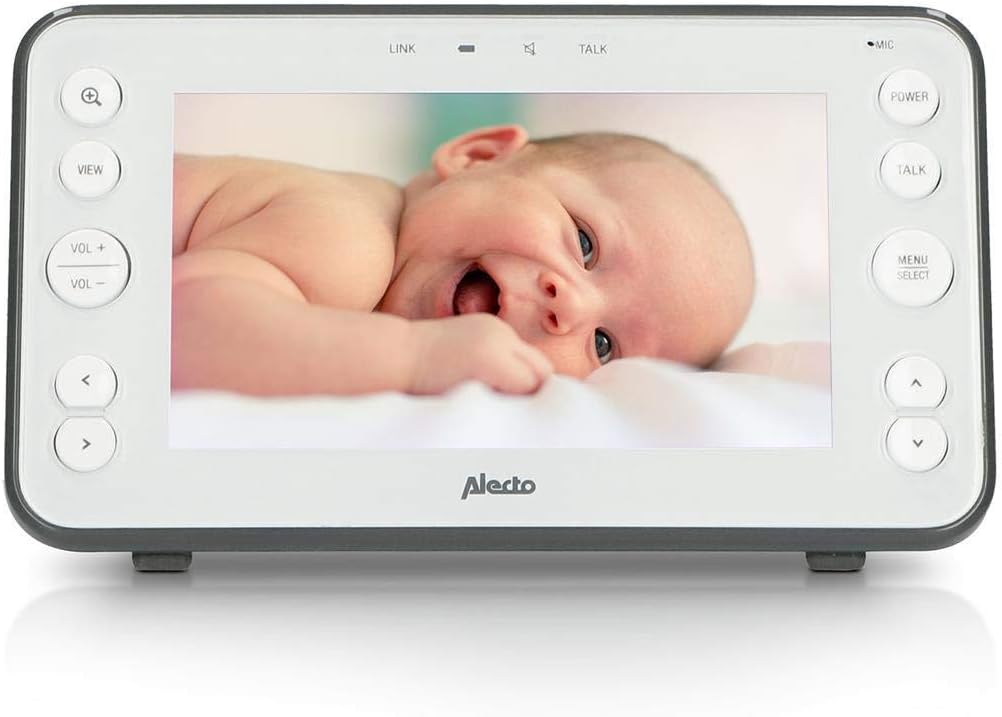
Image 3.1: Alecto DVM-150 Parent Unit. This image displays the front of the parent unit, highlighting the 5-inch screen and control buttons such as zoom, view, volume, talk, power, and menu/select.
3.2 Baby Unit (กล้อง)
The baby unit is equipped with a camera, microphone, and infrared LEDs for night vision. It also includes controls for power and volume, and a speaker for the talk-back function.
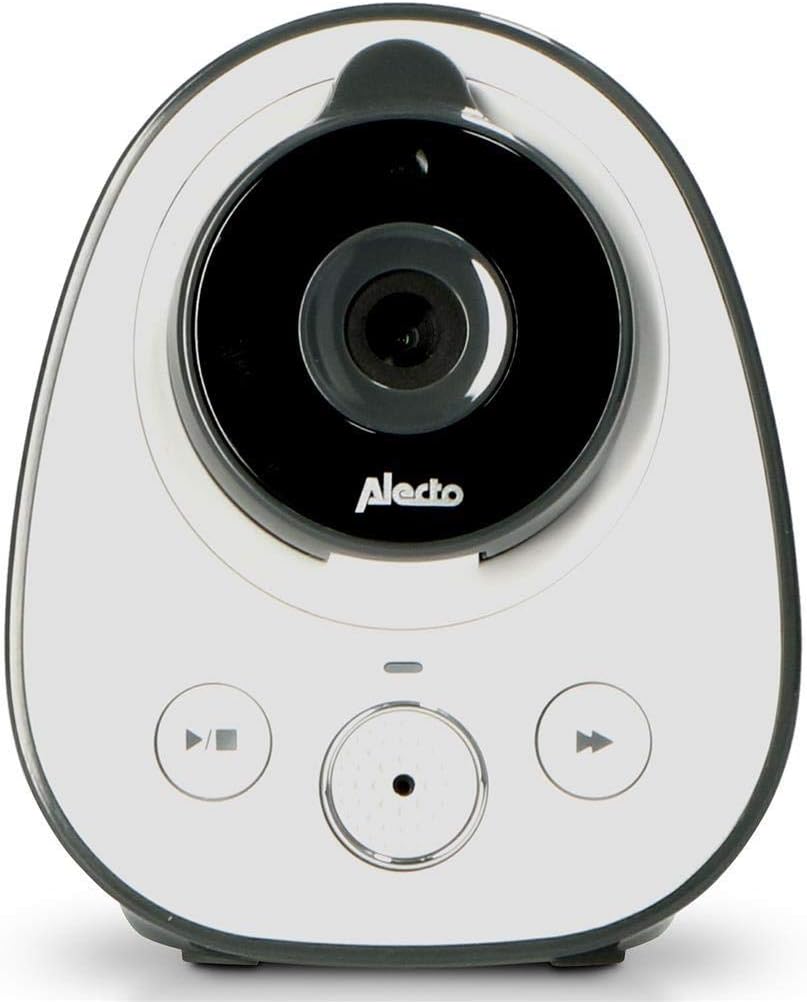
Image 3.2: Alecto DVM-150 Baby Unit (Camera). This image shows the front of the baby unit, featuring the camera lens, microphone, and control buttons.
4. การตั้งค่า
4.1 การวางตำแหน่งหน่วยทารก
วางหน่วยเด็กไว้ในตำแหน่งที่ให้แสงชัดเจน view of your baby's crib or sleeping area. Ensure it is at least 1 meter (3 feet) away from the baby to prevent entanglement with cables and to ensure optimal sound detection. Avoid placing it too close to other electronic devices that may cause interference.

Image 4.1: Baby Unit placed on a shelf. The baby unit is positioned on a white shelf in a nursery, demonstrating a typical setup location.
4.2 Wall Mounting the Baby Unit
The baby unit can be wall-mounted using the included kit for a more permanent and secure placement. Choose a location that offers the best viewing angle and is out of reach of children. Follow the instructions provided with the wall mounting kit for secure installation.

Image 4.2: Baby Unit with wall mount. The baby unit is shown attached to a wall using its mounting bracket, illustrating an alternative installation method.
4.3 Positioning the Parent Unit
Place the parent unit in a convenient location where you can easily monitor your baby. The unit has a built-in kickstand for tabletop use. Ensure it is within the operational range of the baby unit (up to 50 meters indoors, 300 meters outdoors).

Image 4.3: Parent Unit on a table. The parent unit is displayed on a wooden table, showing its use as a freestanding monitor.
4.4 การเปิดเครื่อง
- เชื่อมต่ออะแดปเตอร์ไฟฟ้ากับอุปกรณ์สำหรับเด็กและเสียบเข้ากับเต้ารับที่ผนัง
- Connect the power adapter to the parent unit and plug it into a wall outlet. The parent unit has a rechargeable battery for portable use.
- Press and hold the Power button on both units until they turn on.
- The units should automatically link. If not, refer to the pairing instructions in the menu.
5. คู่มือการใช้งาน
5.1 การตรวจสอบขั้นพื้นฐาน
Once both units are powered on and linked, the parent unit will display live video from the baby unit. The screen will show indicators for signal strength, battery level, and temperature.
5.2 การควบคุมระดับเสียง
ใช้ เล่ม+ และ ฉบับ- buttons on the parent unit to adjust the listening volume from the baby unit.
5.3 Talk-Back Function
หากต้องการพูดคุยกับลูกน้อย ให้กดปุ่มค้างไว้ พูดคุย กดปุ่มบนเครื่องรับสัญญาณหลัก เสียงของคุณจะถูกส่งผ่านลำโพงของเครื่องรับสัญญาณสำหรับเด็ก ปล่อยปุ่มเพื่อฟังต่อ
5.4 การมองเห็นตอนกลางคืน
ชุดอุปกรณ์สำหรับเด็กจะเปิดใช้งานระบบมองเห็นกลางคืนด้วยอินฟราเรดโดยอัตโนมัติในสภาพแสงน้อย ทำให้ได้ภาพขาวดำที่คมชัดบนชุดอุปกรณ์สำหรับผู้ปกครอง
5.5 โหมด ECO
Activate ECO mode through the parent unit's menu to conserve battery power. In ECO mode, the screen and audio on the parent unit will turn off when no sound is detected from the baby unit. It will reactivate automatically when sound is detected.
5.6 Temperature Display and Alarm
The parent unit displays the temperature of the baby's room, measured by the baby unit. You can set temperature alarms in the menu to be notified if the room temperature falls outside a desired range (e.g., 16°C to 20°C).

Image 5.1: Parent Unit held in hand. A hand holds the parent unit, showing the live video feed of a baby in a crib, demonstrating portable use.
6. การบำรุงรักษา
6.1 การทำความสะอาด
Wipe both units with a soft, dry cloth. Do not use abrasive cleaners or solvents. Ensure the units are unplugged before cleaning.
6.2 การดูแลแบตเตอรี่
The parent unit contains a rechargeable battery. For optimal battery life, avoid fully discharging the battery frequently. If storing the unit for an extended period, charge it periodically to maintain battery health.
7 การแก้ไขปัญหา
If you encounter issues with your Alecto DVM-150, please refer to the following common solutions:
- ไม่มีภาพ/เสียง: Ensure both units are powered on and connected to their respective power adapters. Check that the parent unit's battery is charged.
- Poor Picture/Sound Quality: Move the parent unit closer to the baby unit. Ensure there are no large obstructions (e.g., thick walls, metal objects) between the units. Reduce interference from other electronic devices.
- Units Not Linking: If the units do not automatically link, refer to the pairing instructions in the parent unit's menu. Ensure both units are within range.
- อายุการใช้งานแบตเตอรี่สั้น: Ensure the parent unit is fully charged before use. Consider activating ECO mode to extend battery life. Battery performance may degrade over time.
8. ข้อมูลจำเพาะ
| คุณสมบัติ | ข้อมูลจำเพาะ |
|---|---|
| หมายเลขรุ่น | ดีวีเอ็ม-150 |
| ขนาดหน้าจอ | 5 นิ้ว |
| ช่วงในร่ม | สูงสุด 50 เมตร |
| ช่วงกลางแจ้ง | สูงสุด 300 เมตร |
| ช่วงการมองเห็นตอนกลางคืน | Up to 5 meters (effective) |
| เทคโนโลยีการเชื่อมต่อ | ไร้สาย (Bluetooth) |
| แหล่งพลังงาน | AC Adapter, Rechargeable Battery (Parent Unit) |
| สี | White-Anthracite |
| ขนาด (กว้าง x ยาว x สูง) | 20 x 20 x 15 cm (approximate product dimensions) |
9. การรับประกันและการสนับสนุน
For warranty information, technical support, or service inquiries, please refer to the warranty card included with your product or contact Alecto customer service directly. Keep your proof of purchase for warranty claims.


