
การแนะนำ
ขอบคุณสำหรับการซื้อasinขอแนะนำลำโพงปาร์ตี้บลูทูธ Muse M-1935 DJ ระบบเสียงทรงพลังนี้ได้รับการออกแบบมาเพื่อมอบเสียงคุณภาพสูงพร้อมเอฟเฟกต์แสงแบบไดนามิก เหมาะสำหรับทุกงานปาร์ตี้ มาพร้อมการเชื่อมต่อบลูทูธ การเล่นเพลงผ่าน USB อินพุต AUX และช่องเสียบไมโครโฟน จึงมอบตัวเลือกความบันเทิงที่หลากหลาย โปรดอ่านคู่มือนี้อย่างละเอียดก่อนใช้งานเพื่อให้มั่นใจถึงการใช้งานที่ถูกต้องและประสิทธิภาพสูงสุด
คำแนะนำด้านความปลอดภัยที่สำคัญ
- อ่านคำแนะนำเหล่านี้
- เก็บคำแนะนำเหล่านี้ไว้
- จงใส่ใจคำเตือนทั้งหมด
- ปฏิบัติตามคำแนะนำทั้งหมด
- ห้ามใช้อุปกรณ์นี้ใกล้น้ำ
- ทำความสะอาดด้วยผ้าแห้งเท่านั้น
- ห้ามปิดกั้นช่องระบายอากาศ ควรติดตั้งตามคำแนะนำของผู้ผลิต
- ห้ามติดตั้งใกล้แหล่งความร้อน เช่น หม้อน้ำ เครื่องทำความร้อน เตา หรืออุปกรณ์อื่น ๆ (รวมถึง ampเครื่องให้ความร้อน) ที่ผลิตความร้อน
- ปกป้องสายไฟไม่ให้ถูกเหยียบหรือถูกหนีบ โดยเฉพาะที่ปลั๊ก เต้ารับไฟฟ้า และจุดที่สายไฟออกจากเครื่อง
- ใช้เฉพาะอุปกรณ์เสริม/สิ่งที่แนบตามที่ผู้ผลิตกำหนดเท่านั้น
- ถอดปลั๊กอุปกรณ์นี้ในระหว่างพายุฝนฟ้าคะนองหรือเมื่อไม่ได้ใช้งานเป็นเวลานาน
- แจ้งบริการทั้งหมดให้ช่างที่ผ่านการรับรองทราบ จำเป็นต้องให้บริการเมื่ออุปกรณ์ได้รับความเสียหายในลักษณะใดก็ตาม เช่น สายไฟหรือปลั๊กชำรุด ของเหลวหกหรือมีวัตถุตกลงไปในอุปกรณ์ อุปกรณ์โดนฝนหรือความชื้น ไม่สามารถทำงานได้ตามปกติ หรือตกหล่น
เนื้อหาแพ็คเกจ
โปรดตรวจสอบว่ารายการทั้งหมดที่ระบุไว้ด้านล่างรวมอยู่ในแพ็คเกจของคุณหรือไม่:
- ลำโพงดีเจสำหรับงานปาร์ตี้ Muse M-1935
- รีโมทคอนโทรล
- สาย AUX IN (3.5 มม.)
- ไมโครโฟนแบบมีสาย
- สายไฟ
- คู่มือการใช้งาน

ภาพแสดงลำโพงปาร์ตี้ดีเจ Muse M-1935 พร้อมอุปกรณ์เสริมมาตรฐาน ได้แก่ รีโมทคอนโทรล สายต่อ AUX 3.5 มม. และไมโครโฟนแบบมีสาย อุปกรณ์เหล่านี้จำเป็นต่อการใช้งานอย่างเต็มรูปแบบและหลากหลายของระบบลำโพง
สินค้าเกินview
ลำโพงปาร์ตี้ทรงสูง Muse M-1935 DJ มีดีไซน์แข็งแรงทนทานและมีตัวเลือกการเชื่อมต่อหลากหลาย มาพร้อมจอแสดงผล LED สีเหลืองอำพันแสดงข้อมูลได้อย่างชัดเจน ไฟสีและเอฟเฟกต์แสงแฟลชในตัวเพื่อภาพที่น่าตื่นตาตื่นใจ และพอร์ตอินพุตต่างๆ สำหรับเล่นเสียง
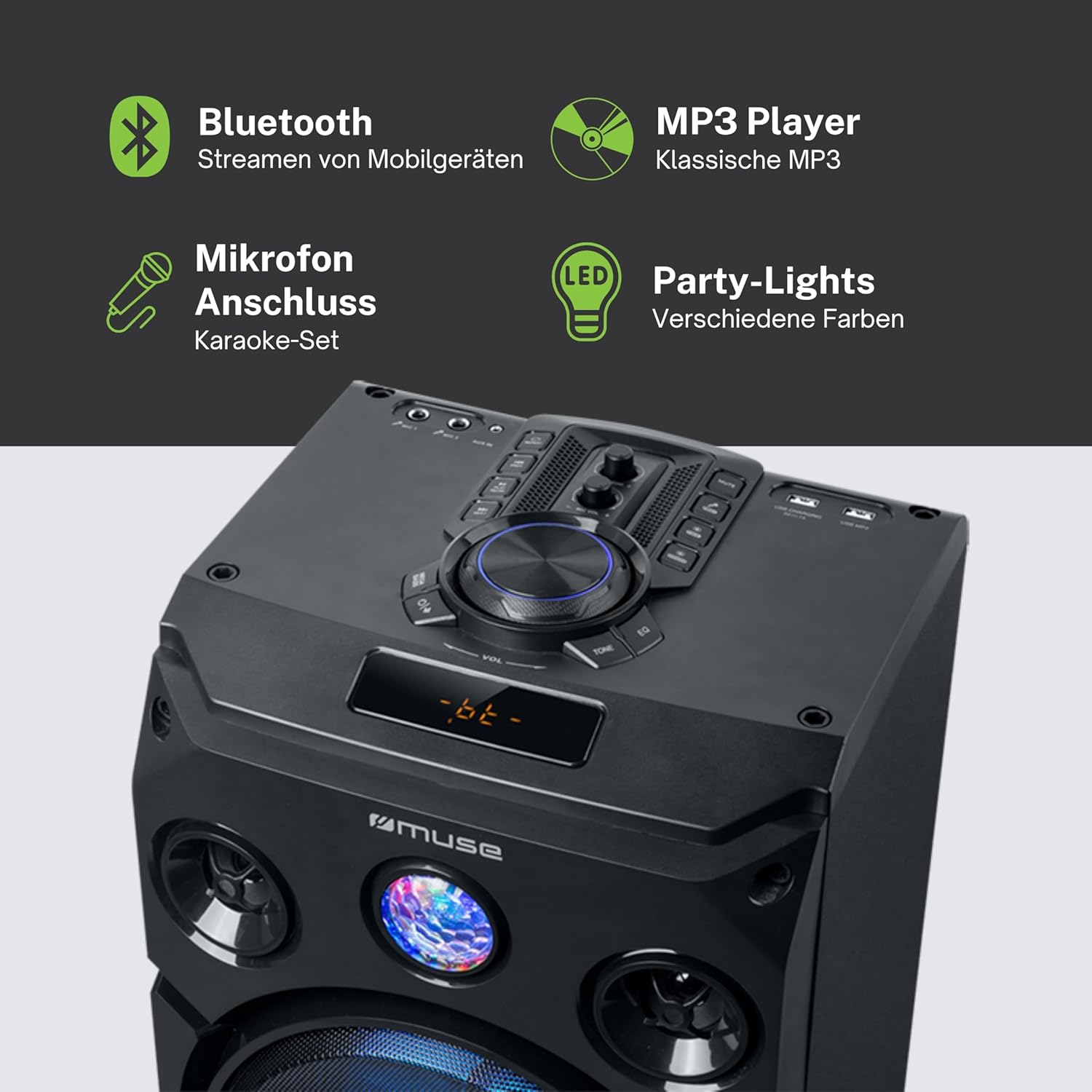
ภาพนี้ให้รายละเอียด view แสดงคุณสมบัติหลักของลำโพง รวมถึงแผงควบคุมด้านบน จอแสดงผล LED สีเหลืองอำพัน และไฟปาร์ตี้ในตัว ไอคอนแสดงถึงการรองรับการสตรีมผ่านบลูทูธ การเล่นไฟล์ MP3 ผ่าน USB การเชื่อมต่อไมโครโฟนสำหรับคาราโอเกะ และเอฟเฟกต์แสงไฟปาร์ตี้แบบไดนามิก
การตั้งค่า
1. การเชื่อมต่อไฟฟ้า
- ตรวจสอบให้แน่ใจว่าได้วางลำโพงบนพื้นผิวที่มั่นคงและเรียบ
- ต่อสายไฟเข้ากับพอร์ต AC IN ที่ด้านหลังของลำโพง
- เสียบปลายอีกด้านของสายไฟเข้ากับเต้ารับไฟฟ้ามาตรฐาน (AC 100-240V, 50/60Hz)
2. ช่องต่อสัญญาณเสียง (ไม่จำเป็น)
- อินพุต AUX: สำหรับเชื่อมต่ออุปกรณ์เสียงภายนอก (เช่น สมาร์ทโฟน แท็บเล็ต เครื่องเล่น MP3) ผ่านสายสัญญาณเสียง 3.5 มม. เสียบปลายด้านหนึ่งของสาย AUX เข้ากับพอร์ต AUX IN บนลำโพง และเสียบปลายอีกด้านหนึ่งเข้ากับช่องเสียบหูฟังของอุปกรณ์ของคุณ
- การเล่น USB: ใส่แฟลชไดรฟ์ USB ที่มีไฟล์เสียง MP3 fileเสียบสาย USB เข้ากับพอร์ต USB ลำโพงจะตรวจจับและเริ่มเล่นเพลงที่รองรับโดยอัตโนมัติ files.
3. ช่องต่อไมโครโฟน (ไม่จำเป็น)
- เชื่อมต่อไมโครโฟนแบบมีสายเข้ากับช่องเสียบ MIC IN บนลำโพง ปรับระดับเสียงไมโครโฟนโดยใช้ปุ่มควบคุมเฉพาะบนแผงควบคุมของลำโพง
คำแนะนำการใช้งาน
1. การเปิด/ปิดเครื่อง
- กดปุ่ม พลัง กดปุ่มบนแผงควบคุมหรือรีโมทคอนโทรลเพื่อเปิดหรือปิดลำโพง
2. การจับคู่บลูทู ธ
- เปิดลำโพง หน้าจอ LED จะแสดงโหมดปัจจุบัน
- กดปุ่ม โหมด กดปุ่มเพื่อเลือกโหมดบลูทูธ หน้าจอจะแสดง "BT" และไฟแสดงสถานะจะกะพริบ แสดงว่าพร้อมสำหรับการจับคู่แล้ว
- บนอุปกรณ์ที่รองรับ Bluetooth ของคุณ (สมาร์ทโฟน แท็บเล็ต ฯลฯ) ให้เปิดใช้งาน Bluetooth และค้นหาอุปกรณ์ที่มีอยู่
- เลือก "MUSE M-1935 DJ" จากรายการ เมื่อจับคู่เสร็จแล้ว ลำโพงจะส่งเสียงยืนยัน และไฟแสดงสถานะบลูทูธจะหยุดกะพริบ
- ตอนนี้คุณสามารถสตรีมเสียงแบบไร้สายจากอุปกรณ์ของคุณไปยังลำโพงได้
3. การเล่นผ่าน USB
- เสียบแฟลชไดรฟ์ USB เข้ากับพอร์ต USB ลำโพงจะเปลี่ยนไปใช้โหมด USB โดยอัตโนมัติและเริ่มเล่นไฟล์ MP3 files.
- ใช้ เล่น/หยุดชั่วคราว, ต่อไป, และ ก่อนหน้า ปุ่มเพื่อควบคุมการเล่น
4. อินพุต AUX
- เชื่อมต่ออุปกรณ์เสียงภายนอกของคุณเข้ากับพอร์ต AUX IN โดยใช้สาย 3.5 มม. ที่ให้มา
- กดปุ่ม โหมด กดปุ่มเพื่อเลือกโหมด AUX เสียงจะเล่นผ่านลำโพงแล้ว
5. การใช้งานวิทยุ FM
- กดปุ่ม โหมด ปุ่มสำหรับเลือกโหมดวิทยุ FM
- กดปุ่มค้างไว้ เล่น/หยุดชั่วคราว กดปุ่มเพื่อเริ่มการสแกนหาคลื่นวิทยุ FM โดยอัตโนมัติ ลำโพงจะบันทึกสถานีที่พบเป็นสถานีโปรด (สูงสุด 60 สถานี)
- ใช้ ต่อไป และ ก่อนหน้า ปุ่มเพื่อนำทางผ่านสถานีที่บันทึกไว้
6. การใช้ไมโครโฟน
- ตรวจสอบให้แน่ใจว่าได้เสียบไมโครโฟนเข้ากับช่อง MIC IN แล้ว
- ปรับระดับเสียงไมโครโฟนโดยใช้ปุ่มปรับระดับเสียงที่กำหนดไว้ ไมค์โวล ปุ่มหมุนบนแผงควบคุม
7. การควบคุมเอฟเฟกต์แสง
- ลำโพงนี้มีไฟสีและเอฟเฟกต์แสงวาบในตัว ใช้งานได้เลย แสงสว่าง กดปุ่มบนแผงควบคุมหรือรีโมทเพื่อเปลี่ยนโหมดแสงต่างๆ หรือปิดไฟ
8. การควบคุมระดับเสียงและโทนเสียง
- ปรับระดับเสียงหลักโดยใช้ปุ่มขนาดใหญ่ ปริมาณ ลูกบิด
- ใช้ BASS และ เสียงแหลม ปุ่มควบคุม (ถ้ามี) สำหรับปรับแต่งคุณภาพเสียง

แผนภาพนี้แสดงให้เห็นถึงฟังก์ชันการทำงานที่หลากหลายของลำโพง เช่น แสงไฟหลากสีและแสงแฟลชที่เปลี่ยนแปลงได้ จอแสดงผล LED สีเหลืองอำพันที่คมชัด การเชื่อมต่อ USB สำหรับเล่นไฟล์ MP3 และชาร์จไฟ วิทยุ FM ในตัวพร้อมหน่วยความจำสำหรับตั้งค่าสถานีล่วงหน้ามากมาย และช่องต่อ AUX อเนกประสงค์สำหรับอุปกรณ์ภายนอก
การซ่อมบำรุง
- การทำความสะอาด: ถอดปลั๊กไฟก่อนทำความสะอาด ใช้ผ้าแห้งนุ่มเช็ดทำความสะอาดภายนอกลำโพง ห้ามใช้น้ำยาทำความสะอาดหรือสเปรย์กระป๋อง
- พื้นที่จัดเก็บ: เมื่อไม่ได้ใช้งานเป็นเวลานาน ควรเก็บลำโพงไว้ในที่แห้งและเย็น หลีกเลี่ยงแสงแดดโดยตรงและอุณหภูมิที่สูงหรือต่ำเกินไป
- การดูแลแบตเตอรี่ ลำโพงนี้มีแบตเตอรี่ลิเธียมไอออนอยู่ภายใน เพื่ออายุการใช้งานแบตเตอรี่ที่ดีที่สุด ควรหลีกเลี่ยงการปล่อยประจุแบตเตอรี่จนหมดบ่อยๆ และควรเก็บเครื่องโดยมีประจุแบตเตอรี่เหลืออยู่บ้างหากไม่ได้ใช้งานเป็นเวลานาน
การแก้ไขปัญหา
| ปัญหา | สาเหตุที่เป็นไปได้ | สารละลาย |
|---|---|---|
| ไม่มีไฟฟ้า | ไม่ได้เสียบสายไฟ; ปลั๊กไฟชำรุด; ลำโพงปิดอยู่ | ตรวจสอบให้แน่ใจว่าเสียบสายไฟแน่นดีแล้ว ลองเสียบกับปลั๊กไฟอื่นดู กดปุ่ม POWER เพื่อเปิดลำโพง |
| ไม่มีเสียง | ระดับเสียงต่ำเกินไป; เลือกโหมดอินพุตไม่ถูกต้อง; ไม่ได้เชื่อมต่อสายสัญญาณเสียงอย่างถูกต้อง (AUX); ไม่ได้จับคู่บลูทูธ | เพิ่มระดับเสียง เลือกโหมดอินพุตที่ถูกต้อง (บลูทูธ, AUX, USB, FM) ตรวจสอบการเชื่อมต่อสายสัญญาณเสียง จับคู่บลูทูธอีกครั้ง |
| การจับคู่บลูทูธล้มเหลว | ลำโพงไม่ได้อยู่ในโหมดจับคู่ อุปกรณ์อยู่ไกลเกินไป มีสัญญาณรบกวน | ตรวจสอบให้แน่ใจว่าลำโพงอยู่ในโหมดจับคู่บลูทูธ ขยับอุปกรณ์ให้ใกล้ลำโพงมากขึ้น (ภายในระยะ 10 เมตร) หลีกเลี่ยงสิ่งกีดขวางและอุปกรณ์ไร้สายอื่นๆ |
| การเล่น USB ไม่ทำงาน | ไดรฟ์ USB ไม่ได้รับการฟอร์แมตอย่างถูกต้อง ไม่เข้ากัน file ประเภท; แฟลชไดรฟ์ USB เสียหาย | ตรวจสอบให้แน่ใจว่าไดรฟ์ USB ฟอร์แมตเป็น FAT32 แล้ว เฉพาะไฟล์ MP3 เท่านั้น fileรองรับการใช้งาน ลองใช้แฟลชไดรฟ์ USB อื่นดู |
| ไมโครโฟนไม่ทำงาน | ไม่ได้เชื่อมต่อไมโครโฟน; ระดับเสียงไมโครโฟนต่ำเกินไป | ตรวจสอบให้แน่ใจว่าเสียบไมโครโฟนเข้ากับช่อง MIC IN อย่างแน่นหนาแล้ว จากนั้นหมุนปุ่มปรับระดับเสียง MIC VOL ขึ้น |
ข้อมูลจำเพาะ
| คุณสมบัติ | ข้อมูลจำเพาะ |
|---|---|
| หมายเลขรุ่น | M-1935 ดีเจ |
| กำลังขับ | 400 วัตต์ |
| ประเภทลำโพง | หอคอย |
| เทคโนโลยีการเชื่อมต่อ | บลูทูธ, USB, AUX |
| อินพุตเสียง | ช่องเสียบไมโครโฟน, ช่องต่อ AUX IN (3.5 มม.) |
| คุณสมบัติพิเศษ | บลูทูธ, ไฟสีต่างๆ, เอฟเฟกต์แสงแฟลช, จอแสดงผล LED สีเหลืองอำพัน, วิทยุ FM (60 สถานีที่ตั้งไว้ล่วงหน้า), การชาร์จผ่าน USB |
| แหล่งพลังงาน | สายไฟ, แบตเตอรี่ลิเธียมไอออนในตัว |
| วัสดุ | พลาสติก |
| สี | สีดำ |
| ขนาดสินค้า (กว้าง x ยาว x สูง) | 83.5 x 26.5 x 28.7 ซม. |
| น้ำหนักสินค้า | 9.05 กิโลกรัม |
| ผู้ผลิต | มิวส์ |
| ประเทศต้นกำเนิด | เบลเยียม |

ภาพวาดทางเทคนิคนี้แสดงขนาดที่แม่นยำของลำโพงดีเจ Muse M-1935 โดยระบุความสูง (835 มม.) ความกว้าง (287 มม.) และความลึก (265 มม.) ขนาดเหล่านี้มีความสำคัญอย่างยิ่งสำหรับการวางแผนการจัดวางและการขนส่ง
การรับประกันและการสนับสนุน
การรับประกันจากผู้ผลิต
ลำโพงปาร์ตี้ดีเจ Muse M-1935 มาพร้อมการรับประกันสามปีสำหรับข้อบกพร่องจากการผลิต โปรดเก็บหลักฐานการซื้อไว้เพื่อใช้ในการเคลมประกัน การรับประกันนี้ครอบคลุมข้อบกพร่องในวัสดุและฝีมือการผลิตภายใต้การใช้งานปกติ ไม่ครอบคลุมความเสียหายที่เกิดจากการใช้งานผิดวิธี อุบัติเหตุ การดัดแปลงโดยไม่ได้รับอนุญาต หรือการสึกหรอตามปกติ
ความพร้อมของอะไหล่
รับประกันว่าอะไหล่สำหรับผลิตภัณฑ์นี้จะมีพร้อมจำหน่ายเป็นเวลา 2 ปีนับจากวันที่ซื้อภายในสหภาพยุโรป
การสนับสนุนลูกค้า
หากต้องการความช่วยเหลือด้านเทคนิค บริการรับประกัน หรือสอบถามข้อมูลทั่วไป โปรดติดต่อฝ่ายบริการลูกค้าของ Muse โปรดดูรายละเอียดเพิ่มเติมในเอกสารทางการของ Muse webโปรดตรวจสอบเว็บไซต์หรือเอกสารการสั่งซื้อของคุณเพื่อดูข้อมูลติดต่อล่าสุด