1. บทนำ
Thank you for choosing the Rapoo H1030 Bluetooth Stereo Headset. This manual provides detailed instructions to help you set up, operate, and maintain your headset for optimal performance. Please read this manual thoroughly before using the product.
2. สินค้าหมดview
The Rapoo H1030 is a wireless over-ear stereo headset designed for comfortable audio listening and communication. It features Bluetooth connectivity, an integrated microphone, and volume controls.

รูปที่ 2.1: ด้านหน้า view of the Rapoo H1030 Bluetooth Stereo Headset. This image shows the overall design of the headset, with both earcups and the headband visible from the front.

รูปที่ 2.2: ด้านข้าง view of the Rapoo H1030 Bluetooth Stereo Headset, illustrating the adjustable headband and the design of the over-ear cushions.
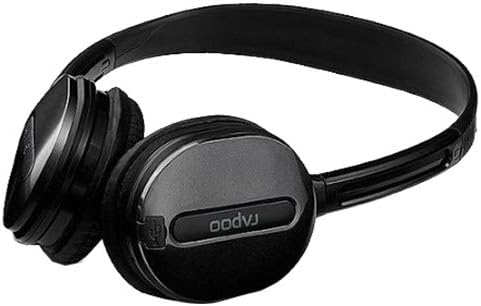
รูปที่ 2.3: ภาพระยะใกล้ view of an earcup, highlighting the integrated controls and the "rapoo" branding. This image details the buttons for volume and playback control, and potentially the charging port or microphone location.
2.1 คุณสมบัติหลัก
- Wireless Bluetooth connectivity (2.4 GHz, up to 10 meters / 33 feet range)
- Over-ear design for comfort
- Built-in omni-directional microphone with noise cancelling
- การควบคุมระดับเสียงแบบบูรณาการ
- แบตเตอรี่ลิเธียมแบบชาร์จไฟได้ (360mAh)
- แถบคาดศีรษะปรับได้
3. การตั้งค่า
3.1 การชาร์จชุดหูฟัง
Before initial use, fully charge the headset. The Rapoo H1030 features a built-in 360mAh rechargeable lithium battery.
- Locate the charging port on the headset (refer to Figure 2.3 for general control area).
- Connect the charging cable (typically Micro-USB) to the headset and the other end to a USB power source (e.g., computer USB port, USB wall adapter).
- The charging indicator light will illuminate (color may vary, refer to product packaging for specifics).
- การชาร์จจนเต็มใช้เวลาประมาณ 2 ชั่วโมง ไฟแสดงสถานะจะเปลี่ยนหรือดับลงเมื่อการชาร์จเสร็จสมบูรณ์
A fully charged headset provides approximately 6 hours of usage time.
3.2 การจับคู่บลูทูธ
The headset uses smart connection technology for easy pairing.
- ตรวจสอบให้แน่ใจว่าชุดหูฟังได้รับการชาร์จและปิดเครื่องแล้ว
- Press and hold the power button (or pairing button, if separate) on the headset until the indicator light begins to flash rapidly, indicating it is in pairing mode.
- บนอุปกรณ์ของคุณ (สมาร์ทโฟน แท็บเล็ต คอมพิวเตอร์) เปิดใช้งาน Bluetooth และค้นหาอุปกรณ์ที่มีอยู่
- Select "RAPOO H1030" (or similar name) from the list of found devices.
- Once connected, the indicator light on the headset will typically stop flashing and remain solid, or turn off.
- The headset is now ready for use. It should automatically reconnect to the last paired device when powered on and within range.
4. คู่มือการใช้งาน
4.1 เปิด/ปิดเครื่อง
- เปิดเครื่อง: กดปุ่มเปิด/ปิดค้างไว้ประมาณ 3 วินาที จนกว่าไฟแสดงสถานะจะสว่างขึ้น
- หมดแรง: กดปุ่มเปิด/ปิดค้างไว้ประมาณ 3-5 วินาที จนกว่าไฟแสดงสถานะจะดับลง
4.2 การควบคุมระดับเสียง
The headset features integrated volume controls.
- เพิ่มปริมาณ: กดปุ่มเพิ่มระดับเสียง
- ลดระดับเสียง: กดปุ่มลดระดับเสียง
4.3 การจัดการการโทร
When connected to a smartphone, the headset can manage phone calls.
- รับ/วางสาย: Press the Multi-function button (often the power button or a dedicated call button) once.
- ปฏิเสธสาย: กดปุ่มมัลติฟังก์ชันค้างไว้ประมาณ 2 วินาที
- โทรซ้ำหมายเลขล่าสุด: กดปุ่มมัลติฟังก์ชั่นสองครั้ง
4.4 การเล่นเพลง
When playing music from a connected device, use the headset controls.
- เล่น/หยุดชั่วคราว: กดปุ่มมัลติฟังก์ชั่นหนึ่งครั้ง
- เพลงถัดไป: Press and hold the Volume Up button (or a dedicated 'Next' button).
- แทร็กก่อนหน้า: Press and hold the Volume Down button (or a dedicated 'Previous' button).
5. การบำรุงรักษา
- การทำความสะอาด: ใช้ผ้านุ่มและแห้งเช็ดทำความสะอาดชุดหูฟัง ห้ามใช้น้ำยาทำความสะอาดหรือสารละลายที่มีฤทธิ์กัดกร่อน
- พื้นที่จัดเก็บ: Store the headset in a cool, dry place away from direct sunlight and extreme temperatures. When not in use, consider folding the headset (refer to Figure 5.1) to save space and protect it.
- การดูแลแบตเตอรี่ เพื่อยืดอายุการใช้งานแบตเตอรี่ ควรหลีกเลี่ยงการใช้แบตเตอรี่จนหมดบ่อยๆ ควรชาร์จหูฟังเป็นประจำ แม้จะไม่ได้ใช้งานอย่างต่อเนื่องก็ตาม
- การสัมผัสน้ำ: ชุดหูฟังนี้ไม่กันน้ำ โปรดหลีกเลี่ยงการสัมผัสกับน้ำหรือความชื้นมากเกินไป

รูปที่ 5.1: The Rapoo H1030 headset in a folded position, demonstrating its portability and ease of storage. This compact form helps protect the earcups and headband when not in use.
6 การแก้ไขปัญหา
| ปัญหา | สาเหตุที่เป็นไปได้ | สารละลาย |
|---|---|---|
| หูฟังไม่สามารถเปิดเครื่องได้ | แบตเตอรี่อ่อน | ชาร์จหูฟังอย่างน้อย 2 ชั่วโมง |
| ไม่สามารถจับคู่กับอุปกรณ์ได้ | ชุดหูฟังไม่ได้อยู่ในโหมดจับคู่; บลูทูธถูกปิดใช้งานบนอุปกรณ์; อุปกรณ์อยู่ไกลเกินไป | Ensure headset is in pairing mode (flashing light). Enable Bluetooth on your device. Move headset closer to the device (within 10 meters). Try restarting both devices. |
| ไม่มีเสียงหรือเสียงเบา | Volume too low on headset or device; headset not properly connected. | Increase volume on both headset and connected device. Re-pair the headset. |
| คุณภาพเสียงไม่ดีหรือขาดการเชื่อมต่อ | Interference; device out of range; low battery. | Move closer to the connected device. Avoid obstacles between headset and device. Charge the headset. Avoid environments with strong Wi-Fi or other 2.4 GHz signals. |
7. ข้อมูลจำเพาะ
| แบบอย่าง | H1030 |
| ยี่ห้อ | ราพู |
| การเชื่อมต่อ | Wireless (Bluetooth, 2.4 GHz) |
| ช่วงการส่งผ่าน | สูงถึง 10 เมตร (33 ฟุต) |
| ประเภทหูฟัง | ครอบหู |
| ไมโครโฟน | Built-in, Omni-Directional, Noise Cancelling |
| ประเภทแบตเตอรี่ | แบตเตอรี่ลิเธียมแบบชาร์จไฟได้ |
| ความจุของแบตเตอรี่ | 360mAh |
| เวลาในการชาร์จ | ประมาณ 2 ชั่วโมง |
| ระยะเวลาการใช้งาน | ประมาณ 6 ชั่วโมง |
| ขนาด (กว้าง x ยาว x สูง) | 6.85 x 5.43 x 2.17 นิ้ว |
| น้ำหนัก | 80 กรัม |
| สี | สีดำ |
| วัสดุ | โลหะ, ยาง |
8. การรับประกันและการสนับสนุน
For warranty information and technical support, please refer to the warranty card included with your product or visit the official RAPOO webไซต์ โปรดเก็บใบเสร็จรับเงินไว้เป็นหลักฐานการซื้อสำหรับการเรียกร้องการรับประกัน
ผู้ผลิต: ราปู


